
OpenGraph fixes the ugliest part of sharing a link: the preview card. Instead of a stretched logo in a grey box, it generates branded Open Graph images from your own site's colors, fonts, and logo, hosts them on a global CDN, and tracks every click. At $59 lifetime on AppSumo, that combination is unusual in the social preview space.
Disclosure: This article contains affiliate links. We may earn a small commission at no extra cost to you when you sign up via our links, it's how this site stays free to run.
TL;DR Verdict
- Who it's for: Bloggers, ecommerce stores, and marketing teams that publish dozens to thousands of pages and need consistent social previews.
- Headline price: $59 one-time for License Tier 1 (500 OG images, 1 template, 25 short links per month, 1 custom domain). Tier 2 costs $159 and Tier 3 costs $299.
- Biggest pro: One template with dynamic variables renders previews for thousands of URLs, so you design once instead of hand-crafting every card.
- Biggest con: Tier 1 caps you at 500 hosted images and 10 AI generations per month, which a busy blog can burn through quickly.
- Trial status: No free plan. AppSumo's 60-day money-back window is your only safety net.
- Bottom line: if social click-through is a real acquisition channel for you, Get the Lifetime Deal →.
What Is OpenGraph?
OpenGraph is a web app that generates, hosts, and tracks branded Open Graph images and short links for your pages. The name comes from the Open Graph protocol, the metadata standard Facebook, LinkedIn, and X read when they build a link preview. The tool's job is to make sure that metadata always points at a sharp, on-brand image instead of whatever the platform scrapes on its own.
The problem it solves shows up everywhere. A product page for connected home gadgets gets shared in a Facebook group and the preview shows a cropped logo. A blog post goes out on LinkedIn with no image at all.
Multiply that by 300 URLs and fixing each one by hand turns into a design project nobody asked for.
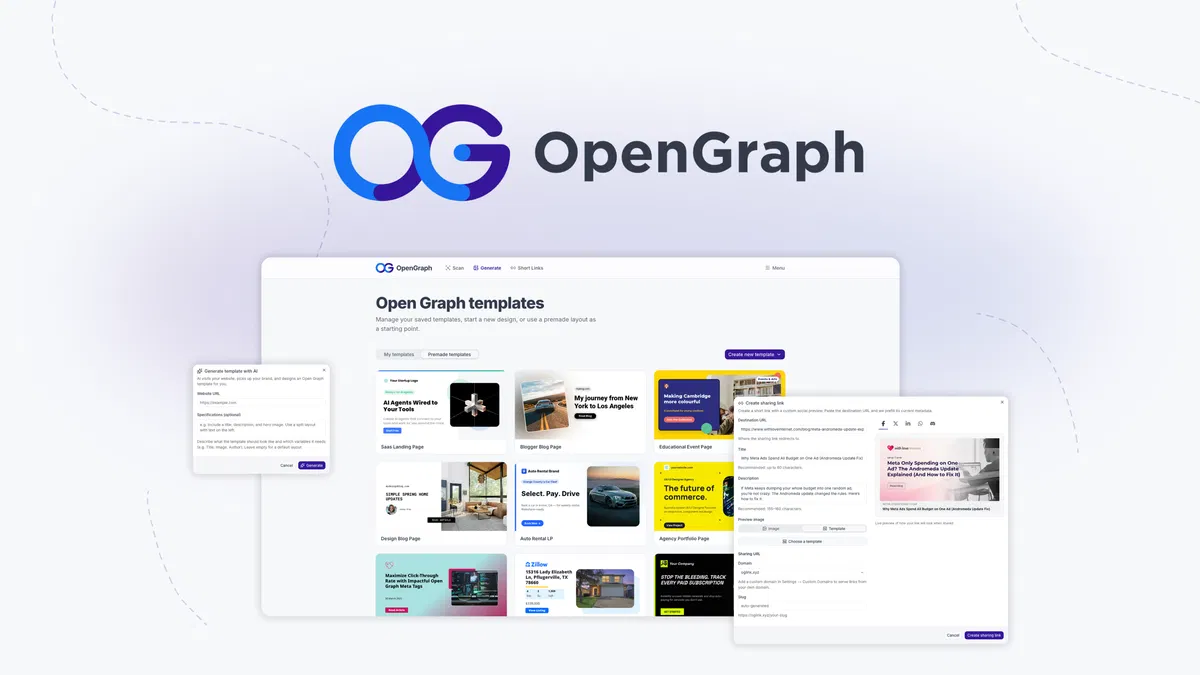
OpenGraph replaces the manual work with a template. You build one layout, attach variables like title, featured image, author, or price, and the system renders a unique image for every URL you point at it. Those images then sit on a CDN, so previews load fast no matter where the reader is.
Key Features That Matter
AI template generation from a URL
Paste a URL and the AI reads your site's colors, fonts, and logo, then builds a matching template. According to the vendor's documentation, this runs before any manual design work, so you start from something that already resembles your brand. Each tier includes a monthly allowance: 10 generations on Tier 1, 30 on Tier 2, and 100 on Tier 3.
Dynamic variables that scale one design
Variables are what separate this from a plain design tool. Attach a title field, a featured image slot, an author name, or a price and the same layout produces thousands of distinct previews. For a catalog of 2,000 product pages, that means 2,000 finished images with zero extra design hours.
A visual editor with real control
Premade layouts exist, but you can also start blank and drag layers, text blocks, and images into place. Fonts, alignment, backgrounds, and borders are all adjustable, which matters when your brand guide is strict about one typeface or a specific border weight. Sites serving several markets can swap the copy per region, the same way software that localizes copy handles multi-language pages.
Global CDN hosting and an asset library
Every generated image is hosted on OpenGraph's CDN with global caching, so you never re-upload assets or watch a preview break after a theme change. Bandwidth is unlimited on all three tiers. If you have ever timed a page on a slow line, you know a heavy image is the usual culprit, so check how fast your own line runs before blaming the CDN.
Short links with custom OG metadata
Short links created inside OpenGraph carry their own Open Graph metadata, so a share goes out with your branded image attached even on platforms that ignore your site's tags. Each tier includes a monthly short link allowance, and custom domains let you keep those links on your own brand rather than someone else's.
Click analytics without limits
Unlimited link analytics break performance down by device, country, browser, and referrer. That tells you whether mobile readers arriving from a newsletter click differently than desktop readers arriving from LinkedIn. You also get one dashboard for every hosted image, so you always know what is live and where it points.
Pricing Tiers (starts $59)
| Tier | Price | Best For | Free trial? |
|---|---|---|---|
| License Tier 1 | $59 one-time | Solo bloggers and small sites (500 OG images, 1 template, 10 AI generations/month, 25 short links/month, 1 custom domain) | No, 60-day refund window |
| License Tier 2 | $159 one-time | Growing blogs and small ecommerce teams (5,000 OG images, 5 templates, 30 AI generations/month, 100 short links/month, 5 custom domains) | No, 60-day refund window |
| License Tier 3 | $299 one-time | Agencies and programmatic sites (25,000 OG images, 25 templates, 100 AI generations/month, 500 short links/month, 25 custom domains) | No, 60-day refund window |
All three tiers include lifetime access, unlimited link analytics, and unlimited bandwidth. The difference is volume, not features. Tier 1 suits a site publishing a few posts a week, Tier 2 fits a store with thousands of product pages, and Tier 3 exists for agencies running this across multiple client sites.
Because bandwidth never gets metered, you also avoid paying a separate provider for offloading media storage once your image library grows.
Pros and Cons
Pros
- One template covers thousands of pages, which removes repetitive design work entirely.
- AI generation reads your site's colors, fonts, and logo before you touch anything.
- Unlimited bandwidth and unlimited link analytics appear on every tier, including $59.
- Short links carry their own metadata, so previews survive platforms that ignore your tags.
- An official WordPress plugin maps your content and automates images without editing each post.
- Lifetime access plus a 60-day refund window limits the downside of buying blind.
- The team is small, bootstrapped, and Dutch, founded January 1, 2024, and AppSumo selected it for Launchpad.
Cons
- No free plan, so you cannot test output quality before paying.
- Tier 1 allows only 10 AI generations and 500 hosted images per month.
- 25 short links per month on Tier 1 is tight for daily campaign work.
- The AppSumo listing shows no reviews yet, so independent buyer feedback is thin.
- Dynamic variables take a learning pass before they behave the way you expect.
- Deep customization assumes you already know what a good social card looks like.
Who Should Use OpenGraph?
Bloggers publishing four or more posts a week
If you publish steadily, preview images are the one asset you keep skipping. OpenGraph automates that step through the WordPress plugin, so each new post gets a branded card without you opening a design app. Over a year, that is 200 or more images you never had to build.
Ecommerce and marketplace operators
Product pages get shared constantly, and a generic preview kills the click before anyone reads your price. Dynamic variables pull the product name, image, and price into a consistent layout across the whole catalog. Stores running seasonal campaigns also get short links with tracked performance by country and device.
Marketing teams and agencies
A team of five to fifteen people usually fights over the same brand assets. One approved template removes that argument, and Tier 3's 25 custom domains let an agency run this per client. Everything stays in one dashboard, which makes keeping assets online and organized far simpler than juggling shared drives.
Alternatives to Consider
Canva is familiar and cheap for one-off graphics, but it has no dynamic variables and no hosting layer, so 1,000 pages means 1,000 manual exports. Bannerbear automates image generation through an API and suits developers, though it bills monthly and expects coding work. Bitly handles short links and basic click data well, but its preview customization is thinner than a full template editor with dynamic fields.
Final Verdict
OpenGraph targets a specific, unglamorous problem and solves it properly: consistent, branded previews across every URL you own. The dynamic template engine is the reason to buy, and the $59 Tier 1 entry point is low enough that a single improved campaign can justify it. The main risks are the absence of a free plan, thin public reviews, and image caps that push serious publishers toward Tier 2 or Tier 3.
If you already buy lifetime software and know how to judge a deal, this one fits the pattern of a similar lifetime deal worth testing inside the refund window. Get the Lifetime Deal →
Frequently Asked Questions
Does OpenGraph have a free plan?
No. There is no free tier and no trial period on the AppSumo listing. The protection you get instead is a 60-day money-back guarantee, which is longer than the 30 days most lifetime deals offer.
How does OpenGraph compare to Canva for OG images?
Canva is a general design tool where you build each graphic by hand. OpenGraph adds three things Canva does not: dynamic variables that generate images in bulk, CDN hosting for those images, and click analytics tied to your short links.
Can I cancel anytime?
There is nothing to cancel, because this is a one-time lifetime purchase rather than a subscription. You can request a refund within 60 days of purchase through AppSumo. After that window closes, the license is yours permanently, with no recurring fee.
Is OpenGraph worth the price?
It depends on page volume. Under 50 pages, you can handle previews manually and skip this. Above a few hundred URLs, the time saved on design and the click data from short links usually outweigh $59.
Teams running multiple domains should look at Tier 2 or Tier 3.
Does OpenGraph work with WordPress?
Yes. The founders built an official WordPress plugin that connects a template, maps your content fields, and generates images automatically for new posts. It also pairs with SEO plugins such as Yoast, and if you handle your own logins across several tools, keeping them organized helps when connecting new integrations.

