
In today’s interconnected world, VPN for Privacy protection your online privacy is more crucial than ever. Cyber threats, data breaches, and invasive tracking are on the rise, making tools like Virtual Private Networks (VPNs) indispensable. A VPN for privacy protection not only safeguards your personal information but also provides you with the freedom to browse the web anonymously and securely.
What is a VPN and How Does it Work?
In today’s digital age, where online privacy is increasingly threatened, a Virtual Private Network (VPN) has become an essential tool for individuals and businesses alike. A VPN establishes a secure and encrypted connection between your device and a remote server, creating a private tunnel for your internet traffic. This tunnel masks your actual IP address and encrypts your data, making it difficult for third parties to track your online activities or intercept your sensitive information.
Think of it like this: sending a letter in a sealed envelope through a private courier service. The envelope (VPN tunnel) protects your letter (data) from prying eyes, and the courier service (VPN provider) ensures it reaches the intended recipient (website) securely.
There are different types of VPNs, each designed for specific purposes:
- Personal VPN Services: These are the most common type and are used by individuals to protect their privacy while browsing the internet, accessing online services, and using applications .
- Remote Access VPNs: Businesses often use these to allow employees to securely access the company’s internal network and resources while working remotely .
- Business VPNs: These are similar to remote access VPNs but are specifically designed for businesses and offer features like secure file sharing and access to company servers.

Why Use a VPN for Privacy Protection?
VPNs offer a multitude of benefits for enhancing your online privacy and security:
- Hides your IP address and location: By masking your real IP address with one from the VPN server, you prevent websites, advertisers, and your internet service provider (ISP) from tracking your online activity and creating a detailed profile of your browsing habits. This prevents targeted advertising and helps you maintain your anonymity online .
- Encrypts your internet traffic: A VPN encrypts your data, making it unreadable to anyone who might intercept it. This is particularly important when using public Wi-Fi networks, which are often unsecured and vulnerable to hackers. With a VPN, your sensitive information like passwords, credit card details, and personal messages remain protected from prying eyes .
- Protects against online surveillance: VPNs can help shield your browsing activity from government agencies and other third parties that might be monitoring your internet usage. By encrypting your traffic and masking your IP address, you make it more difficult for these entities to track your online behavior and collect your data .
- Bypasses censorship and geo-restrictions: Some countries or organizations restrict access to certain websites or online services. A VPN allows you to bypass these restrictions by connecting to a server in a different location. This can be useful for accessing blocked social media platforms, news websites, or streaming services while traveling or residing in a country with internet censorship .
- Protects against employee monitoring: With the rise of remote work, employee monitoring software has become increasingly common. Employers use this software to track employee activity, monitor productivity, and even access sensitive data. A VPN can help protect employee privacy by encrypting their internet traffic and masking their online activity from such monitoring tools .
Key VPN Features for Privacy
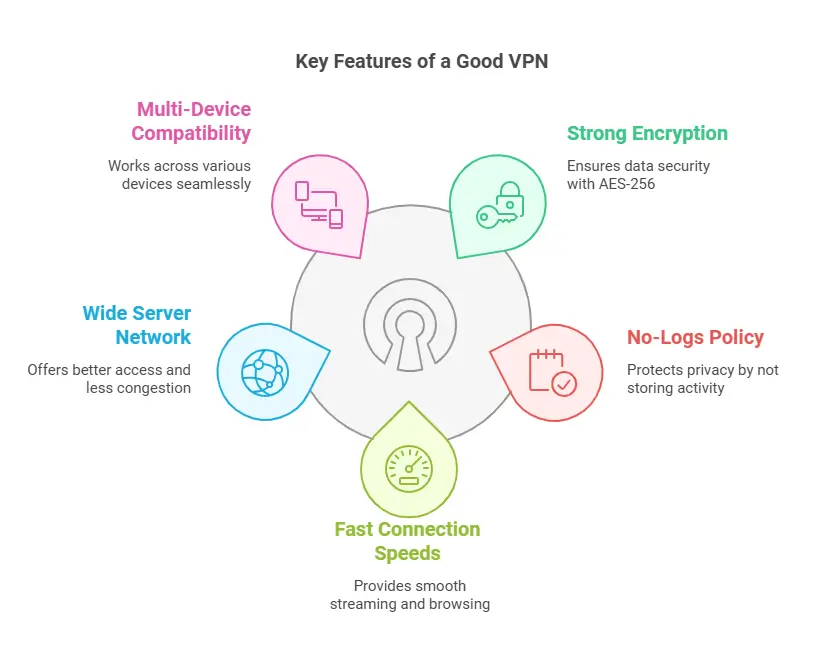
When choosing a VPN for privacy protection, consider these essential features:
- Strong encryption: Look for VPNs that use AES-256 encryption, the industry standard for data security. This encryption level is virtually unbreakable with current technology, ensuring your data remains confidential and protected from unauthorized access .
- No-logs policy: A strict no-logs policy is crucial for privacy. This means the VPN provider does not store any records of your browsing history, connection timestamps, or other sensitive data. Choose a provider with a transparent and independently audited no-logs policy to ensure your online activity remains private .
- Kill switch: A kill switch is a vital security feature that automatically disconnects your internet connection if the VPN connection drops. This prevents your real IP address and unencrypted data from being exposed during temporary VPN outages .
- DNS leak protection: DNS leaks can occur when your device sends DNS requests outside the VPN tunnel, potentially revealing your browsing history to your ISP. Ensure your chosen VPN has DNS leak protection to prevent such leaks and maintain your privacy .
- Multiple server locations: A VPN with a wide range of server locations offers greater flexibility and speed. You can choose servers closer to your physical location for optimal performance or connect to servers in different countries to access geo-restricted content .
- VPN protocols: Different VPN protocols offer varying levels of speed and security.
- OpenVPN: A widely used open-source protocol that provides a good balance of security and speed .
- WireGuard: A newer protocol known for its speed and efficiency .
- IKEv2/IPsec: A secure and stable protocol often used on mobile devices .
Choosing the right protocol depends on your individual needs and priorities. For example, if speed is your primary concern, WireGuard might be a good option. However, if you prioritize maximum security, OpenVPN might be a better choice.
It’s important to note that there is often a trade-off between speed and security when choosing a VPN protocol. More secure protocols may sometimes result in slightly slower speeds, while faster protocols might have potential security vulnerabilities .
Using a VPN for Torrenting
Torrenting involves downloading and sharing files over a peer-to-peer network, which can sometimes raise privacy concerns. Using a VPN while torrenting can enhance your privacy and security by:
- Masking your IP address: This prevents your ISP from monitoring your torrenting activity and potentially throttling your internet speed.
- Encrypting your traffic: This protects your data from being intercepted by third parties and helps you avoid potential legal issues associated with downloading copyrighted material .
Potential Drawbacks of Using a VPN
While VPNs offer significant privacy and security benefits, it’s important to be aware of potential drawbacks:
- Possible speed reduction: Depending on the VPN server’s location and the encryption protocol used, you might experience a slight decrease in internet speed.
- Potential for traffic blocking: Some websites or online services might block VPN traffic to prevent users from bypassing geo-restrictions or accessing content from unauthorized locations .
- Trusting the VPN provider: You are essentially entrusting your data to the VPN provider. It’s crucial to choose a reputable provider with a strong no-logs policy and a commitment to user privacy.
Top VPNs for Privacy Protection
Here are some of the top VPN providers known for their strong privacy features:
- ExpressVPN: Known for its exceptional speed, robust security, and user-friendly interface. It offers a wide range of server locations and is excellent for streaming and bypassing geo-restrictions .
- NordVPN: Provides a comprehensive suite of features, including strong encryption protocols, a strict no-logs policy, and a kill switch. It also offers unique features like Threat Protection and Dark Web Monitor for enhanced security .
- CyberGhost VPN: A user-friendly and affordable VPN with a generous free trial option. It offers dedicated streaming servers and is a good choice for beginners .
- Private Internet Access (PIA): A budget-friendly option with a strong emphasis on privacy. It offers a strict no-logs policy, WireGuard support, and a large server network .
- Surfshark: Allows unlimited simultaneous connections, making it a great value for families or individuals with multiple devices. It also offers excellent speeds and a CleanWeb ad blocker .
Here’s a table summarizing the key features, pros, cons, pricing, and server locations of each VPN:
| VPN Provider | Key Features | Pros | Cons | Pricing | Server Locations |
|---|---|---|---|---|---|
| ExpressVPN | Strong encryption, no-logs policy, kill switch, split tunneling | Fast speeds, user-friendly apps, wide device compatibility | More expensive than some competitors | Starts at $6.67/month | 94 countries |
| NordVPN | AES-256 encryption, NordLynx protocol, Threat Protection, Dark Web Monitor | Large server network, good speeds, strong security features | Can be complex for beginners | Starts at $3.49/month | 60 countries |
| CyberGhost VPN | No-logs policy, kill switch, dedicated streaming servers | Affordable, easy to use, good for streaming | Speeds can vary | Starts at $2.19/month | 91 countries |
| Private Internet Access (PIA) | Strict no-logs policy, WireGuard support, large server network | Budget-friendly, strong privacy features, unlimited connections | Basic user interface | Starts at $2.03/month | 84 countries |
| Surfshark | Unlimited connections, fast speeds, CleanWeb ad blocker | Affordable, good for streaming, strong security | No port forwarding | Starts at $2.30/month | 100 countries |
How to Choose the Right VPN for Your Needs
With so many VPN providers available, choosing the right one can seem daunting. Here’s a simplified approach:
- Consider your budget: VPN prices vary significantly. Determine how much you’re willing to spend and look for providers that offer the best value for your money.
- Identify your priorities: What are your primary reasons for using a VPN? Is it privacy, security, streaming, or bypassing censorship? Choose a provider that excels in your desired areas.
- Read reviews and compare: Explore reviews from reputable sources and compare the features, pricing, and server locations of different VPN providers.
- Test the VPN: Most providers offer free trials or money-back guarantees. Take advantage of these offers to test the VPN and ensure it meets your needs before committing to a long-term subscription.
Frequently Asked Questions
What devices are compatible with VPNs?
Most VPN providers offer apps for a wide range of devices, including:
- Computers (Windows, macOS, Linux, Chromebooks)
- Mobile devices (smartphones and tablets)
- Wireless routers
- Streaming media consoles (Amazon Fire TV, Apple TV, Chromecast)
- Smart TVs
- Gaming consoles (Xbox, Playstation, Nintendo Switch)
Will a VPN slow down my internet speed?
Yes, using a VPN can potentially slow down your internet speed, but the impact should be minimal with a reputable provider . Factors that can affect speed include the VPN server’s distance from your location, the encryption protocol used, and the server load.
Can I use a VPN for streaming?
Yes, many VPNs are excellent for streaming. They can help you bypass geo-restrictions and access content from different regions. Some popular VPNs for streaming include NordVPN, Surfshark, and ExpressVPN .
How do I choose the right VPN protocol?
The best VPN protocol depends on your needs and priorities. Consider factors like security, speed, compatibility, and ease of configuration . Some popular protocols include OpenVPN, WireGuard, and IKEv2/IPsec.
How do I set up a VPN on my device?
Setting up a VPN is usually a straightforward process. Most VPN providers offer user-friendly apps with step-by-step instructions. You can also manually configure a VPN connection on your device if needed .
Conclusion
In an era of increasing online surveillance and data breaches, protecting your privacy is more important than ever. VPNs play a crucial role in safeguarding your online activity and sensitive information. By encrypting your internet traffic, masking your IP address, and providing a secure tunnel for your data, VPNs empower you to take control of your online privacy.
As VPN technology continues to evolve, we can expect to see even more innovative features and stronger security protocols in the future. This continuous development will further enhance online privacy and provide users with greater control over their digital footprint.
Choose a reputable VPN provider with a strong no-logs policy, robust encryption, and essential features like a kill switch and DNS leak protection. By doing so, you can confidently navigate the digital world, knowing your privacy is protected.

