

Virtual Assistant Tools vs Personal Assistants and efficiency is key, both in our personal and professional lives. As technology evolves, we have more options than ever to streamline tasks and optimize our time. Two popular solutions for achieving this are virtual assistant tools and personal assistants. While both aim to increase productivity and free up time, they differ significantly in their approach and capabilities. This article delves into the nuances of each, providing a comprehensive comparison to help you determine which option best suits your needs.
What are Virtual Assistant Tools?
Virtual assistant tools are software applications that leverage artificial intelligence (AI) to perform a wide range of tasks. These tools excel in handling digital tasks such as managing emails, scheduling appointments, and updating websites . They are designed to automate repetitive tasks, provide quick access to information, and enhance productivity. Some popular examples include:
Communication Tools: Slack, Zoom, Google Meet
Task Management Tools: Trello, Asana, Monday.com
Time Tracking Tools: RescueTime, Toggl
File Sharing and Collaboration Tools: Google Workspace, Dropbox
Project Management Tools: Asana, Trello, Basecamp
Scheduling and Appointment Tools: Calendly, Acuity Scheduling
Social Media Management Tools: Hootsuite, Buffer
Writing Tools: Grammarly
These tools work by using AI algorithms to understand user requests and perform actions accordingly. For example, a scheduling tool can analyze your calendar and suggest available time slots for meetings, while a communication tool can facilitate seamless interaction with colleagues or clients . For more on this, see our guide on best email marketing tools for shopify.
Security and Access with Virtual Assistants
To effectively utilize virtual assistant tools, you often need to grant them access to various accounts and platforms. This raises concerns about data security and privacy. However, password management tools like LastPass and NordPass offer a secure solution for sharing access without compromising your sensitive information .
These tools allow you to securely store and manage your passwords, while granting limited access to your virtual assistant. This ensures that your accounts remain protected while enabling your virtual assistant to perform tasks on your behalf. For more on this, see our guide on best accounting software tools.
In practice, a common mistake is granting full administrative privileges to a virtual assistant. Instead, adopt a principle of least privilege — give only the permissions required for the specific tasks. By 2026, many organisations also implement zero-trust access models, requiring multi-factor authentication and regular audits of who has access to what. Pairing your virtual assistant tools with secure cloud hosting practices can further reduce vulnerability to data breaches. You can find reliable infrastructure options by exploring the best cloud hosting for small business that prioritises security and compliance.

Figure 1: A visual comparison highlighting the key differences between AI-powered virtual assistant tools and human personal assistants.
What are Personal Assistants?
Personal assistants (PAs) are individuals who provide dedicated support to clients in person. They handle a wide range of tasks, including running errands, organizing files in an office, or attending personal appointments . Unlike virtual assistant tools, PAs offer a human touch, personalized attention, and the ability to handle tasks that require physical presence . For more on this, see our guide on ai tools for product managers.
PAs work closely with their employers to understand their preferences and needs. They act as the first point of contact with people from both inside and outside the organization . They often act as gatekeepers, managing communication, prioritizing tasks, and ensuring that their employers' time is used efficiently . Their duties can include:
Devising and maintaining office systems, including data management and filing .
Arranging travel, visas, and accommodation .
Screening phone calls, inquiries, and requests .
Organizing and maintaining diaries and making appointments .
Taking dictation and minutes .
Carrying out background research and presenting findings .
Producing documents, briefing papers, reports, and presentations .
Essential Skills for Personal Assistants
To excel in their role, personal assistants require a diverse skill set that goes beyond basic administrative tasks. Some essential skills include:
Bookkeeping: Managing budgets, tracking expenses, and ensuring accurate financial records .
Task Scheduling: Prioritizing tasks, managing calendars, and ensuring efficient time management for their employers .
Paperwork Management: Organizing and maintaining files, both physical and digital, to ensure easy access and retrieval of information .
Problem-solving: Addressing unexpected issues, resolving conflicts, and making sound decisions under pressure .
Communication: Effectively conveying information, both verbally and in writing, and maintaining professional relationships with stakeholders .
Organization: Maintaining order and efficiency in all aspects of their work, from managing schedules to organizing events .
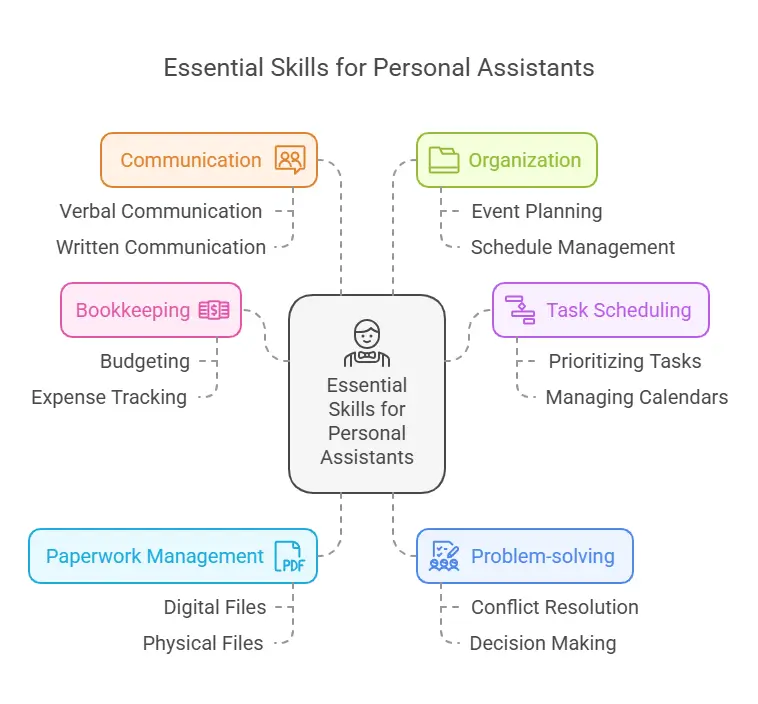
Figure 2: Core skills required for a successful personal assistant career, including bookkeeping, scheduling, and communication.
Virtual Assistant Tools vs. Personal Assistants: Key Differences
While both virtual assistant tools and personal assistants aim to enhance productivity, they differ significantly in several key aspects:
Feature Virtual Assistant Tools Personal Assistants
Nature Software applications Human individuals
Task Execution Automated through AI Performed by a person
Flexibility Available 24/7 Limited by human working hours
Personalization Can be customized to some extent Offer a higher degree of personalized attention
Physical Presence Lack physical presence Can handle tasks that require physical presence
Cost Generally more affordable Can be more expensive, especially for full-time employment
Communication Can sometimes lack the nuances of human interaction Offer better understanding of emotions and context
Skill Set Often specialized in specific tasks Can have a broader range of skills, depending on the individual
Examples Calendly, Slack, Zoom Administrative assistants, executive assistants
Strengths and Weaknesses of Virtual Assistant Tools
Strengths:
24/7 Availability: Virtual assistant tools are available around the clock, providing support whenever needed .
Cost-Effectiveness: Compared to hiring a full-time personal assistant, virtual assistant tools are generally more affordable . Studies have shown that companies can save up to 78% in operating expenses by hiring a virtual assistant compared to an in-house employee .
Increased Productivity: By automating repetitive tasks, virtual assistant tools free up time for more strategic activities .
Accuracy: AI-powered tools can perform tasks with a high degree of accuracy .
Flexibility: Virtual assistant tools can be adapted to various tasks and workflows .
Diverse Skill Set: Virtual assistants come from various professional backgrounds, bringing a diverse skill set to the table, allowing users to find specialized support tailored to their needs .
Weaknesses:
Dependence on Technology: Virtual assistant tools rely on technology, which can be susceptible to glitches or outages .
Security Vulnerabilities: Data security can be a concern with some virtual assistant tools .
Communication Barriers: While natural language processing is improving, virtual assistant tools may sometimes struggle with understanding complex requests or nuances in human communication. There is also the potential for communication challenges due to time zone differences, language barriers, or reliance on text-based communication .
Limited Functionality: Some virtual assistant tools have limited functionality and may not be able to handle all tasks .
Lack of Human Contact: Virtual assistant tools lack the human touch and emotional intelligence that a personal assistant can provide .
Strengths and Weaknesses of Personal Assistants
Strengths:
Personalized Attention: Personal assistants offer a higher degree of personalized attention and can anticipate their employers' needs .
On-Site Support: PAs can handle tasks that require physical presence, such as attending meetings or running errands .
Stronger Relationships: Working closely with a PA can foster a stronger working relationship and better understanding of preferences due to their physical presence and ability to understand personal preferences .
Broader Skill Set: Depending on the individual, PAs can have a broader range of skills and experience .
Better Communication: PAs can better understand emotions, context, and non-verbal cues, leading to more effective communication .
Weaknesses:
Higher Costs: Personal assistants, especially those employed full-time, can be more expensive than virtual assistant tools .
Limited Availability: PAs are limited by human working hours and may not be available 24/7 .
Limited Skill Set: A PA's skill set may be limited to their individual expertise and experience .
Potential for Dependence: Employers may become overly reliant on their PA, making it difficult to function without them .
Trust Issues: Sharing confidential information with a PA requires a high level of trust .
Types of Virtual Assistant Tools
Virtual assistant tools can be categorized based on their functionality:
Communication Tools: Facilitate communication and collaboration, such as Slack, Zoom, and Google Meet .
Task and Project Management Tools: Help organize and manage tasks and projects, such as Trello, Asana, and Monday.com .
Time Tracking Tools: Monitor time spent on tasks, such as RescueTime and Toggl .
File Sharing and Collaboration Tools: Enable secure storage and sharing of files, such as Google Drive and Dropbox .
Scheduling and Appointment Tools: Automate appointment scheduling, such as Calendly and Acuity Scheduling .
Social Media Management Tools: Help manage social media accounts, such as Hootsuite and Buffer .
Customer Relationship Management (CRM) Tools: Manage customer interactions and data, such as Bitrix24 .
Financial Tools: Assist with bookkeeping and accounting, such as QuickBooks, FreshBooks, and Wave .
Writing Tools: Enhance writing quality and accuracy, such as Grammarly .
Types of Personal Assistants
Personal assistants can be categorized based on their area of focus and responsibilities:
Administrative Assistants: Provide general administrative support, such as managing schedules, handling correspondence, and organizing files .
Executive Assistants: Offer higher-level support to executives, including managing complex schedules, coordinating travel, and handling confidential information .
Specialized Assistants: Possess expertise in specific areas, such as social media management, event planning, or real estate .
Virtual Personal Assistants: Provide support remotely, similar to virtual assistant tools but with a human touch .
When to Use Virtual Assistant Tools vs. Personal Assistants
Choosing between the two comes down to the nature of your tasks and your working style. Virtual assistant tools excel at handling high-volume, repetitive, and data-driven activities that follow clear rules. If you spend hours each week scheduling meetings, sorting emails, or generating reports, a software tool can complete these tasks in seconds without fatigue. Personal assistants, by contrast, shine in situations requiring judgment, emotional nuance, or physical presence — such as negotiating a contract, planning a surprise event, or managing an in-person team.
A practical way to decide is to audit your week: list every task you currently do, note whether it is rule-based or judgment-based, and whether it requires you to be physically somewhere. Rule-based digital tasks are prime candidates for tools; everything else points toward a PA. Many professionals find they benefit from both, using tools for the predictable 80% and a PA for the nuanced 20%.
Hybrid Approach: Combining Virtual Assistant Tools and Personal Assistants
Many businesses and busy professionals find that a purely digital or purely human solution isn't enough. A hybrid approach — using virtual assistant tools for repetitive, data-driven tasks while relying on a personal assistant for high-touch, judgment-based work — often delivers the best results. For example, you might use a scheduling tool like Calendly to automate client meeting bookings, while your personal assistant handles the follow-up emails, travel logistics, and relationship management. This combination leverages the 24/7 availability and cost-efficiency of software with the emotional intelligence and adaptability of a human.
In practice, start by identifying tasks that are rule-based and high-volume — those are ideal for automation. Then delegate the remaining tasks that require intuition, negotiation, or physical presence to a personal assistant. Many successful entrepreneurs use a detailed grammar checker comparison to pick the right writing assistant, then have their PA handle final edits for tone and brand voice. Similarly, automated email campaigns can be managed through popular email automation platforms, while a PA nurtures VIP client relationships. For more on this, see our guide on rapid application devlopment tools.
To get the most out of a hybrid model, schedule a weekly 15-minute sync between your PA and your tech stack. This ensures the human assistant knows what automations are running, can override them when needed, and can spot tasks that should be moved from manual to automated or vice versa. Many teams also use a shared dashboard, like Trello or Asana, where both the tool outputs and the PA's manual actions are visible — giving you full visibility without micromanaging.
Cost of Virtual Assistant Tools
The cost of virtual assistant tools varies depending on the specific tool and its features. Some tools offer free plans with basic functionality, while others require paid subscriptions. For example:
Time etc.: Offers monthly plans ranging from $380 for 10 hours to $2100 for 60 hours .
Wishup: Monthly plans start from $899 for 4 hours/day .
Wing Assistant: Offers part-time plans for $699 per month and full-time plans for $1099 per month .
Many tools: Offer free plans with limited features and paid plans with more advanced functionality .
It's important to consider the cost savings of hiring a virtual assistant compared to a full-time employee. Virtual assistants are only paid for the time they spend working on tasks, eliminating the costs associated with salaries, benefits, and office space .
Cost of Personal Assistants
The cost of hiring a personal assistant can vary significantly based on factors such as experience, location, and responsibilities. For more on this, see our guide on best graphic design tools.
Hourly Rates: Typically range from $15 to $50 or more per hour .
Monthly Salaries: Can range from $2,000 to $8,000 or more per month .
One-Time Fees: Some personal assistants may charge a one-time fee of $500 to $1,000 .
When comparing costs, do not overlook hidden expenses. For a personal assistant, budget for payroll taxes, health insurance contributions, paid time off, and potential overtime pay — these can add 20–30% to the base salary. For virtual assistant tools, factor in integration costs, premium plan upgrades as your usage grows, and the time required to set up and maintain the software. A true comparison should look at total cost of ownership over a year, not just the monthly sticker price.
How to Choose Between Virtual Assistant Tools and Personal Assistants: A Decision Framework
To make the right choice, evaluate your specific needs against these four criteria:
Task Type : Are your tasks purely digital (scheduling, email, data entry) or do they require physical presence (errands, in-person meetings, office organization)? Digital tasks suit virtual tools; physical tasks need a PA.
Budget : Virtual assistant tools typically have lower upfront costs and predictable monthly fees. Personal assistants involve higher ongoing costs, including benefits if full-time.
Desired Personalization : If you need someone who learns your preferences, anticipates your needs, and handles sensitive decision-making, a PA is irreplaceable. For routine, one-size-fits-all automation, tools suffice.
Availability Needs : Do you need support 24/7 or during off-hours? Virtual tools are always on; PAs work within agreed hours. If you operate across time zones, a mix of both may be best.
Many users find that starting with a virtual tool for a few key tasks frees up budget to later hire a part-time PA for the remaining work. For example, you might automate invoicing with enterprise-grade accounting software while a PA handles client follow-ups. Similarly, if you’re a freelancer, using tax preparation software can reduce the hours your PA spends on bookkeeping.
To put this framework into action, score each criterion from 1 (strongly favors tools) to 5 (strongly favors PAs). Add up the scores: 4–8 suggests tools only, 9–12 suggests a hybrid approach, and 13–20 points toward hiring a personal assistant. Revisit this scoring every six months, as your business needs and budget evolve.
Legal and Ethical Considerations
When choosing between virtual assistant tools and personal assistants, it's essential to consider the legal and ethical implications. Disputes are handled differently for each. With virtual assistants, issues typically fall under contract law, while with personal assistants, employment law applies . This distinction highlights the importance of clear agreements and expectations when engaging either type of assistance.
Beyond the basics, data privacy regulations such as GDPR and CCPA impose strict requirements on how you collect, store, and share personal information — whether through a tool or a human assistant. Ensure your virtual assistant tools are compliant, and that your personal assistant signs a confidentiality agreement. For tax purposes, correctly classifying a virtual assistant as an independent contractor (not an employee) is critical to avoid penalties. The IRS provides guidance on worker classification, and consulting a tax professional is recommended. If you hire a personal assistant, you must also comply with wage and hour laws, including minimum wage, overtime, and workers' compensation.
Another area often overlooked is liability insurance. When hiring a personal assistant, consider whether your existing business insurance covers actions taken by an employee. For virtual assistant tools, review the software's terms of service regarding data loss or breach — many limit their liability to the amount you paid for the subscription. You may need a separate cyber liability policy. It is also wise to have a written service-level agreement (SLA) with any tool provider, specifying uptime guarantees and data handling procedures.
Frequently Asked Questions
What are the most common tasks virtual assistants can handle?
Virtual assistants excel at a variety of tasks, including:
Scheduling appointments and managing calendars
Making phone calls and managing emails
Making travel arrangements
Providing customer service
Managing social media accounts
Conducting research
Writing and editing content
How do I ensure the security of my confidential information when using a virtual assistant?
Virtual assistants often require access to sensitive information. To ensure security:
Use strong passwords and two-factor authentication for all your accounts.
Utilize password management tools like LastPass or NordPass to securely share access with your virtual assistant .
Choose reputable virtual assistant services that prioritize data security and have strong confidentiality agreements in place .
What are the key benefits of hiring a personal assistant?
Personal assistants offer several advantages:
Personalized attention and understanding of your preferences
On-site support for tasks requiring physical presence
Stronger working relationships and better communication
A broader skill set depending on the individual's experience
How do I find a qualified and trustworthy personal assistant?
To find a reliable personal assistant:
Use reputable agencies or platforms that specialize in personal assistant placements .
Conduct thorough interviews and background checks.
Clearly define expectations and responsibilities in a written agreement.
What are the legal considerations when hiring a personal assistant?
When hiring a personal assistant, it's crucial to understand employment laws regarding:
Wages and benefits
Taxes and withholdings
Workplace safety
Non-discrimination
Can I use virtual assistant tools and a personal assistant together?
Absolutely. Many professionals adopt a hybrid model where tools handle repetitive digital tasks like scheduling and email sorting, while the personal assistant takes on judgment-based work such as client relationship management, strategic planning, and in-person errands. This combination often yields the best balance of cost efficiency and personalized support.
What happens if a virtual assistant tool makes an error?
With software tools, errors typically stem from incorrect setup, outdated data, or algorithmic limitations. Most providers offer support and logs to trace what went wrong. Unlike a human assistant, a tool cannot adapt mid-task or use common sense — so it is essential to verify critical automated actions, especially those involving financial transactions or sensitive communications.
Real-World Examples of Virtual Assistant Costs
To illustrate how the cost of virtual assistants can vary, let's examine some case studies:
Small Business: A small business hired a freelance virtual assistant with moderate experience to handle customer service and social media management for a flat rate of $150 per week for 10 hours of work .
Startup: A startup opted for a virtual assistant agency, paying $500 per month for a dedicated assistant working 20 hours per week. The higher cost was justified by the assistant's specialized skills and the agency's reliability .
Enterprise: An enterprise-level company hired a highly experienced freelance virtual assistant for project management and data analysis, paying $50 per hour for 40 hours per month .
Freelancer: A freelancer hired a virtual assistant on an hourly basis for scheduling and email management, paying $20 per hour for 5 hours per week .
These examples demonstrate how the cost of a virtual assistant can vary based on factors such as experience, the type of tasks required, and the chosen arrangement (freelance or agency).
Conclusion: Choosing the Right Solution
The choice between virtual assistant tools and personal assistants depends on your specific needs and preferences. If you're looking for an affordable and efficient way to automate tasks and increase productivity, virtual assistant tools are a great option. However, if you require personalized attention, on-site support, and a human touch, a personal assistant might be a better fit.
Consider your budget, the types of tasks you need help with, and your preferred working style when making your decision. If you're a busy entrepreneur with a limited budget and primarily need help with digital tasks, virtual assistant tools like Calendly and Slack can be a game-changer. They offer a cost-effective solution for streamlining your workflow and increasing productivity without significant financial burden . However, if you're a high-level executive who requires personalized support, on-site assistance, and a high degree of trust, a dedicated personal assistant might be a better investment. Personal assistants excel in building strong working relationships and understanding individual preferences, offering a level of support that goes beyond task completion.
Ready to streamline your workflow? Start by automating your most repetitive tasks with a free trial of a scheduling tool, or explore our detailed grammar checker comparison to perfect your writing. Then take the next step: use the saved time to identify one task you would delegate to a personal assistant — and begin your search with confidence.

