ERP an Accounting Software? Discover the Key Differences
Lead SaaS Analyst & Software Developer at PCSaaS · Software Developer (GitHub @Ratankarmakar) · Google Ads & Analytics Certified · 500+ SaaS Tools Tested · 8+ years in software engineering, B2B SaaS evaluation, AppSumo deal auditing, and performance marketing
Is ERP an Accounting Software? Discover the Key Differences
No, ERP is not just accounting software. ERP systems handle much more.
Enterprise Resource Planning (ERP) software integrates various business processes. It manages operations like supply chain, inventory, human resources, and customer relationships. Accounting is only one part of ERP. This software provides a complete view of business activities in one platform.
Companies use ERP an Accounting Software to streamline their processes and improve efficiency. Understanding the differences between ERP and accounting software is crucial. This blog will explain how ERP systems work and why they include more than just accounting functions. Stay tuned to learn about the vast capabilities of ERP software and how it benefits businesses.
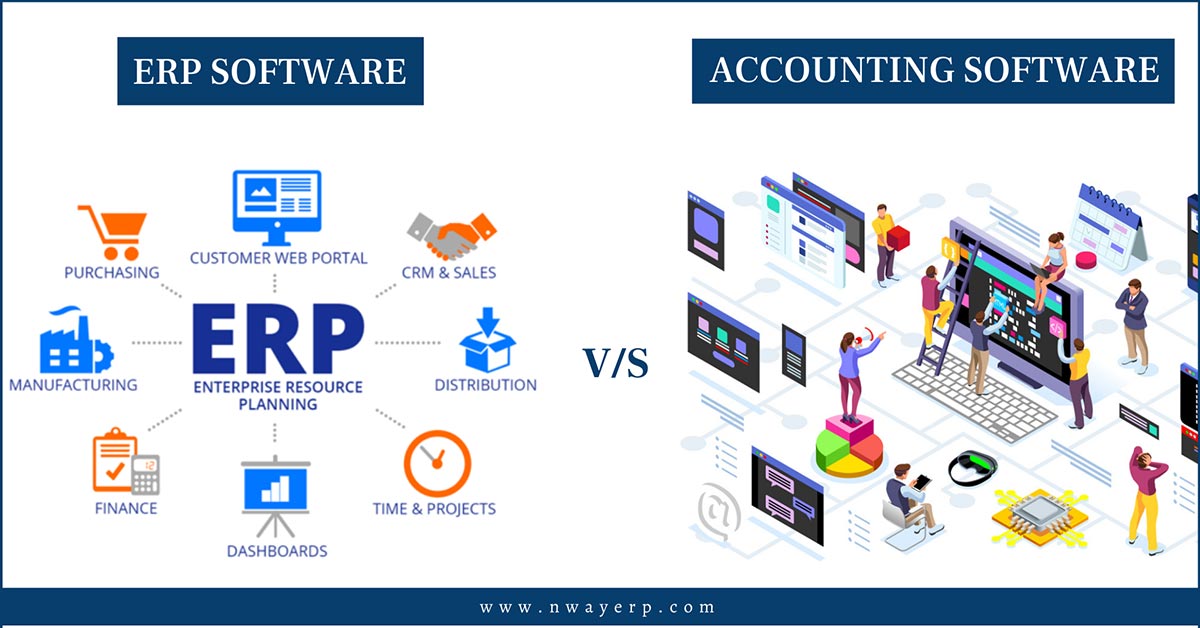
Side-by-side comparison of ERP and accounting software scope.
Credit: www.nwayerp.com
Introduction To ERP And Accounting Software
Are you confused about ERP and accounting software? You are not alone. Many people find it hard to understand these systems. This post will help you learn about both. Let's start with the basics.
Erp Basics
ERP stands for Enterprise Resource Planning. It is a type of software. Businesses use ERP to manage their operations. It integrates various functions. These can include inventory, human resources, and customer relations. ERP helps streamline processes. It also improves efficiency.
Accounting Software Basics
Accounting software is different from ERP. It focuses on financial tasks. This software helps manage accounts. It can track income and expenses. It also generates financial reports. Businesses use it to ensure accurate financial records. Accounting software is essential for any business. It helps maintain financial health.
Core Functions Of ERP
The core functions of ERP systems play a crucial role in modern businesses. ERP, or Enterprise Resource Planning, is much more than just accounting software. Its core functions streamline and integrate various business processes, offering real-time data access and improving overall efficiency.
Integration Of Business Processes
ERP systems integrate various business processes into one unified system. This includes:
Finance and accounting
Human resources
Inventory management
Sales and marketing
Customer relationship management (CRM)
This integration ensures that all departments can share information easily. It eliminates data silos and improves collaboration. Employees can access the same data, making decision-making faster and more accurate.
Real-time Data Access
Real-time data access is another crucial function of ERP systems. With ERP, businesses can:
Monitor operations in real-time
Track inventory levels instantly
Generate up-to-date financial reports
Analyze customer data on-the-fly
Real-time access to data helps businesses react quickly to changes. It reduces delays in processes and enhances overall productivity.
Function Benefit
Real-Time Data Faster decision-making
Process Integration Improved collaboration
In practice, an ERP system’s integration capability eliminates the need for manual data entry between departments. A common mistake is treating ERP as an upgrade to accounting software, but the real value lies in how procurement, sales, and production share a single source of truth. For example, when a sales order is entered, inventory is automatically reserved and a procurement request is triggered if stock runs low.
In summary, ERP systems are powerful tools that go beyond accounting. They integrate business processes and provide real-time data access, leading to greater efficiency and better decision-making.
https://www.youtube.com/watch?v=91Nl-JexkdM
Core Functions Of Accounting Software
Accounting software is essential for businesses of all sizes. It helps manage and streamline financial processes. These core functions make accounting software an invaluable tool for any organization. Let's explore some of these core functions.
Financial Transaction Management
Managing financial transactions is a primary function of accounting software. This includes recording, tracking, and organizing all financial activities. The software helps in maintaining accurate records of:
Sales
Purchases
Receipts
Payments
By automating these processes, businesses can reduce errors. They can also save time. Accounting software ensures that all transactions are recorded accurately. This is crucial for financial health.
Compliance And Reporting
Compliance and reporting are another vital function of accounting software. Businesses must adhere to various financial regulations and standards. Accounting software helps ensure compliance by:
Generating accurate financial statements
Preparing tax reports
Ensuring adherence to legal requirements
The software simplifies the reporting process. It provides a clear overview of the company's financial status. This is essential for informed decision-making. Accurate reports also help in audits and assessments.
A reliable accounting software also helps with cash flow management by automating invoice reminders and payment reconciliation. In 2026, many cloud-based accounting solutions offer bank feeds that import transactions directly, reducing data entry mistakes.
In summary, accounting software plays a crucial role in managing financial transactions and ensuring compliance and reporting. These core functions help businesses maintain accuracy and efficiency in their financial operations.
ERP Vs. Accounting Software: Key Differences
ERP systems and accounting software serve different purposes. ERP handles broader business processes, while accounting software focuses on financial transactions. Both are essential but cater to distinct needs.
Understanding the differences between ERP and accounting software helps in choosing the right tool. Both have their unique features and target different users.
Scope Of Functionality
ERP software offers a wide range of functions. It covers inventory management, human resources, and customer relationship management. Accounting software focuses only on financial transactions. It handles tasks like bookkeeping, invoicing, and financial reporting.
ERP integrates various business processes. Accounting software specializes in financial management. ERP aims to improve overall business efficiency. Accounting software ensures accurate financial records.
Target Users
ERP software targets large businesses and organizations. It helps them manage complex operations. Small businesses and freelancers often use accounting software. It meets their simpler financial needs.
ERP systems support multiple departments. Accounting software is usually used by the finance team. ERP provides a holistic view of the business. Accounting software focuses on financial health.
Choosing the right tool depends on your business needs. Large companies benefit from ERP's broad capabilities. Smaller businesses may find accounting software sufficient.
Detailed Comparison Table
| Feature | ERP Software | Accounting Software |
|---|---|---|
| Scope | End-to-end business process management (finance, HR, supply chain, CRM) | Primarily financial transactions and reporting |
| Data integration | Full cross-departmental integration | Limited to financial data |
| Real-time visibility | Operational and financial data in one dashboard | Financial data only |
| User roles | All departments (sales, ops, HR, finance) | Mainly finance and accounting teams |
| Implementation complexity | High – requires process reengineering | Low to moderate – quicker to deploy |
| Cost | Higher upfront and ongoing investment | Lower initial cost, scalable pricing |
| Suitable for | Medium to large businesses with complex workflows | Small businesses, freelancers, startups |
When to Choose Each System
Choose ERP when your business:
- Has multiple departments that need to share real-time data.
- Manages inventory, production, or a supply chain.
- Needs a unified view of operations beyond finance.
- Plans to scale and requires integrated modules for HR, CRM, and project management.
Choose accounting software when your business:
- Only needs to manage income, expenses, invoices, and tax reporting.
- Has fewer than 20 employees and simple financial processes.
- Wants a low-cost, quick-to-implement solution.
- Does not require cross-departmental workflows or inventory tracking.
Benefits Of ERP Systems
Enterprise Resource Planning (ERP) systems provide numerous advantages for businesses. They help improve efficiency, collaboration, and data accuracy. Let's explore some key benefits of ERP systems.
Streamlined Operations
An ERP system integrates various business processes into one platform. This reduces the need for multiple software systems. With ERP, companies can manage inventory, sales, finance, and human resources in one place. This integration leads to smoother operations and less redundancy.
ERP systems automate many repetitive tasks. This saves time and reduces errors. For example, an automated inventory management system updates stock levels in real-time. This helps avoid stockouts and overstock situations. It also ensures that orders are processed quickly and accurately.
ERP systems also provide real-time data. This allows managers to make informed decisions. They can see the status of orders, inventory levels, and financial data in one view. This visibility helps identify issues early and address them promptly.
Enhanced Collaboration
ERP systems improve collaboration across departments. All team members can access the same information. This ensures that everyone is on the same page. For example, the sales team can see if a product is in stock before making a promise to a customer.
ERP systems also support better communication. Team members can share updates and notes within the system. This reduces the need for lengthy email threads and meetings. It also helps keep everyone informed about project progress and changes.
ERP systems often include tools for project management. These tools help teams track deadlines, assign tasks, and monitor progress. This makes it easier to collaborate on complex projects and ensure timely completion.
Overall, ERP systems foster a culture of collaboration and transparency. They help break down silos and encourage teamwork.
From an operational standpoint, real-time collaboration via ERP reduces decision-making latency. Teams in different time zones can work from the same dashboard, which is particularly valuable for businesses with remote or hybrid workforces.
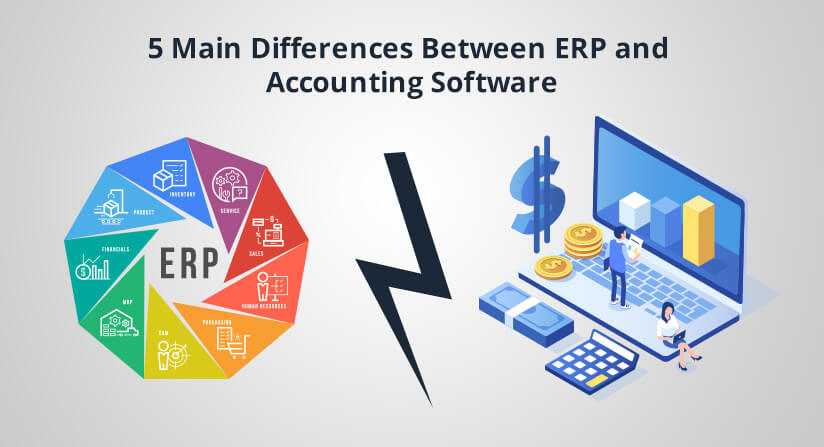
Visual summary of ERP versus accounting software functionalities.
Credit: www.optiproerp.com
Benefits Of Accounting Software
Accounting software offers numerous benefits for businesses. It helps maintain accurate financial records, simplifies tax preparation, and reduces manual errors. Let's explore some key advantages of using accounting software.
Accuracy In Financial Data
Accounting software ensures accuracy in financial data . Manual entries can lead to errors. Automated systems minimize mistakes. This software updates records in real-time. This ensures that financial data is always current. Accurate data helps in making informed decisions.
Simplified Tax Preparation
Tax preparation can be complex. Accounting software simplifies tax preparation . It organizes financial records. It categorizes transactions correctly. Many software options offer tax compliance features. These features ensure that all tax regulations are met. This reduces the risk of penalties.
Furthermore, accounting software often integrates with payroll services and expense management tools, creating a seamless financial workflow. This integration helps businesses maintain an audit trail that satisfies both internal controls and external regulators. Consulting official guidelines from the Internal Revenue Service (IRS) can further clarify recordkeeping requirements.
Benefit Description
Time-saving Automates repetitive tasks, saving time.
Enhanced Security Protects sensitive financial data.
Cost-effective Reduces costs associated with manual accounting.
Using accounting software has many benefits. It ensures accuracy, simplifies tax preparation, and enhances security. It saves time and is cost-effective. This makes it an essential tool for businesses.
Choosing Between ERP And Accounting Software
Choosing between ERP and accounting software can be challenging. Each has unique features that cater to different business needs. Understanding which to select depends on several factors. Let's explore some of these factors in detail.
Business Size And Needs
Smaller businesses often need basic accounting functions. They might choose standalone accounting software. It provides essential features like invoicing, payroll, and tax calculations. ERPs offer more. They integrate various business processes into one system. This includes inventory, human resources, and customer relationship management.
Medium to large businesses usually have complex operations. They benefit from ERP systems. These systems streamline processes and improve efficiency. They provide a unified view of the business. This helps in better decision-making. For a growing business, an ERP system may be a better choice.
Budget Considerations
Budget is a critical factor. Accounting software is often more affordable. It has lower upfront costs. This makes it ideal for small businesses. They get the necessary features without a significant investment. ERP systems can be expensive. They require a higher initial investment. Implementation and maintenance costs are also higher.
ERP systems offer a return on investment over time. They improve productivity and reduce operational costs. For businesses with a limited budget, starting with accounting software might be wise. As the business grows, they can transition to an ERP system.
Implementation and Migration Considerations
Moving from accounting software to an ERP system is not a plug-and-play process. Businesses should evaluate their current workflows, data quality, and team readiness before migrating. Common pitfalls include underestimating training time and failing to clean up historical data. In practice, a phased rollout — starting with finance and inventory modules — often reduces disruption. For smaller firms, exploring lifetime deal considerations for SaaS ERP tools can lower initial costs. Additionally, reviewing marketing automation features in modern ERPs helps align sales and finance data from day one. If your business relies heavily on email campaign management, ensure the ERP you choose integrates with your existing outreach tools.
Future Trends In ERP And Accounting Software
The business world is evolving rapidly. ERP and accounting software are no exception. Companies need to stay ahead to remain competitive. Understanding future trends helps to make informed decisions.
Cloud-based Solutions
More businesses are adopting cloud-based ERP and accounting software. Cloud solutions offer flexibility and accessibility. Users can access their data from anywhere, at any time. This is essential for businesses with remote teams. Cloud solutions also reduce the need for physical servers. This can save costs and simplify IT management.
Artificial Intelligence Integration
Artificial intelligence (AI) is becoming a key feature in ERP and accounting software. AI can automate repetitive tasks. This includes data entry and invoice processing. AI can also provide insights through data analysis. These insights help businesses make better decisions. AI integration can improve efficiency and reduce errors.
Low-Code and No-Code Extensions
In 2026, many ERP and accounting platforms offer low-code environments that let businesses customize workflows without heavy IT involvement. This trend lowers the barrier for small teams to build integrations that match their unique processes. For example, you can connect a CRM with an inventory module using drag-and-drop logic. Some no-code website builders even offer ERP connectors, making it feasible for e-commerce operators to sync orders and inventory seamlessly. As AI evolves, predictive analytics tools embedded in ERPs help forecast demand and flag financial anomalies before they become problems.
Practical Decision-Making for 2026
When evaluating ERP versus accounting software today, consider the following actionable steps:
- Map your current workflows – Identify which processes are manual and where data silos exist.
- Define must-have modules – List the departments that need real-time data sharing.
- Calculate total cost of ownership – Include implementation, training, and ongoing support.
- Test with a pilot – Many vendors offer sandbox environments. Use them to validate integration capabilities.
- Check vendor support for third-party tools – Ensure the system can connect to AI-powered add-ons for automation.
Businesses that invest in an ERP early often avoid the cost of migrating later when their needs outgrow standalone accounting software.
Frequently Asked Questions
What Is ERP Software?
ERP software integrates various business processes into a unified system. It manages core functions like finance, HR, supply chain, and manufacturing.
Is ERP The Same As Accounting Software?
No, ERP is not just accounting software. It encompasses broader business management functions, including accounting, inventory, and customer relationship management.
Can ERP Software Handle Accounting Tasks?
Yes, ERP software can handle accounting tasks. It includes modules for financial management, budgeting, and reporting, making it comprehensive.
Why Choose ERP Over Standalone Accounting Software?
ERP offers integrated solutions across business functions. It enhances efficiency, data accuracy, and decision-making, unlike standalone accounting software.
How Long Does It Take to Implement an ERP System?
Implementation timelines vary widely. A small-to-medium business can go live in three to six months for core modules, while larger enterprises may take a year or more. Cloud-based ERPs generally deploy faster than on-premises systems.
Can Accounting Software Be Upgraded to a Full ERP Later?
Yes, many vendors offer growth paths. You can start with accounting software and later add inventory, HR, or CRM modules. However, migrating to a completely different ERP platform requires data migration and retraining, so plan ahead.
What Are the Hidden Costs of ERP?
Beyond licensing, budget for data migration, custom integrations (such as marketing automation features), employee training, and ongoing support. Some vendors charge extra for advanced AI or analytics modules.
Conclusion
ERP systems offer more than just accounting features. They integrate various business processes. This integration helps streamline operations. Accounting is a key component, but not the only one. ERP systems manage inventory, human resources, and customer relations too. This makes them versatile tools for businesses.
Understanding ERP's full scope can benefit your organization. It can improve efficiency and decision-making. Consider your needs carefully before choosing a system. An ERP might be the right choice. It can support your business beyond accounting tasks.
Ready to assess whether ERP fits your operations? Start by mapping your current workflows and identifying integration gaps — a clear evaluation will guide your next step.
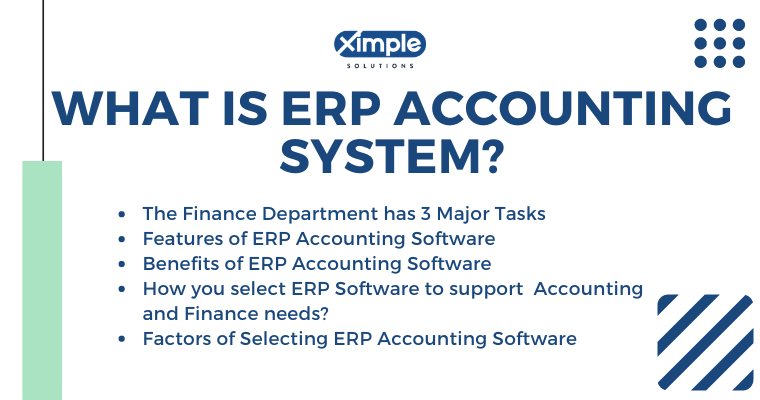
Overview of ERP system components beyond accounting.
Credit: www.ximplesolution.comGraphic illustrating the comprehensive scope of ERP systems beyond financial management.
Credit: www.ximplesolution.com
Can Small Businesses Use ERP Systems?
Yes, many ERP vendors now offer entry-level plans designed specifically for small businesses. Cloud-based ERPs with subscription pricing make ERP accessible even for companies with fewer than 20 employees. However, if your operations are simple and you primarily need invoicing and expense tracking, standalone accounting software remains a more practical choice.
What Data Should I Migrate When Moving from Accounting Software to ERP?
Migrate at least three years of historical financial data, open invoices, customer and vendor records, chart of accounts, and inventory counts. Clean the data beforehand — eliminate duplicate entries and standardize naming conventions. A smooth migration also requires mapping your old account codes to the ERP's structure.
How Do ERP Modules Typically Get Added?
Most ERP systems are modular. You can start with financial management and add inventory, HR, or CRM modules as your business grows. This phased approach spreads out costs and allows teams to adapt gradually. Vendors often offer bundled module discounts, so compare pricing for the full suite versus individual add-ons.
Do I Need IT Staff to Run an ERP System?
Cloud-based ERPs reduce the need for in-house IT support. The vendor handles server maintenance, security updates, and backups. On-premises ERP systems, by contrast, require dedicated IT personnel for installation and upkeep. In 2026, the majority of new ERP deployments are cloud-based for this reason.
Final Recommendation
Choosing between ERP and accounting software ultimately depends on your business complexity, growth trajectory, and budget. Accounting software excels at financial accuracy and tax compliance. ERP systems provide broader operational visibility and cross-departmental integration. For most growing businesses, starting with robust accounting software and planning a future transition to ERP is a sensible path. Map your core requirements first, then evaluate platforms that match both your current needs and your anticipated scale. Get a free trial or sandbox access from at least three vendors before committing — hands-on testing reveals whether the software truly fits your daily workflows.

Similar Posts