CaptionBolt Review (2026): Honest Take After Real Research
Lead SaaS Analyst at PCSaaS · Software Developer · 500+ Tools Tested · Google Ads & Analytics Certified · 8+ Years Experience
Disclosure: This article contains affiliate links. We may earn a small commission at no extra cost to you when you sign up via our links, it's how this site stays free to run.
CaptionBolt review research points to one standout benefit: it can turn talking footage into a first draft with captions, B-roll, music, and more. Its lifetime AppSumo deal starts at $35.10, but monthly processing minutes and short video limits matter.
TL;DR Verdict
- Best for: Solo creators and small teams turning short talking videos into social clips.
- Price: $35.10 once for Starter, with higher lifetime tiers available.
- Biggest pro: Auto Edit builds a draft with captions and optional visual and audio additions.
- Biggest con: Starter permits only 60 processing minutes monthly and five-minute videos.
- Free access: New accounts receive 10 free minutes; AppSumo purchases include a 60-day refund period.
CaptionBolt is worth considering if its workflow fits your footage and monthly limits. Try the free minutes with your own video before buying: Get the Lifetime Deal →.
What Is CaptionBolt?
CaptionBolt is an AI video editor for turning talking videos into short, captioned clips with optional B-roll, hooks, music, and sound effects. It is aimed at creators who want a prepared draft to review rather than a blank editing timeline.
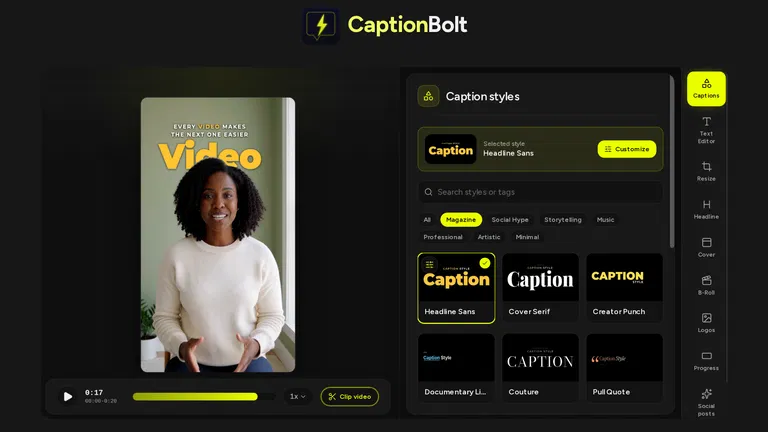
Upload a tutorial, interview, or product demo and choose what the AI should add. Captions are included, while options include an opening text hook, overlays, stock footage, camera moves, emojis, music, and sound effects. You can also choose captions only and add other elements later.
The editor lets you revise or remove generated elements, swap B-roll, edit captions, and undo the initial Auto Edit. CaptionBolt’s official website describes its editing features and export options; the AppSumo offer sets the plan limits and lifetime pricing covered below.
If you also create scripts and supporting material, writing tools for content teams can complement the video editing step.
Key Features That Matter
Generate a first draft from talking footage
Auto Edit can add an opening hook, on-screen text, B-roll, camera moves, emojis, music, and sound effects to a talking video. This is useful when you want a starting point for a social clip, not a finished edit that needs no review. According to the deal terms, Editor AI tools do not use extra processing minutes, but transcribing your uploaded footage does.
Match B-roll to what you say
CaptionBolt can place B-roll alongside the lines it illustrates, helping creators add visual variety to tutorials and demos. You can replace selected clips with AI-picked alternatives, search Pexels, or upload your own footage. The rebuilt editor also supports attaching stock or personal clips to transcript sentences, with up to 30 clips per project.
Caption speech in different languages
The listing states that CaptionBolt supports word-by-word captions in 45 languages and offers 359 caption styles. You can preview how a style moves before applying it, edit words in the transcript, and use Deep Scan to help recover lines obscured by music. Caption output still needs review, especially when speakers use names, technical terms, or unclear audio.
Resize clips and save brand settings
Export presets include vertical 9:16, square 1:1, 4:5, and widescreen 16:9, alongside the option to keep the original frame. You can save a caption style, logo, and progress bar as a brand preset for later videos. The listing also includes 24 cover templates and editable post-copy drafts for TikTok, Instagram Reels, and YouTube Shorts.
Export video and caption files
Every tier includes MP4 and TXT exports, with watermark-free video export up to 4K listed among the features. Tier 2 adds SRT and ASS subtitle exports; Tier 3 also includes VTT. A transparent caption overlay is available from Tier 2, while REST API access and an MCP server are listed for Tier 3.
Pricing Tiers (starts $35.10)
The deal uses a one-time payment, but processing minutes renew monthly and video length limits vary by tier. A 60-day refund window is listed for AppSumo purchases.
| Tier | Price | Best For | Free trial? |
|---|---|---|---|
| Tier 1 (Starter) | $35.10 once | Occasional short clips, up to 60 processing minutes monthly and five-minute videos | 10 free minutes for new accounts; 60-day refund |
| Tier 2 (Pro) | $116.10 once | Regular publishing, up to 400 minutes monthly and 10-minute videos | 10 free minutes for new accounts; 60-day refund |
| Tier 3 (Max) | $206.10 once | Higher volume, up to 1,200 minutes monthly and 20-minute videos | 10 free minutes for new accounts; 60-day refund |
The free account allocation is a limited way to try the workflow, not a permanent free plan. Starter costs less upfront but offers one concurrent job and a 500MB upload limit; Pro allows two concurrent jobs and 1GB uploads. Max allows three concurrent jobs, 3GB uploads, and high processing priority.
Check the current deal page before purchase, since AppSumo offers and listed pricing can change.
Creators selling products through a Shopify storefront might use short clips as part of their product marketing, but should first confirm the plan’s limits match their publishing schedule.
Pros and Cons
CaptionBolt’s strongest advantages are its draft-building workflow and one-time deal pricing. Its limitations center on processing allowances, video duration, and the need to review AI edits.
Pros
- Auto Edit can add captions, B-roll, hooks, music, and effects in one pass.
- Editor AI tools use no additional processing minutes, subject to fair-use limits.
- Starter includes all caption styles and AI video editing features.
- Caption presets, logos, and progress bars help maintain a consistent branded look.
- Captions support 45 languages, with transcript editing for correcting individual words.
- Tier 2 and Tier 3 provide additional subtitle formats and caption-overlay exports.
- A 60-day refund period gives buyers time to evaluate the AppSumo purchase.
Cons
- Starter’s 60 monthly processing minutes and five-minute cap restrict heavier use.
- Processing minutes apply to transcription, even when Editor AI tools use none.
- Caption recognition still requires checking names, specialist terms, and speech errors.
- The lifetime deal requires a larger upfront payment than a monthly subscription.
- API, MCP, and several export options require higher-tier purchases.
- Fair-use limits apply to the claim of no extra Editor AI minutes.
Who Should Use CaptionBolt?
CaptionBolt suits creators who publish short, speech-led videos and want help assembling an initial edit. The fit depends on how much footage they process and how often they need longer clips.
Solo creators making social clips
If you regularly turn tutorials, interviews, or demos into short posts, Auto Edit can provide a draft with captions and optional supporting visuals. The Starter tier makes the most sense when each source video stays under five minutes and monthly transcription fits within 60 minutes.
Small marketing teams reusing talking-head footage
Teams that repurpose product explainers or staff interviews can use presets to keep captions and branding consistent. Pro’s 400 monthly processing minutes and 10-minute video limit give more room than Starter, while remaining a one-time purchase.
Creators who want caption exports for another editor
CaptionBolt can suit people who want captions or a transparent caption layer alongside work in another editing app. Tier 2 and above include the caption overlay export, while subtitle format availability depends on the tier. For people also planning campaigns, ad research for promotion can sit alongside video production, though it serves a separate job.
Skip CaptionBolt if you need a full-featured long-form editing suite, process large volumes of footage, or want unlimited monthly transcription. It is also a poor fit if you prefer to create every cut manually and do not need AI-assisted captions or draft elements.
Alternatives to Consider
Descript is worth comparing if transcript-based editing and working with spoken content are central to your process. CaptionBolt’s deal emphasizes automatic short-video additions such as B-roll and music, while the right choice depends on which editing workflow and pricing model suit you.
CapCut is another option for creators who want a broad video-editing app with tools for social content. CaptionBolt’s key distinction is its specific Auto Edit workflow and lifetime AppSumo offer; compare current feature access and costs before choosing.
After editing, a creator may also need a destination for profile links or promotions. For that separate task, a place for campaign links can complement a video workflow without replacing an editor.
Final Verdict
CaptionBolt’s main appeal is practical: it aims to give creators an editable first draft instead of making them build every short clip from scratch. The $35.10 Starter tier is a modest one-time entry, but its 60-minute monthly allowance and five-minute maximum are important constraints. Test the 10 free minutes with representative footage, then choose a tier based on actual processing needs.
If the workflow and caps fit, the 60-day refund window reduces the risk of trying the deal.
Frequently Asked Questions
Does CaptionBolt have a free plan?
The supplied deal information describes 10 free minutes for new accounts, not an ongoing free plan. That allocation lets you try the editor with your own footage before buying. AppSumo buyers also receive a listed 60-day refund period.
How does CaptionBolt compare to CapCut?
CaptionBolt focuses on creating a talking-video draft with captions and optional B-roll, hooks, music, and effects. CapCut is a separate editing option for social video; compare the current tools and pricing against the specific workflow you need.
Can I cancel anytime?
The AppSumo offer is a one-time lifetime purchase, so there is no monthly CaptionBolt subscription to cancel under these listed tiers. Processing-minute allocations renew monthly, but the purchase itself is not presented as a monthly plan. Review the current deal terms before ordering.
Is CaptionBolt worth the price?
It can be worthwhile if you often edit short talking videos and its monthly processing allowance fits your usage. Starter begins at $35.10, but buyers needing longer videos or more monthly minutes should compare the Pro and Max limits before purchasing.
What does CaptionBolt include in an Auto Edit?
Auto Edit can create a draft with captions and selected additions such as a hook, text overlays, B-roll, camera moves, emojis, music, and sound effects. You can disable elements, adjust individual additions, or undo the edit. Upload transcription uses regular processing minutes, while Editor AI tools do not use extra minutes, subject to fair-use limits.

Similar Posts