Linkie Review (2026): Honest Take After Real Research
Lead SaaS Analyst at PCSaaS · Software Developer · 500+ Tools Tested · Google Ads & Analytics Certified · 8+ Years Experience
Linkie is a link-in-bio tool from the Publer team that auto-updates with your latest social posts and runs on your own domain. It targets creators and agencies who want brand control, smart routing, and lifetime pricing instead of monthly fees.
[](https://pcsaas.com/go/linkie)
Disclosure: This article contains affiliate links. We may earn a small commission at no extra cost to you when you sign up via our links, it's how this site stays free to run.
TL;DR Verdict
- Best for social media managers, agencies, and creators who manage multiple client or brand pages.
- Lifetime pricing starts at $49 for 5 bio pages, with no monthly subscription.
- Biggest pro: auto-updating pages via API or Publer scheduler, custom domains, and smart links.
- Biggest con: early-stage product with only one public review on AppSumo at research time.
- Refundable up to 60 days through AppSumo, but no free plan exists.
Bottom line: Linkie is a strong lifetime deal for agencies and creators who want a self-updating, branded link-in-bio without recurring costs. Get the Lifetime Deal →
What Is Linkie?
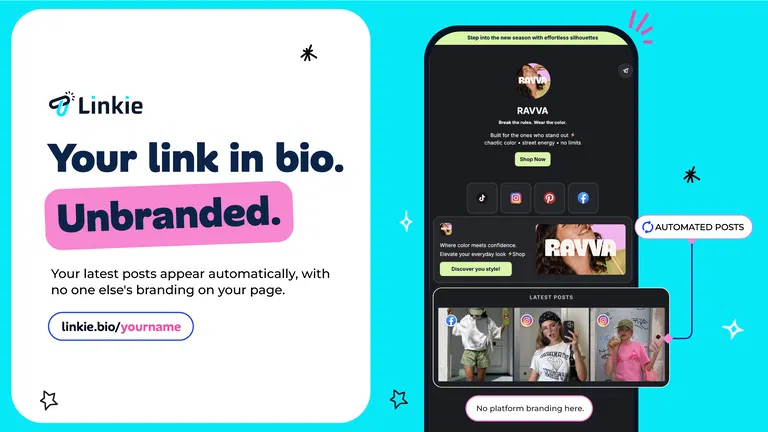
Linkie is a link-in-bio platform that automatically displays your latest social posts and lets you point each post to a custom destination link. According to the official Linkie documentation, the tool connects to your social accounts through a free API or the Publer scheduler. When you publish a new post on Instagram, TikTok, Facebook, or Google Sheets, that post appears on your Linkie page with the link you choose.
The tool solves a specific job: turning a single bio link into a dynamic, branded hub that sends visitors to your shop, video, signup page, or affiliate offer. Instead of manually updating a static list of links, you let Linkie pull your latest content and route clicks where they matter. Linkie comes from the team behind Publer, a social media scheduling platform, which explains the tight integration with scheduled posts.
For agencies, Linkie also solves multi-client management. You can manage every link-in-bio page from one login, switch between pages without logging out, and give each client their own custom domain or subdomain. The AppSumo listing shows a 5.00 star rating based on one review at research time, with 10+ transactions and a 15.0% refund rate.
Key Features That Matter
Auto-Updating Bio Pages
Linkie pulls your latest social posts onto your bio page as soon as you publish them. You connect the free API or use Publer to schedule posts, and each post appears with its own destination link. This removes the manual work of updating a link tree every time you post.
Pair Linkie with your content creation stack to keep posts flowing without extra steps.
Custom Domains and Subdomains
You can run your Linkie page on your own domain or a subdomain, so visitors see your brand in the URL instead of linkie.bio. The vendor-supplied screenshots show a clean page with no platform branding. This matters for creators and businesses that want to keep every touchpoint on-brand.
Smart Links by Country, Device, and Browser
Smart links match visitors with the right destination based on country, device, or browser. For example, iPhone users can be sent to the App Store while Android users go to Google Play. This is useful for app launches, regional offers, or device-specific checkout pages.
If you already handle affiliate link management, Linkie adds another routing layer on top.
Email Collection on the Page
Linkie lets you collect email addresses directly from your bio page. You can build a list from visitors who already found you through social media, without sending them to a separate landing page. This turns a simple link hub into a lead capture tool.
Multi-Page Management from One Login
You can manage multiple bio pages from a single Linkie account. Each page can have its own domain, email collection, analytics, and smart links. For teams coordinating project workflows, this single login reduces switching and keeps client work separate.
In-App Browser Bypass
Linkie can open links outside the in-app browser, so visitors keep their logins and saved cards at checkout. This is a practical fix for a common conversion problem on Instagram and TikTok. When a link opens in the platform's internal browser, users often lose their payment details or login state.
Pricing Tiers (starts $49)
| Tier | Price | Best For | Free trial? |
|---|---|---|---|
| 1 Code | $49 | Solo creators testing Linkie with up to 5 bio pages | 60-day refund, no free trial |
| 2 Codes | $98 | Small agencies managing up to 10 pages | 60-day refund, no free trial |
| 3 Codes | $147 | Growing teams with up to 15 pages | 60-day refund, no free trial |
| 4 Codes | $196 | Larger agencies with up to 20 pages | 60-day refund, no free trial |
The AppSumo listing references a fifth plan with up to 25 bio pages, but pricing for that tier was not visible in our research. All tiers are lifetime deals, meaning you pay once and avoid monthly fees. The 60-day refund window applies to most AppSumo deals, but Linkie is not covered by the "We Got Your Back" guarantee because it is an early-stage product.
Pros and Cons
Pros
- Auto-updates pages from Instagram, TikTok, Facebook, and Google Sheets via API or Publer.
- Custom domain support removes linkie.bio branding from your URL.
- Smart links route iPhone users to the App Store and Android users to Google Play.
- Email collection is built directly into the bio page.
- One login manages multiple client pages without logging out.
- Lifetime pricing avoids recurring monthly or annual fees.
- 60-day refund window reduces the risk of trying the tool.
Cons
- Only one public review on AppSumo at research time.
- No free plan, only paid lifetime tiers starting at $49.
- Early-stage product founded September 2024, with a limited track record.
- Refund rate listed at 15.0% on AppSumo, which is higher than some mature tools.
- Advanced features like affiliate management are only future ideas, not current functionality.
- No "We Got Your Back" guarantee, only the standard AppSumo refund.
Who Should Use Linkie?
Social Media Managers and Agencies
If you manage multiple client accounts, Linkie's single login and per-page custom domains save real time. You can switch between pages without logging out and give each client a branded URL. A client management platform can handle proposals and billing while Linkie manages the bio pages.
Solo Creators and Influencers
Creators who publish daily on Instagram or TikTok benefit from auto-updating pages. You do not need to manually reorder links every time you post. If you already use creator audience tools, Linkie fits into that stack without adding another monthly bill.
Ecommerce Sellers and Affiliate Marketers
Smart links and in-app browser bypass help you send mobile visitors to the right checkout page. If you are selling through a Shopify store, Linkie can route iPhone and Android users to different app store or product pages. Email collection on the page also helps you build a retargeting list.
You should skip Linkie if you need a free plan, a mature tool with hundreds of third-party reviews, or advanced link management features like deep analytics and team roles. Large enterprises with strict compliance requirements may also find the early-stage product too limited.
Alternatives to Consider
Linktree is the most well-known link-in-bio tool, with a free plan and a large template library. The trade-off is that Linktree branding appears on free pages, and custom domains require a paid subscription.
Bitly focuses on link shortening and QR codes, with strong analytics. It does not auto-update with your social posts the way Linkie does.
Rebrandly offers custom domain link management and team features. It is more expensive for multiple pages and lacks the social post auto-update integration.
Final Verdict
Linkie is a focused, lifetime-priced link-in-bio tool that solves a real problem for creators and agencies. The auto-updating feature, custom domains, and smart links are practical, not gimmicks. The early-stage status and limited reviews mean you should test it during the 60-day refund window before committing.
If you want a branded, self-updating bio page without monthly fees, Linkie is worth a close look. The lifetime deal removes the recurring cost that most competitors charge.
Frequently Asked Questions
Does Linkie have a free plan?
No, Linkie does not offer a free plan. The lifetime deal starts at $49 for 5 bio pages. You get a 60-day refund window through AppSumo, which acts as a trial period.
How does Linkie compare to Linktree?
Linkie auto-updates with your latest social posts and supports custom domains on all paid tiers. Linktree has a free plan and more templates, but custom domains and advanced features require a paid subscription. Linkie's lifetime pricing can be cheaper over time.
Can I cancel anytime?
Linkie is a lifetime deal, so there is no subscription to cancel. You pay once and keep access. If you are not satisfied, you can request a refund within 60 days through AppSumo.
Is Linkie worth the price?
For agencies managing multiple client pages, the $49 lifetime tier pays for itself quickly compared to monthly link-in-bio tools. Solo creators who post daily also benefit from auto-updating pages. The main risk is the early-stage product and limited public reviews.
Can I use my own domain with Linkie?
Yes, Linkie supports custom domains and subdomains on all paid tiers. You can point your own domain to your Linkie page, so visitors see your brand in the URL instead of linkie.bio.

Similar Posts






](https://pcsaas.com/wp-content/uploads/2026/11/linkie-your-link-in-bio-your-brand-your-domain-auto-updated-mwrvnvz8.webp)%5D(https://pcsaas.com/go/linkie))