TexAu Review (2026): Honest Take After Real Research
Lead SaaS Analyst & Software Developer at PCSaaS · Software Developer (GitHub @Ratankarmakar) · Google Ads & Analytics Certified · 500+ SaaS Tools Tested · 8+ years in software engineering, B2B SaaS evaluation, AppSumo deal auditing, and performance marketing
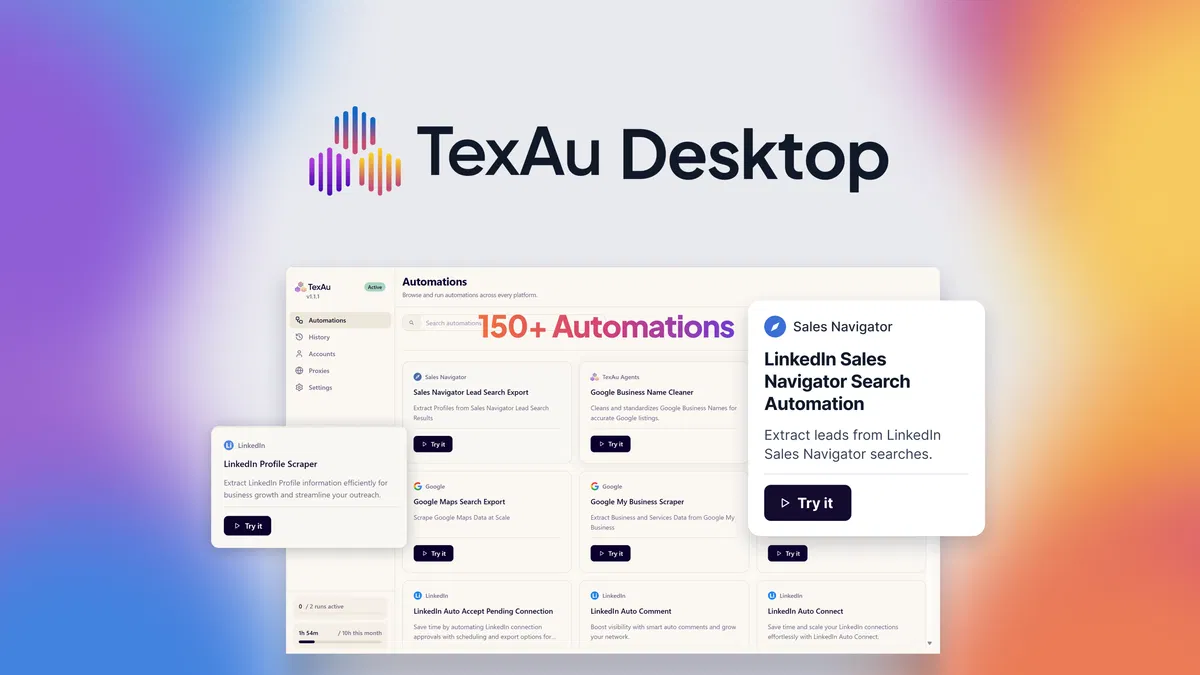
TexAu runs 110+ lead scraping and outreach automations on your own desktop instead of a vendor's cloud, and that single architectural choice changes the price, the risk, and the way you work. It covers LinkedIn, Google Maps, X, Slack, and YouTube out of the box. Here is what the deal actually gets you, where it falls short, and who should walk away.
Disclosure: This article contains affiliate links. We may earn a small commission at no extra cost to you when you sign up via our links. It's how this site stays free to run.
TL;DR Verdict
- Best for: sales managers, solopreneurs, and agencies running repeatable prospecting for one or several clients.
- Price: $69 one-time for Tier 1 (1 machine, 50 runtime hours per month), reduced from $199.
- Biggest pro: 110+ ready-to-run automations that execute locally, with unlimited connected accounts and proxy support.
- Biggest con: your computer must stay on and logged in for runs to complete, and lower tiers cap monthly runtime hours.
- Free trial: none. AppSumo substitutes a 60-day money-back window, which is the closest thing to a risk-free test here.
Bottom line: a 60-day refund window turns this into a cheap experiment, so Get the Lifetime Deal → and run one automation before you commit to a workflow.
What Is TexAu?
TexAu is a desktop automation app that runs prebuilt lead scraping and outreach recipes on your own computer rather than on the vendor's servers. You pick an automation, feed it a LinkedIn URL, a Google Maps search term, or a CSV of inputs, and it returns structured rows you export as a spreadsheet.
The jobs it handles are specific and repetitive. Pulling employee names and titles from a LinkedIn company page. Scraping Google My Business listings by city or business type.
Sending connection requests and follow-up messages in sequence. Cleaning a column of badly formatted company names so your CRM stops matching "Acme, Inc." and "ACME Inc" as two accounts.
The product has a history worth knowing. TexAu launched on AppSumo in December 2020 as a cloud platform and ran that way for three years. The team then rebuilt it as a desktop application, a pivot the founder attributes to long conversations with LinkedIn.
According to the founder's campaign note, more than 30,000 businesses have used TexAu across both eras, and existing lifetime buyers from 2020 and 2021 were migrated with doubled runtime rather than cut off.
That context matters because it explains the design. Local execution exists to keep your scraped data on your hard drive and to keep account sessions tied to your own browser fingerprints. The trade-off is that you supply the machine, the power, and the uptime.
If you want a sense of what self-hosted infrastructure costs in practice, a rented cloud machine is one route, though this app is built for Windows and Mac desktops first.
Key Features That Matter
110+ automations with no workflow builder
The library is the product. You filter by platform or search for a task, then run it as-is. LinkedIn automations cover invitation sending, messaging, commenting, and Sales Navigator searches.
Other recipes pull from Google Maps, X, Slack, and YouTube.
That design removes the biggest failure point in tools like Make or Zapier: nobody has to design the logic. The cost is flexibility, since you cannot merge three automations into one custom sequence inside the app.
Bulk runs from a single URL or a CSV
You can trigger an automation against one input or import a spreadsheet with hundreds of rows. The vendor's screenshots show a preview step before a run starts, so you see the shape of the output before spending runtime hours on it. For an agency working through a list of client target accounts, that batching is the difference between a morning and a week.
Local execution through your existing browser session
A Chrome extension pairs your logged-in browser with the desktop app, and no API credentials are required. The app drives the session you already have. Because the data stays on your machine, nothing is stored on a vendor server that could be breached or subpoenaed; local-first storage aligns with the access-control thinking behind established security frameworks.
Unlimited accounts with proxy support
The listing states you can connect unlimited accounts and attach proxies, a setup aimed squarely at agencies running outreach for several clients. Each client's LinkedIn or X account can keep its own session and IP. Proxi bandwidth is sold separately as a one-time add-on at $49 per 49 units, capped at 490 units.
Run reporting and CSV export
Every run logs successful, failed, and skipped rows separately. You export the results as CSV and drop them into HubSpot, Pipedrive, or Zoho. Rerunning a past automation from history takes one click, which matters when you need the same Google Maps scrape refreshed monthly.
Data cleaning automations
A quieter but useful category. These recipes take messy inputs, such as inconsistent company names or malformed domains, and normalise them before enrichment. Teams that have tried scouting influencer contacts will recognise how much time bad input data wastes downstream.
Pricing Tiers (starts $69)
| Tier | Price | Best For | Free trial? |
|---|---|---|---|
| License Tier 1 | $69 one-time (from $199) | One operator, light daily use, 1 machine, 1 concurrent run, 50 runtime hours/month | No, 60-day refund |
| License Tier 2 | $138 one-time (from $499) | A single power user, 1 machine, 3 concurrent runs, 300 runtime hours/month | No, 60-day refund |
| License Tier 3 | $276 one-time (from $799) | Small agencies, 3 machines, 6 concurrent runs, 750 runtime hours/month | No, 60-day refund |
| License Tier 4 | $552 one-time (from $1,249) | Teams and multi-client agencies, 5 machines, 12 concurrent runs, unlimited runtime hours | No, 60-day refund |
Every tier includes the full automation library, unlimited connected accounts, the proxy feature, Discord community access, and future desktop updates. The differentiators are machines, concurrent runs, and monthly runtime.
Plain English: Tier 1 buys you about 1.6 hours of automation per day, which is enough for one person doing prospecting in bursts. Tier 2 is the realistic pick for anyone running outreach daily, because 50 hours disappears fast once you start scraping Google Maps by city. Tier 4 is the only option with unlimited runtime, and it is the only one that makes sense for an agency with five or more client accounts.
If you habitually wait for launch deal alerts before buying software, note that these AppSumo prices are already discounted roughly 65% from the listed list price and are tied to a lifetime licence rather than a subscription.
Pros and Cons
Pros
- 110+ automations ship ready to run, with no workflow building required.
- Local execution keeps scraped data on your own hard drive.
- Unlimited connected accounts plus proxy support suits multi-client agency work.
- CSV in, CSV out, with clean exports for HubSpot, Pipedrive, and Zoho.
- Row-level success, failure, and skip logging shows exactly what broke.
- Lifetime licence at $69 undercuts every subscription competitor on this list.
- 60-day refund window gives a genuine out if the app does not fit.
Cons
- Your machine must stay awake and logged in during long runs.
- Tier 1 caps you at 50 runtime hours per month with one concurrent run.
- No cloud version any more, so there is no browser-only option.
- The library is fixed, so custom multi-step sequences are not possible.
- Proxi bandwidth is a paid add-on, not included in any tier.
- The AppSumo listing showed only one review at the time of writing.
One more risk worth stating plainly: LinkedIn's user agreement restricts automated activity, so account restrictions remain possible no matter where the software runs. Local execution reduces some fingerprinting risk. It does not make the activity invisible to the platform.
Who Should Use TexAu?
Sales managers running repeatable prospecting
If your team rebuilds the same Sales Navigator search every Monday, TexAu turns that into a saved automation with a CSV output. You get consistent row counts and a log of what failed, which is more than a manual tab-hopping session gives you.
Solopreneurs and consultants who prospect weekly
One person doing outreach between client calls rarely has time to build a workflow. The library format fits that. Run a Google Maps scrape, export it, send messages through the LinkedIn automations, and move on.
If you also monetise an audience, pairing this with commission-friendly programs gives the outreach a destination.
Agencies handling outreach for multiple clients
Unlimited accounts, proxy support, and multiple machines on Tier 3 and above are the agency pitch. Each client keeps a separate session, and the run history lets you show what was delivered.
Skip TexAu if you need cloud execution with no local machine involved, you want custom multi-branch workflows, or you are building a storefront rather than a sales pipeline. It is also the wrong purchase if your monthly scraping volume exceeds your tier's runtime hours and you are unwilling to upgrade.
Alternatives to Consider
Hunter.io focuses on email discovery and verification rather than browser automation. It is the better pick when you need verified addresses, while TexAu is stronger at pulling raw lists from social and local search.
Lusha delivers contact data through a browser extension and CRM integrations with little setup. The trade-off is a subscription and a credit cap, versus TexAu's one-time licence and local data ownership.
ZoomInfo is the enterprise option with the deepest firmographic database and the highest price. For a side-by-side data tool comparison of how much database depth costs, it helps to see where premium data platforms sit relative to scraper tools.
Final Verdict
TexAu is a narrow, honest tool: it does bulk LinkedIn, Google Maps, and X actions from your desktop without asking you to design anything. The $69 Tier 1 is cheap enough to test, and the 60-day refund removes most of the downside. The limits are real, namely runtime hours, a fixed library, and a machine that has to stay on.
Buy it for repetitive prospecting, not for a data warehouse.
Ready to try it on one list? Get the Lifetime Deal →
Frequently Asked Questions
Does TexAu have a free plan?
No. There is no free tier and no trial period. AppSumo covers the purchase with a 60-day money-back guarantee, so the practical test window is two months after you buy.
How does TexAu compare to Hunter.io?
Hunter.io finds and verifies email addresses. TexAu automates browser actions to collect profile and listing data, then exports it. If your bottleneck is finding verified emails, Hunter wins.
If it is pulling hundreds of LinkedIn profiles or local business listings, TexAu wins.
Can I cancel anytime?
There is nothing to cancel, because the licence is a one-time payment rather than a subscription. You can request a refund within the 60-day window. After that, the licence stays valid for life, including future desktop updates.
Is TexAu worth the price?
At $69 for Tier 1, it pays for itself if it saves you a few hours of manual copying in the first month. The maths turns against Tier 1 if you need more than roughly 1.6 hours of automation per day, so budget for Tier 2 at $138 if outreach is a daily habit.
Does TexAu work with LinkedIn Sales Navigator?
Yes. The vendor lists Sales Navigator among the supported LinkedIn surfaces, alongside standard profile and company page scraping. Automations still run through your logged-in browser session, so you keep your own Sales Navigator seat.

Similar Posts