
AI Emaily connects Gmail, Outlook, iCloud, Fastmail, Proton, and any IMAP address into one inbox, then uses an AI chief of staff to filter the noise and draft replies in your voice. It landed on AppSumo at $69 for lifetime access, a 79% drop from the listed $324. The promise is blunt: stop being the human filter between your inbox and your actual work.
Disclosure: This article contains affiliate links. We may earn a small commission at no extra cost to you when you sign up via our links, it's how this site stays free to run.
TL;DR Verdict
- Best for: freelancers, consultants, and small teams juggling two or more email accounts.
- Headline price: $69 lifetime for Tier 1 (2 inboxes, 1,000 AI credits, 100 credits per month per user).
- Biggest strength: an agentic triage layer that scores unknown senders and files cold pitches instead of dropping them next to client work.
- Biggest weakness: almost no public review history yet, and the team tiers jump hard to $379 and $799.
- Trial status: no free plan, but AppSumo backs the purchase with a 60-day money-back guarantee.
- Bottom line: if you run several inboxes and want drafts you approve before anything sends, Get the Lifetime Deal → is a low-risk experiment.
What Is AI Emaily?
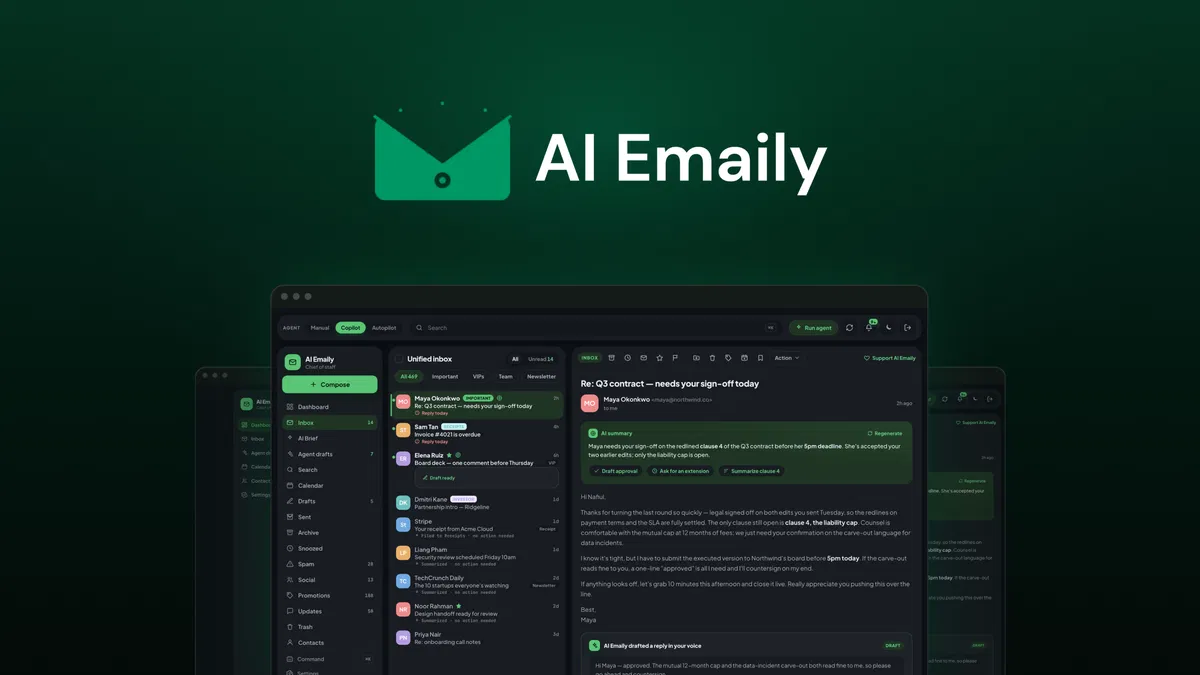
AI Emaily is an agentic unified inbox that pulls every email account you own into one view, then adds AI triage, sender scoring, and voice-matched reply drafting on top of it.
The jobs it replaces are concrete. You stop alt-tabbing between four browser tabs to check whether a client replied. You stop reading 40 cold pitches to find the two messages that actually need a decision.
You stop rewriting the same "thanks, here's my availability" reply in a tone that sounds nothing like you. According to the official AppSumo listing and vendor documentation, every connected account gets sorted on arrival, ranked by priority, and paired with a one-line summary so you can triage before you read.
The product itself is young. It was founded on January 1, 2026, is bootstrapped out of Dhaka, Bangladesh, and runs with a team of 1 to 10 people. The founder's launch post makes the case in numbers: 1,336 emails in 30 days, 153 of them cold pitches from real people that still landed in Primary alongside investor updates.
That is the problem AI Emaily sells against, and it is a familiar one for anyone comparing new software deals every quarter.
Key Features That Matter
One inbox for six providers
You connect Gmail, Outlook, iCloud, Fastmail, Proton (through Bridge), and any IMAP account into a single prioritized view with 20 languages supported. Smart tabs separate VIP mail, newsletters, updates, and social notifications, so client threads do not sit under promo codes. If you already keep client details organised elsewhere, this is the layer that sits in front of it.
Cold email protection that files instead of deletes
Unknown senders are scored on whether a real relationship exists, and pitches get moved out of the way rather than erased. When it gets one wrong, you move the message back and allowlist the sender, which trains the filter over time. That single behavior is the difference between a filter you trust and one you fight.
Voice-matched drafts using your Context brain
You define your tone and standing facts once, then build a profile for each key client (1 on Tier 1, up to 80 on Tier 4). Drafts read the full thread and the client context before writing a word, and the tone shifts from formal for a board deck to casual for a follow-up. Anyone who has compared AI drafting tools knows the gap between generic output and something you would actually send.
Living Brief and Slack summaries
One screen shows what needs a reply from you today, with open loops surfaced from long threads. A Slack brief can deliver your priorities before you open a single tab, which suits anyone who starts the day in chat rather than email. The vendor's screenshots show quick actions, snooze, and follow-up scheduling sitting inside that same brief.
Smart AI search by meaning
Search runs across every connected account and matches on intent, not just exact keywords. Ask for "the invoice thread from the agency about Q3" and it should surface the right chain even if you never typed those words. This matters most at the six-month mark, when your inbox has become an archive you cannot scroll.
Approve-first sending with undo and an audit trail
Nothing sends unless you approve it, unless you deliberately switch on Autopilot with rules you set yourself. Approved sends get an undo window, filed mail can be moved back, and every AI action is logged. For anyone nervous about an agent replying on their behalf, that audit trail is the guardrail that makes it usable, and it pairs well with apps that protect focus during deep work blocks.
Pricing Tiers (starts $69)
| Tier | Price | Best For | Free trial? |
|---|---|---|---|
| License Tier 1 | $69 (list $324) | Solo users with 2 inboxes and 1 client context | No, 60-day refund |
| License Tier 2 | $129 (list $540) | Freelancers with 4 inboxes and 5 client profiles | No, 60-day refund |
| License Tier 3 | $379 (list $1,650) | Small teams needing 6 seats and 8 inboxes | No, 60-day refund |
| License Tier 4 | $799 (list $4,125) | Agencies with 15 seats, 20 inboxes, Shared Inboxes | No, 60-day refund |
Every tier is a one-time payment for lifetime access, refundable for 60 days through AppSumo's guarantee. The jump between Tier 1 and Tier 2 is small at $60 and buys two more inboxes plus four more client profiles, so most solo buyers should look there first. Tier 3 is where the math changes: $379 unlocks 6 team seats, 8 inboxes, 600 AI credits per month per user, 30 context folders, and shared inboxes.
Tier 4 at $799 pushes to 15 seats, 20 inboxes, and 80 client contexts, which only makes sense if you bill client work by the hour. Note that BYOK (bring your own key), Autopilot, shared inboxes, and advanced inbox rules show as higher-tier unlocks rather than baseline features, so check what your tier actually includes before you buy.
Pros and Cons
Pros
- One prioritized view across six providers, including Proton through Bridge
- Cold pitch scoring that files rather than deletes, with allowlist correction
- Drafts that read thread history plus per-client context before writing
- Nothing sends without approval, and every AI action is logged
- Desktop apps for macOS and Windows, plus iOS and offline PWA support
- Slack brief delivers daily priorities before you open email
- Tier 2 at $129 is a modest step up from the entry price
Cons
- Tiers 3 and 4 jump to $379 and $799 with no middle option
- Only 1 team seat on Tier 1 and Tier 2, so teammates cost real money
- AI credits are capped monthly per user, which heavy senders will hit
- AppSumo shows no user reviews yet, so there is little independent proof
- Desktop availability for Linux is not listed anywhere on the deal page
- Autopilot and BYOK sit behind higher tiers rather than on entry
Who Should Use AI Emaily?
Solo consultants running 3 to 5 inboxes
You bill by the hour, so every morning spent sorting mail is unpaid admin. AI Emaily puts two to four accounts in one ranked view, drafts replies that sound like you, and shows a single brief of what needs a decision today. At $69 to $129 one-time, it pays for itself the first week it saves you three hours.
Small agencies with client-facing email volume
Client context profiles are the feature that matters here. With 5 profiles on Tier 2 or 50 on Tier 3, each draft already knows the account, the tone, and the standing facts. Pair it with the way you handle social chatter and the peripheral inboxes stop competing for attention.
Founders and operators buried in cold outreach
The founder's own numbers (153 cold pitches in 30 days, all in Primary) describe this buyer exactly. If your mornings are decision-making about other people's requests rather than doing your own work, the sender scoring alone changes your day.
Skip AI Emaily if you use one Gmail account and Gmail's tabs already work for you, if you need a free forever plan, or if you require documented enterprise compliance certifications like SOC 2, which are not published on the deal page.
Alternatives to Consider
Superhuman is the polished speed-focused client with keyboard shortcuts and a strong reputation, but it runs on a recurring monthly subscription with no lifetime option. Shortwave brings AI drafting and search to Gmail specifically, which is a problem the moment you add an Outlook or iCloud account. SaneBox handles filtering and sender scoring well and costs less, but it does not draft replies or unify multiple providers into one screen. If you mainly want an AI assistant layer across other tools, it is worth seeing how AI assistant platforms handle similar drafting work before you commit.
Final Verdict
AI Emaily attacks a real problem with a sensible guardrail: the AI drafts, you approve. The unified inbox across six providers, sender scoring for cold pitches, and per-client context profiles cover the three things that actually eat a freelancer's morning. The risks are honest ones.
There are no public reviews to lean on yet, the team tiers get pricey fast, and Autopilot sits behind a higher tier. Given the 60-day refund window, the downside is mostly your setup time.
If you run multiple inboxes and want a lifetime license instead of another subscription, Get the Lifetime Deal → and test it against your worst inbox week.
Frequently Asked Questions
Does AI Emaily have a free plan?
No. There is no free tier and no time-limited free trial. Instead, every AppSumo license is a one-time lifetime purchase covered by a 60-day money-back guarantee, so you can request a refund if the tool does not fit your workflow.
How does AI Emaily compare to Superhuman?
Superhuman focuses on speed, keyboard shortcuts, and a premium recurring subscription. AI Emaily focuses on agentic triage, cold email scoring, and approved AI drafts, and it charges once. If you want the fastest manual client, Superhuman wins.
If you want the AI to do the first pass, AI Emaily is the better fit.
Can I cancel anytime?
There is nothing to cancel, because you pay once for lifetime access rather than subscribing. The relevant window is the 60-day refund period through AppSumo. After that, the license stays active on the tier you bought, with the inbox, credit, and seat limits that tier defines.
What are AI credits and what happens when they run out?
AI credits cover the drafting, summarizing, and search actions the assistant performs. Tier 1 includes 1,000 credits with 100 credits per month per user, and the monthly per-user allowance rises with each tier to 1,000 on Tier 4. Once you hit the monthly cap, the assistant stops generating until the allowance resets.
Is AI Emaily worth the price?
For Tier 1 at $69, one saved morning a month covers the cost within the first quarter. The caveat is scope. Check that your tier includes the inbox count, team seats, and features you actually need, since shared inboxes, Autopilot, and BYOK only appear on higher plans.


1 thought on “AI Emaily Review (2026): Honest Take After Real Research”