
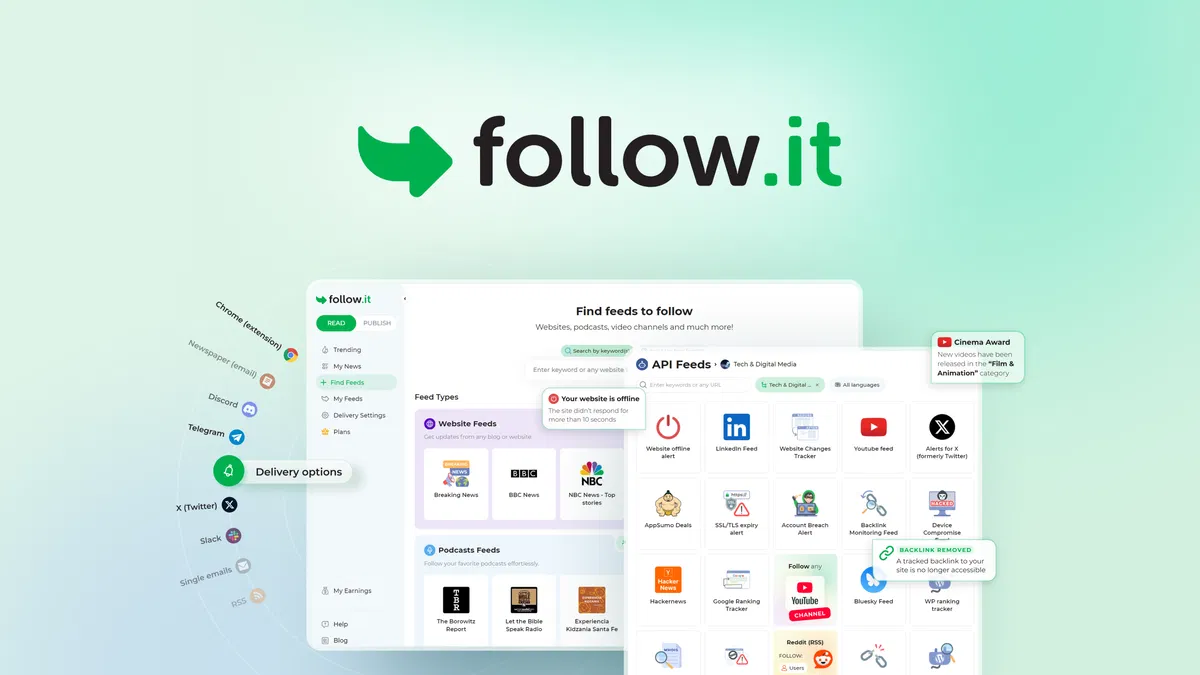
follow it does one thing most feed readers refuse to do: it watches far more than blogs. According to the vendor's own listing, the platform tracks websites, YouTube channels, uptime, SSL expiry, exchange rates, and specialized API feeds, then routes what matters to email, RSS, Telegram, Slack, or browser push. The AppSumo lifetime deal starts at $49, which is the main reason people are searching for a follow it review right now.
Disclosure: This article contains affiliate links. We may earn a small commission at no extra cost to you when you sign up via our links, it's how this site stays free to run.
TL;DR Verdict
- Who it's for: content creators, marketers, and solopreneurs tracking 50 or more sources at once.
- Headline price: $49 one-time for License Tier 1 (500 regular feeds), down from $196.
- Biggest pro: one hub for blog posts, keyword alerts, YouTube uploads, and uptime monitoring.
- Biggest con: AI summaries and AI filter checks carry daily and monthly caps, even on the top tier.
- Trial status: no free trial, but every license is refundable for 60 days under AppSumo's guarantee.
- Bottom line: if you currently pay for three separate monitoring tools, follow it replaces all of them for a single payment.
Ready to skip the research? Get the Lifetime Deal →
What Is follow it?
follow it is a website and feed monitoring platform that collects updates from blogs, news sites, YouTube channels, and API feeds into one filtered hub. The company has run since November 2016 out of Balzan, Malta, and the founder states in the AppSumo launch thread that this is the flagship product arriving on the marketplace after earlier deals for related tools.
The jobs it solves are practical. You stop opening 30 tabs to check whether a competitor published something. You stop missing a client's blog post because their RSS feed died two years ago.
You stop discovering a site went down when a customer emails you about it.
The pricing structure is where the positioning gets interesting. Most monitoring stacks bill monthly per seat, and costs climb as you add sources. follow it sells a lifetime license with a fixed feed count, so the cost is settled on day one. That model fits freelancers and small teams better than enterprises with rotating headcount.
Understanding how software deals get vetted before you commit helps here, since lifetime licenses live or die by whether the vendor keeps shipping.
Key Features That Matter
Website and Blog Following Without the Tab Hopping
You paste any website URL and follow it converts the page into a tracked feed, even where no native RSS exists. That covers old blogs, local news sites, and company announcement pages that never bothered to publish a feed. The payoff is simple: one dashboard instead of a browser full of bookmarks.
Keyword, Author, and Tag Filters
Filtering is the feature that separates a useful feed from a firehose. The platform lets you filter any feed by keyword, tag, or author, so a busy news domain only surfaces the stories matching your criteria. A marketing consultant tracking "pricing" mentions across 40 publications can drop the noise entirely.
AI Prompts, Daily Digests, and Weekly Magazines
Beyond keyword rules, follow it accepts AI prompts to filter and surface updates. Delivery rhythm is configurable too: instant alerts, a daily Newspaper digest, or a weekly Magazine digest. The tier structure meters AI summaries at 5, 20, 50, or 100 per day depending on license level.
Five Delivery Channels From One Hub
Updates reach you by email digest, RSS, Telegram, Slack, browser push, or mobile alerts, and you can set the channel per feed. That granularity keeps Slack clean for team-relevant alerts while personal reading stays in your inbox. If you already follow the RSS specification, the output remains portable and you are never locked into one client.
Beyond Blogs: YouTube, Uptime, SSL, and Finance
The monitoring layer goes past publishing. You can track YouTube channels for videos matching keywords or quality thresholds, watch website uptime and SSL/TLS expiry, and follow exchange rates, commodity prices, or weather via API feeds. Anyone running a storefront will want a second opinion on infrastructure too, so pair this with the basics of checking your own connection when a site appears to go dark.
Personal News Page and Social Forwarding
Saved stories build into a personal news page you can organize by topic. You can also forward items straight to Buffer for social queuing, which turns a feed item into a scheduled post without copy-pasting. That workflow matters more than it sounds, because how your links preview decides whether a queued post gets clicked.
Creators who schedule posts across channels will recognize the bottleneck this removes.
Pricing Tiers (starts $49)
| Tier | Price (one-time) | Best For | Free trial? |
|---|---|---|---|
| License Tier 1 | $49 (list $196) | Solo creators, 500 regular feeds, 10 number feeds, 5 AI summaries per day | No, 60-day refund |
| License Tier 2 | $99 (list $396) | Freelancers, 1,000 regular feeds, 25 number feeds, 20 AI summaries per day | No, 60-day refund |
| License Tier 3 | $199 (list $796) | Marketing teams, 3,000 regular feeds, 50 number feeds, 50 AI summaries per day | No, 60-day refund |
| License Tier 4 | $299 (list $1,196) | Agencies, 8,000 regular feeds, unlimited number feeds, 100 AI summaries per day | No, 60-day refund |
In plain terms, each tier multiplies feed capacity and AI allowance rather than gating core features. Tier 1 gives you 500 regular feeds, 10 number feeds, 10 course feeds, standard delivery speed, and 500 AI-checked messages per month. Tier 2 and above add faster email delivery (up to 5x, then up to 10x), premium support, and larger AI filter budgets.
Tier 4 lifts number feeds to unlimited, which is the ceiling most power users actually care about.
Pros and Cons
Pros
- Tracks sites with no native RSS, which most readers simply cannot do.
- One subscription covers email, Slack, Telegram, RSS, push, and mobile.
- Keyword, tag, and author filters cut feed noise before it reaches you.
- AI filter checks are metered monthly, so heavy keyword rule sets stay affordable.
- Lifetime pricing removes recurring costs that climb with every added source.
- Buffer forwarding turns monitored content into scheduled social posts fast.
- Uptime, SSL, and domain monitoring bundled at no extra platform cost.
Cons
- AI summaries cap at 100 per day even on the $299 tier.
- No free trial, so you commit before you can test delivery speed yourself.
- The interface carries a learning curve once you stack filters, channels, and API feeds.
- Real-time alerting depends on how fast the source site publishes in the first place.
- Lifetime deals depend on the vendor surviving, so long-term value is not guaranteed.
- No published third-party review scores yet on major software platforms.
Who Should Use follow it?
Solo creators publishing four or more times a week
You need to know what competitors published this morning without refreshing six tabs. Keyword filters across 100 sources give you a research feed that actually stays readable. The $49 tier covers 500 regular feeds, which is more headroom than most solo operators ever use.
Marketing teams of 5 to 15 people
Shared Slack alerts on brand mentions, competitor launches, and industry news beat a weekly email nobody opens. Tier 3 at $199 handles 3,000 regular feeds with 50 AI summaries per day. If your team also monitors WordPress properties, locking down comment spam is the natural companion task.
Analysts and operators tracking non-editorial data
This is where follow it separates from every feed reader on the market. Exchange rates, commodity prices, weather alerts, and service status all arrive through the same filtering engine. If markets matter to your work, the discipline of tracking your own finances maps neatly onto how you would configure these feeds.
Skip follow it if: you follow fewer than 10 sources, you need real-time sub-second alerting for trading, or your team already standardizes on a full enterprise monitoring stack with SOC-style alerting. The lifetime model also makes less sense if you prefer month-to-month flexibility over a fixed commitment.
Alternatives to Consider
Feedly remains the best-known reader, with strong AI features and team boards, but it bills monthly and its free tier is limited. The trade-off is recurring cost versus follow it's one-time license.
Inoreader handles power-user rule sets and automation well, and its filtering engine is genuinely deep. The trade-off is price: advanced tiers cost more per year than follow it's entire lifetime fee.
NewsBlur appeals to people who want a classic reader with no cloud dependency and a small annual fee. The trade-off is narrower scope: it does feeds well and does not attempt uptime, SSL, or API monitoring.
Final Verdict
follow it wins on scope and price, not on polish. For $49 you get 500 feeds, five delivery channels, keyword and AI filtering, plus monitoring categories most competitors never enter. The honest caveats are the AI caps and the absence of third-party review scores, both of which matter more to agencies than to solo operators.
If your current stack costs more than $49 a year, the math is straightforward. If your needs are sub-second and mission-critical, look elsewhere.
Frequently Asked Questions
Does follow it have a free plan?
Not on AppSumo. The deal is a one-time lifetime license starting at $49, with no free tier and no trial period. Purchases are refundable up to 60 days under AppSumo's money-back guarantee.
How does follow it compare to Feedly?
Feedly focuses on reading and AI-assisted research across publications. follow it adds uptime checks, SSL expiry, YouTube monitoring, and API feeds on top of feed reading. The bigger difference is billing: Feedly charges monthly, follow it charges once.
Can I cancel anytime?
The license is a one-time payment, so there is no subscription to cancel. Your 60-day refund window is the exit point; after that, the license stays active for the lifetime of the plan you bought.
Is follow it worth the price?
For anyone tracking more than 50 sources across mixed channels, yes. Tier 1 at $49 replaces separate tools for feed reading, keyword alerts, uptime checks, and social queuing. The value drops sharply if you only follow a handful of blogs.
What makes follow it different from a standard RSS reader?
Standard readers need a feed to exist before they can track a site. follow it generates feeds from pages that never offered one, then filters them by keyword, tag, author, or AI prompt. It also pushes output to Slack, Telegram, and push notifications rather than only a reading app.

