Rival Ads Review (2026): Honest Take After Real Research
Lead SaaS Analyst at PCSaaS · Software Developer · 500+ Tools Tested · Google Ads & Analytics Certified · 8+ Years Experience
Disclosure: This article contains affiliate links. We may earn a small commission at no extra cost to you when you sign up via our links, it's how this site stays free to run.
Rival Ads review research points to one standout feature: competitor ad intelligence across six platforms in one workspace. It combines ad tracking, AI-assisted creative research, and client-ready white-label reports, with lifetime deal access starting at $41.65.
TL;DR Verdict
- Best for: Marketers and agencies tracking competitors across Meta, Google, TikTok, LinkedIn, Microsoft, and Pinterest.
- Headline price: $41.65 once for the Growth lifetime plan, currently discounted from $49.
- Biggest pro: It brings creative research, monitoring, AI reads, and agency reports into the same workflow.
- Biggest con: Growth refreshes tracked ads every seven days, and its six-monitor limit can feel tight for busy agencies.
- Free trial: No free trial is listed. The AppSumo deal offers a refund period of up to 60 days.
Bottom line: Consider it if you regularly turn competitor ad research into briefs or client reports. Get the Lifetime Deal →.
What Is Rival Ads?
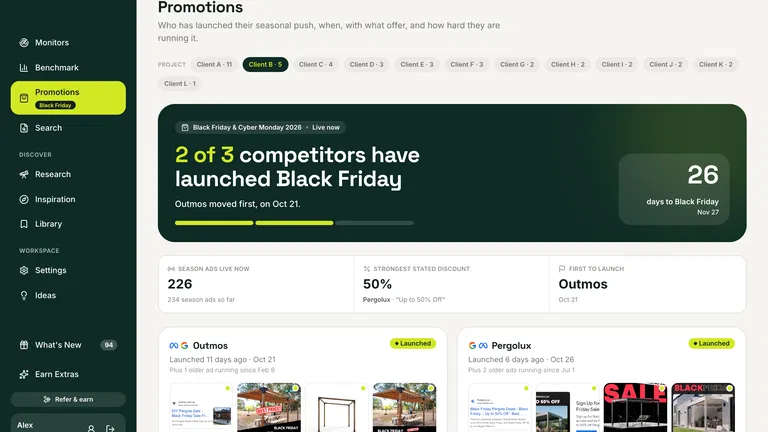
Rival Ads is an ad intelligence tool for tracking competitors, researching creative, and preparing reports across six advertising platforms. It stores tracked ads, copy, creative details, and activity in one workspace instead of requiring separate searches and manual screenshot collections.
You can monitor selected advertisers, search for creative ideas, and review extracted hooks, messaging angles, audience cues, transcripts, and on-screen text when usable media is available. Meta landing-page captures and offer history add context about the pages and offers connected to tracked ads.
The product also targets agencies that need to turn research into client-facing work. Higher plans include white-label branding, project access, reports, and API or remote MCP connections. For the complete feature list and current deal terms, consult the official Rival Ads site.
Teams assembling a wider marketing stack can also compare options for capturing prospective customers.
Key Features That Matter
Track advertisers across six platforms
Rival Ads lists support for Meta, Google, TikTok, LinkedIn, Microsoft, and Pinterest. You can assign monitors to competitors and track their advertising activity, with up to five supported locations per monitor.
The plan matters here: Growth includes six monitors, while the listed tiers scale to 150 on Ultra. If you watch many brands or markets, check the monitor allowance before choosing a tier.
Turn ads into creative research
AI reads can surface hooks, messaging angles, audience cues, video transcripts, and on-screen text when the source media supports those details. Keyword search, creative filters, long-running ads, and competitor benchmarks help narrow a collection into examples your team can discuss.
Saved-ad folders, artwork and copy exports, and a shared swipe file support planning briefs or campaign concepts. If your research leads directly into production, you can pair that work with writing resources for marketers.
Track changes and offers over time
New-ad and activity alerts flag changes after a source read, while weekly email digests give teams another way to follow updates. The platform also lists Meta landing-page captures and offer history, which can help you compare ad messaging with the page it promotes.
Fetch schedules vary by plan. Growth lists automatic fetching every seven days, while Scale, Agency, and Max list fetching every three days. That difference matters if your team needs fresher competitive reads.
Prepare reports under your agency brand
Rival Ads supports PDF reports and shareable links, with password protection and link rotation. Agency, Max, and Ultra include white-label branding and a custom domain across the dashboard, reports, and emails.
Projects and scoped client access help organize client work, while the listing specifies unlimited team members and 14 dashboard and report languages. Agencies that also assess tools for referral campaigns can compare those needs separately from ad research and reporting.
Connect AI and custom workflows
The product lists remote MCP support for compatible clients such as Claude and ChatGPT, along with a REST API. The API covers projects, monitors, tracked ads, library records, report sharing, and sync requests, according to the deal information.
These connections are most relevant when your team already uses AI clients or internal workflows to handle research. The listing describes workspace-based access controls and owner-managed API keys or supported OAuth connections.
Pricing Tiers (starts $41.65)
Rival Ads is sold here as a lifetime deal, not a monthly subscription. Prices below reflect the discounted amounts shown in the supplied AppSumo listing.
| Tier | Price | Best For | Free trial? |
|---|---|---|---|
| Growth | $41.65 once, listed regular price $49 | Individuals or small teams tracking up to 6 competitors | No; refundable up to 60 days |
| Scale | $84.15 once, listed regular price $99 | Teams needing up to 12 monitors and weekly AI reads | No; refundable up to 60 days |
| Agency | $169.15 once, listed regular price $199 | Agencies tracking up to 30 monitors and needing white-label reports | No; refundable up to 60 days |
| Max | $339.15 once, listed regular price $399 | Larger teams tracking up to 75 monitors, with priority queue placement | No; refundable up to 60 days |
| Ultra | Price not shown in supplied deal details | Larger portfolios needing up to 150 monitors | No; refundable up to 60 days |
The Growth plan fetches ads every seven days and provides monthly AI strategy reads. Scale, Agency, and Max list fetching every three days and weekly AI reads; Max also lists priority queue placement. Ultra is listed with up to 150 monitors, but its price and full tier details are not included in the supplied pricing information.
Check the live deal page for current availability before buying.
Pros and Cons
Pros
- Tracks ads across six platforms in one research workspace.
- Growth starts at $41.65 for one-time lifetime access.
- Creative analysis includes hooks, angles, audience cues, and available transcripts.
- Meta landing-page captures and offer history add campaign context.
- Agency, Max, and Ultra include white-label branding and custom domains.
- Reports support PDFs, shareable links, passwords, and link rotation.
- REST API and remote MCP connect research with external workflows.
Cons
- Growth is limited to six monitors and refreshes ads every seven days.
- No free plan or trial is listed.
- Ultra pricing and complete plan details are not provided in the supplied listing.
- AI extraction depends on usable source media for some details.
- White-label branding is unavailable on Growth and Scale.
- Coverage and refresh schedules should be checked against your target markets.
Who Should Use Rival Ads?
Performance marketers researching competitor campaigns
Rival Ads suits marketers who regularly collect competitor ads and compare creative approaches. Search, saved folders, activity alerts, and AI reads can help turn that research into a brief rather than a scattered set of screenshots.
Agencies building client reports
Agency teams can use project access, client-scoped work, and shareable reports to organize research by account. White-label branding starts on Agency, so smaller agencies should compare the cost of that tier with their client-reporting needs.
Agencies that need a separate home for links and campaign destinations can also review ways to organize campaign links. That work complements ad research but does not replace competitor monitoring.
Teams connecting research to AI workflows
Teams using Claude, ChatGPT, or custom software can assess Rival Ads’ remote MCP and REST API options. The connections are more useful when people need tracked ads and saved research inside an existing workflow, rather than in another isolated tool.
Who should skip it? Skip Rival Ads if you only research competitors occasionally, need a free plan, or require a specific refresh frequency that the selected tier does not provide. It is also a poor fit if your advertising channels are outside its six listed platforms.
Alternatives to Consider
BigSpy is another named option to compare for ad research. Rival Ads stands out in its supplied offer for combining six-platform monitoring with white-label reports and API/MCP access; compare current coverage and plan limits before deciding.
AdSpy is another ad-intelligence product worth evaluating if competitor-ad discovery is your main task. Rival Ads packages monitoring with client reporting and workflow integrations, so compare those needs against AdSpy’s current features and pricing.
For adjacent marketing work, social-proof solutions address a different part of campaign conversion. They do not replace the competitor monitoring and ad research described here.
Final Verdict
Rival Ads brings competitor monitoring, creative analysis, alerts, reporting, and AI workflow connections into one product. Its $41.65 Growth lifetime price is a low entry point, but six monitors and seven-day fetching make the plan better suited to small-scale research than broad agency coverage. Larger teams should compare the monitor limits, reporting features, and current Ultra pricing before committing.
If those limits match your workload, the 60-day refund period gives you time to assess the deal.
Frequently Asked Questions
Does Rival Ads have a free plan?
No free plan or free trial appears in the supplied deal details. The AppSumo offer includes a refund period of up to 60 days, subject to the deal’s terms.
How does Rival Ads compare to BigSpy?
Rival Ads lists six-platform tracking, white-label reports on selected tiers, and REST API and remote MCP access. BigSpy is another product to compare for ad research; check both current feature lists and pricing against the channels and reporting your team needs.
Can I cancel Rival Ads anytime?
The listed offer is a one-time lifetime purchase, so it does not describe a recurring subscription to cancel. Review the live deal terms for access conditions and the refund process before purchasing.
Is Rival Ads worth the price?
It can be worthwhile if you regularly monitor competitors and use the findings in campaign briefs or client reports. At $41.65, Growth provides six monitors, but its seven-day fetch schedule and monthly AI reads may not suit teams needing faster updates.
Which advertising platforms does Rival Ads track?
The listing names Meta, Google, TikTok, LinkedIn, Microsoft, and Pinterest. Each monitor supports up to five locations, and plan limits determine how many competitors you can track.

Similar Posts