Ethos Review (2026): Honest Take After Real Research
Lead SaaS Analyst at PCSaaS · Software Developer · 500+ Tools Tested · Google Ads & Analytics Certified · 8+ Years Experience
Disclosure: This article contains affiliate links. We may earn a small commission at no extra cost to you when you sign up via our links, it’s how this site stays free to run.
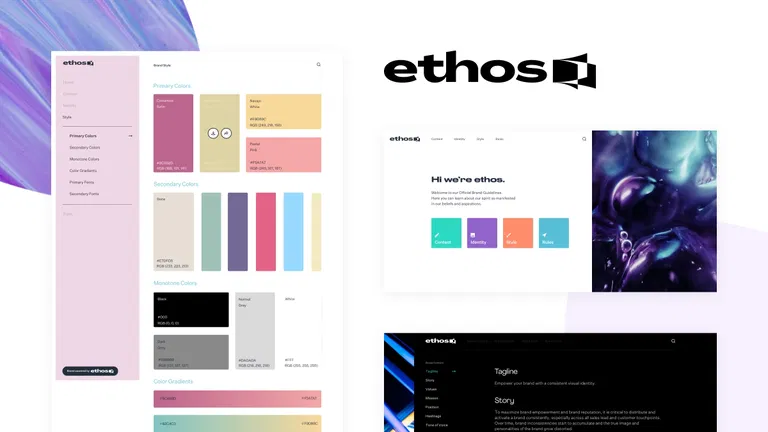
Ethos review readers should know its strongest differentiator: it combines brand guidelines, creative assets, and an interactive online brand guide. That gives teams one place to explain how their brand should appear across marketing materials.
TL;DR Verdict
Ethos is most compelling when your brand assets and usage rules are scattered across folders, documents, and messages.
- Best for: Freelancers, marketing teams, and agencies managing brand guidelines and shared assets.
- Headline price: Lifetime access starts at $26.10 once through the listed AppSumo deal; higher tiers are also available.
- Biggest pro: Publish brand guidelines as an interactive website that stakeholders can reference.
- Biggest con: The available listing does not clearly show every tier’s exact limits and feature allocation.
- Free trial: No free plan or trial is listed. The deal offers a 60-day refund window, with a partner-managed listing caveat.
If your team needs a central brand reference more than a full-scale digital asset management system.
What Is Ethos?
Ethos is a brand asset management tool for creating, publishing, and sharing brand guidelines alongside creative files. It aims to keep logos, fonts, messaging, and rules in one accessible location.
The practical problem it addresses is familiar: one person uses an outdated logo, another chooses an off-brand typeface, and a contractor cannot find the right approved image. Ethos gives teams a shared brand guide and asset hub to reduce those handoffs and inconsistencies.
According to the Ethos product site, the workflow centers on building a guide, adding brand materials, and publishing the result as an interactive website. The AppSumo listing also names integrations with Amazon S3, Calendly, Google Fonts, and WordPress. That makes Ethos relevant to teams that need a reference point for brand rules, not just another place to store files.
Key Features That Matter
Ethos is most useful when it turns brand rules into something collaborators can consult during real work. These features focus on creating that shared reference and keeping assets connected to it.
Build a branded guide around your actual materials
Ethos offers brand guideline templates and sections for adding creative assets and messaging. You can use the guide to bring together practical details such as visual identity and brand voice, rather than sending separate files and instructions to every collaborator.
The listing describes custom content, asset, and font sections, with broader content, asset, style, and rule sections also appearing in the plan details. Since the tier-by-tier feature allocation is not fully clear in the provided listing, check the current plan matrix before buying.
Publish guidelines as an interactive website
A brand guide is more useful when contractors, colleagues, and partners can find it without asking for a file. Ethos says you can publish your guide as an interactive website, giving stakeholders a shared destination for brand best practices.
This format can suit teams that regularly brief designers, writers, or campaign partners. It also means you should check which plans support custom domains or white labeling if a branded public-facing guide matters to your business.
Keep creative assets close to the rules
Ethos brings brand assets into the same workspace as the instructions for using them. That can help reduce confusion when a team has several logo variations, approved fonts, or campaign materials to distribute.
The listing includes asset uploads and references an MB-based brand asset limit, but does not specify the limits by tier in the provided details. Confirm storage allowances and any file restrictions before moving a large asset library into the product.
Draft brand content with an AI writing aid
The product listing names a brand content AI autowriter. Its intended role is to help create or refine brand-related copy, which can be useful when teams are documenting voice guidelines or preparing consistent messaging.
The available information does not explain how the autowriter is trained, what formats it supports, or how its output is reviewed. Treat it as a drafting aid, not a substitute for your brand strategy or editorial approval process. Teams comparing writing software can also review these content creation options for broader copy needs.
Organize the guide for different users
The plan details mention features such as custom section titles, menu and checklist reordering, collaborator invites, and enhanced security permissions. Those options matter when different people need different levels of access or when a guide needs to match an established internal workflow.
Ethos also lists brand audits and brand education among its capabilities. The provided plan snapshot does not make every permission, user, or audit limit clear, so verify those specifics against the tier you intend to purchase.
Connect the guide to your existing workflow
The listed integrations include Amazon S3, Calendly, Google Fonts, and WordPress. For example, Google Fonts can be relevant when documenting typography, while WordPress may suit a team maintaining a public web presence.
The integration list is not a promise that every connection supports every use case. Check the vendor’s current documentation for connection details before planning a workflow around a particular integration.
Pricing Tiers (starts Content Strategy)
Ethos uses one-time lifetime deal pricing in the supplied listing, with four tiers and a 60-day refund period. The price is clear; the exact tier limits need closer checking.
| Tier | Price | Best For | Free trial? |
|---|---|---|---|
| Ethos Standard | $26.10 once, listed regular price $29 | Individuals or small teams starting with a brand guide | No; 60-day refund window |
| Ethos Premium | $52.20 once, listed regular price $58 | Buyers who need more features than the entry tier | No; 60-day refund window |
| Ethos Agency | $78.30 once, listed regular price $87 | Agencies managing brand work for clients | No; 60-day refund window |
| Ethos Enterprise | $104.40 once, listed regular price $116 | Larger organizations reviewing advanced needs | No; 60-day refund window |
These are lifetime deal prices shown in the supplied AppSumo listing, not monthly subscriptions. The feature matrix includes items such as PDF downloads, custom templates, white labeling, and user limits, but the provided details do not reliably map each item to a specific tier. Confirm the current offer, included features, and any usage limits before checkout.
The listing says purchases are refundable for 60 days, but notes that the partner-managed deal does not include AppSumo’s “We Got Your Back” guarantee.
Pros and Cons
Ethos has a focused use case and an appealing one-time entry price, but the listing leaves important purchase details to verify.
Pros
- Combines brand guidelines, messaging, and creative assets in one workspace.
- Publishes an interactive web guide for employees, contractors, and partners.
- Offers reusable templates to help teams structure brand documentation.
- Includes a brand content AI autowriter for drafting brand-related copy.
- Lists integrations with Amazon S3, Calendly, Google Fonts, and WordPress.
- Provides four lifetime deal tiers starting at $26.10 once.
Cons
- The provided plan details do not clearly map features to each tier.
- Asset-size and user limits are not specified in the available information.
- No free plan or free trial appears in the supplied listing.
- Listing feedback includes requests for a more modern UI and additional features.
- The partner-managed deal excludes AppSumo’s “We Got Your Back” guarantee.
Who Should Use Ethos?
Ethos fits teams that need a practical home for brand rules and approved assets, rather than a large suite for every marketing task.
Freelancers and small businesses with repeat collaborators
If you routinely share logos, fonts, and messaging with clients or contractors, Ethos can give everyone a common reference. A published guide can reduce repeated explanations, especially when several people create materials for the same brand.
For freelancers who also need client management and invoicing, Ethos is not a complete business hub. A tool like Plutio’s client workflow setup addresses more of that broader operational work.
Marketing teams coordinating campaigns
A marketing team can use a shared guide to keep brand instructions and approved materials available across campaign work. This is especially relevant when internal staff and outside partners contribute to the same brand.
Teams that also need to track project tasks should assess how Ethos fits alongside their existing planning system. For a broader team coordination context, compare it with a project workspace for teams.
Agencies managing multiple client identities
An agency that serves several brands can benefit from keeping each client’s standards and assets organized for collaborators. The Agency and Enterprise labels suggest higher-level purchase options, but check the actual brand, user, and white-label limits before relying on them.
Agencies with extensive documentation needs may also want a separate knowledge base. For example, a structured documentation workspace can cover general internal information beyond brand guidelines.
Skip Ethos if you only need basic cloud storage, already have a brand portal that works, or require confirmed enterprise controls that the listing does not clearly document. It is also a poor fit if your priority is comprehensive project management rather than brand asset organization.
Alternatives to Consider
Ethos is focused on brand guidelines and assets, while alternatives can prioritize storage or design collaboration instead. Compare the actual workflows your team uses before choosing.
Brandfolder is worth considering if your priority is a dedicated digital asset management platform. Ethos emphasizes a brand guide and its publication, while your evaluation of Brandfolder should focus on the asset-management features and controls your organization requires.
Dropbox offers a familiar approach to file storage and sharing. It can suit teams that primarily need folders and file access, while Ethos puts brand rules and a published guide closer to the center of the workflow.
Figma is a stronger option when teams need collaborative interface and visual design work. Ethos is oriented around brand documentation and asset distribution, rather than serving as a full design canvas.
Final Verdict
Ethos addresses a specific, common problem: people need approved brand materials and clear instructions in one place. Its most attractive qualities are the interactive web guide, bundled asset and guideline workflow, and lifetime deal starting at $26.10. The main buying risk is uncertainty about tier limits and feature allocation, so confirm those details before committing.
If that scope matches your needs.
Frequently Asked Questions
These answers focus on the practical questions buyers should settle before choosing a tier.
Does Ethos have a free plan?
No free plan or free trial is listed in the supplied deal information. The offer instead provides a 60-day refund window, subject to the partner-managed listing terms. The listing specifically says AppSumo’s “We Got Your Back” guarantee does not apply.
How does Ethos compare to Dropbox?
Dropbox is primarily a file storage and sharing option, while Ethos combines assets with brand guidelines and a publishable brand guide. Choose based on whether your team needs organized files alone or documented rules for using those files. Check current product plans for the exact storage and collaboration limits.
Can I cancel Ethos anytime?
The listed Ethos deal is a one-time lifetime purchase, not a monthly subscription, so there is no recurring subscription shown to cancel. The listing states that purchases are refundable for up to 60 days from the purchase date. Review the checkout terms for any conditions that apply to your order.
Is Ethos worth the price?
At $26.10 once for Standard, Ethos can be worth considering if you need a shared brand guide and asset hub. Its value depends on the tier’s actual limits and whether the included features cover your workflow. Confirm the current plan matrix, especially for users, file sizes, and white labeling.
What does Ethos do for brand asset management?
Ethos brings brand guidelines, creative assets, and messaging together, then lets you publish the guide as an interactive website. The goal is to help teams and external collaborators find approved materials and follow brand rules. Its fit depends on whether the available storage, permissions, and integrations meet your requirements.

Similar Posts