Webclaw Review (2026): Honest Take After Real Research
Lead SaaS Analyst at PCSaaS · Software Developer · 500+ Tools Tested · Google Ads & Analytics Certified · 8+ Years Experience
Disclosure: This article contains affiliate links. We may earn a small commission at no extra cost to you when you sign up via our links, it's how this site stays free to run.
Webclaw review: this web scraping API’s standout promise is one credit per page, including JavaScript rendering, anti-bot solving, and AI extraction. Its lifetime AppSumo deal starts at $53.10, which makes it worth examining if your AI workflows regularly need data from web pages.
TL;DR Verdict
Webclaw’s simple per-page credit model and lifetime pricing are appealing, but the deal is best suited to people who already have a clear scraping workflow.
- Best for: Developers, AI-agent builders, and researchers who need page content in Markdown or structured JSON.
- Price: AppSumo lifetime access starts at $53.10 once, with four tiers available.
- Biggest pro: JavaScript rendering, protected-page handling, and AI extraction are included in the stated one-credit-per-page price.
- Biggest con: Credits are limited by tier, and the listing does not show a free plan.
- Trial: No free trial is listed. AppSumo says the purchase is refundable for up to 60 days.
Bottom line: Webclaw is worth considering if you need repeatable web extraction and can estimate your monthly page volume. Get the Lifetime Deal →
What Is Webclaw?
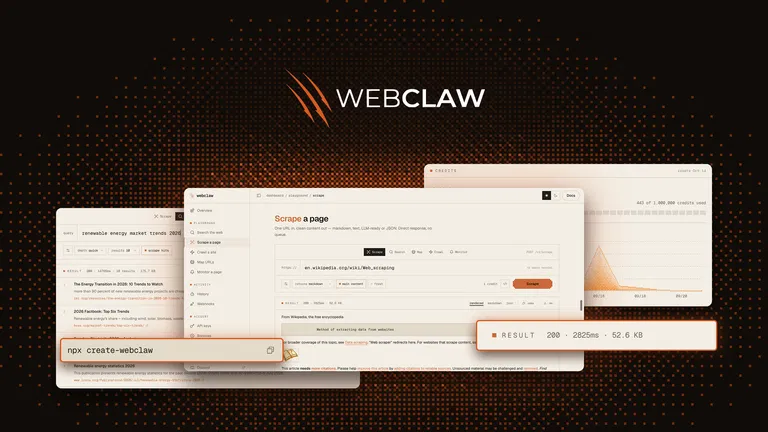
Webclaw is a web scraping API that turns public web pages into clean Markdown, structured JSON, or other formats for AI agents and software workflows.
Rather than manually copying a page into an AI tool, you send Webclaw a URL and request the format or extraction you need. The service can render JavaScript pages, handle some anti-bot protections, remove page clutter, and return the result in a single response, according to its AppSumo listing.
That makes it relevant when you want an agent to read product pages, collect information across a site, or extract specific fields from pages. Webclaw also offers search, site mapping, crawling, a REST API, CLI, and an MCP server for tools including Claude, Cursor, Codex, and Windsurf. Its official website is the primary place to check current product details.
Key Features That Matter
Webclaw is most compelling when it reduces the work between finding a web page and giving useful page data to a model. These are the features that matter for that job.
Page extraction in formats your workflow can use
You can request Markdown, JSON, HTML, plain text, LLM-optimized text, or raw output. Markdown suits an agent that needs readable context, while JSON helps when you need consistent fields such as price, availability, or product name.
JavaScript rendering and anti-bot handling included
Some pages rely on JavaScript before their useful content appears, while others block automated requests. Webclaw’s listing says rendering and anti-bot solving are included at one credit per page, rather than charged as separate add-ons. That can make page costs easier to estimate, although it does not guarantee every site will be accessible.
AI extraction without manually parsing every page
Webclaw includes LLM tools for extracting data into your own schema, along with summarize, diff, and brand functions. For example, you could ask for specific product attributes rather than feeding an entire page to a model and building a separate parsing step.
Search results can include extracted page content
Webclaw’s search feature can return results with page content attached, instead of only giving you links to fetch separately. You can also choose how many results to scrape, which gives you a way to limit how much content a broad search brings into your workflow.
Map a site before crawling it
Site mapping can identify URLs from links and sitemaps before you fetch page content. You can plan which pages to crawl and use glob patterns to filter URLs, a useful step if a site contains thousands of pages but your task needs only a subset.
Connect through an API, CLI, or MCP
The product offers REST endpoints, a command-line tool, and an MCP server for supported AI clients. Webclaw also advertises a Firecrawl /v2 compatibility layer for users switching from that API, which could reduce migration work for existing integrations.
Pricing Tiers (starts $53.10)
The listed deal is a one-time payment, but each tier still has a monthly credit allowance. Choose based on recurring page volume, not just the upfront price.
| Tier | Price | Best For | Free trial? |
|---|---|---|---|
| Tier 1 | $53.10 once | Individuals testing small workflows; 5,000 monthly credits and 25,000 one-time credits | No free trial listed; refundable up to 60 days |
| Tier 2 | $134.10 once | Regular use; 9,000 monthly credits and 150,000 one-time credits | No free trial listed; refundable up to 60 days |
| Tier 3 | $233.10 once | Larger projects; 40,000 monthly credits and 300,000 one-time credits | No free trial listed; refundable up to 60 days |
| Tier 4 | $359.10 once | High-volume use; 125,000 monthly credits and 600,000 one-time credits | No free trial listed; refundable up to 60 days |
Every listed tier includes the core API, MCP server, CLI, six output formats, JavaScript rendering, anti-bot solving, and AI tools. The listing states that each page costs one credit, including pages using those features. Prices shown are AppSumo deal prices; check the listing for current availability and terms before purchasing.
There is no free plan or recurring subscription price shown in the supplied offer details.
Pros and Cons
Webclaw’s pricing and output options are clear strengths, but the deal still requires careful capacity planning.
Pros
- One credit per page includes rendering, anti-bot handling, and AI extraction.
- Lifetime purchase avoids a listed recurring subscription fee.
- Six output formats suit different downstream tools and data workflows.
- Search can return extracted content instead of links alone.
- Site mapping and URL filters help target specific pages.
- MCP, REST API, and CLI cover multiple integration styles.
Cons
- No free plan or free trial appears in the supplied deal details.
- Monthly credit allowances vary substantially between the four tiers.
- Public-page access does not guarantee every protected website will work.
- One-time credits do not replace the tier’s monthly allowance.
- A lifetime deal depends on the vendor continuing to operate the service.
- The listing does not provide independent performance benchmarks or uptime figures.
Who Should Use Webclaw?
Webclaw makes the most sense when web data is a repeated input to your work, rather than an occasional manual task.
Developers building AI agents
If your agent needs current information from public pages, Webclaw can return content in formats suited to software workflows. MCP, REST, and CLI access provide different ways to connect it, while the /v2 compatibility layer is relevant if you are migrating an existing integration.
Researchers and analysts tracking web changes
Teams that need to collect information from many pages can use mapping and filters to select target URLs before crawling. The diff feature is also relevant when you want to compare page content over time, though you should confirm that the available outputs fit your monitoring process.
Ecommerce and marketing teams gathering public data
Webclaw can support workflows that collect product details or review landing-page information for analysis. If you are researching store operations, it can sit alongside broader guidance on building a Shopify business or tools for creating written content. For competitor research, page extraction could complement ad analysis workflows, but it does not replace an ad intelligence platform.
Skip Webclaw if you only need to scrape a few pages occasionally, require guaranteed access to specific websites, or want a free plan before committing. It is also a poor fit if your workflow has no clear use for structured page data or recurring credits.
Alternatives to Consider
The best alternative depends on whether you prioritize a familiar scraping API, browser automation, or another kind of data collection.
- Firecrawl: A direct alternative for turning web pages into data for AI applications. Webclaw’s stated trade-off is its one-credit pricing and Firecrawl
/v2compatibility layer, while Firecrawl may be preferable if your team already uses its service. - Browse AI: A no-code option for extracting information from websites. Compared with Webclaw’s API, CLI, and MCP emphasis, Browse AI may better suit users who prefer setting up visual workflows.
- PhantomBuster: A platform for automating data collection and actions across supported web services. It may fit social and sales workflows better, while Webclaw focuses on returning web-page content for AI and software use.
For teams using collected information to improve AI search visibility, Webclaw could support the research process alongside answer visibility tracking. For finding business prospects, it may also complement lead sourcing tools, but scraping does not provide the same prospect database or sales features.
Final Verdict
Webclaw stands out for a simple promise: one credit per page, with rendering, anti-bot handling, and AI extraction included. The $53.10 lifetime entry tier is attractive if you need regular page extraction, but its credit cap and lack of a free trial make usage planning important. Check the current deal terms and confirm your target sites work for your use case before buying.
If those conditions fit, compare the four credit tiers and choose one that matches your expected workload. Get the Lifetime Deal →
Frequently Asked Questions
Does Webclaw have a free plan?
The supplied AppSumo listing does not show a free plan or free trial. It lists four paid lifetime tiers, with a refund window of up to 60 days. Check the current product site and deal terms for any changes.
How does Webclaw compare to Firecrawl?
Webclaw advertises one credit per page, including JavaScript rendering, anti-bot solving, and AI extraction, plus a Firecrawl /v2 compatibility layer. Firecrawl could be a better fit if your team already relies on its product or prefers its current plan options. Compare the live terms and features before switching.
Can I cancel Webclaw anytime?
The listed AppSumo offer is a one-time lifetime purchase, not a recurring subscription, so there is no monthly plan to cancel under those terms. Review the deal’s conditions, including its 60-day refund period, before buying.
Is Webclaw worth the price?
It can be worthwhile if you regularly process enough pages to use its credits and need the included rendering or extraction features. The $53.10 Tier 1 offer includes 5,000 monthly credits and 25,000 one-time credits. If your usage is occasional, a paid scraping service could be harder to justify.
What does Webclaw do with a scraped page?
Webclaw can return a page as Markdown, JSON, HTML, plain text, LLM-optimized text, or raw output. Its listing also describes tools for extraction, summarization, comparison, and brand analysis. Results depend on the page and the requested workflow.

Similar Posts