
Introduction
Explore effective strategies to drive business growth with HubSpot social media marketing.
Many people use social media. Businesses can connect with customers there. Social media marketing is a must for building your brand and selling more. But social media can be hard. HubSpot can help. It's a powerful tool with features to make social media easier and more effective.
What is HubSpot?
HubSpot is a top tool for managing customer relationships (CRM). It helps with marketing, sales, customer service, and how you work. It helps businesses find, connect with, and make customers happy. HubSpot helps businesses use inbound marketing. This means attracting customers with helpful content and personal experiences.
HubSpot's marketing hub has tools for social media, content, email, and more. It's one place to manage all your marketing. You can see how you're doing, check your results, and make your campaigns better.
Here's a closer look at what HubSpot offers:
Marketing Hub: This has tools for inbound marketing, content, SEO, social media, and more. It helps marketers create and run good marketing campaigns.
Sales Hub: This has tools for sales, like automation and managing deals. It helps sales teams work better.
Service Hub: This has a help desk for customer support. It helps businesses solve problems quickly.
CMS Hub: This is for making and managing websites. It's easy to use for building and improving websites.
Operations Hub: This has tools for data, automation, and reports. It helps businesses work better.
Transform your social media strategy now!
When choosing HubSpot, many businesses also evaluate complementary tools for their stack. For example, pairing HubSpot’s CRM with a managed cloud hosting provider ensures your website and landing pages load fast, which directly impacts social media ad quality scores and conversion rates. Similarly, exploring lifetime software deals can help you stretch your budget while testing additional marketing automation tools alongside HubSpot.
What is Social Media Marketing?
Social media marketing is using social media to connect with people. It helps you build relationships and tell people about your brand. Here are some things you might do:
Share good content: Post fun things like words, pictures, videos, and stories. This gets people's attention and helps them.
Build a community: Talk to people who follow you. Answer their questions. Make them feel like they belong.
Use ads: Run ads to reach more people. This helps people know about your brand or visit your website.
Listen to what people say: See what people are saying about your brand. Check what they say about your competitors too.
Check your results: See how well your social media is working. This helps you make your plan better. Sources and related content
In practice, social media marketing today (2026) also requires a strong focus on short-form video, authentic community engagement, and first-party data strategies as platforms continue to phase out third-party cookies. Successful brands treat each platform as a two-way conversation rather than a broadcast channel. A common mistake is posting without a clear goal — start by defining one primary KPI per campaign, whether that’s reach, engagement, or click-through rate.
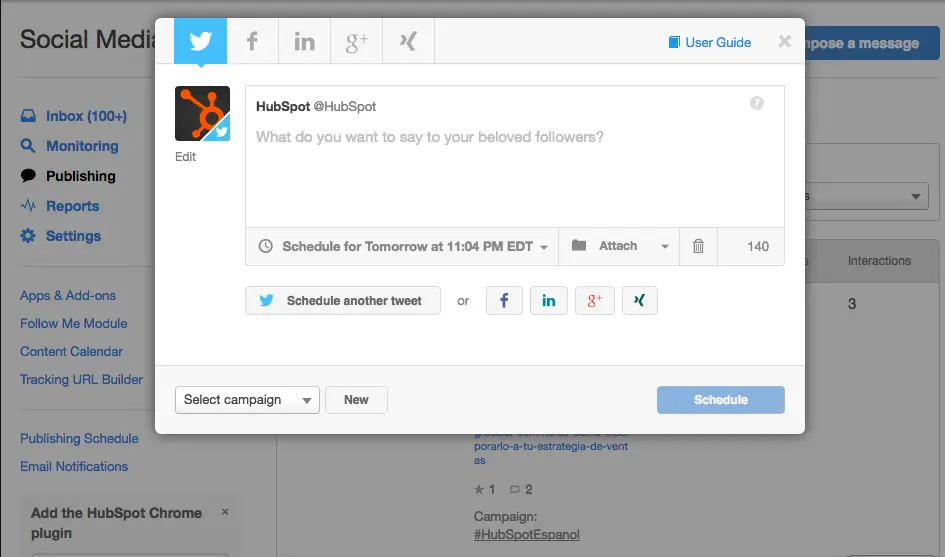 HubSpot’s content calendar helps teams schedule posts across multiple social networks from a single view.
How to Use HubSpot for Social Media Marketing
HubSpot provides a comprehensive suite of tools to streamline your social media marketing efforts. Here's how you can leverage HubSpot to achieve your social media goals:
1. Connect Your Social Media Accounts
Connect your Facebook, Instagram, Twitter, LinkedIn, and YouTube accounts to HubSpot. Now you can manage everything in one place.
2. Publish and Schedule Content
Create and schedule posts for all your accounts. Write fun posts with words, pictures, and videos. Schedule them to post later. This keeps your social media active.
HubSpot can also help you:
See all your posts on a calendar.
Find the best times to post.
3. Monitor Social Media Conversations
See what people are saying about your brand and your competitors.
With HubSpot you can:
Track keywords.
Get emails when someone talks about your brand.
4. Engage with Your Audience
Answer comments and messages in one place. This helps you build relationships.
5. Analyze Your Social Media Performance
HubSpot shows you how your social media is doing. You can see what's working and what's not.
6. Run Social Media Advertising Campaigns
Create and manage ads on different social media sites. Choose who you want to see your ads, set your budget, and see how your ads are doing.
7. Leverage HubSpot's AI-Powered Tools
HubSpot has AI tools to:
Help you think of new ideas for posts.
Find the best times to post.
Understand your results.
8. Creating a Content Strategy with HubSpot
HubSpot helps you plan your social media content. You can:
Plan your posts on a calendar.
Make great content with words, pictures, videos, and stories.
Share your content on different social media sites.
9. Adapting to a Cookieless World
Things are changing, and some ads don't use cookies anymore. HubSpot helps you find new ways to reach people. You can:
Use ads that don't need cookies.
Build a strong community.
10. Leveraging Short-Form Video
Short videos are important for social media. HubSpot can help you:
Post your videos on HubSpot and share them.
Edit your videos.
See how your videos are doing.
Transform your brand with HubSpot today!
A practical tip: when scheduling posts, always include UTM parameters inside HubSpot to track which social channel drives the most traffic back to your site. You can then use those insights to refine your budget allocation. For teams running simultaneous campaigns, a business-grade hosting plan under the same domain can prevent downtime during traffic spikes from viral posts.
Why Use HubSpot for Social Media?
HubSpot has many good things for social media:
1. Work Faster
HubSpot puts all your social media tools in one place. This saves you time. You can do other important things.
2. Better Results
HubSpot helps you see how your social media is doing. You know what works best. This helps you get better results. For example, some HubSpot users got many more leads and sales.
3. Keep Your Brand the Same
HubSpot helps you use the same message and look everywhere. This makes your brand look professional.
4. Talk to Customers
HubSpot makes it easy to talk to people. You can build good relationships.
5. Smart Choices
HubSpot gives you lots of information. This helps you make smart choices. You can see what people like. You can also see which social media sites work best. This helps you reach your goals.
Beyond these benefits, the real advantage lies in HubSpot’s unified CRM. Because every social interaction is linked to a contact record, your sales team can see which prospects have engaged with your posts before a call. This creates a seamless handoff between marketing and sales — a capability that standalone scheduling tools cannot replicate.
Case Studies
Many businesses have done well with HubSpot. One company got way more website visitors and leads. A small business got many more followers. They also got more people to like and share their posts. These examples show HubSpot helps all kinds of businesses.
Transform your brand with smart social media!
Overcoming Common Challenges with HubSpot Social Media
Even with a powerful platform like HubSpot, businesses often stumble on a few practical hurdles. Here’s how to address them:
Content Repurposing at Scale – Creating unique posts for every platform can exhaust your team. Instead, use HubSpot’s campaign tools to create one core piece of content (e.g., a blog post) and repurpose it into a LinkedIn article, a Twitter thread, and three short videos. HubSpot’s asset library keeps all versions organised in one folder.
Maintaining Consistent Brand Voice – When multiple team members publish posts, tone can drift. Build a shared brand voice guide as a HubSpot document attached to your social campaigns. Use HubSpot’s approval workflows to require a review before any post goes live.
Managing Negative Comments – Not all engagement is positive. Set up custom alerts in the social monitoring tool for keywords like “complaint,” “refund,” or your product name + “problem” to respond quickly. Responding publicly to a complaint in under an hour can turn a critic into a loyal advocate.
Budgeting for Ads vs. Organic – A common mistake is pouring all resources into ads without building organic community. HubSpot’s dashboards help you compare the cost-per-lead of paid and organic efforts side by side so you can adjust your mix.
For a solid technical foundation, pairing HubSpot with a reliable domain and hosting provider ensures that links in your social bios and ads always resolve quickly. Many businesses also turn to virtual assistant tools to handle the repetitive parts of social monitoring, freeing their marketing team to focus on strategy.
Frequently Asked Questions
Q: What are HubSpot's main social media features?
A: HubSpot has many social media features, like:
Posting and scheduling: You can create and schedule posts for all your accounts.
Watching social media: You can see when people mention your brand.
Social inbox: You can manage all your social media messages in one place.
Checking results: You can see how your social media is doing.
Running ads: You can create and manage ads.
AI tools : HubSpot can help you with ideas, posting times, and understanding your data.
Q: How does HubSpot help with a social media plan?
A: HubSpot has tools to help you make a good plan:
Planning content: You can plan your posts on a calendar.
Making content: You can make good content in different ways.
Sharing content: You can schedule your content to post on different sites.
Q: How does HubSpot help with changes in online ads?
A: Online ads are changing. HubSpot can help you by:
Using social media ads: You can target people based on what they like.
Building a community : You can create a community around your brand.
Q: How does HubSpot help with short videos?
A: HubSpot has tools for short videos:
Hosting videos: You can put your videos on HubSpot.
Editing videos: You can change your videos.
Checking video results: You can see how your videos are doing.
Q: Why is HubSpot good for social media?
A: HubSpot has many good things:
Saves time: It makes social media easier to manage.
Better results: You can see what works and get better results.
Same brand look: You can keep your brand consistent.
Good customer relations : You can talk to your audience.
Smart choices: You can use data to make good decisions.
Q: Does HubSpot integrate with third-party social media management tools?
A: Yes. In 2026, HubSpot’s App Marketplace offers dozens of integrations for additional scheduling, analytics, and listening capabilities. Popular add-ons include Canva for design, Loom for video, and Buffer for lightweight scheduling. However, most teams find that HubSpot’s native tools are sufficient unless they need extremely niche reporting, such as competitive analysis across hundreds of brands. For guidance on selecting a reliable hosting infrastructure for your HubSpot-connected website, check out our related resources.
Conclusion
HubSpot can help businesses reach their social media goals. It has many tools to make social media easier and more effective. If you want better social media results, look at HubSpot. It might change how people see you online.
Start with a free trial — connect one social account and schedule your first five posts. Within a week, you’ll see how much time a unified dashboard saves, and you’ll have the data to justify a full rollout.

