
Disclosure: This article contains affiliate links. We may earn a small commission at no extra cost to you when you sign up via our links, it's how this site stays free to run.
TL;DR Verdict
WPSmartPay is a WordPress plugin that turns the Gutenberg block editor into a payment form builder. In our research, the tool stands out for one reason: it adds one-time, recurring, and donation payments to an existing WordPress site without a shopping cart.
- Who it's for: WordPress site owners, consultants, and nonprofits that need simple payment forms.
- Headline price: $59 one-time for a lifetime AppSumo license.
- Biggest pro: No-code forms for one-time, subscription, and donation payments.
- Biggest con: WordPress only, and there is no inventory or shipping.
- Free trial: No free plan; refunds are available for 60 days.
Bottom line: If you need payment forms on WordPress and want to avoid monthly fees, the Get the Lifetime Deal → is a low-risk buy thanks to the refund policy.
What Is WPSmartPay?
WPSmartPay is a WordPress payment plugin that lets you build no-code payment forms for one-time, recurring, and donation payments without installing a full shopping cart. You design forms in the Gutenberg editor, embed them with a block or shortcode, and connect a payment gateway like Stripe or PayPal.
The job-to-be-done is clear. Many WordPress sellers already have a website, but they waste hours patching together checkout buttons, invoices, and subscription tools. WPSmartPay replaces that patchwork with one plugin.
According to the official product description, the plugin also manages invoices, subscriptions, receipts, VAT, and sales taxes after checkout.
The plugin runs on your own domain, so your site infrastructure needs current PHP and HTTPS. It is not a replacement for a full ecommerce platform with shipping and inventory. Instead, it fills the gap between a simple payment link and a full WooCommerce store.
When you later reconcile transactions, the payment records slot into your bookkeeping system. That makes WPSmartPay useful for service businesses that need clean payment history.
Key Features That Matter
Gutenberg form builder
The plugin uses the WordPress block editor to build payment forms. You drag fields into place, choose one-time or recurring billing, and embed the form in any page, post, or widget area. This removes the need for a separate page builder or custom code.
Subscriptions and recurring billing
WPSmartPay handles subscriptions, not just single purchases. You can sell memberships, service retainers, or recurring donations. The invoice manager tracks active plans, so you know who is paying and when a subscription renews.
Multiple payment gateways
According to the official WPSmartPay feature list, the plugin supports Stripe, PayPal, Paddle, Mollie, Authorize.net, and others. Payments go straight to your own gateway account. That gives you more control than a hosted platform that holds funds for you.
Reporting dashboard
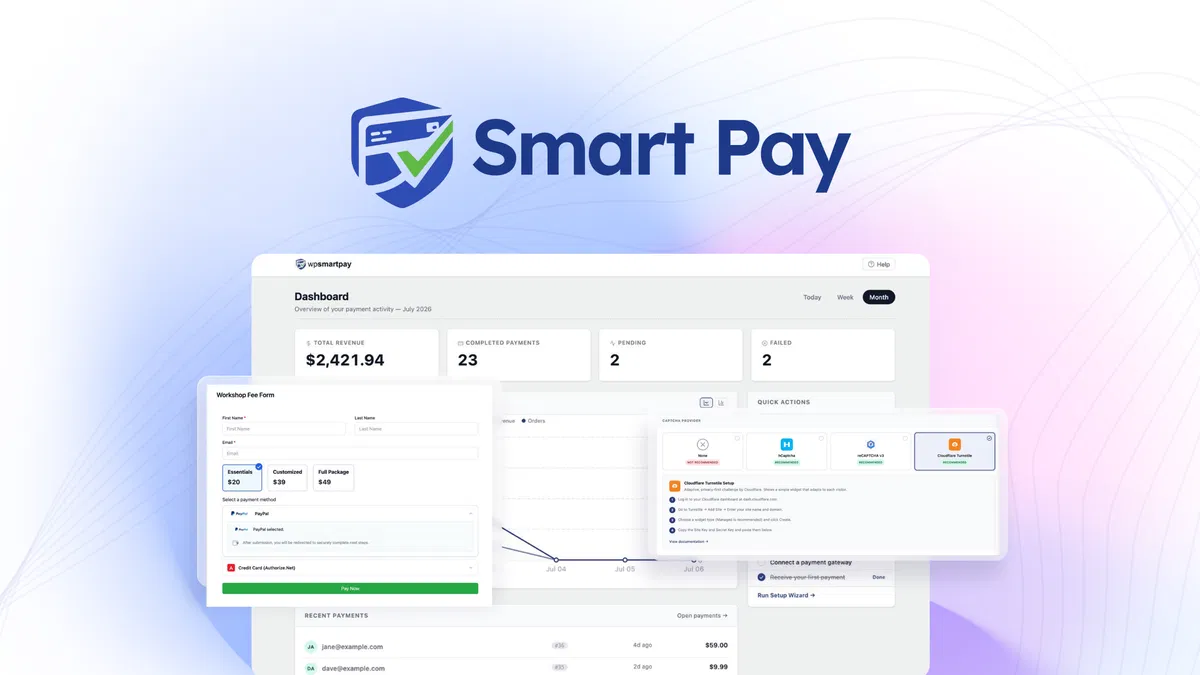
The dashboard shows total revenue, completed payments, active subscriptions, and day-wise sales charts. You can manage customers and invoices from one screen instead of switching between multiple tools. This is useful when you need a quick answer on monthly cash flow.
Coupons, custom amounts, and anti-spam
Each form can include coupon codes, flexible pricing, and anti-spam controls. Sellers use this for pay-what-you-want products, promotions, and donation campaigns. No custom development is required.
Integrations and notifications
Email receipts, branded notifications, CRM syncs, and Zapier or Slack workflows are supported. A new payment can trigger a welcome sequence inside your automated email toolbox. Version 3.0 also adds API and MCP access, which lets you connect AI agents to payment flows.
Pricing Tiers (starts $59)
WPSmartPay is sold as a lifetime AppSumo deal rather than a monthly subscription. The listing shows two main lifetime tiers at the time of writing.
| Tier | Price | Best For | Free trial? |
|---|---|---|---|
| AppSumo Lifetime Tier 1 | $59 one-time (list $119) | Solo consultants and single WordPress sites | No free plan; 60-day refund |
| AppSumo Lifetime 50 Sites | $199 one-time (list $399) | Agencies and developers managing multiple client sites | No free plan; 60-day refund |
Every purchase is lifetime access, not a subscription. The $59 tier covers up to 15 sites, while the $199 tier expands to 50 sites. The lower tier includes all current and future Essential plan updates.
If AppSumo offers a higher tier, you can upgrade while the deal is live and downgrade within 60 days.
There is no free plan, but the 60-day refund window makes the purchase less risky. A one-time payment also means you never see a recurring charge on your credit card.
Pros and Cons
Pros
- Gutenberg-native form builder requires no coding and embeds anywhere.
- Lifetime price starts at $59 one-time instead of monthly subscriptions.
- Handles one-time, recurring, and donation payments without a shopping cart.
- Connects to Stripe, PayPal, Paddle, Mollie, and other gateways.
- One dashboard tracks revenue, customers, invoices, and active subscriptions.
- 60-day refund policy covers all AppSumo purchases.
- AppSumo buyers rate it 4.67 stars from 6 reviews.
Cons
- WordPress only, so non-WordPress sites need a different tool.
- No free plan or free trial, only a refund window.
- Does not manage inventory, shipping, or physical products.
- Payment gateways still charge their own transaction fees.
- Only 6 public reviews make long-term support evidence thin.
- Full cart functionality still requires WooCommerce or similar.
Who Should Use WPSmartPay?
Solo consultants and freelancers
If you bill clients for retainers, projects, or deposits, WPSmartPay gives you a clean way to collect payments from your own site. Embed a form for a project deposit, a subscription retainer, or a one-off invoice. You can also set custom amounts so clients choose the right package.
Nonprofits and donation-driven sites
Custom donation amounts, recurring gifts, and email receipts matter for fundraisers. WPSmartPay supports all three without forcing donors into a cart experience. It works well for donation pages, event registration, and membership drives.
Agencies managing multiple WordPress sites
The 50-site license suits web agencies that build client sites. You can embed a payment form for hosting fees, maintenance retainers, or project milestones. For follow-up and support, you can pair payment data with customer relationship records.
Who should skip this tool
Skip WPSmartPay if you need a full storefront with inventory, shipping, product variations, or a marketplace. WooCommerce is better for physical products, and Gumroad is better if you want a completely hosted digital-product checkout. You should also skip it if you do not run WordPress at all.
Alternatives to Consider
WPSmartPay occupies a middle space in the WordPress payment ecosystem. Gumroad is the closest alternative because it also handles digital products and subscriptions, but it hosts checkout on its own platform rather than on your WordPress site. WooCommerce is the standard full-cart option, but it is heavier and usually requires more setup.
Stripe Payment Links is lighter, but it gives you less control over form design and customer management inside WordPress.
As a plugin, WPSmartPay depends on the WordPress host you already use. If you have not set that up yet, affordable hosting plans are a good starting point.
Final Verdict
WPSmartPay solves a specific problem: accepting payments on WordPress without building a checkout flow from scratch. It is not a full ecommerce platform, but it does not pretend to be one. For consultants, nonprofits, and digital sellers, the plugin offers clean payment forms, subscriptions, and donation support at a one-time price.
The 60-day refund makes the decision easier. If the plugin does not fit your workflow, you can get your money back. If it does fit, you avoid paying for yet another monthly subscription.
In our research, the lifetime pricing is the main reason to consider WPSmartPay over other WordPress payment tools.
Ready to put payment forms on your WordPress site? Get the Lifetime Deal →
Frequently Asked Questions
Does WPSmartPay have a free plan?
No. WPSmartPay does not offer a free plan or a free trial. The AppSumo deal is a paid lifetime license that starts at $59.
You can test the risk with the 60-day refund guarantee instead.
How does WPSmartPay compare to Gumroad?
Gumroad is a hosted platform, meaning your buyers leave your website to pay. WPSmartPay keeps checkout on your WordPress site and connects to your own Stripe or PayPal account. WPSmartPay also adds subscription management and invoicing inside WordPress for a one-time price.
Can I cancel anytime?
There is no subscription to cancel because WPSmartPay uses a lifetime license. You pay once and keep access. If you change your mind within 60 days, AppSumo provides a refund.
Is WPSmartPay worth the price?
At $59 one-time, WPSmartPay is cheaper than twelve months of many payment plugins. If you bill clients in WordPress and want recurring or donation payments, it can pay for itself quickly. Complex tax setups may still require separate tax preparation tools, but the core payment features are included.
Does WPSmartPay support both one-time and recurring payments?
Yes. WPSmartPay handles one-time payments, subscriptions, custom donation amounts, and flexible pricing. It also tracks active subscriptions and generates invoices from the same dashboard.

