

A CRM with email marketing combines customer management and targeted email campaigns to streamline communication and improve engagement effectively.
Sounds like a game-changer, right? That’s exactly what a CRM with email marketing can do for you. It helps you connect with your audience in a way that feels personal and relevant, all while saving you hours of repetitive work. But here’s the catch: not all CRM platforms offer powerful email marketing features. Choosing the right one can make all the difference in turning your leads into loyal customers. To save you the headache of sorting through endless options, we’ve reviewed the 13 best CRM tools with built-in email marketing to help you find the perfect fit for your business. Ready to discover how you can automate your emails, increase engagement, and skyrocket your ROI?
Introduction To CRM With Email Marketing
CRM with Email Marketing combines customer management and targeted communication. This approach helps businesses build relationships and increase sales effectively. Understanding how these tools work together unlocks powerful marketing strategies. Let’s explore the basics.
Understanding CRM And Its Role In Business Growth
Customer Relationship Management (CRM) is a system that stores customer data and interactions in one place. It helps businesses track leads, sales, and customer history.
CRM supports business growth by:
Organizing customer information for easy access
Improving customer service through personalized communication
Tracking sales progress and marketing efforts
Automating repetitive tasks to save time
Using CRM means businesses can understand customers better. This leads to smarter decisions and stronger connections.
The Power Of Integrating Email Marketing With CRM
Email Marketing sends messages like promotions and updates directly to customers' inboxes. When combined with CRM, it becomes more targeted and efficient.
The integration allows:
Feature Benefit
Segmented Email Lists Send relevant emails to specific groups based on data
Automated Email Triggers Emails sent automatically based on customer actions
Personalized Content Messages tailored to individual preferences and history
Performance Tracking Monitor open rates, clicks, and conversions within CRM
Integrating these tools saves time and increases customer engagement.
How CRM With Email Marketing Boosts Sales And Engagement
Combining CRM and email marketing improves sales by keeping customers interested and informed.
Key advantages include:
Timely Follow-ups: Automated emails reach customers at the right moment.
Lead Nurturing: Regular contact turns prospects into buyers.
Personalized Offers: Tailored deals increase chances of conversion.
Reduced Manual Work: Automation frees up time for strategy.
This method builds trust and encourages repeat business. It also helps businesses understand customer needs better through data.
In practice, the real power comes from combining behavioral data with email triggers. For example, if a prospect visits a pricing page twice without converting, a CRM can automatically send a targeted offer or case study. This kind of data-driven outreach consistently outperforms blast campaigns. To get the most from these insights, many teams turn to detailed analytics tools that track customer behavior and tie it directly to email performance.

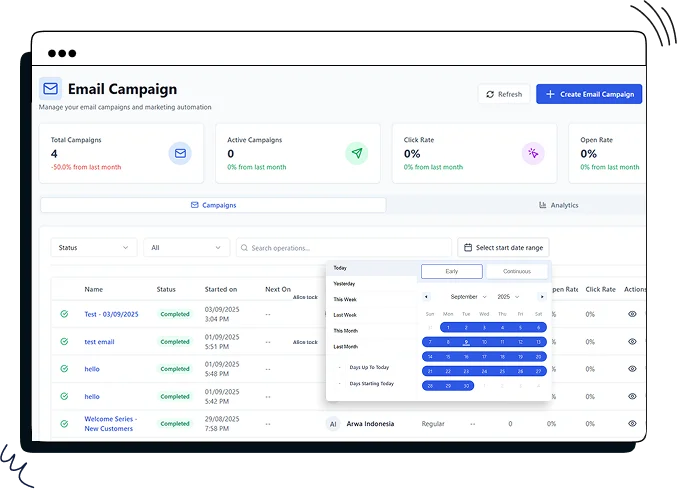
CRM email marketing dashboard with key performance metrics and segmentation overview.
Credit: modernoutreach.beehiiv.com
Key Features Of CRM With Email Marketing
CRM with email marketing combines powerful tools to manage contacts, automate emails, and track results. This integration helps businesses reach the right audience with personalized messages. It also streamlines marketing efforts and improves customer engagement. Here are the key features that make this combination essential for marketers.
Contact Management And Segmentation: Targeting The Right Audience
Effective contact management organizes all customer information in one place. Segmentation divides contacts into groups based on behavior, location, or preferences.
Store detailed customer profiles
Create segments for tailored campaigns
Send relevant emails to each group
This ensures messages reach the audience most likely to respond. It reduces wasted effort and increases engagement rates.
A common mistake is over-segmenting to the point of tiny lists that lack statistical significance. Instead, focus on the three or four segments that matter most: new leads, repeat buyers, inactive subscribers, and high-value customers. Each group needs a different email frequency and offer. A well-structured lead generation process ensures you capture the right data from the start, making segmentation far more effective.
Email Automation: Streamlining Campaigns For Efficiency
Email automation sends emails based on specific triggers or schedules. It removes the need to send messages manually, saving time.
Automated welcome emails for new subscribers
Follow-up emails after purchases or website visits
Abandoned cart reminders to recover lost sales
Automation keeps communication timely and consistent. Marketers focus on strategy while tasks run automatically.
Personalization Capabilities: Enhancing Customer Experience
Personalized emails create a stronger connection with customers. CRM data allows emails to include names, preferences, and past interactions.
Use customer names in subject lines
Recommend products based on purchase history
Send personalized offers or content
Personalization improves open rates and builds trust. Customers feel valued and understood.
Analytics And Tracking: Measuring Campaign Success
Tracking tools show how email campaigns perform. Marketers see data on opens, clicks, and conversions.
Metric Purpose
Open Rate Measures how many recipients opened the email
Click-Through Rate Shows how many clicked links inside the email
Conversion Rate Tracks actions like purchases or sign-ups
These insights guide future campaigns to improve results and ROI.
Lead Nurturing And Sales Pipeline Integration: Closing Deals Faster
CRM with email marketing supports lead nurturing by sending relevant content throughout the sales cycle. Integration with the sales pipeline tracks leads and automates follow-ups.
Identify leads ready to buy
Send targeted emails based on lead stage
Alert sales teams for timely contact
This reduces delays and helps close deals faster.
Pricing And Affordability Breakdown
Choosing the right CRM with email marketing depends heavily on cost and value. Understanding pricing structures helps businesses pick tools that fit budgets without losing key features. This section breaks down pricing models, compares free and paid plans, and evaluates return on investment.
Overview Of Pricing Models For Popular CRM With Email Marketing Tools
Most CRM platforms with email marketing use tiered pricing. Prices rise with features, contacts, or email sends. Common models include:
Subscription-based: Monthly or yearly fees based on number of users or contacts.
Pay-as-you-go: Charges based on email volume or additional features used.
Freemium: Limited free use with option to upgrade for more features.
CRM Tool Starting Price Key Pricing Basis Included Email Limits
Salesforce Email Marketing $25/month Users and contacts Up to 10,000 emails/month
HubSpot CRM Free plan available Contacts and features Up to 2,000 emails/month on free plan
Zoho CRM $12/month Users Depends on plan
Comparing Free Vs. Paid Plans: What You Get
Free plans offer basic CRM and email marketing features. Paid plans unlock advanced tools and higher limits.
Free Plans:
Paid Plans:
Free plans suit startups or small lists. Paid plans benefit growing businesses needing more power and flexibility.
Be aware of hidden costs such as fees for additional contacts, premium integrations, or dedicated support. Some platforms charge extra for A/B testing or advanced automation triggers. Before committing, estimate your list growth over six months and compare total costs. For smaller teams, a budget-friendly CRM with email marketing can deliver solid results without breaking the bank, especially if you choose a plan that includes the automation features you actually need.
Assessing Roi: Is The Investment Worth It For Your Business?
Investing in CRM with email marketing can boost customer engagement and sales.
Key ROI factors include:
Time saved automating campaigns.
Improved lead nurturing and conversion rates.
Personalized customer communication.
Data-driven decision making from analytics.
Businesses should compare costs to gains in productivity and revenue. Many see positive ROI within months.
Choosing a plan with scalable pricing helps match growth and budget.
Pros And Cons Of Crm With Email Marketing Based On Real-world Usage
CRM with email marketing blends customer management and targeted communication. It helps businesses send timely emails while tracking customer behavior. This combination boosts marketing efforts but also brings some challenges. Real users report both benefits and hurdles from their experience with these tools.
Advantages: Increased Efficiency, Better Customer Insights, And Higher Engagement
Increased Efficiency comes from automating repetitive tasks like welcome emails and follow-ups. Marketers save time and focus on strategy instead of manual sending.
Better Customer Insights arise from tracking how customers interact with emails and purchases. This data helps create personalized campaigns that fit each customer’s needs.
Higher Engagement happens because emails are sent based on customer actions. Triggered emails like abandoned cart reminders raise open and click rates significantly.
Automated workflows reduce manual work
Customer data centralizes for clearer marketing decisions
Personalized emails improve response rates
Challenges: Learning Curve, Integration Complexities, And Cost Considerations
The learning curve is steep for newcomers. Understanding both CRM and email automation features requires time and training.
Integration complexities occur when connecting CRM with other tools. Syncing data and workflows can cause technical headaches.
Cost considerations matter, especially for small businesses. Advanced CRM with email marketing can be pricey and include hidden fees.
Challenge Impact Tip
Learning Curve Slows initial adoption Use tutorials and support resources
Integration Complexities Causes data syncing issues Choose platforms with native integrations
Cost Considerations Limits budget for small teams Evaluate plans carefully before purchase
User Feedback Highlights: What Customers Love And What They Wish Improved
Easy automation of emails based on customer behavior
Centralized customer data for better targeting
Improved engagement rates and ROI
Time-saving through workflow automation
Simpler setup and user interface
Better integration with third-party apps
More affordable pricing options for small businesses
Enhanced reporting features for deeper insights
Common Integration Pitfalls and How to Avoid Them
Even with a feature-rich CRM, many teams struggle during the initial setup. The most frequent issue is duplicate contact records created when email marketing imports clash with existing CRM data. To prevent this, configure deduplication rules before importing your first list.
Another common problem is sending too many automated emails too quickly, which overwhelms subscribers and increases unsubscribe rates. Start with a simple welcome series and one re-engagement campaign, then add more as you monitor engagement metrics. Always include a clear preference center so recipients can control email frequency.
Finally, avoid the trap of building complex automation workflows without testing each step. A broken trigger can send the wrong offer to hundreds of contacts. Run a single test contact through every new flow before activating it for your full list. For deeper guidance on campaign structure, consider working with experts who specialize in email marketing integration to set up your workflows correctly from day one.
Ideal Users And Use Case Recommendations
CRM with email marketing suits various business sizes and needs. Choosing the right CRM depends on the company's size, sales process, and marketing goals. The combination of CRM and email marketing helps streamline communication, automate follow-ups, and personalize messages.
Different users benefit from distinct features, from budget-friendly tools for startups to complex automation for larger firms. Understanding these use cases guides effective adoption and maximizes ROI.
Small Businesses And Startups: Leveraging CRM For Growth On A Budget
Small businesses and startups often have limited budgets and staff. They need tools that are easy to use and affordable. A CRM with built-in email marketing helps them:
Automate welcome emails and follow-ups
Manage contacts without extra software
Run simple campaigns to increase engagement
Track customer interactions in one place
These features boost productivity without high costs. Startups gain a structured way to nurture leads and build customer relationships.
Medium-sized Enterprises: Managing Complex Sales Cycles And Campaigns
Medium-sized businesses handle more complex sales and marketing. They require CRM systems that support:
Segmented email campaigns based on customer data
Multi-step automation workflows
Integration with sales pipelines
Detailed reporting on campaign performance
This helps sales teams track prospects better and marketing teams tailor messages to different audiences. The CRM becomes a central tool for managing long sales cycles and multiple campaigns.
Scaling Businesses: Advanced Features For Expanding Customer Bases
Scaling companies face growing customer data and sales volume. They benefit from advanced CRM features such as:
Feature Benefit
AI-driven email personalization Delivers highly relevant content to diverse segments
Automated lead scoring Prioritizes high-potential customers for sales follow-up
Advanced analytics and reporting Measures campaign impact and customer behavior deeply
Multi-channel integration Combines email marketing with social and mobile outreach
These tools keep marketing efforts efficient and aligned with business growth.
Industry-specific Recommendations: Tailoring CRM Email Marketing To Your Sector
Different industries require tailored CRM and email marketing strategies. Examples include:
Retail: Abandoned cart emails and personalized offers increase sales.
Healthcare: Appointment reminders and educational content build trust.
Real Estate: Automated follow-ups and property alerts keep leads engaged.
Education: Enrollment reminders and course updates improve communication.
Choosing a CRM that supports custom templates and workflows suits specific industry needs. This personalization improves customer experience and campaign success.
Getting Started: A Simple Setup Checklist
Moving from research to action can feel overwhelming. Follow these five steps to launch your CRM email marketing integration quickly:
- Audit your existing contact data. Remove duplicates, correct invalid emails, and tag contacts by source.
- Define your primary goal. Are you focusing on lead nurturing, re-engagement, or transactional emails? Pick one to start.
- Map a single automation workflow. For example, a welcome series: day 1 thank-you, day 3 product highlight, day 7 discount offer.
- Test the integration. Send a test email from the CRM to yourself and verify that contact activity (opens, clicks) is tracked.
- Review performance after 30 days. Check open rate, click-through rate, and unsubscribe rate. Adjust the workflow accordingly.
For a more detailed walkthrough of these steps, the lead generation process guide offers practical templates you can adapt for your first campaign.

Pipedrive CRM showing email automation workflow builder and contact list segmentation.
Credit: www.pipedrive.com
Conclusion: Maximizing Sales And Engagement With CRM And Email Marketing
Combining CRM with email marketing creates a powerful tool to boost sales and customer engagement. It helps deliver personalized messages based on customer data. Automated emails save time and keep customers interested.
Using the right CRM platform with built-in email marketing features improves communication. It allows businesses to track customer behavior and send timely, relevant emails. This strategy increases the chances of turning leads into loyal customers.
Best Practices For Integrating CRM And Email Marketing Successfully
Segment your audience: Use CRM data to group customers by behavior, preferences, or demographics.
Personalize messages: Tailor email content using customer names and past interactions.
Automate key emails: Set triggers for welcome emails, reminders, and follow-ups.
Test and analyze: Monitor email open rates, click-throughs, and conversions to improve campaigns.
Maintain clean data: Regularly update CRM records to avoid sending emails to inactive contacts.
Future Trends: Evolving Features To Watch In CRM Email Marketing
Trend Description Benefit
AI-Powered Personalization Use artificial intelligence to create highly customized email content. Increases engagement by matching emails to customer interests.
Advanced Automation Automate complex customer journeys with multiple triggers and actions. Improves efficiency and ensures timely communication.
Integrated Analytics Combine CRM and email data for deeper insights into customer behavior. Helps refine marketing strategies and boost ROI.
Omni-Channel Campaigns Coordinate email marketing with SMS, social media, and more. Creates a consistent customer experience across channels.
As of 2026, AI-driven personalization has moved from experimental to essential. Platforms now offer predictive send-time optimization and subject-line generation based on historical engagement data. Early adopters report open-rate improvements of 20–30% after turning on these features.
Final Thoughts: Choosing The Right CRM With Email Marketing For Your Business
Select a CRM platform that fits your business size and goals. Look for easy email marketing integration and automation features. The tool should help you manage contacts, segment lists, and track results.
Consider platforms with user-friendly interfaces and reliable customer support. Choose one that grows with your business needs. Visit Email Marketing by Salesforce for a strong option combining CRM and email marketing.
Email marketing continues to evolve rapidly. To stay ahead, experiment with one new feature per quarter—whether that’s dynamic content blocks or behavioral trigger emails. The combination of CRM and email remains one of the highest-ROI channels, especially when you align your machine learning marketing strategies with your automation workflows.
Email marketing concept showing customer profile linked to CRM data for personalized campaigns.
Credit: www.crmone.com
Read More : Shopify Email Marketing: Boost Sales with Proven Strategies
Frequently Asked Questions
What Is The Best CRM For Email Marketing?
HubSpot ranks best overall for email marketing with CRM. EngageBay excels in tracking and analytics. Freshsales suits buyer journey management. Pipedrive offers ease of use. Zoho CRM fits medium businesses, while Salesforce supports scaling companies.
Does CRM Include Email Marketing?
Yes, many CRMs include email marketing features. They help automate campaigns, personalize messages, and track customer engagement.
What Are The 4 Types Of CRM?
The four types of CRM are operational, analytical, collaborative, and strategic. Each focuses on sales, data, communication, or long-term goals.
Is Mailchimp A CRM Or CMS?
Mailchimp is primarily a CRM with strong email marketing features. It helps manage contacts, automate campaigns, and track engagement. It is not a CMS.
How do I choose between a standalone email marketing tool and a CRM with email marketing?
If your primary need is sending broadcast campaigns to a large list, a standalone email tool (like Mailchimp or Constant Contact) may suffice. But if you need to track individual customer interactions, manage sales pipelines, and send behavior-triggered emails, a CRM with built-in email marketing is the better choice. Standalone tools often lack the contact history and lead scoring that CRM platforms provide. For most businesses aiming to grow, integrated CRM email marketing delivers more value over time.
Conclusion
Combining CRM with email marketing boosts your customer connections. It helps send the right message at the right time. You save time by automating routine emails. This approach improves engagement and builds loyalty. Choosing the right tool makes a big difference. Explore reliable options like Email Marketing to enhance your campaigns. Simple, smart, and effective—this combo fits many business needs. Start using CRM with email marketing to grow steadily.
Ready to cut through the noise and see real results? Book a strategy session with our team and build a CRM email plan tailored to your business goals.


4 thoughts on “CRM With Email Marketing: Boost Sales and Skyrocket Engagement”