

What is web hosting? It is a service that stores website files on servers, making sites accessible on the internet for users worldwide.
Understanding what web hosting is might seem tricky at first, but it’s actually quite simple once you break it down. Web hosting is the backbone that keeps your website online and accessible to visitors around the world. Without it, your site would just be files sitting on your computer, invisible to everyone else. You’ll discover exactly what web hosting means, how it works behind the scenes, and the different types available so you can pick the best option for your needs. Whether you want to start a personal blog, launch a business site, or build an online store, knowing the basics of web hosting will give you the confidence to move forward. Ready to get started?
Credit: www.hostinger.com
Introduction To Web Hosting
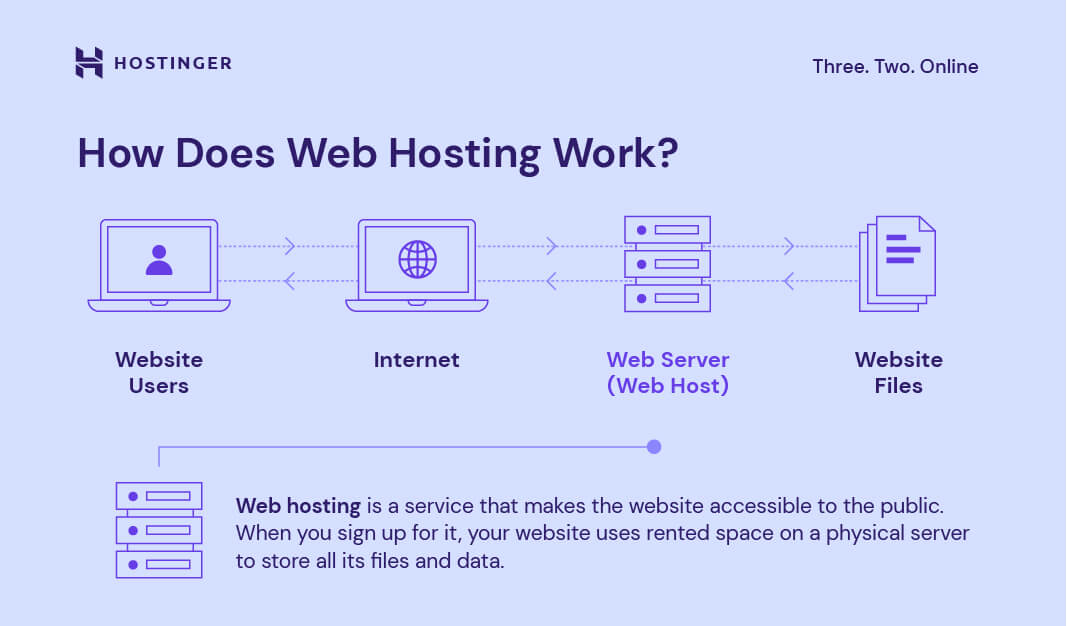
Web hosting is a key part of having a website online. It acts as a home for your website’s files and data. Without web hosting, people cannot see your website on the internet. This section explains what web hosting is, why it matters, and how it works in simple terms.
What Is Web Hosting?
Web hosting is a service that stores your website’s files on a server. A server is a powerful computer that runs 24/7 and connects to the internet. When you buy web hosting, you rent space on this server to keep your website’s content.
These files include text, images, videos, and code needed for your website to function. The web host manages the server, keeps it secure, and makes sure your website loads quickly for visitors.
Why Web Hosting Is Essential For Your Website
- Website Availability: Hosting keeps your website online and accessible anytime.
- Storage Space: It provides space to save all your website’s files safely.
- Security: Web hosts protect your data with security measures.
- Speed: Hosting servers help your website load fast for users.
- Technical Support: Many hosts offer help if issues arise.
Without web hosting, your website cannot be found or used by visitors. It is the backbone of your online presence.
How Web Hosting Works: A Simple Overview
- Upload Files: You upload your website files to the server.
- Store Data: The server saves these files securely.
- Internet Connection: The server stays connected to the internet all the time.
- Visitor Requests: When someone types your website address, the server sends files to their browser.
- Display Website: The visitor sees your website content on their device.
| Step | Description |
|---|---|
| 1. Upload Files | Transfer website files to the hosting server using FTP or control panel. |
| 2. Store Data | Server securely saves your website’s text, images, and code. |
| 3. Internet Connection | Server remains online, ready to send data to visitors. |
| 4. Visitor Requests | Users request your website by entering its domain name. |
| 5. Display Website | Server sends files to browsers, showing your website to users. |
Key Features Of Web Hosting Services
Web hosting services offer essential features that keep your website online and accessible. These features ensure your site runs smoothly, loads quickly, and stays secure. Understanding these core components helps you choose the best hosting plan for your needs.
Server Infrastructure: Powering Website Accessibility
The server infrastructure is the backbone of web hosting. It consists of powerful computers called servers that store your website’s files. These servers work 24/7 to deliver your content to visitors without interruption.
Good servers have:
- High-speed processors for fast data handling
- Reliable power and internet connections
- Redundancies to avoid downtime
This infrastructure ensures your website stays accessible anytime, anywhere.
Storage Space And Bandwidth: Managing Your Website’s Data Flow
Storage space is the amount of disk space your website files use on the server. It includes text, images, videos, and databases.
Bandwidth is the data transfer limit for visitors accessing your site. It controls how much data moves between your server and users.
| Feature | Description | Why It Matters |
|---|---|---|
| Storage Space | Disk space for website files | Enough space prevents site crashes or slowdowns |
| Bandwidth | Data transfer capacity | High bandwidth handles more visitors smoothly |
Choose plans that offer storage and bandwidth suited to your website’s size and traffic.
Domain Name Integration: Linking Your Website’s Address
Domain name integration connects your website’s address (like example.com) to your hosting server. It lets visitors find your site easily by typing your domain in a browser.
Web hosts often provide:
- Simple domain linking tools
- Domain registration services
- Automatic DNS management
This feature ensures your website’s address points correctly to your content for smooth access.
Technical Support And Security: Ensuring Smooth Operation
Technical support helps solve problems quickly. Reliable hosts offer 24/7 assistance via chat, email, or phone. Fast support prevents long downtimes.
Security protects your website from cyber threats. Web hosts use firewalls, SSL certificates, and malware scanning to keep your data safe.
- Real-time monitoring for attacks
- Regular backups for data recovery
- Updates to keep software secure
Strong support and security maintain your site’s performance and trustworthiness.
Types Of Web Hosting Explained
Web hosting comes in several types, each suited for different needs. Choosing the right type is key to your website’s success. Here, we explain the main types clearly and simply. This helps you find the best option for your site’s size, traffic, and control needs.
Shared Hosting: Affordable And Beginner-friendly
Shared hosting means your website shares a server with many other sites. This is the most budget-friendly option. It suits small websites, personal blogs, or new businesses just starting.
- Low cost
- Easy to set up and use
- Limited resources (CPU, RAM, bandwidth)
- Less control over server settings
- Best for low to moderate traffic
Since many sites share the same server, performance can slow if traffic spikes on others. Still, shared hosting is perfect for simple sites and beginners.
Virtual Private Server (vps) Hosting: Enhanced Control And Resources
VPS hosting divides a physical server into virtual servers. Each VPS acts like its own dedicated server with guaranteed resources. This gives you more power and control than shared hosting.
- More CPU, RAM, and storage than shared hosting
- Root access to customize server settings
- Better performance and stability
- Suitable for growing websites and moderate traffic
VPS hosting is ideal if you need more control but don’t want the cost of a full dedicated server.
Dedicated Hosting: Maximum Power For High-traffic Sites
Dedicated hosting provides an entire physical server only for your website. You get full control over hardware, software, and security. This type suits large businesses or sites with heavy traffic.
- Complete server resources at your disposal
- High security and customization
- Excellent performance and uptime
- Higher cost than other hosting types
Dedicated hosting is the best choice for websites needing maximum power and reliability.
Cloud Hosting: Scalability And Reliability Across Networks
Cloud hosting uses a network of servers to host your website. Resources come from multiple servers, not just one. This setup offers strong reliability and easy scaling.
- Automatic resource scaling for traffic spikes
- High uptime due to network redundancy
- Pay only for what you use
- Great for websites with variable or growing traffic
This hosting type fits businesses needing flexible resources and constant availability.

Credit: www.elegantthemes.com
Pricing And Affordability Breakdown
Web hosting pricing varies widely based on features and service types. Understanding costs helps pick the right plan for your needs. This section breaks down key factors influencing prices and compares hosting types. It also highlights budget-friendly options that maintain good quality.
Cost Factors Influencing Web Hosting Prices
Several elements affect the final price of web hosting services. Here are the main cost drivers:
- Server Type: Shared servers cost less than dedicated servers.
- Storage Space: Larger storage means higher prices.
- Bandwidth: More bandwidth allows more visitors but increases costs.
- Security Features: SSL certificates and backups add to the price.
- Customer Support: 24/7 support usually costs more.
- Uptime Guarantee: Higher uptime percentages may raise prices.
- Additional Tools: Control panels, site builders, and email services can add fees.
Comparing Pricing Across Different Hosting Types
| Hosting Type | Typical Price Range (per month) | Key Features | Best For |
|---|---|---|---|
| Shared Hosting | $2 – $10 | Shared server resources, basic support | Small websites, blogs, beginners |
| VPS Hosting | $20 – $80 | Virtual private servers, more control | Growing websites, moderate traffic |
| Cloud Hosting | $10 – $100+ | Scalable resources, pay-as-you-go | Websites with variable traffic |
| Dedicated Hosting | $80 – $300+ | Full server control, high performance | Large businesses, high traffic sites |
| WordPress Hosting | $5 – $30 | Optimized for WordPress sites | WordPress users seeking ease |
Budget-friendly Hosting Options Without Compromising Quality
Affordable hosting does not mean poor service. These options balance cost and quality:
- Shared Hosting: Ideal for new websites and small budgets. Offers basic features with decent uptime.
- Cloud Hosting Starter Plans: Pay for what you use. Scales with your website growth.
- WordPress Hosting: Often affordable and tailored for WordPress performance.
Look for hosts that provide:
- Reliable uptime of 99.9% or higher
- Free SSL certificates for security
- Easy-to-use control panels for site management
- Responsive customer support without extra fees
Choosing wisely can keep costs low while maintaining good website performance and security.
Pros And Cons Of Web Hosting Options
Choosing the right web hosting option affects your website’s speed, security, and cost. Different hosting types suit different needs and budgets. Understanding the advantages and limitations of each helps you make a smart choice.
Advantages Of Shared, Vps, Dedicated, And Cloud Hosting
| Hosting Type | Advantages |
|---|---|
| Shared Hosting |
|
| VPS Hosting |
|
| Dedicated Hosting |
|
| Cloud Hosting |
|
Potential Limitations And Challenges Of Each Hosting Type
- Shared Hosting: Limited resources; performance can drop if neighbors use too much server power.
- VPS Hosting: Requires basic technical knowledge; higher cost than shared hosting.
- Dedicated Hosting: Expensive; needs server management skills or additional support.
- Cloud Hosting: Pricing can be confusing; depends on internet connectivity quality.
Real-world Usage Insights And Customer Experiences
Many beginners start with shared hosting due to its low price and simplicity. It works well for personal blogs and small business sites. Some users face slow loading times during traffic peaks.
VPS hosting suits growing websites needing more power and control. Customers appreciate the balance of cost and performance but warn about the learning curve.
Dedicated hosting is favored by large businesses with heavy traffic. Clients report excellent speed and security but mention higher costs and technical demands.
Cloud hosting receives praise for flexibility and uptime. Many users note it handles traffic surges well, though some find cost management tricky.
Credit: www.bluehost.com
Choosing The Right Web Hosting For Your Needs
Selecting the right web hosting is crucial for your website’s success. The hosting type affects your site’s speed, security, and reliability. Different websites need different hosting solutions. Understanding your site’s needs helps you pick the best plan.
Factors like website size, traffic volume, and technical skills shape your choice. Budget also plays a role. Choosing wisely avoids downtime and poor user experience. This section explores ideal options for various needs.
Ideal Hosting Solutions For Small Businesses And Startups
Small businesses and startups usually need affordable, easy-to-use hosting. Shared hosting fits well here. It offers low cost by sharing server resources with others. Ideal for sites with low to moderate traffic.
- Benefits: Budget-friendly, easy setup, basic security
- Limitations: Limited resources, slower speeds during traffic spikes
Cloud hosting also suits growing startups. It scales resources with traffic and offers good uptime. Control panels simplify management for beginners. Look for hosts with 24/7 support and security features.
Best Hosting For High-traffic And Resource-intensive Websites
Websites with heavy traffic or complex functions need powerful hosting. VPS and dedicated hosting provide isolated resources for better performance.
| Hosting Type | Advantages | Ideal For |
|---|---|---|
| VPS Hosting | Dedicated resources, scalable, more control | Medium to high traffic sites, growing businesses |
| Dedicated Hosting | Full server control, maximum performance, enhanced security | Large enterprises, high-traffic eCommerce, resource-heavy apps |
These plans handle traffic spikes well and offer advanced security. They require some technical knowledge or support from the host. Ideal for sites with custom software or online stores.
Specialized Hosting For Developers And Enterprises
Developers and large companies need hosting that supports complex projects. Cloud hosting and managed hosting fit here. They provide flexibility, automation, and strong security.
- Cloud Hosting: Offers high scalability and pay-as-you-go pricing.
- Managed Hosting: Provider handles server setup, updates, and backups.
Developer-friendly features include SSH access, staging environments, and integration tools. Enterprises benefit from dedicated support and compliance options. These hosts often provide advanced analytics and uptime guarantees.
Additional Tips To Boost Your Website Success With Hosting
Choosing the right web hosting is just the first step. Optimizing your website’s success depends on how you use the hosting features. Hosting impacts speed, security, and search engine rankings. Small changes in hosting can lead to better performance and user satisfaction.
This section shares practical tips to improve your website through smart hosting decisions. These tips help your site run faster, stay safe, and rank higher in search engines.
Optimizing Website Performance Through Hosting Choices
Website speed matters for visitors and search engines. Hosting affects loading times and uptime. Choose hosting with:
- Fast servers: Look for SSD storage and modern hardware.
- High uptime guarantees: Aim for 99.9% uptime or better.
- Content Delivery Network (CDN): Helps deliver content faster worldwide.
- Scalable resources: Upgrade CPU, RAM, and bandwidth easily.
Use hosting control panels to monitor performance and manage resources. Regularly check site speed using tools like Google PageSpeed Insights.
Ensuring Security And Backup With Your Hosting Provider
Security protects your website from threats and keeps visitor data safe. Good hosting providers offer:
- SSL certificates: Encrypt data between visitors and your site.
- Regular backups: Automatic daily or weekly backups prevent data loss.
- Malware scanning and removal: Detect and fix malicious files.
- Firewall and DDoS protection: Block harmful traffic and attacks.
Verify your host’s security policies. Keep backups stored outside the hosting server for extra safety.
Leveraging Hosting Features For Seo And User Experience
Hosting impacts your SEO and user experience in many ways. Use hosting features to:
- Improve site speed: Faster sites rank better and keep visitors.
- Enable SSL: Secure sites get a ranking boost from search engines.
- Use server location: Choose a server near your audience for faster access.
- Access to caching tools: Reduce server load and speed up page delivery.
- Support for SEO-friendly technologies: Use clean URLs and HTTPS easily.
Check if your hosting supports one-click installation for SEO plugins if you use CMS platforms like WordPress. This saves time and improves site optimization.
Frequently Asked Questions
What Do You Mean By Web Hosting?
Web hosting is a service that stores website files on a server and makes them accessible online. It provides space, bandwidth, and resources to keep websites live 24/7. Hosting providers manage servers, infrastructure, and support for smooth website operation.
What Is An Example Of A Web Host?
An example of a web host is Bluehost. It provides server space, bandwidth, and tools to publish websites online. Other popular hosts include SiteGround and HostGator.
Does Amazon Have Web Hosting?
Yes, Amazon offers web hosting through Amazon Web Services (AWS). AWS provides scalable, reliable cloud hosting for websites and applications. It supports businesses with flexible pricing and extensive features to manage web hosting efficiently and securely.
Can I Run My Website Without Hosting?
You cannot run a website online without hosting. Hosting stores your site’s files on a server accessible via the internet. Local setups allow offline viewing but don’t make your site public. Hosting ensures your website is live and reachable by visitors worldwide.
Conclusion
Web hosting makes your website visible and accessible online. It stores your website files on a server that works all day. Choosing the right hosting service helps your site run smoothly and securely. Understanding web hosting basics is key for beginners. To get reliable web hosting, consider trusted providers. Explore options and find a plan that fits your needs. For a great deal on web hosting, check out this offer. Your website deserves a strong foundation to grow and succeed.

