Business Intelligence Reporting: Turn Data into Actionable Insights
Founder & Lead SaaS Analyst at PCSaaS · Google Ads & Analytics Certified · SaaS Stack Architect · 500+ Software Tools Tested · 8+ years in B2B SaaS evaluation, AppSumo lifetime deal curation, performance marketing, and AI workflow automation
Learn how Business Intelligence Reporting reveals key trends and helps your business stay ahead of the competition.
Imagine turning piles of confusing numbers into clear visuals that highlight exactly what's working and what needs attention. With the right BI reports, you gain powerful insights that help you make smarter decisions, spot trends early, and keep your business on the path to success.
You'll discover how Business Intelligence Reporting works, why it matters for your business, and how you can start using it to unlock your full potential. Ready to transform your data into your strongest asset? Let's dive in. For more on this, see our guide on business intelligence architecture.

An overview of how BI dashboards consolidate data into one readable screen for decision-makers.
Credit: www.cxtoday.com
Bi Reporting Process
Business Intelligence (BI) reporting is a structured approach to turning raw data into useful information. It involves gathering data, examining it carefully, and showing the results clearly. This process supports businesses in making smart, data-driven decisions. Each step of the BI reporting process builds on the last to ensure accurate and meaningful insights.
In practice, many organizations discover that the BI reporting process is only as strong as its weakest link. A common mistake is rushing data collection without verifying source reliability, which leads to misleading visualizations later. Taking time to validate each stage — from ingestion to presentation — prevents costly misinterpretations down the line.
Data Collection Methods
Data collection is the first step in the BI reporting process. It involves gathering information from many sources like sales records, customer feedback, and financial reports. Automated tools often help collect data quickly and reduce errors. Clean and reliable data is key to good reporting.
Analyzing Business Data
Once data is collected, it needs careful analysis. This step finds patterns, trends, and important details in the numbers. Analysts use software to filter and compare data sets. The goal is to turn complex data into clear facts that explain business performance.
Presenting Insights Visually
Visual presentation makes data easy to understand. Charts, graphs, and dashboards help show insights at a glance. Good visuals highlight key points and support quick decision-making. They also allow users to explore data interactively for deeper understanding.

A sample visualization showing how bar charts reveal comparisons between business segments.
Credit: www.n-ix.com
Report Formats
Business Intelligence reporting delivers data in several clear formats. These formats help teams see patterns and insights quickly. Choosing the right format improves understanding and speeds decisions. Each format serves a unique purpose in presenting information effectively.
Tables And Spreadsheets
Tables and spreadsheets organize data in rows and columns. They show detailed numbers and text clearly. This format works well for comparing figures side by side. Teams can easily scan and find exact data points. Spreadsheets also allow basic calculations and sorting to highlight trends.
Charts And Graphs
Charts and graphs turn data into visual stories. Bar charts, pie charts, and line graphs reveal patterns fast. Visuals help spot growth, drops, or changes at a glance. They make complex data simple and engaging. Color and shape guide the eye to key insights.
Custom Dashboards
Dashboards combine various report elements in one view. Users see charts, tables, and metrics on a single screen. Customization lets users focus on data that matters most. Dashboards update in real time to reflect current conditions. They offer a quick summary for decision-makers.
Automated Scheduling
Automated scheduling sends reports at set times without manual work. Teams receive fresh data regularly by email or platform alerts. This keeps everyone informed with the latest numbers. Automation saves time and reduces errors in reporting. It supports timely responses to business changes.
Bi Components
Business Intelligence (BI) reporting relies on key components that work together. These components turn raw data into clear insights. Understanding these parts helps businesses improve decisions and strategies.
Data Gathering
Data gathering collects information from many sources. These sources include sales records, customer feedback, and market trends. This step ensures data is complete and relevant. Good data gathering sets the foundation for accurate BI reports.
Data Standardization
Data standardization cleans and organizes gathered data. It removes errors and unifies formats. This process makes different data sets compatible. Standardized data is easier to analyze and compare.
Data Analysis
Data analysis examines standardized data to find patterns. It uses methods like statistical tools and software. This step reveals trends, risks, and opportunities. Analysis turns raw data into meaningful business insights. For teams looking to go deeper, modern analysis approaches increasingly incorporate predictive modelling built on top of traditional reporting — a direction that aligns closely with the patterns used in algorithmic forecasting.
Reporting Cycle
The reporting cycle creates and shares BI reports regularly. Reports show updated data and analysis results. This cycle helps businesses track progress over time. Regular reporting supports faster and smarter decisions.
Analytics Types
Business Intelligence (BI) reporting relies on different types of analytics to turn data into useful insights. Each type serves a unique purpose. These analytics types help businesses understand past events, find reasons behind them, forecast future outcomes, and suggest actions to improve results. Using all four analytics types creates a complete picture for smarter decisions.
Descriptive Analytics
Descriptive analytics shows what has happened in the past. It summarizes data using reports, charts, and dashboards. This type helps businesses see trends and patterns clearly. It answers simple questions like "How many sales did we make last month?" or "What was the customer count?" Descriptive analytics forms the foundation for deeper analysis.
Diagnostic Analytics
Diagnostic analytics explains why something happened. It digs deeper into data to find causes of past events. This type uses techniques like drill-downs and data mining. It answers questions such as "Why did sales drop last quarter?" or "What caused the increase in returns?" Diagnostic analytics helps uncover problems and areas to improve.
Predictive Analytics
Predictive analytics forecasts future outcomes based on historical data. It uses statistical models and machine learning to identify trends. This type answers questions like "What will sales be next month?" or "Which customers might leave soon?" Predictive analytics helps businesses prepare for future challenges and opportunities. Many BI tools now integrate directly with cloud-based machine learning services, making this capability accessible even to teams without dedicated data scientists. Exploring the foundational algorithms behind these predictions can help teams understand which models suit their particular use cases.
Prescriptive Analytics
Prescriptive analytics recommends the best actions to take. It uses optimization and simulation techniques to suggest solutions. This type answers questions such as "What should we do to increase sales?" or "How can we reduce costs effectively?" Prescriptive analytics supports making decisions that improve business performance.
Benefits Of Bi Reporting
Business Intelligence (BI) reporting offers many advantages for companies of all sizes. It turns complex data into clear, easy-to-understand information. This helps businesses act quickly and wisely. Using BI reports, leaders gain a better view of their operations and market conditions. It supports smarter decisions and improves overall performance.
Data-driven Decisions
BI reporting gives access to accurate and up-to-date data. Decisions based on real facts reduce guesswork and errors. Teams can identify opportunities and risks faster. This leads to better choices in marketing, sales, and operations. Data-driven decisions help businesses stay competitive and meet goals.
Performance Monitoring
BI reports track key performance indicators (KPIs) clearly. Managers see which areas perform well and which need improvement. Regular monitoring allows quick responses to problems. It keeps teams focused on targets. Performance monitoring ensures business activities align with strategic plans.
Trend Detection
BI tools highlight patterns and trends over time. Recognizing trends early helps businesses adapt to market changes. Companies can spot customer behavior shifts or new demands. This insight supports proactive strategies rather than reactive actions. Trend detection helps maintain long-term success.
Operational Efficiency
BI reporting identifies inefficiencies in processes and workflows. It shows where resources are underused or wasted. Businesses can streamline tasks and reduce costs. Improved efficiency boosts productivity and employee satisfaction. Operations run smoother with clear, data-backed insights. Applying automation alongside BI reporting further reduces manual data handling and accelerates the feedback loop between analysts and decision-makers.
Strategic Growth Support
BI reports provide a solid foundation for planning and growth. Leaders use data to set realistic goals and measure progress. It uncovers new market opportunities and potential risks. Strategic growth becomes more focused and achievable. BI reporting helps companies expand with confidence.
Reporting Styles
Business Intelligence reporting offers different styles to suit varied needs. Each style provides unique benefits for interpreting data. Choosing the right reporting style helps businesses make smarter decisions. Understanding these styles improves how teams use data daily.
Managed Reporting
Managed reporting delivers pre-built, standardized reports. These reports follow set formats and schedules. They provide consistent, reliable information for regular review. Users receive clear data summaries without creating reports themselves. This style suits routine tracking and compliance needs. It saves time and reduces errors in report generation.
Ad-hoc Reporting
Ad-hoc reporting allows users to create reports on the fly. It offers flexibility to explore data as questions arise. Users choose data fields and filters to customize reports. This style supports quick decision-making and problem-solving. It empowers teams to find answers without waiting for scheduled reports. Ad-hoc reports adapt to changing business demands and priorities.
Steps To Build Bi Reports
Building effective Business Intelligence (BI) reports requires a clear, step-by-step approach. These steps help turn complex data into simple, useful information. Each phase focuses on making data accessible and actionable. Follow these steps to create BI reports that drive better decisions.
Assess Data Maturity
Start by evaluating your current data setup. Check the quality, availability, and structure of your data. Understand how mature your data processes are. This helps identify gaps and areas for improvement before building reports.
Select Bi Platform
Choose a BI tool that fits your needs and budget. Consider ease of use, integration options, and scalability. The right platform supports your data sources and reporting goals efficiently.
Set Goals And Audience
Define what you want the report to achieve. Identify who will use the report and what decisions they need to make. Clear goals guide the design and focus of your BI reports.
Connect Data Sources
Link all relevant data sources to your BI platform. This can include databases, spreadsheets, and cloud services. Proper connections ensure data accuracy and real-time updates for your reports.
Query And Visualize Data
Use queries to extract meaningful data from your sources. Then, create visualizations like charts and graphs. Visuals help users quickly understand trends and key metrics.
Share Reports And Dashboards
Distribute your reports to the right audience through dashboards or scheduled emails. Make reports accessible on multiple devices. Sharing insights widely supports better collaboration and decision-making.
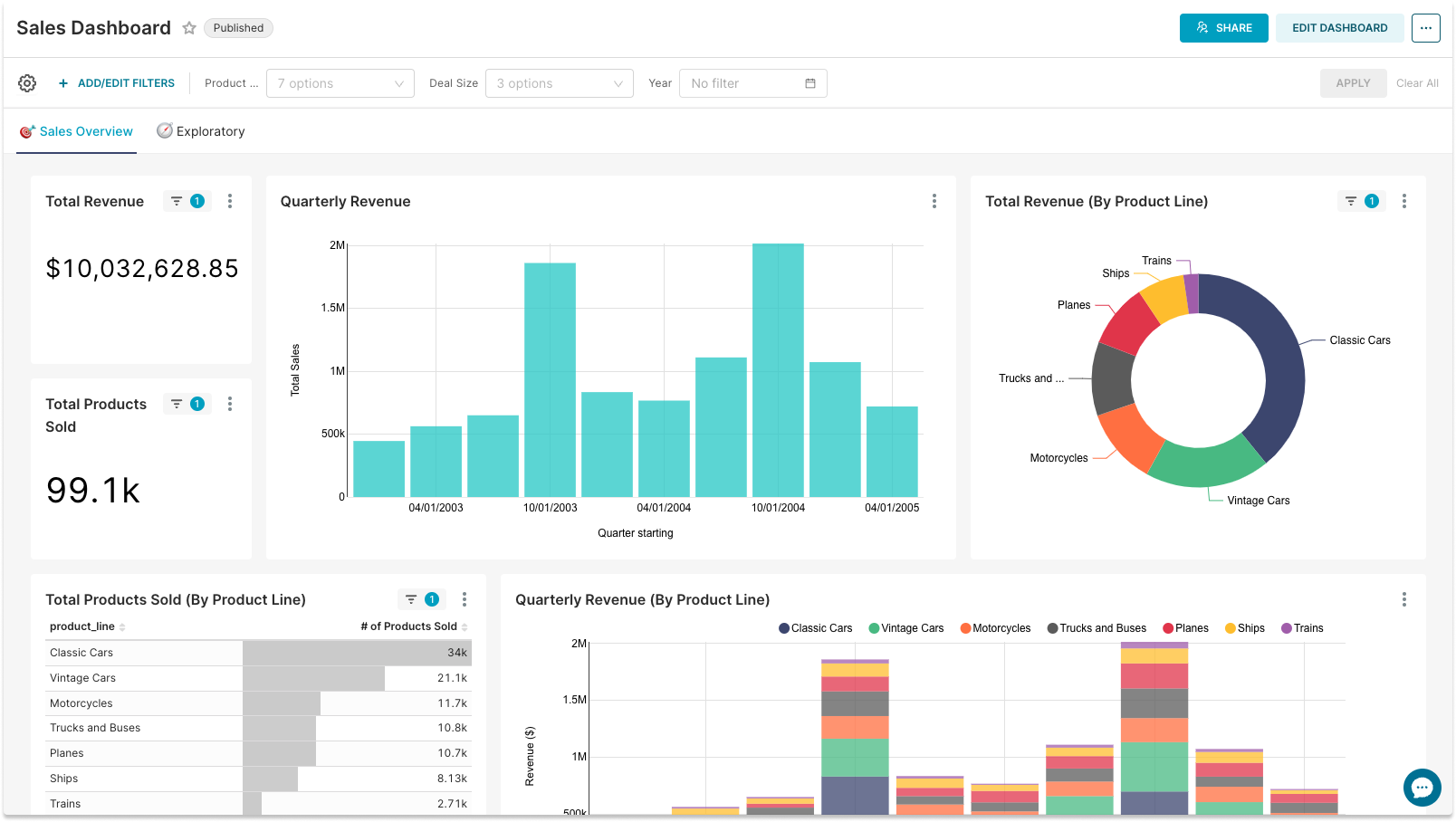
A live dashboard example displaying key sales metrics filtered by time period and geography.
Credit: preset.io
Common BI Reporting Challenges
Even with careful planning, BI reporting initiatives often encounter obstacles that reduce their effectiveness. Recognizing these challenges early helps teams address them before they undermine trust in the data.
Data Quality Issues
Inconsistent, incomplete, or duplicated data is the most frequent barrier to reliable reporting. When different departments enter data in different formats or use varying definitions for the same metric, reports become contradictory. Establishing clear data governance rules and using automated validation checks at the point of entry prevents many of these problems.
Tool Adoption Resistance
A BI platform is only useful if teams actually use it. Some employees prefer their familiar spreadsheets and resist learning new tools. Addressing this requires involving end-users in the platform selection process, providing hands-on training, and demonstrating quick wins — such as a dashboard that saves them an hour of manual work each week.
Report Overload
Creating too many reports can overwhelm decision-makers rather than inform them. When every team produces its own dashboard without coordination, conflicting numbers and information fatigue set in. A centralized report inventory with clear owners and review cycles helps keep the reporting ecosystem manageable and relevant.
Measuring BI Report Success
To ensure BI reporting delivers real value, businesses should track specific success indicators beyond just report delivery rates.
User Engagement Metrics
Monitor how often reports and dashboards are accessed, by whom, and which sections receive the most attention. Low engagement often signals that the report format or content misses the mark and needs refinement.
Decision Impact
The ultimate measure of BI reporting is whether it leads to better decisions. Track instances where a specific report directly informed a strategic move — such as adjusting inventory levels based on demand trends or reallocating marketing spend toward higher-performing channels.
Time Saved
Quantify the time teams save by using automated reports instead of manual data compilation. Even saving a few hours per team member per week translates into significant productivity gains across the organization.
Read More : Artificial Intelligence Chat: Revolutionizing Online Interaction
Frequently Asked Questions
How To Build A Business Intelligence Report?
Start by defining your report's goal and target audience. Choose a BI platform and connect data sources. Query data, analyze trends, and create visualizations. Design clear, concise dashboards or reports. Finally, share the report for informed decision-making.
What Is The Format Of A Business Intelligence Report?
A business intelligence report typically includes tables, charts, graphs, and dashboards. It presents analyzed data clearly, often in PDFs or web-based formats. Reports can run automatically on set schedules, helping users track performance and make informed decisions quickly.
What Are The 4 Concepts Of Business Intelligence?
The four concepts of business intelligence are data gathering, data standardization, data analysis, and reporting. These steps enable informed decisions and strategic planning.
What Are The Four Types Of Business Intelligence?
The four types of business intelligence are descriptive, diagnostic, predictive, and prescriptive analytics. They help analyze past, present, and future data for smarter decisions.
How Do Small Businesses Start With BI Reporting?
Small businesses can begin by focusing on one core question — such as "Which products generate the most profit?" — and building a simple dashboard around that question. Free or low-cost BI tools with pre-built connectors for common accounting and sales platforms make entry accessible without large upfront investment. Scaling gradually as proficiency grows avoids the complexity trap that derails many early BI efforts.
What Is The Difference Between BI Reporting And Data Analytics?
BI reporting focuses on presenting historical data in an accessible format for regular monitoring and operational decisions. Data analytics typically involves deeper investigation, statistical modelling, and hypothesis testing to uncover root causes or predict future outcomes. Both complement each other — reporting provides the what, while analytics explains the why and explores the what if.
Conclusion
Business Intelligence reporting helps businesses see their data clearly. It turns complex numbers into simple charts and reports. This makes it easier to find patterns and make smart choices. Regular reports keep teams informed and focused on goals. Using BI reporting saves time and reduces guesswork.
Every business can benefit from clearer, data-driven insights. Start small, learn, and improve your reporting over time. The right information leads to better decisions and success.
Ready to build your first dashboard? Begin by listing the three most important metrics your team needs to track daily — then choose a BI tool that connects directly to the source of that data.

Similar Posts

















[…] content and pre-owned inventory previews. Applying this framework is a practical way to use the business intelligence reporting tools you may already have in […]
[…] Custom reporting filters let you isolate specific campaigns or timeframes, removing the noise of broader data. For example, you could generate a report showing only blog-related keyword movements since a redesign. […]