HoneyBill Review (2026): Honest Take After Real Research
Lead SaaS Analyst & Software Developer at PCSaaS · Software Developer (GitHub @Ratankarmakar) · Google Ads & Analytics Certified · 500+ SaaS Tools Tested · 8+ years in software engineering, B2B SaaS evaluation, AppSumo deal auditing, and performance marketing
HoneyBill turns a one-line job description into a finished, branded invoice you can send from your own Gmail or Outlook address. That single move, plus a $29 lifetime tier on AppSumo, is why freelancers are paying attention to it right now.
Disclosure: This article contains affiliate links. We may earn a small commission at no extra cost to you when you sign up via our links, it's how this site stays free to run.
TL;DR Verdict
- Who it's for: freelancers, consultants, and small service businesses sending roughly 5 to 50 invoices a month.
- Headline price: $29 one-time for License Tier 1 (5 invoices monthly), $79 one-time for License Tier 2 (unlimited). Both showed a $77 list price at launch.
- Biggest pro: invoices arrive from your own email address, which keeps them out of promotions tabs and in the client's primary inbox.
- Biggest con: Tier 1 caps you at 5 invoices a month, 5 projects, and one connected email account.
- Trial status: no free plan, but AppSumo refunds purchases within 60 days and you must activate the license within 60 days.
- Bottom line: if billing admin eats two hours of your month, Get the Lifetime Deal → and stop paying monthly for it.
What Is HoneyBill?
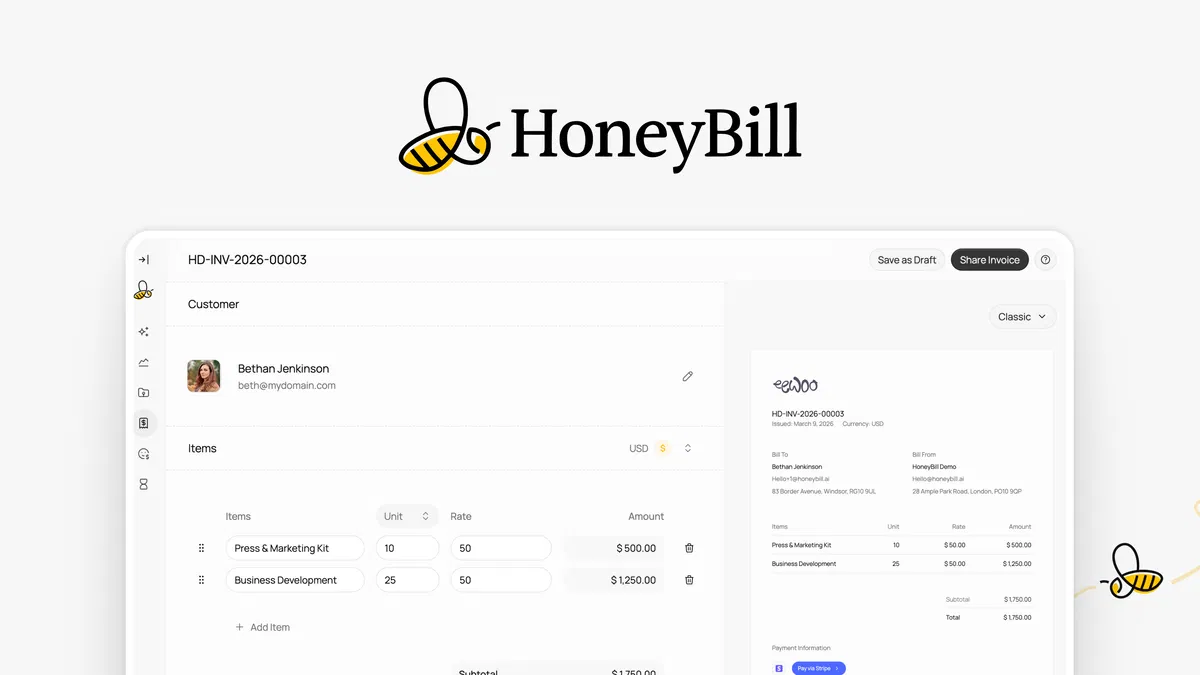
HoneyBill is an AI-powered invoicing platform that converts a plain-English description or a voice note into a complete, branded invoice. It launched on October 1, 2025, runs as a bootstrapped team of 1-10 people out of London, and is currently sold through AppSumo as a lifetime deal with 18 public reviews averaging 4.50 stars.
The job it solves is narrow but genuinely irritating. You finish a project, then you open a template, hunt for the client's billing address, retype line items, export a PDF, attach it, write a subject line, and send from a billing inbox the client has never seen. HoneyBill compresses that whole sequence into one sentence typed into a prompt box, and it names the product accurately on its official site.
It also handles the second half of billing, which is the part people underestimate. Recurring invoices for retainer clients, automatic payment reminders, a hosted checkout page, and a dashboard that shows whether the client actually opened what you sent.
For solo operators who already juggle client records and outreach across separate tools, that consolidation matters more than any AI label does.
Key Features That Matter
Plain-English and voice-note invoice generation
Describe the work the way you would explain it to a friend, and HoneyBill builds the invoice: client details, line items, quantities, and totals. According to the vendor's documentation, voice notes work the same way, which helps when you are billing from a phone between site visits. This is what separates it from a static template pack you download once and forget.
Sending from your own Gmail or Outlook address
HoneyBill connects to the mailbox clients already reply to, so invoices leave from a familiar address instead of a generic billing system. That matters because person-to-person email tends to land in the primary inbox more reliably than bulk billing notifications. The PDF attaches automatically, removing the separate export step that people forget under deadline pressure.
Recurring invoices for retainer clients
Set a retainer up once and HoneyBill issues the invoice on schedule without a reminder from you. Consultants billing the same monthly amount to three or four clients stop losing money to forgotten invoices. Tier 1 includes recurring billing, but the 5 invoices per month limit applies to scheduled runs too.
Hosted checkout with several payment routes
Every invoice links to a hosted checkout page where clients pay by card, bank transfer, or Pay by Bank. Stripe is the core payment provider on the deal page, with PayPal, Revolut, Venmo, and Payoneer listed as additional options. Fewer payment excuses means faster cash collection and less follow-up.
Time tracking and invoice status in one dashboard
Log hours against a project and push them straight into an invoice instead of rebuilding the numbers by hand at month end. The dashboard also shows when a client viewed an invoice, which tells you the smart moment to send a nudge.
Automatic payment reminders
Chasing money is the least pleasant part of freelancing. HoneyBill sends scheduled reminders against the invoice itself, so the awkward second email writes itself and the client relationship stays intact.
Pricing Tiers (starts $29)
| Tier | Price | Best For | Free trial? |
|---|---|---|---|
| License Tier 1 | $29 one-time (list $77) | Solo freelancers sending up to 5 invoices a month | No free plan, 60 day refund |
| License Tier 2 | $79 one-time | Consultants and small studios needing unlimited billing volume | No free plan, 60 day refund |
Both tiers are lifetime access with all future Standard Plan updates included. Tier 1 caps you at 5 invoices per month, 5 projects, and 1 connected email account. Tier 2 removes those caps and adds unlimited projects, unlimited email accounts, and unlimited invoices.
Both include AI invoice generation, time and project tracking, Stripe-hosted checkout, recurring invoices, custom domain connection, branding removal, payment reminders, project comments, and zero platform fees.
You can upgrade between the two tiers while the deal runs, and downgrade within 60 days of purchase. There is no monthly subscription and no free tier to test first, so the $29 entry point is effectively your commitment level. Compared with low-cost bookkeeping tools that bill every month forever, the one-time structure is the main financial argument here.
Pros and Cons
Pros
- Invoices arrive from your own address, which helps deliverability.
- AI generation cuts invoice creation down to one typed sentence.
- A one-time $29 entry price beats monthly billing subscriptions.
- Stripe, PayPal, Revolut, Venmo, and Payoneer cover most client payment habits.
- Recurring invoices plus reminders run without manual nudges.
- Zero platform fees on both tiers, separate from Stripe's own processing charges.
- Time tracking and billing sit on the same screen, so hours become invoices fast.
Cons
- Tier 1's 5 invoices per month is tight for anyone billing weekly.
- No free tier, so you commit $29 before touching the dashboard.
- Only two license tiers exist, with nothing in between.
- Payment processing fees from third-party providers stay outside the price.
- The product launched in 2025, so the public review base is still small.
- No general ledger, payroll, or tax filing, so you still need a broader finance stack alongside it.
Who Should Use HoneyBill?
Freelance consultants with 3 to 15 active clients
You bill the same handful of people every month, often on retainers or milestone schedules. HoneyBill removes the template shuffle and the follow-up email, so your energy goes toward winning new work instead of cleaning up paperwork.
Small studios and agencies with 2 to 10 people
Tier 2 lifts every cap: unlimited invoices, unlimited projects, unlimited connected email accounts, and team members. A studio with three billable people can run client billing through one place instead of three personal spreadsheets that nobody reconciles.
Solo founders who need bills sent, not books balanced
If your requirement is a clean invoice in a client's inbox with a working payment link, HoneyBill covers that loop without the setup overhead of full accounting software. Founders who already use early-stage outreach platforms for lead generation will recognise the same logic: pick one tool, remove one recurring task.
Who should skip it
Skip HoneyBill if you need VAT or GST reporting, multi-currency ledgers, payroll runs, or expense management tied to a general ledger. It is also a poor fit if you bill more than 5 invoices a month and refuse to move up to the $79 tier, or if you already pay for the right client database and invoicing inside it works well enough.
Alternatives to Consider
FreshBooks is a mature accounting and invoicing platform with expense tracking, double-entry bookkeeping, and accountant access. The trade-off is a monthly fee that never ends, versus a single $29 payment for HoneyBill.
Xero handles bank reconciliation and reporting well for growing businesses. It is built for bookkeeping first and invoicing second, and a year of Xero costs far more than HoneyBill costs once.
Dubsado bundles contracts, forms, scheduling, and client management for creative studios. Setup is heavier, and invoicing is one module inside a much larger system.
If you already live inside the QuickBooks ecosystem, understanding how higher tiers differ matters before you bolt on another billing tool.
Final Verdict
HoneyBill does one job well: it gets a professional invoice out of your head and into a client's inbox with a payment link attached. The AI generation is the headline, but the deliverability angle and the automatic reminders are what actually shorten your payment cycle. The trade-offs are real, including the 5 invoice ceiling on Tier 1 and the absence of any bookkeeping depth.
At $29 for lifetime access with a 60 day refund window, the downside is limited to your time. Independent platforms such as G2 track satisfaction across invoicing tools, and HoneyBill's public review base is still small, so read the AppSumo reviews yourself before buying.
If you send at least a handful of invoices a month and you are tired of writing follow-up emails, Get the Lifetime Deal → and retire the template folder.
Frequently Asked Questions
Does HoneyBill have a free plan?
No. There is no free tier or trial account, so the lowest commitment is the $29 License Tier 1. AppSumo's 60 day refund policy effectively works as an extended trial period, provided you activate your license within 60 days of purchase and request the refund inside that window.
How does HoneyBill compare to FreshBooks?
FreshBooks is full accounting software with invoicing bolted in, which means expenses, reports, and accountant access. HoneyBill is invoicing and collection only, but it costs $29 once instead of a monthly fee. If you need a profit and loss statement, keep accounting software separately and use HoneyBill for billing.
Can I cancel anytime?
There is nothing to cancel, because the lifetime deal is a one-time payment rather than a subscription. You can request a full refund through AppSumo within 60 days of purchase. After that window closes, your license stays active permanently for the tier you bought, under the deal terms published on the listing.
Is HoneyBill worth the price?
At $29 for Tier 1, the math is simple: recover a few hours of billing admin and the tool has paid for itself. Anyone billing more than 5 invoices a month should budget for the $79 Tier 2 instead, which still undercuts a year of most monthly invoicing subscriptions. The value case weakens if you need real bookkeeping.
Does HoneyBill work with my own email address and a custom domain?
Yes. The deal page lists Gmail and Outlook integrations plus custom domain connection on both tiers. Invoices leave from your own address, and the hosted checkout page for payments is provided by Stripe.
You will still need a domain registered and pointed correctly for branded sending.

Similar Posts





















