Best CRM Software of 2025: Top Picks for Small Businesses
Lead SaaS Analyst & Software Developer at PCSaaS · Software Developer (GitHub @Ratankarmakar) · Google Ads & Analytics Certified · 500+ SaaS Tools Tested · 8+ years in software engineering, B2B SaaS evaluation, AppSumo deal auditing, and performance marketing
Choosing the right CRM software can transform your business operations. It helps manage customer relationships and boosts efficiency.
Introduction
Future business leaders! In today's fast-paced digital world, building strong customer relationships is more crucial than ever. That's where CRM software comes in. Think of it as your business's secret weapon for managing all your customer interactions in one place. This guide is your roadmap to navigating the world of CRM software and finding the perfect solution to fuel your growth in 2025 and beyond. Whether you're just starting out or looking to upgrade your current system, we'll break down everything you need to know to make an informed decision. Ready to unlock the power of CRM software and take your business to the next level? Let's dive in! Finding the best CRM software can be a game-changer. For more on this, see our guide on which tax software is best for small business.
CRM dashboard displaying key metrics and customer interaction timelines
Credit: syncmatters.com
What is CRM Software and Why Do You Need It?
CRM stands for Customer Relationship Management. It helps businesses track their relationships with customers and leads. It's more than just a contact list—it stores all your customer data, interactions, and notes in one place. You can easily access contact details, sales history, service notes, and marketing results.
Why do you need it? In today's market, strong customer relationships are key. CRM software helps you connect with customers, understand their needs, and offer better service. It also helps with sales, automates marketing, and gives you insights into your customer base. Whether you're a small business or a large company, CRM software can help boost sales, improve customer loyalty, and support growth. There's CRM software for sales, marketing, and customer service, so you can find the right one for your needs. Choosing the right CRM is an investment in your business's future.
When evaluating whether your business truly needs a CRM, ask yourself: are you losing track of follow-ups? Do your team members have to ask around for customer history before a call? In practice, businesses that adopt a CRM early—before chaos sets in—save months of cleanup work later. A common mistake is waiting until your contact list exceeds a thousand names, by which point data has already scattered across spreadsheets, email inboxes, and sticky notes. Starting with a system that centralizes everything from day one pays dividends well before your first major growth spurt.
Choosing the Best CRM Software: Key Things to Think About
Choosing the right CRM software doesn't have to be hard. Here are some simple factors to help you find the best CRM for your business:
Business Size and Industry: Are you a small business or a big company? Different CRMs are made for different sizes and industries. Small businesses often need easy-to-use, affordable solutions, while large companies need more advanced features.
Your Needs and Goals: What do you want to achieve with your CRM? Whether it's lead generation, better customer support, or sales automation, knowing your goals will help you choose the right CRM.
Features: Think about the key features you need. Common features include contact management, pipeline tracking, and reporting. Some businesses might need more specific tools.
Budget: CRM pricing varies a lot. Set a budget and stick to it. Remember to think about the long-term value of your CRM.
Ease of Use: Make sure the CRM is easy for your team to use. Look for a simple interface, and offer training if needed.
Scalability: Choose a CRM that can grow with your business. You don't want to switch systems every year.
Integrations: Does the CRM work with your current tools, like email marketing or accounting software? Good integrations can save time and effort.
Customer Support: Reliable support is key. Check reviews to see how well different CRMs help their customers.
Beyond the checklist above, consider the total cost of ownership. Many CRMs advertise low per-user monthly prices but charge extra for essential features like API access, advanced reporting, or workflow automation. Before committing, request a detailed pricing breakdown from each vendor. Also, ask about migration assistance—switching platforms midway can be disruptive if your data isn't portable. Look for a CRM that offers straightforward export options in standard formats like CSV or JSON, so you're never locked in.

Mobile CRM app showing contact details and recent activity log
Credit: www.erpabsolute.com
Top 5 Best CRM Software Solutions for 2025
Choosing the right CRM software can help your business build better relationships with customers. Here are five CRM tools to check out in 2025. These platforms offer different features, so find the one that fits your needs.
1. Salesforce (Best for Large Companies)
Salesforce is a popular choice for large businesses. It has many advanced features and can be customized. Key Features: Sales automation, lead management, tracking opportunities, integrations. Pros: Customizable, scalable, strong support. Cons: Difficult to set up, expensive. Best For: Large businesses with complex sales.
2. HubSpot CRM (Best for Marketing)
HubSpot is easy to use and great for inbound marketing. It also offers a free version. Key Features: Contact management, lead forms, email marketing automation. Pros: Free version, user-friendly, great for marketing. Cons: Free version has limits, can be expensive as you grow. Best For: Small and medium businesses focused on marketing.
3. Zoho CRM (Affordable and Full of Features)
Zoho is affordable and offers many features for the price. Key Features: Sales automation, marketing tools, customer support. Pros: Good pricing, lots of features. Cons: Setup can be difficult, older user interface. Best For: Small to medium businesses that need a lot of features.
4. Freshsales (Easy to Use and Sales-Focused)
Freshsales is simple and works well for sales teams. Key Features: Contact management, sales automation, built-in phone and email. Pros: Easy to use, great for sales teams. Cons: Lacks some advanced features. Best For: Small businesses focused on sales.
5. Pipedrive (Best for Pipeline Management)
Pipedrive helps businesses manage sales pipelines. Key Features: Visual sales pipeline, deal tracking, reporting. Pros: Easy to use, great for pipeline management. Cons: Fewer features than other CRMs. Best For: Businesses focusing on sales pipeline.
When choosing a CRM, try free trials or demos. Comparing features will help you pick the best CRM for your business.
Honorable Mention: CRM for Bootstrapped Startups
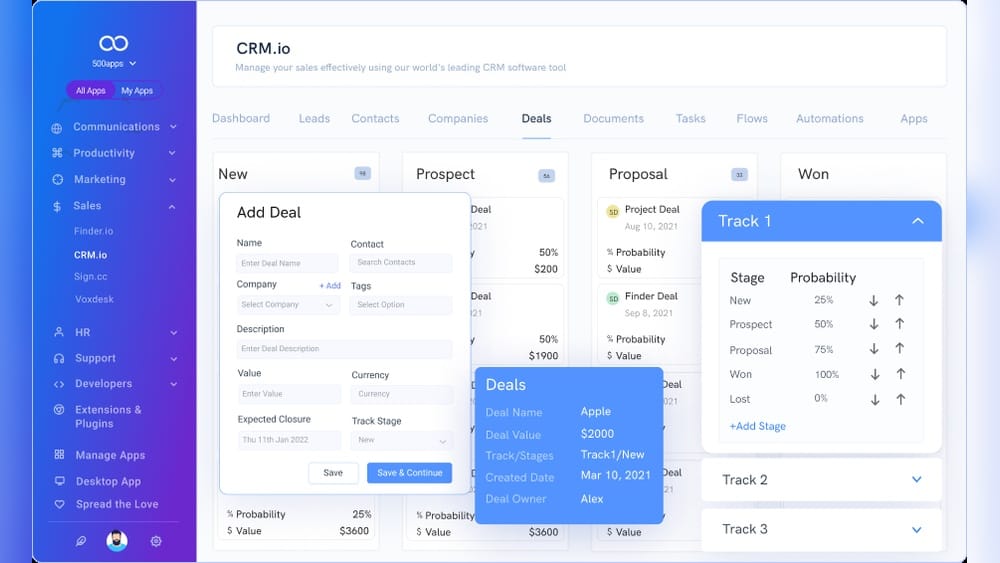
If you're running a very tight budget, consider exploring affordable lifetime-license deals that some software vendors offer through marketplaces. These one-time purchases can be ideal for early-stage businesses that want core CRM functionality without monthly subscription pressure. However, be aware that lifetime deals typically lack ongoing updates and premium support compared to subscription-based platforms like those from major providers. Always read the fine print on upgrade paths and data portability before buying.
How to Evaluate CRM Demos Effectively
When you sign up for a free trial, use your actual customer data rather than dummy entries. This reveals how well the CRM handles your real-world contact formats, duplicate records, and custom fields. Invite one or two team members to test alongside you—what seems intuitive to a solo user may confuse others. Pay special attention to mobile responsiveness if your team works in the field. Most importantly, test the import and export processes; a CRM that makes data entry easy but data extraction difficult can become a trap.
How to Implement Best CRM Software Successfully
Congrats on choosing the best CRM for your business! Now, let's make sure you implement it successfully. Follow these simple steps:
Plan Ahead: Take your time. Set clear goals for using the CRM. What do you want to achieve? Make a plan with specific tasks, deadlines, and responsibilities. Transfer Your Data: Moving customer data to your new CRM can be tricky. Organize your data before you transfer it. Use tools to help make the process smooth and accurate. Train Your Team: Your CRM will only work if your team uses it. Provide training and explain the benefits. Show them how the CRM makes their work easier. Customize It: Customize the CRM to match your business. Adjust settings to fit your workflow. Don't be afraid to try new things. Keep Improving: CRM isn't a one-time thing. Check in regularly to see how it's performing. Ask for feedback from your team and make changes to improve it.
A crucial step that many small businesses overlook is data cleaning before migration. Before importing anything into your new CRM, deduplicate your existing contacts, standardize phone number formats, and remove stale leads that haven't engaged in over two years. In practice, this pre-work can cut your implementation timeline in half. Set aside at least one full day for this cleanup—it's tedious but prevents the new system from inheriting old problems. Also, designate one person as the CRM champion who handles daily questions and enforces consistent data entry habits across the team.

Small business team learning CRM workflows during an onboarding workshop
Credit: www.youtube.com
Top CRM Software Providers
Here's an overview of some of the top CRM software providers in the market:
| CRM Provider | Pros | Cons | Pricing |
|---|---|---|---|
| Zoho CRM | Deep feature set, near-total customizability, flexible AI layer, integrated gamification features | Can be complex for new users | Starts at $14 per user per month |
| Salesforce | Comprehensive features, scalability, extensive customization, vast third-party integration capabilities | Steep learning curve, complex setup, expensive at higher tiers | Starts at $25 per user per month |
| HubSpot | User-friendly interface, scalability, free version, robust training and support | Limited features in the free version | Free version available, paid plans start at $50 per month |
| Insightly | Smooth data input and sharing, slick interface, highly customizable, easy integration with Insightly's help desk and marketing apps | Not as feature-rich as some competitors | Starts at $29 per user per month |
| Freshsales | Affordable base plan, intuitive interface, excellent onboarding support, lots of integrations | Limited customization options | Starts at $15 per user per month |
| SugarCRM | Flexible and customizable, intuitive user interface, advanced reporting and analytics, scalability | High pricing, complex customization, mixed customer support experiences | Starts at $49 per user per month |
| Zendesk Sell | Excellent integration with Zendesk's help desk software, useful Explorer feature for reporting, easy onboarding, useful Smart Lists | Can get pricey quickly, limited pipelines | Starts at $19 per user per month |
| Pipedrive | Sales funnel management, collaboration features, process automation, advanced user permissions | Limited advanced reporting in lower tiers | Starts at $14.90 per user per month |
| Microsoft Dynamics 365 | Complete customer view, agile support models, predictive analysis, integrated AI functionality, integrates with other Microsoft products | Steep learning curve, premium pricing | Starts at $65 per user per month |
Note: Pricing information may vary depending on the specific plan and features chosen. Always verify current pricing on the vendor's website before purchasing.
Ready to transform your customer relationships and boost your sales?
Start exploring CRM options today!
CRM Best Practices
CRM Best Practices To get the most out of your CRM system, follow these simple tips:
Manage your data: Keep your customer information accurate and updated. Clean and organize your CRM regularly to ensure the data is always reliable.
Get users on board: Help your team use the CRM well. Offer training and help with any issues they might have.
Keep improving: Check your CRM system often. Look for ways to improve and make any needed changes to your processes.
Common CRM Pitfalls to Avoid
Even with the best intentions, small businesses often stumble in a few predictable ways. One frequent mistake is over-customizing too early—adding dozens of custom fields and automations before the team has fully adopted the basics. This creates confusion and resistance. Instead, start with the default settings for the first month, then add customizations gradually based on real user requests.
Another pitfall is neglecting mobile access. If your sales team visits clients in person or attends networking events, a CRM without a solid mobile app becomes a bottleneck. Test each candidate's mobile experience during your trial period, especially for tasks like logging calls on the go or quickly looking up a contact before a meeting.
Finally, don't ignore reporting from day one. Set up three essential reports early: (1) a pipeline summary showing deal stages, (2) an activity log showing who contacted whom and when, and (3) a conversion report tracking lead-to-customer rates. These reports tell you immediately whether your CRM investment is paying off.
https://www.youtube.com/watch?v=B3IHIpJtNoY
Frequently Asked Questions
Q: What does the best CRM software do?
A: The best CRM software helps businesses stay in touch with customers. It keeps track of contact details, sales, and marketing. It also helps improve customer support.
Q: How much does the best CRM software cost?
A: The price of CRM software depends on the vendor, features, and how many people use it. There are options for any budget.
Q: What are the benefits of using the best CRM software?
A: The best CRM software helps businesses build better customer relationships, sell more, improve processes, and give better service.
Q: Is the best CRM software good for small businesses?
A: Yes, CRM software is great for small businesses. It helps them stay organized and grow. Many CRM providers have solutions for small businesses.
Q: What is cloud-based CRM software?
A: Cloud-based CRM software is stored online and is easy to use. Businesses don't need to install or take care of software. It is popular because it's easy and can grow with the business.
Q: How long does it take to implement a CRM for a small business?
A: For a small business with fewer than ten users, implementation typically takes two to four weeks from signup to full adoption. This includes data migration, basic customization, and team training. More complex setups with heavy integration might take six to eight weeks. The key is not rushing—skipping training often leads to low adoption rates that waste the entire investment.
Q: Can I use CRM software for customer support only, without sales features?
A: Absolutely. Many CRMs offer customer service modules as standalone products. Freshsales and Zendesk Sell, for example, let you purchase support-focused plans separately. If you only need ticket tracking and knowledge base features, look for a CRM that unbundles its modules so you're not paying for sales pipeline tools you won't use.
Q: Do I need a separate CRM for email marketing?
A: Not necessarily. Several CRMs, including HubSpot and Zoho, include built-in email marketing tools. However, if you send high-volume newsletters or complex automated sequences, dedicated email marketing platforms often offer better deliverability and template design. In that case, choose a CRM that integrates smoothly with your existing email tool rather than replacing it.
Q: How do I convince my team to use the CRM consistently?
A: Start by showing them how the CRM makes their individual jobs easier, not just how it helps management. For example, demonstrate how automatic logging of calls and emails eliminates manual note-taking. Gamify adoption with small rewards for the most complete data entry in the first month. Most importantly, lead by example—if leadership doesn't use the CRM daily, neither will the team.
Choosing Between All-in-One vs. Specialized CRM
One decision that confuses many small business owners is whether to pick an all-in-one platform like HubSpot that combines CRM, marketing, sales, and service, or a specialized tool that excels at one function, like Pipedrive for pipeline management.
All-in-one CRMs offer the advantage of a single source of truth—customer data flows seamlessly between marketing emails, sales calls, and support tickets. This reduces data silos and manual syncing. The trade-off is that these platforms can become expensive as you add modules, and each module may be less powerful than its specialized counterpart.
Specialized CRMs focus on doing one thing exceptionally well. They're often cheaper, easier to learn, and faster to deploy. The downside is that you may need to integrate multiple tools to cover marketing, sales, and support separately, which can create data fragmentation and extra monthly costs.
For a small business with fewer than 15 employees, an all-in-one approach usually delivers the best value because it simplifies workflows and keeps data unified. Once your team exceeds 30 people, specialized tools with deeper capabilities may become worthwhile, especially if you have dedicated marketing or support departments.
How CRM Integrates with Your Broader Business Tools
Your CRM shouldn't exist in isolation. For maximum efficiency, connect it with the tools you already use daily. Key integrations to prioritize include:
- Email platform: Sync contacts and track opens/clicks from campaigns
- Calendar: Automatically log meetings and set follow-up reminders
- Accounting software: Access payment history and invoice status directly from customer records
- E-commerce platform: See purchase history and abandoned carts alongside contact details
- Help desk: Link support tickets to customer profiles for full service history
If you're using a reliable hosting setup for your business website, your CRM can also pull lead data from forms and landing pages automatically. This eliminates manual data entry and ensures no lead slips through the cracks. For businesses just starting their online presence, selecting dependable hosting that supports CRM integrations like webhooks or API connections is a smart foundational step.
Conclusion
Choosing the right CRM is key for your business. Understand your needs, compare options, and use the CRM well. This will help you build better customer relationships and grow your business. A good CRM is a smart investment.
Invest time in finding the best fit. Your business deserves the best tools. Happy CRM hunting!

Similar Posts