
Most book ideas die somewhere between the outline and chapter three. Inkfluence AI attacks that exact bottleneck: describe your concept in one sentence, and the platform drafts structured chapters, generates a cover, and hands you a PDF, EPUB, or DOCX file you can upload to a storefront. It is one of the few AppSumo deals in the books category that covers writing, design, and export in a single workspace.
Disclosure: This article contains affiliate links. We may earn a small commission at no extra cost to you when you sign up via our links, it’s how this site stays free to run.
TL;DR Verdict
- Who it’s for: authors, coaches, and content creators who need a sellable book or lead magnet without hiring a ghostwriter or a cover designer.
- Headline price: $49 one-time for License Tier 1 (35 chapters per month), down from $89 on the AppSumo listing.
- Biggest pro: one prompt produces a full, structured manuscript plus a matching cover, so you skip the two slowest parts of publishing.
- Biggest con: there is no free tier, so you pay $49 before you can judge the writing quality on your own topic.
- Trial status: no free plan, but every tier is refundable for up to 60 days under AppSumo’s money-back guarantee.
Bottom line: if you publish lead magnets, workbooks, or Kindle titles on a schedule, Get the Lifetime Deal → before the price tier you want sells out.
What Is Inkfluence AI?
Inkfluence AI is a browser-based book generation platform that turns a short prompt into a structured manuscript, a designed cover, and an export-ready file. It is built by a bootstrapped London team of one to ten people, founded in November 2025, and sold on AppSumo as a lifetime deal rather than a subscription.
The jobs it solves are concrete. You stop paying a cover designer $150 to $400 per book. You stop paying a ghostwriter $0.05 to $0.15 per word for a 30,000-word manuscript.
You stop reformatting a Word document by hand for Kindle, Gumroad, or Etsy uploads.
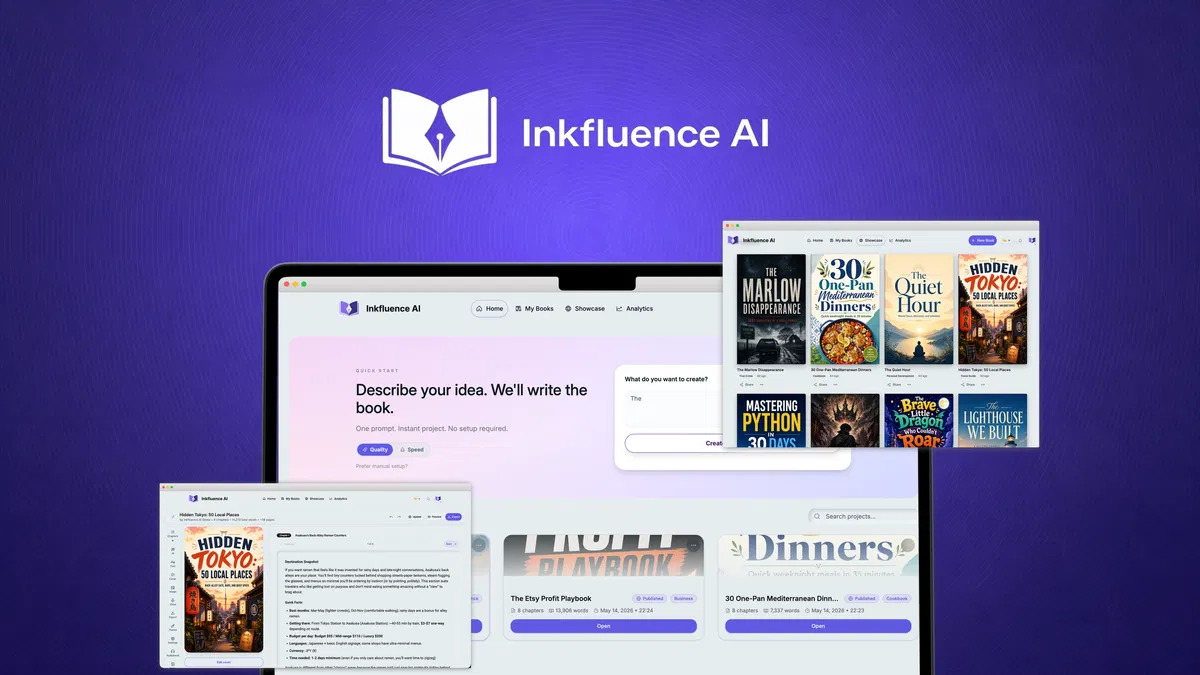
According to the vendor’s documentation, the workflow runs in one pass: enter your idea, pick one of 33 book types, generate, then edit inside a rich text editor with autosave. Everything after that is export. If you have used a like-minded AI writing assistant before, the mental model will feel familiar, though the book-specific structure is the part that separates this tool from a general chatbot.
Key Features That Matter
One-Prompt Book Drafting
You type a description of your book and the platform returns a full structure with chapters and sections already drafted. That matters because the hardest part of publishing is not typing, it is deciding what belongs in chapter seven. The draft gives you something to react to instead of a blank page.
33 Book Types, From Cookbooks to Lead Magnets
The template library spans fiction, cookbooks, guides, workbooks, and lead magnets. A coach building a client onboarding workbook and a novelist writing a series need very different chapter logic, and this is where a book-specific generator beats a generic text model. Choosing the right type at the start changes the structure you get back.
Cover Design With AI or Your Own Art
You can browse professional cover templates and customize fonts, colors, and layout, or generate a cover with AI. Uploading your own artwork is supported too, and one click applies it across the project. The 3D mockup preview shows you what a buyer sees on a product page before you export anything.
KDP, Gumroad, and Etsy Exports
Export produces PDF, EPUB, and DOCX files with formatting intact, which is the format set that Amazon’s Kindle Direct Publishing accepts for ebooks and paperbacks. One-click publishing to Gumroad and Etsy is built in for creators who sell direct. That combination matters if you sell the same title through more than one storefront.
Audiobook Generation on Higher Tiers
License Tier 3 and Tier 4 add audiobook chapters and 38 AI voices, with 30 and 60 chapters per month respectively. Audiobooks are the fastest-growing format for nonfiction and self-help titles, and adding one normally means paying a narrator per finished hour. This is the feature that justifies the jump from $99 to $329 for many buyers.
Real-Time Sync and Remixing
Projects sync across devices, so you can start a chapter on a desktop and finish it on a lightweight machine during a commute. The remix tool repurposes an existing book into a new format or edition without starting from zero. Remixing is how a single manuscript becomes a workbook, a pocket guide, and a bundle.
Pricing Tiers (starts $49)
Every tier is a one-time payment with lifetime access, and every tier carries the same 60-day refund window. There is no monthly subscription option.
| Tier | Price | Best For | Free trial? |
|---|---|---|---|
| License Tier 1 | $49 (was $89) | Testing the tool on a single book or lead magnet, 35 chapters/month, 1 seat | No, 60-day refund instead |
| License Tier 2 | $99 (was $179) | Regular publishers who need 80 chapters/month, 1 seat | No, 60-day refund instead |
| License Tier 3 | $329 (was $399) | Audiobook and illustrated book creators, unlimited chapters, 30 audiobook chapters, 50 illustrations/month, 1 seat | No, 60-day refund instead |
| License Tier 4 | $499 (was $979) | Agencies and studios, unlimited chapters, 60 audiobook chapters, 100 illustrations/month, 3 seats plus client workspaces | No, 60-day refund instead |
Plain English: Tier 1 at $49 is roughly the cost of one freelance cover design, and it covers 35 chapters a month. Tier 2 doubles the chapter allowance for another $50, which is the sensible upgrade if you publish more than one title per month. Tier 3 is where audiobooks and AI illustrations unlock, and Tier 4 is the only tier that gives you three seats, so it is the one to pick if you bill clients for book production.
Commercial rights are included across all four tiers, so you keep the revenue from every sale.
Pros and Cons
What Works Well
- One prompt returns a full chapter structure instead of a blank page.
- Lifetime pricing from $49, with no recurring subscription to cancel.
- 33 book types cover fiction, cookbooks, workbooks, and lead magnets.
- PDF, EPUB, and DOCX exports keep formatting for storefront uploads.
- Full commercial rights mean you keep every dollar from sales.
- Cloud sync lets you move between devices mid-manuscript.
- Audiobook voices and AI illustrations unlock on the upper tiers.
Where It Falls Short
- No free plan, so you pay before testing output on your topic.
- Tier 1 caps you at 35 chapters per month, tight for high-volume publishers.
- The AppSumo listing shows 3.94 stars from 36 reviews, so quality is debated.
- Every AI draft still needs a human editing pass before you sell it.
- Audiobook and illustration features start at $329, far above the entry price.
- The company launched in late 2025, so the track record is short.
Who Should Use Inkfluence AI?
Solo Authors and Self-Publishers
If you publish two to four Kindle titles a year, the math is simple. A single cover design costs more than Tier 1, and you still need to write the manuscript. At $49, this tool replaces both invoices for the price of one.
Coaches and Course Creators
Coaches sell workbooks, onboarding guides, and lead magnets constantly, and those assets usually stall because nobody wants to write 40 pages of exercises. Pair the output with a learning platform built for course delivery, and you have a funnel from free ebook to paid program. The remix feature matters here, because one core manuscript can become three client-facing products.
Agencies and Freelance Ghostwriters
Tier 4 gives you three seats and client workspaces, which is the difference between a personal tool and a billable service. Ghostwriters can quote a fixed price per book and cut production time from weeks to days. You will still need a human editor, but the margin per project improves sharply.
Skip it if: you write literary fiction that depends on a distinctive voice, you need granular control over every sentence before a draft exists, or you want a free tool to test first. This is a production accelerator, not a writing coach.
Alternatives to Consider
Jasper is the closest match on raw AI writing, but it is priced as a monthly subscription and does not ship cover design or book-specific export formatting. You would still need a separate design tool.
Canva handles cover design and basic ebook layouts beautifully, and most creators already pay for it. It will not write a single chapter, so it covers only the back half of the workflow Inkfluence AI bundles.
Scrivener remains the better choice for long-form authors who want deep outlining, split-screen research, and compile control. Its learning curve is steeper, and there is no AI generation or one-click storefront publishing.
Final Verdict
Inkfluence AI earns its place in the books category by bundling three jobs that normally cost three separate invoices: drafting, cover design, and formatted export. The 60-day refund window removes most of the risk, and the $49 entry tier costs less than a single freelance cover. The trade-offs are real, especially the absence of a free plan and the 35-chapter monthly cap on Tier 1, and the 3.94-star AppSumo rating shows buyers are not unanimous.
If you publish on a schedule and you already know what your next book is about, the value is straightforward.
Frequently Asked Questions
Does Inkfluence AI have a free plan?
No. There is no free tier or limited free trial. The lowest entry point is License Tier 1 at $49 as a one-time payment, and every purchase is refundable for up to 60 days through AppSumo’s money-back guarantee.
That refund window functions as your test period, so run your own manuscript through it early after purchase.
How does Inkfluence AI compare to Jasper?
Jasper is a general AI writing assistant sold on a monthly subscription with no cover design or book export pipeline. Inkfluence AI is narrower and book-specific, and its lifetime pricing means you pay once. If you also write blog posts, ad copy, and emails, Jasper covers more ground.
If you only produce books, Inkfluence AI covers more of the actual production chain.
Can I cancel anytime?
There is nothing to cancel. All four AppSumo tiers are one-time lifetime purchases, not recurring subscriptions. What you can do is request a refund within 60 days of purchase if the tool does not fit your workflow.
After that window closes, the license stays yours permanently.
Is Inkfluence AI worth the price?
At $49 for 35 chapters per month and full commercial rights, it pays for itself against a single freelance cover design. The case gets stronger at Tier 3, where audiobook generation replaces a per-hour narrator fee. It is harder to justify if you only plan to publish one short lead magnet and never again.
Can I sell the books I generate with Inkfluence AI?
Yes. The vendor states that all tiers include full commercial rights, so you can sell on any storefront you choose, including Amazon KDP, Gumroad, Etsy, or directly to clients. Because you own the output, registering a copyright in your own name is your call to make, and the [U.S.
Copyright Office explains how registration works for published works. Always read the current license terms on the deal page before you launch a paid title.


1 thought on “Inkfluence AI Review (2026): Honest Take After Real Research”