BizReply Review (2026): Honest Take After Real Research
Lead SaaS Analyst & Software Developer at PCSaaS · Software Developer (GitHub @Ratankarmakar) · Google Ads & Analytics Certified · 500+ SaaS Tools Tested · 8+ years in software engineering, B2B SaaS evaluation, AppSumo deal auditing, and performance marketing
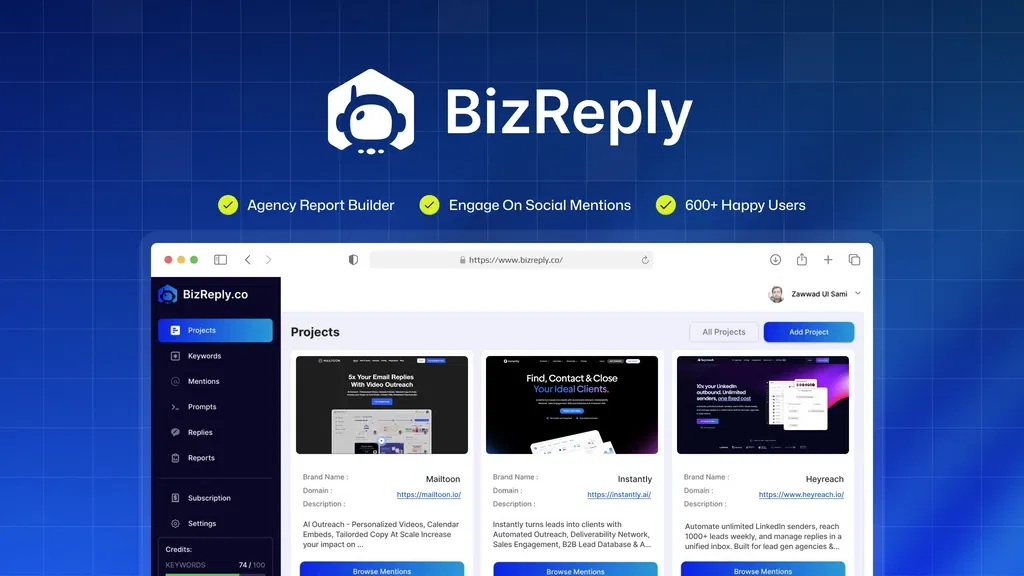
BizReply watches eight social platforms for the keywords you care about, then drafts replies in your brand voice and packages the results into client-ready reports. Its strongest differentiator is that discovery and response sit in the same tab, so you stop copying post links into a separate AI chat. This review covers what the $69 lifetime deal actually includes, and where the tool stops short.
Disclosure: This article contains affiliate links. We may earn a small commission at no extra cost to you when you sign up via our links, it's how this site stays free to run.
TL;DR Verdict
- Who it's for: Marketing agencies and social media managers handling anything from 1 to 20 brand projects.
- Headline price: $69 one-time for License Tier 1, down from a $599 list price, which covers one brand and 200 AI replies per month.
- Biggest pro: Keyword tracking and AI reply drafting live in one dashboard, so you go from finding a post to answering it without switching apps.
- Biggest con: You must supply your own OpenAI or Google Gemini API key, so AI usage costs sit outside the $69.
- Trial status: No free trial. AppSumo allows refunds for up to 60 days from the purchase date instead.
Bottom line: BizReply makes financial sense if you manage several brands and already pay for a language model API.
What Is BizReply?
BizReply is a keyword monitoring and AI reply tool that scans social platforms for mentions you care about. You load a keyword list, and the tool surfaces matching posts, comments, and threads with a button to generate a response.
Two jobs sit at the center of the product. The first is discovery: finding the posts where your brand, a competitor name, or a topical phrase shows up across eight networks. The second is response: turning those finds into replies that sound like your brand instead of like a generic bot.
The pricing tells you who the vendor built this for. One brand project on Tier 1 suits a freelancer or a single-location business. Five projects on Tier 2 and twenty on Tier 3 suit an agency juggling several client profiles at once.
If you already run a daily routine inside a social management tool, BizReply sits beside that stack rather than replacing it.
The founders' stated goal is time recovery. Manual mention checking and reply writing eats hours every week, and the AppSumo listing frames the product as a way to cut that work down to minutes. That framing is reasonable, with one caveat covered later: the AI layer runs on your key, not on the vendor's credits.
Key Features That Matter
Keyword Tracking With AI Suggestions
You add the terms you want followed, whether that is a brand name, a product line, a competitor handle, or an industry phrase. BizReply then pulls matching posts from all eight supported networks and drops them into a review queue. Tier 1 tracks 5 keywords, Tier 2 tracks 25, and Tier 3 tracks 100.
Negative keywords do the filtering work. Once you track a broad term like "sale" or "budget," the noise climbs fast, and an exclusion list keeps the queue usable. The vendor also generates keyword suggestions based on your brand and intent, which helps when you cannot decide what to monitor first.
AI Reply Drafting Using Your Own API Key
BizReply does not bundle AI credits. You paste an OpenAI or Google Gemini API key into the settings, and the tool uses your account to write replies. That keeps the product purchase one-time, but it also means your model bill runs separately every month.
Teams that already generate copy with AI help will recognize the pattern: you bring the key, the tool brings the workflow. If you have never set up an API key before, budget 10 minutes for it. If you already have one for another project, this step is copy and paste.
Prompt Library With Tone and Language Controls
The prompt manager stores reusable instructions for different response types, from a quick thank-you to a longer product explanation. You pick the tone, the model, and the output language before generating anything. That matters for agencies running campaigns in more than one market, since a single workspace can produce replies in several languages.
Custom prompts are the part worth building early. The default library covers common cases, but a prompt tuned to your client's voice produces drafts you can publish with light edits. Note that this feature handles replies, not filling a content calendar, so plan a separate tool for original posts.
Branded PDF Reports for Clients
BizReply generates PDF reports you can hand to a client without extra design work. You add your own logo or the client's, and the report lists responses, post links, platforms, and dates in one document. Tier 1, Tier 2, and Tier 3 all include the report builder.
For agencies, this is the feature that pays for the license fastest. A monthly engagement report that used to take two hours in a spreadsheet now takes a few clicks. The output covers engagement activity rather than revenue, so pair it with whatever you use for tracking marketing spend if clients ask about return.
Multi-Brand Workspaces
Higher tiers separate work by brand project, which keeps client A's keywords out of client B's queue. Tier 2 gives you 5 projects and 3 team seats, while Tier 3 opens 20 projects and 10 seats. That structure is what turns a personal monitoring tool into something an agency can share across a team.
If you already run client work in one hub for task and project management, BizReply stays in its lane. It monitors and drafts, then you push the output to whichever platform actually publishes.
Pricing Tiers (starts $69)
| Tier | Price | Best For | Free trial? |
|---|---|---|---|
| License Tier 1 | $69 one-time (list $599) | Solo social managers, single brand, 50,000 mentions | No, 60-day refund window |
| License Tier 2 | $149 one-time | Small agencies, up to 5 brand projects, 3 seats | No, 60-day refund window |
| License Tier 3 | $289 one-time | Agencies with 20 projects, 10 seats, unlimited AI replies | No, 60-day refund window |
All three tiers include the client report builder, all 8 social networks, custom prompts, and multi-language output. The differences come down to volume: history storage (1 year on Tier 1, 2 years above that), brand projects, team seats, tracked keywords, and monthly AI replies. Tier 1 caps you at 5 keywords and 200 replies a month, which is tight for anything beyond a single brand.
Tier 3 removes the reply ceiling entirely and lifts keyword tracking to 100.
Because these are one-time payments, the comparison is not monthly subscription against monthly subscription. A $289 Tier 3 purchase replaces roughly one to two months of a typical per-seat social listening plan, and then you own it. The trade-off is that lifetime deals rarely include the same support commitments as a paid subscription, and this listing sits outside AppSumo's partner guarantee, which the vendor page states plainly.
Pros and Cons
What Works Well
- Lifetime pricing starting at $69 removes recurring subscription math for small teams.
- Keyword discovery and AI drafting share one tab, shortening the find-to-reply gap.
- Bring-your-own-key support means reply quality tracks the model you already trust.
- Negative keywords and AI suggestions keep a busy tracking list from drowning in noise.
- Branded PDF reports give agencies a client-ready artifact without extra design hours.
- Ten team seats on Tier 3 make it shareable across a mid-sized agency pod.
Where It Falls Short
- No native scheduling or publishing, so you still need a separate posting tool.
- AI replies depend on your own API key, adding a second bill to track.
- Tier 1 is restrictive: 1 brand, 5 keywords, 200 replies monthly.
- No free trial, only a 60-day money-back window through AppSumo.
- The vendor excludes this listing from AppSumo's "We Got Your Back" guarantee.
- Reporting focuses on engagement metrics, not revenue or pipeline attribution.
Who Should Use BizReply?
Agencies Running 5 to 20 Client Brands
This is the core buyer. Tier 2 and Tier 3 exist because agencies need separate projects per client and enough seats for a small team. The report builder alone justifies the price if you currently build monthly engagement summaries by hand.
In-House Social Managers at a Single Company
Tier 1 covers one brand with 5 tracked keywords, which fits a business monitoring its own name plus a few product terms. You get the reply drafting and the reporting without paying for agency-scale volume. Watch the 200-reply monthly cap during launch weeks.
Marketing Consultants Who Bill for Engagement
If your service is community management or reputation monitoring, BizReply gives you a repeatable process you can show clients. Teams that already lean on cutting manual outreach work with automation will find the learning curve short.
Who should skip it: solo creators who publish twice a week and rarely answer mentions, teams that need an all-in-one scheduler with an inbox for direct messages, and anyone unwilling to manage an API key. Those buyers should look at a publishing-first platform instead, since BizReply deliberately avoids the scheduling layer.
Alternatives to Consider
Brand24 handles media and mention monitoring well, including blogs and news sites that BizReply does not cover. The trade-off is pricing: Brand24 runs on a monthly subscription, and it does not draft replies for you.
Mention offers broader monitoring coverage with alerting across web and social sources. You get deeper listening data, but you lose the one-time price and the built-in reply generation.
SocialBu combines publishing, scheduling, and engagement in one monthly plan, and it works well for teams that want keeping a posting schedule running alongside monitoring. BizReply is cheaper over time and more focused on reply drafting, while SocialBu covers the publishing gap BizReply leaves open.
Final Verdict
BizReply solves a specific problem well: finding the posts worth answering and drafting those answers fast. At $69 for a lifetime Tier 1 license, the risk is low for a single brand, and Tier 2 at $149 is the sweet spot for most small agencies. The honest catches are the missing scheduler, the API key requirement, and the lack of a free trial, so lean on the 60-day refund window if you are unsure.
If mention monitoring and reply drafting are the bottleneck in your week, this is a sensible purchase. For anyone who needs fielding customer questions or full DM management, it is not the right tool and no refund window will change that.
Ready to test it against your own keyword list? Get the Lifetime Deal →
Frequently Asked Questions
Does BizReply have a free plan?
No. There is no free tier and no free trial. The only risk-free option is the 60-day refund window that AppSumo applies to this listing, which starts on your purchase date.
How does BizReply compare to Brand24 or Mention?
Brand24 and Mention focus on listening breadth, including news and blog sources, and they charge monthly. BizReply tracks eight social networks, costs a one-time fee, and adds AI reply drafting that neither competitor includes by default. Pick based on whether you need replies or pure monitoring.
Can I cancel anytime?
There is nothing to cancel in the usual sense, because you pay once for lifetime access rather than subscribing. What you can do is request a refund within 60 days. After that window closes, the license is yours permanently, including the tier limits you bought.
Is BizReply worth the price?
For an agency running multiple client brands, yes. The $149 and $289 tiers replace both a monitoring subscription and hours of manual report building. For a casual user who checks mentions once a month, the free options inside each social platform are enough.
Do I need my own OpenAI or Gemini API key?
Yes. BizReply requires bring-your-own-key access, so the 200 to unlimited reply generation happens on your own account. You only pay the model provider for what you use, which is usually cents per reply.
Budget a few dollars a month for light usage, and set a spend limit with your provider before you start.

Similar Posts






















[…] into the thread. If your real bottleneck is inbound mail rather than outbound drafting, a dedicated email reply assistant covers that job […]
[…] already building out a stack of reply and outreach tools, the kind covered in our look at automating first replies, will recognise the […]