FeedBoss Review (2026): Honest Take After Real Research
Lead SaaS Analyst & Software Developer at PCSaaS · Software Developer (GitHub @Ratankarmakar) · Google Ads & Analytics Certified · 500+ SaaS Tools Tested · 8+ years in software engineering, B2B SaaS evaluation, AppSumo deal auditing, and performance marketing
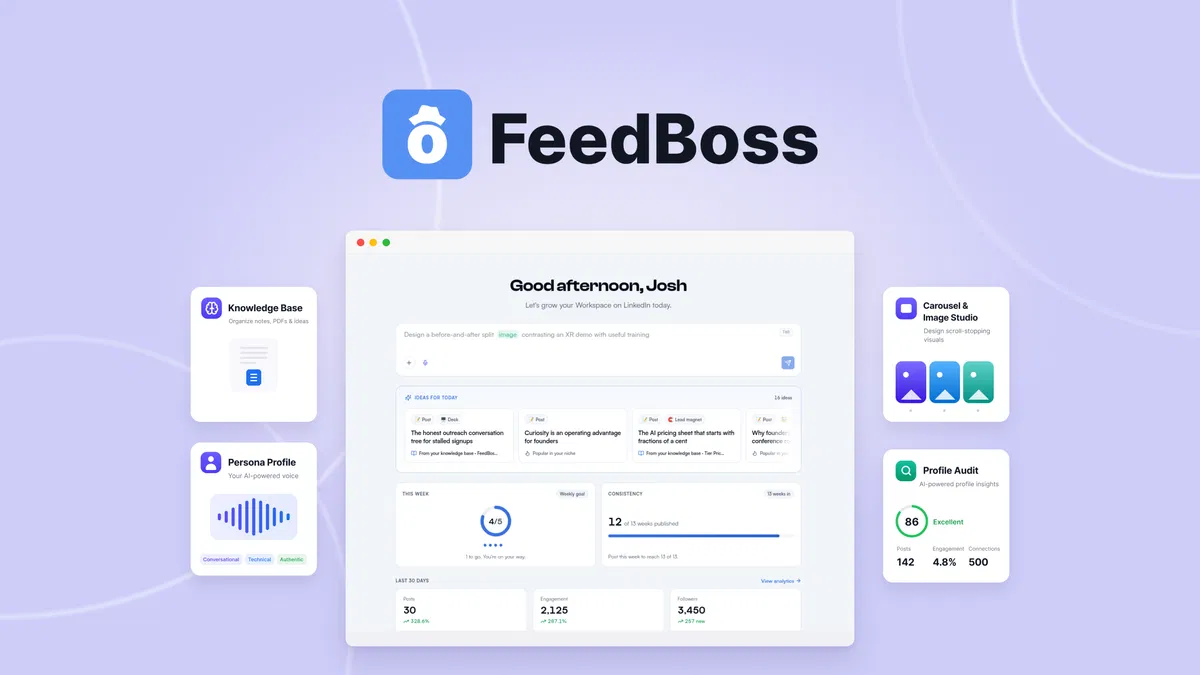
FeedBoss is not another blank-box AI writer. It picks the topic for you, drafts it in your voice, and then rewrites the lines that read like a machine wrote them. That combination puts it in a different category from the average LinkedIn scheduler.
Disclosure: This article contains affiliate links. We may earn a small commission at no extra cost to you when you sign up via our links, it's how this site stays free to run.
TL;DR Verdict
FeedBoss is worth $59 if LinkedIn is your main channel, and a hard pass if it is not. Here is the short version.
- Who it is for: solo creators, social media managers, and consultants publishing on LinkedIn three or more times a week.
- Headline price: $59 one-time for License Tier 1, which includes 400 monthly AI credits and 2,000 one-time credits.
- Biggest pro: the Persona Profile and Knowledge Base, which keep every draft tied to what you actually know.
- Biggest con: it launched in September 2025 and only manages LinkedIn, so multi-platform teams still need a second scheduler.
- Free trial: there is no free plan or trial period; the AppSumo deal is instead refundable for up to 60 days.
Bottom line: if consistent LinkedIn output drives your pipeline, Try It Free →
What Is FeedBoss?
FeedBoss is an AI LinkedIn content workspace that plans, drafts, designs, and schedules posts using your own voice and knowledge base. The company behind it is bootstrapped, based in the USA, and lists a team of one to ten people.
The product targets one specific job: deciding what to publish tomorrow. Most social tools assume you already have the idea and just need somewhere to queue it. FeedBoss opens with a set of post ideas matched to your niche, your expertise, and your career stage, then drafts whichever one you pick.
Two more jobs matter here. The first is design, since carousels, infographics, and images are generated from a prompt with a saved Brand Kit applied. The second is engagement, because a Chrome extension drafts comments in your voice directly inside the LinkedIn comment box.
That mix explains why building a professional audience stays difficult for people who post in bursts and then disappear for a month.
The listing shows integrations with Google Gemini, OpenAI, Claude, and OpenRouter, with no API key required on the standard setup. The AppSumo page carries a 4.93 average across 61 reviews, though that sample comes from early adopters rather than the wider market. Independent aggregate ratings on platforms such as G2 are worth checking before you commit, because AppSumo feedback skews toward people who bought at a discount.
Key Features That Matter
The features that justify the price are the ones that remove work, not the ones that add options. Six of them carry the product.
A daily idea feed instead of a blank page
Every session starts with curated post ideas grounded in your niche, your knowledge base, and your career stage. You pick one and FeedBoss writes the draft. This removes the planning step that stalls most solo posters on a Tuesday morning.
Persona Profile and Knowledge Base
You train a persona on your brand voice, and the official FeedBoss site describes it as refining itself over time as you publish. The knowledge base accepts voice memos, text, and PDFs, with a "talk it out" mode on higher tiers, which sits close to pulling structure out of raw files. Anything the system learns about your writing can be reviewed, paused, or deleted.
AI scoring and automatic rewrite
FeedBoss scores each draft the way a real reader would score it, then rewrites the lines that sound like generic AI output. This is the feature that separates it from a prompt-and-paste workflow, where you still edit every paragraph by hand.
Carousels, infographics, and image editing
You generate swipeable carousels and infographics from a single prompt using dozens of templates. Fonts, colors, and layouts follow the saved Brand Kit, and images can be edited afterward by swapping objects, changing backgrounds, or restyling text inside the image.
Competitor and prospect tracking
You track chosen profiles, draft comments on their posts, and see the engagement each comment earned. Tier 1 includes 10 tracked engagement profiles, and Tier 4 raises that ceiling to 100.
Scheduling and bulk generation
You can plan weeks of content inside the same workspace or auto-generate a full month in seconds. Best-time-to-post suggestions come from your own results rather than a generic industry average, which matters more once you have 30 or 40 posts of history.
Pricing Tiers (starts $59)
FeedBoss sells lifetime licenses on AppSumo rather than a monthly subscription, and the price climbs in four steps.
| Tier | Price | Best For | Free trial? |
|---|---|---|---|
| License Tier 1 (Creator) | $59 one-time | 1 member, 400 monthly AI credits, 1 LinkedIn profile, 25 GB storage | No, 60-day refund |
| License Tier 2 (Pro) | $149 one-time | 2 members, 1,200 monthly credits, 5 profiles, 100 GB storage | No, 60-day refund |
| License Tier 3 (Studio) | $299 one-time | 10 members, 3,200 monthly credits, 10 profiles, post approval workflow | No, 60-day refund |
| License Tier 4 (Scale) | $499 one-time | 30 members, 5,000 monthly credits, 25 profiles, API access, 1 TB storage | No, 60-day refund |
Read the table carefully, because credits, not seats, are the real constraint. Tier 1 gives you 400 monthly AI credits plus 2,000 one-time credits, and heavy carousel or image generation burns through those faster than text posts do. Profile audits also scale by tier, from 5 per month on Tier 1 to 50 on Tier 4.
If you already buy software this way, our notes on a one-time AI purchase explain how these offers usually compare to subscriptions. Our breakdown of flat-rate AI deals covers the same ground from a different angle.
Pros and Cons
The honest picture: strong on ideation and voice, thin on platform coverage. Both sides matter before you spend $59.
What works well
- The idea feed removes the daily "what do I post" stall entirely.
- Persona training keeps drafts closer to your real sentence rhythm.
- Auto-rewrite targets AI-sounding lines instead of just shortening text.
- Carousels and infographics come from one prompt with your Brand Kit applied.
- Comment drafting inside LinkedIn saves a second tool and a second tab.
- Lifetime pricing at $59 undercuts most monthly LinkedIn tools within a year.
- The 60-day refund window beats the standard 14 or 30 days.
Where it falls short
- No free plan, so you must pay before judging output quality.
- LinkedIn only, with no native publishing to X, Instagram, or Facebook.
- Credit limits can surprise you if you generate many images.
- The company launched in late 2025, so long-term support is unproven.
- The Chrome extension adds a browser dependency for comment drafting.
- Advanced items, including API access and the authority map, sit behind the $499 tier.
Who Should Use FeedBoss?
FeedBoss fits one specific operator: someone whose growth depends on consistent LinkedIn output. Three profiles get the most from it.
Solo creators and consultants posting three to five times a week
You need a steady stream of ideas and drafts that sound like you rather than a template. FeedBoss handles both, and the streak tracking plus nudges keep you publishing on the days you would otherwise skip.
Social media managers running several client profiles
Tier 3 supports 10 members, 10 LinkedIn profiles, and 25 monthly profile audits. A post approval workflow is included, which matters when a client has to sign off before anything goes live.
Small B2B teams with founder-led content
If your pipeline depends on a founder posting consistently, FeedBoss turns that founder's voice memos into drafts. Pair it with managing a sales pipeline and the content connects to revenue instead of piling up in a scheduler nobody reads.
Who should skip it
Skip FeedBoss if LinkedIn is a side channel, if you need Instagram or TikTok scheduling in the same dashboard, or if you refuse to pay before testing. Teams already running a full social suite will not replace it, they will bolt it on. Anyone whose growth plan leans on email should look at newsletter platforms worth switching to first, and pairing content with tools built for early-stage teams covers the list-building gap FeedBoss leaves open.
Alternatives to Consider
If FeedBoss is not the right fit, three tools cover the gap.
Buffer schedules across multiple networks from one calendar and offers a free tier for a few channels. It does not learn your voice or generate grounded ideas, so you still write everything yourself.
Hootsuite is built for agencies and larger teams, with approval chains and social listening included. It costs more per month and offers nothing close to a persona-trained draft.
Taplio is the closest LinkedIn-specific rival, with a library of high-performing posts and its own Chrome extension. FeedBoss leans harder on grounding drafts in your knowledge base and career stage, while Taplio leans on inspiration from other creators.
Final Verdict
FeedBoss solves the part of LinkedIn that most tools ignore: deciding what to say, then saying it in your voice. The persona training, the knowledge base, and the AI-line rewrite are the three features worth paying for, and the $59 entry tier is low enough to test without much risk. The trade-offs are real, though, since there is no free tier, no multi-network publishing, and the company is young enough that you are betting on its roadmap.
If your growth depends on consistent LinkedIn output, the 60-day refund makes Try It Free → a low-stakes experiment.
Frequently Asked Questions
Does FeedBoss have a free plan?
No. FeedBoss has no free tier and no trial period. The AppSumo deal replaces that with a 60-day money-back guarantee, and you must activate your license within 60 days of purchase.
How does FeedBoss compare to Buffer?
Buffer schedules across many networks and starts free. FeedBoss publishes to LinkedIn only, but it plans your topics and drafts in your voice, which Buffer does not attempt.
Can I cancel anytime?
There is nothing to cancel, because you buy a one-time license rather than a subscription. You can request a refund within 60 days, and you can downgrade between tiers inside that same window.
Is FeedBoss worth the price?
For someone posting on LinkedIn three or more times a week, yes. At $59 one-time it costs less than two months of most LinkedIn schedulers, and the grounding features cut editing time on every draft.
Does FeedBoss write posts that sound like AI?
That is the specific problem it targets. Drafts are scored the way a reader would score them, and lines that read as generic AI output get rewritten automatically before you publish.
What happens when my AI credits run out?
Monthly credits refresh on your billing cycle, and each tier also includes a bank of one-time credits. Tier 1 pairs 400 monthly credits with 2,000 one-time credits, so a heavy carousel week draws on the reserve rather than stopping your schedule.

Similar Posts






















[…] anyone already keeping a posting calendar full, that step alone can save an hour a […]
[…] connect your site, and it generates and publishes on a cadence you define. That places it closer to automated content publishing tools than to a chat-based writing […]