Keyshift AI Review (2026): Honest Take After Real Research
Lead SaaS Analyst & Software Developer at PCSaaS · Software Developer (GitHub @Ratankarmakar) · Google Ads & Analytics Certified · 500+ SaaS Tools Tested · 8+ years in software engineering, B2B SaaS evaluation, AppSumo deal auditing, and performance marketing
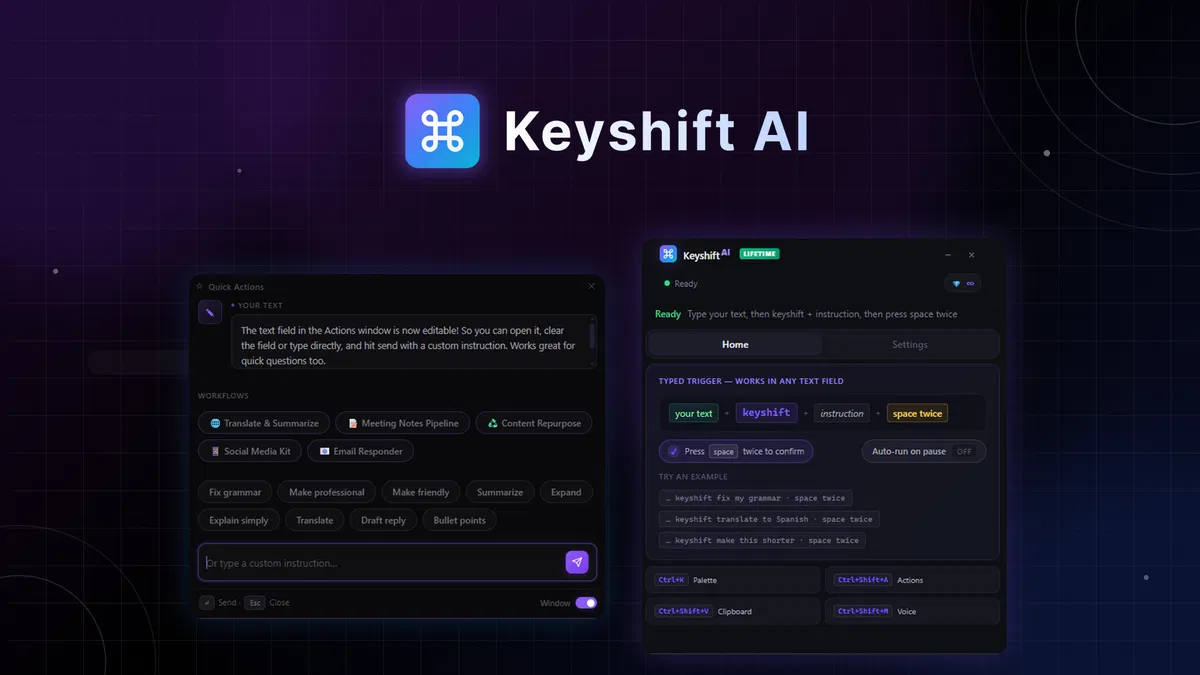
KeyShift AI moves the AI prompt into the text field you are already typing in. Type a trigger word plus an instruction inside Slack, Gmail, or Notion, tap the spacebar twice, and the rewritten sentence replaces itself in place. That single habit, more than the feature list, separates it from the chatbot you keep parked in another tab.
Disclosure: This article contains affiliate links. We may earn a small commission at no extra cost to you when you sign up via our links, which is how this site stays free to run.
TL;DR Verdict
- Best for: content creators, copywriters, and solo founders who write in five or more apps every day.
- Headline price: $19 one-time on AppSumo (list price $70), including lifetime access and 1,000 credits per month.
- Biggest pro: the inline trigger works in almost any text field, so AI comes to your cursor instead of the other way around.
- Biggest con: credits reset every month, and there is no free tier to test before you pay.
- Refund window: 60 days, which covers two full months of real use.
Bottom line: if tab switching eats 20 minutes of your working day, KeyShift AI is one of the cheapest fixes available. Get the Lifetime Deal →
What Is Keyshift AI?
KeyShift AI is a desktop writing assistant for Windows and Mac that runs AI actions inside whichever application you happen to be typing in. There is no separate editor, no browser tab, and no chat window competing for space on your screen.
The problem it targets is mechanical. You draft a reply in a Slack thread, notice the tone reads as curt, and then choose between rewriting it by hand, pasting it into a chatbot, or sending it and hoping. KeyShift adds a fourth option that takes two seconds.
Select the sentence, hit the keyboard shortcut, pick "make it friendlier" from the floating panel, and the new line drops into the thread. If your real bottleneck is inbound mail rather than outbound drafting, a dedicated email reply assistant covers that job instead.
The same pattern handles translation, summarizing a long email chain, tightening grammar, and turning raw notes into structured output. According to the vendor's own site at keyshift.ai, the trigger word is customizable, which matters for teams where "keyshift" already appears in normal writing. Founder Endri Demiraj built the tool after losing time shuttling text between a document and an AI assistant, a friction point anyone drafting in a second language will recognize.
The deal listing carries 4.88 stars from 16 reviews on AppSumo at the time of writing, and AppSumo selected it for their Launchpad program. It runs natively on Windows and macOS, so a high-end Apple laptop handles it without a noticeable load.
Key Features That Matter
Inline Triggers That Live in Any Text Box
Type your instruction, press space twice, and the result replaces the selected text where you were already working. That matters most in applications that never shipped a built-in AI button, including Slack, Notion, Outlook, and your installed Office apps. Vendor-supplied screenshots show the prompt sitting on the same line as the draft.
Quick Actions Panel
A keyboard shortcut opens a floating editor on top of the active window, so focus never leaves the tool you are working in. You get one-click defaults plus a custom instruction box, and a preview window lets you approve the rewrite before it lands. That preview is the difference between a tool you trust and one you undo every third attempt.
Voice Input
You can speak the instruction instead of typing it, and KeyShift converts your speech into an AI action within seconds. Dictate a messy paragraph, apply "turn this into a professional email," and the output inserts at your cursor. Anyone who thinks faster out loud than at a keyboard gets an obvious win here.
Multi-Step Workflows
Workflows chain several AI steps into a single run. The example from the deal page is realistic: paste raw meeting notes and get back a summary, a list of action items, and a follow-up email. You build them in the dashboard by stacking actions, such as translate and then rewrite as a social post, and trigger them from the Quick Actions panel.
Course creators use the same pattern to turn rough lesson notes into module summaries, which pairs well with a full course hosting platform.
Clipboard AI, Screenshot-to-Text, and Live Translate
Clipboard AI processes any text you copy, including from apps that block browser extensions. Screenshot-to-text pulls language out of images and slide decks, and live translate handles cross-language messages without a separate translation tab. These three cover the cases an inline trigger cannot reach on its own.
Bring Your Own AI Provider
The plan lists support for multiple AI providers and unlimited API key usage, so you can route requests through a model account you already fund. That keeps billing predictable and helps if your workplace blocks third-party AI services by domain.
Pricing Tiers (starts $19)
| Tier | Price | Best For | Free trial? |
|---|---|---|---|
| License Tier 1 | $19 one-time (list $70) | One writer covering a handful of apps | No, 60-day refund |
| License Tier 2 | $129 one-time (list $280) | Daily users who need 2,000 credits per month | No, 60-day refund |
| Larger credit tiers | Priced at checkout on the deal page | Agencies running bulk daily work | No, 60-day refund |
AppSumo runs this as a lifetime deal rather than a subscription, so the $19 tier is a single payment instead of a recurring charge. The entry tier covers 1,000 credits per month, and the $129 tier doubles that to 2,000 with more headroom for heavy usage. The pricing slider on the deal page scales as high as 8,000 credits per month, with those larger tiers priced at checkout.
Credits do not roll over, so 1,000 is a monthly ceiling rather than a balance you can save up.
Pros and Cons
What We Like
- Works inside Slack, Gmail, Notion, and other everyday text boxes
- One-time $19 payment instead of a $20 monthly subscription
- 60-day refund window is longer than most software trials
- Preview before insert prevents accidental overwrites of finished text
- Multi-step workflows turn raw meeting notes into sendable deliverables
- Bring-your-own API key keeps model billing inside your own account
- Native desktop builds for both Windows and Mac machines
What Could Be Better
- No free tier, so you pay before you get to test
- Credits reset each month and never roll over
- Desktop only build, with no iOS or Android version
- The trigger syntax takes a session or two to learn
- Young AppSumo launch means long-term support is unproven
- Voice accuracy depends on your microphone and connection quality
Who Should Use Keyshift AI?
Solo Creators Publishing Several Times a Week
If you write the same idea three ways for a newsletter, LinkedIn, and a short video script, you spend more time rewriting than creating. KeyShift compresses that second pass. Creators who already run social scheduling tools get the most from the Quick Actions panel, since the same panel covers captions, comments, and direct messages.
Copywriters and Marketing Generalists
Agency copywriters bounce between client emails, briefs, Google Docs, and CMS fields all day, and every hop costs a few seconds. Running tone and length checks inside the CMS removes the alt-tab loop entirely. The tool pays for itself fastest for people billing hourly on production work rather than strategy.
Support and Success Teams
Small support teams live inside a helpdesk, and most helpdesk platforms ship no inline rewriting tool at all. KeyShift runs on top of whatever support desk software you already pay for, so agents can soften a blunt response or translate for a customer without abandoning the ticket. That saves real minutes when your team handles 200 tickets a day.
Who Should Skip It
Skip KeyShift if you write in one application only, if you already pay for an AI subscription you are happy with, or if you work mainly from a phone or tablet. There is no mobile build, and the trigger pattern needs a physical keyboard to feel fast. Anyone who wants campaign planning, content calendars, and publishing in one place should look at a broader all-in-one AI platform instead of a text utility.
Alternatives to Consider
Grammarly checks grammar, tone, and clarity inside browsers and desktop apps, and it is the safer pick if proofreading is your only need. It does not chain multi-step workflows or translate full documents, and the annual plan costs more than a $19 lifetime license.
Copy.ai targets long-form marketing copy and team-level workflow automation. It is stronger for campaign work and weaker for a two-second rewrite inside a Slack thread.
WisprFlow is voice-first dictation. If your main problem is typing rather than editing, it competes directly on speech, but it does not offer the trigger-word rewrite pattern or a lifetime price.
Independent directories such as G2 track dozens of AI writing assistants, and most of them charge monthly, which makes the one-time structure here the standout detail.
Final Verdict
KeyShift AI fixes one narrow problem properly: moving text to an AI and getting better text back. The trigger word removes the clipboard step, the floating panel keeps you inside the active window, and workflows handle the repetitive jobs you run every week. At $19 one-time with 60 days to change your mind, the financial risk sits close to zero.
The monthly credit cap on the entry tier is the only thing that will push heavy users toward the $129 plan.
If you write in Slack, Gmail, or a CMS for more than an hour a day, this pays for itself inside the first week. Get the Lifetime Deal →
Frequently Asked Questions
Does Keyshift AI have a free plan?
No. There is no free tier and no time-limited trial. What replaces it is AppSumo's 60-day money-back guarantee, which runs longer than the 14-day trials most SaaS products offer.
Buy the $19 tier, use it daily for a month, and request a refund if it does not fit your workflow.
How does Keyshift AI compare to Grammarly?
Grammarly corrects and scores the writing you already have, inside supported apps. KeyShift generates new text, translates, summarizes, and chains steps together. If grammar checking is your only need, Grammarly is enough.
If you want rewriting and translation to happen in place inside any text box, KeyShift does more for less money.
Can I cancel anytime?
There is nothing to cancel. This is a one-time purchase rather than a subscription, so no recurring charge lands on your card. If the tool does not work out, AppSumo's refund policy gives you 60 days from purchase to request your money back.
Is Keyshift AI worth the price?
At $19 one-time, it pays for itself if it saves you 30 minutes in the first month. The $129 tier only makes sense if you burn through 1,000 credits every month, which takes daily, heavy use. The 60-day refund means you can test that assumption without much downside.
Does the keyshift trigger work in every app?
It works in any application with a standard text field on Windows and Mac, which covers Slack, Gmail, Notion, Word, and most CMS editors. Apps with locked-down or custom input fields may need the Quick Actions panel instead. Clipboard AI and screenshot-to-text exist for exactly those leftovers.

Similar Posts






















[…] teams watching AI answer engine tracking across ChatGPT, Perplexity, and similar surfaces, this matters. You cannot prove that AI citations […]