SocialBu Review: Scheduling and Analytics Features Explained
Lead SaaS Analyst & Software Developer at PCSaaS · Software Developer (GitHub @Ratankarmakar) · Google Ads & Analytics Certified · 500+ SaaS Tools Tested · 8+ years in software engineering, B2B SaaS evaluation, AppSumo deal auditing, and performance marketing
Disclosure: This article contains an affiliate link. If you purchase through it, we may earn a commission.
Managing a dozen social media accounts from separate browser tabs is a recipe for burnout. You reformat the same post four times, miss publishing windows, and waste hours each week jumping between platforms. SocialBu aims to solve that by pulling scheduling, analytics, and content recycling into one dashboard that works across 12+ social networks.
This SocialBu review walks through the platform's real-world capabilities, where it shines, and the limitations you need to know before committing your workflow to it. You can also read our guide on appsumo for social media marketing.
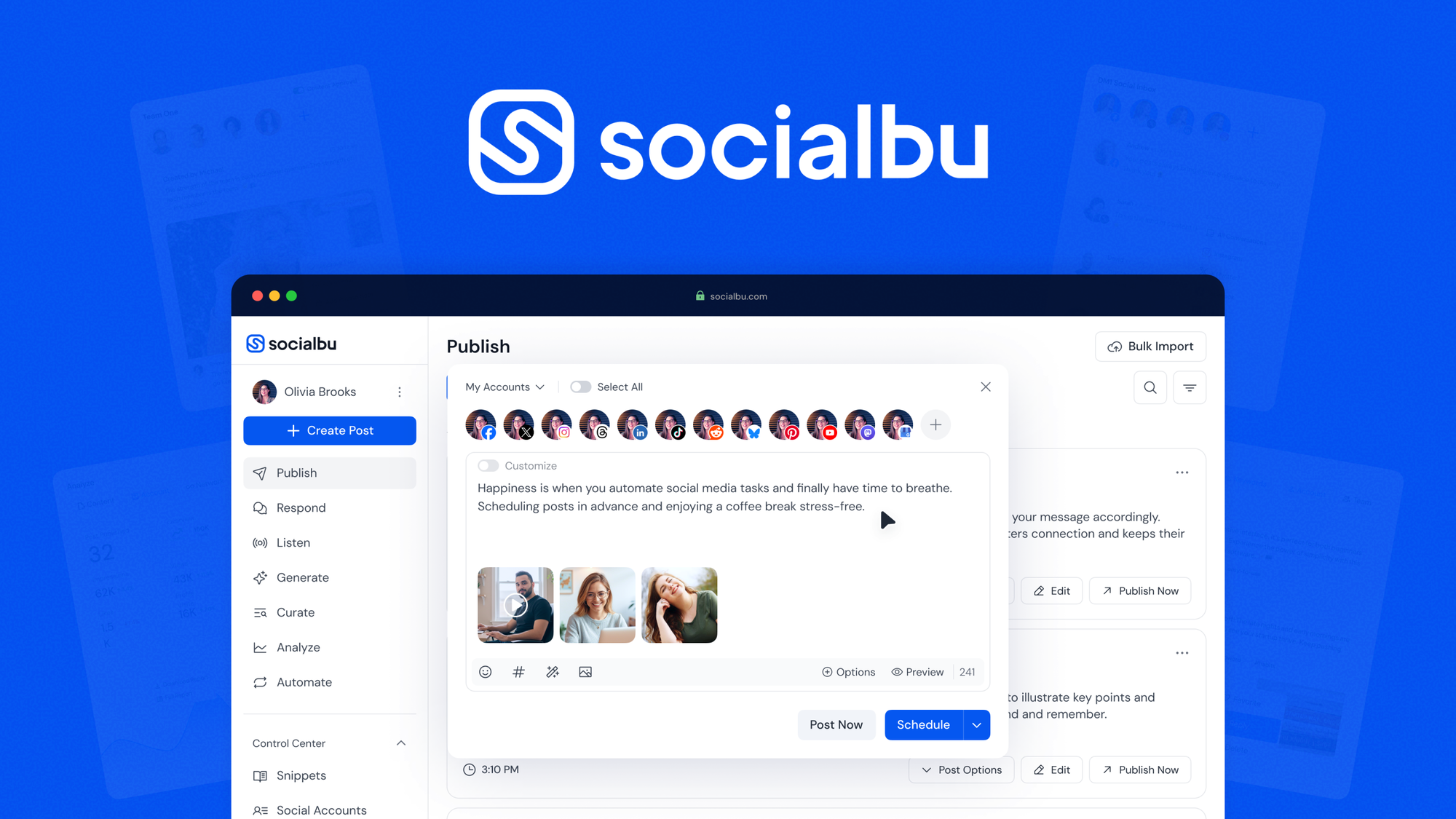
SocialBu's main dashboard interface showing connected social accounts and the publishing calendar.
What Is SocialBu and Who Actually Needs It?
SocialBu is a social media management platform designed to schedule, publish, analyze, and recycle content across multiple networks from a single interface. Instead of logging into Facebook, LinkedIn, Twitter, Instagram, and TikTok separately, you connect each profile once and control everything through one calendar.
The tool fits three specific user types well:
- Solo creators who run 2–4 brand or project accounts and want consistent daily posting without manual effort
- Digital marketing agencies handling 5+ client profiles with distinct content calendars and reporting needs
- Small business owners who maintain a presence on several platforms but lack a dedicated social media manager
SocialBu is not a good fit if you manage a single personal profile and post casually once a week. The upfront setup time—connecting accounts, configuring permissions, building your content library—only pays off when you publish steady volume. If you post fewer than ten times per month across all platforms, a free native scheduler or manual posting will serve you better.
Core Features: What Works in Practice
Multi-Platform Publishing and the Visual Calendar
The central scheduling feature supports 12+ social networks, including Facebook, Instagram, LinkedIn, Twitter, TikTok, Pinterest, YouTube, and several others. You compose one post, attach media, and choose which profiles receive it—or tailor the message per platform.
The visual calendar view is where this tool saves most of your time. Instead of scrolling through individual platform dashboards, you see every scheduled post for every account in one weekly or monthly grid. You can spot gaps where your feed will go quiet and drag posts to fill them. In practice, this visual overview alone reduces missed publishing slots by a significant margin for teams that manage multiple brands—something you can read more about in how different social media tools handle multi-account workflows.
Note on multi-platform accuracy: Not every network supports every post type natively. Instagram Stories, LinkedIn carousels, and Twitter threads each have specific formatting rules. SocialBu handles most standard post types, but always test a few sample posts before scheduling a full month of content.
Bulk Uploading and Google Drive Integration
Uploading 50 posts one at a time eats an hour of your week. SocialBu's bulk import tool lets you prepare a spreadsheet with post text, image URLs, publishing times, and target profiles, then load everything in one go. The system parses the sheet and populates your calendar within minutes.
The Google Drive sync is a genuine productivity gain for teams that store media assets in the cloud. Instead of downloading video clips and images to your local machine, then re-uploading them, you link your Drive folder and pull files directly into the post composer. This eliminates version-control headaches—your team always works from the same approved asset library.
Pro tip: Set up dedicated subfolders within Drive for approved media only. If your team has access to raw drafts or unedited clips, someone will accidentally schedule the wrong version. A "Ready to Publish" folder with final files prevents that mistake.
Content Recycling: Give Your Best Posts a Second Life
Most social media posts have a shelf life of a few hours. You invest time crafting a thoughtful LinkedIn article or a polished Instagram carousel, and it disappears from feeds before lunch. SocialBu's recycling feature solves this by letting you flag evergreen content and set it to republish on a recurring schedule.
You define the interval—every 30 days, 60 days, or custom—and the system rotates through your recycled posts so the same message doesn't appear twice in a row. This is useful for:
- Product announcements that stay relevant for months
- Educational content that new followers haven't seen
- Lead magnets and link-in-bio promotions
Honest limitation: The recycling feature works well only when your content library has enough variety. If you recycle fewer than 20 posts and publish four times daily, followers will see the same update every five days. That feels spammy. Build a library of at least 30–40 evergreen posts before enabling auto-recycling, or set a slower rotation.
Analytics: What the Numbers Actually Tell You
SocialBu's analytics dashboard tracks account growth, post performance, and engagement metrics across connected profiles. You see which posts earned clicks, comments, shares, and saves—plus trends over time so you can spot what's working.
Where this feature falls short of premium competitors like Sprout Social or Hootsuite is depth. SocialBu gives you the high-level numbers that answer "what happened," but it doesn't offer sentiment analysis, competitor benchmarking, or detailed audience demographics. For a solo creator or small agency, that's usually enough. You can identify your top-performing post types and double down on what works. For enterprise reporting requirements, you'd need additional tools.
The analytics export generates CSV and PDF reports, which makes client reporting straightforward. You can pull a month's data, add your commentary, and deliver it without opening separate analytics tools.
SocialBu Compared to Manual Publishing and Other Schedulers
| Method | Profiles Supported | Import Method | Calendar View | Analytics Depth |
|---|---|---|---|---|
| Native Platform Publishing | 1 per browser tab | Manual file upload | None | Platform-native only |
| Basic Free Schedulers | 2–3 networks | Single post entry | Simple list | Limited or absent |
| SocialBu Dashboard | 12+ platforms | Bulk import + Google Drive | Full visual calendar | Growth + engagement tracking |
| Enterprise Tools (Sprout, Hootsuite) | 10+ platforms | Bulk import + cloud storage | Full calendar with team workflows | Deep analytics + sentiment |
The key trade-off: SocialBu sits between free tools that lack features and enterprise platforms that cost hundreds monthly. You get bulk scheduling, cloud sync, and recycling without the premium price tag—but you accept shallower analytics and fewer advanced automations.
What to Verify Before You Buy
Network Permissions and Account Types
SocialBu connects to platforms through official API permissions. However, not every account type supports automated posting equally. Instagram Creator and Business accounts work; personal Instagram accounts do not. LinkedIn Company Pages post automatically; personal profiles have tighter restrictions.
Before purchasing, confirm that each profile you plan to manage is set to the correct account type. Changing an Instagram profile from Personal to Creator takes 30 seconds in settings, but forgetting this step means your first scheduled post will silently fail.
Team Member Access and Permissions
If you run an agency, check how SocialBu handles team roles. The dashboard lets you invite team members with varying permission levels—admin, editor, or viewer. This matters when you have a content assistant scheduling posts and a client who should only see reports.
File Format and Size Limits
Different networks have different media constraints. Instagram limits carousel images to 10 slides. Twitter video maxes out at 512MB. LinkedIn prefers images under 8MB. SocialBu enforces these limits during upload, but it's better to prepare your media correctly upfront than discover a failed post at publishing time.
Troubleshooting Common Scheduling Issues
Scheduled Post Didn't Go Live
The most common cause is an expired API token. Social networks periodically revoke third-party access to maintain security. If a post remains in "scheduled" status past its time, open the settings panel and reconnect the affected profile. This takes 30 seconds and usually resolves the issue.
Another frequent culprit: file size violations. A 2GB video that plays fine on YouTube will fail on Twitter. Check the platform's current file limits and compress media before uploading.
Recycled Posts Appear Too Often
If followers see the same message every few days, your recycling library is too small for your posting frequency. Add more evergreen content or extend the interval between repeats. As a rule of thumb, your library should contain at least 4x the number of posts you publish per cycle. Publishing 2 recycled posts daily means you need at least 60 unique evergreen items to run a 30-day rotation.
Bulk Import Fails Mid-Import
Bulk imports stop when they hit a row with bad data. Common issues include:
- Google Drive file permissions set to private
- File names with special characters (avoid &, %, #, ?)
- Links that point to deleted or moved files
- Missing required columns in the spreadsheet
Check your import sheet for these issues, fix the problematic rows, and re-run the import. It will skip rows that already exist in your calendar and add only new posts.
Pro tip: Always run a test import with 3–5 posts before loading a full month of content. This catches formatting errors early.
Safety and Compliance: Automating Without Getting Penalized
SocialBu works through official API connections, which means it operates within each platform's terms of service. You won't get banned for using an approved scheduling tool.
The danger zone is content strategy, not the tool itself. If you publish identical text and links across 10 profiles at the exact same minute, platform algorithms flag that as spam behavior. Even though each post is legitimate, the automated pattern looks like a bot network.
Practical guidelines to stay safe:
- Stagger cross-published posts by at least 15–30 minutes per platform
- Write unique captions per network rather than copy-pasting
- Avoid scheduling more than 5 posts per profile per day unless you have high engagement
- Monitor your account health warnings in each platform's settings
If you manage client accounts subject to compliance rules—regulated industries, legal review requirements, or brand guidelines—verify your approval workflow before automating. SocialBu doesn't include an approval chain feature, so you'll need a manual review step before posts enter the queue.
Frequently Asked Questions

A tablet displaying SocialBu's FAQ section on a desk alongside a notebook and pen.
Can I manage accounts for different businesses inside SocialBu?
Yes. The dashboard keeps each client's profiles and content separate. You switch between brands without worrying about posting to the wrong account. Each brand maintains its own content calendar, analytics, and recycled post library.
Which cloud storage tools link directly with SocialBu?
Google Drive is the primary cloud storage integration. You connect your Drive account and pull images, videos, and documents directly into the post composer. There is currently no native Dropbox, OneDrive, or Box integration.
How many social media channels can I connect?
SocialBu supports 12+ social networks from one dashboard. The exact number depends on your subscription tier, but the standard plan covers Facebook, Instagram, LinkedIn, Twitter, TikTok, Pinterest, YouTube, and several others.
Can I upload posts in bulk?
Yes. The bulk import tool accepts a spreadsheet with columns for post text, media links, publishing times, and target profiles. You load dozens of posts in minutes instead of entering each one manually.
What analytics does SocialBu track?
The built-in analytics track follower growth, post impressions, engagement rates, clicks, and shares. You can view trends over time and export reports in CSV or PDF format for client presentations.
Does SocialBu require a monthly subscription?
The current offer provides lifetime access with a single payment. You won't face recurring monthly fees, which makes budget planning simpler for solo creators and small agencies.
Final Verdict: Is SocialBu Worth Your Time?
SocialBu solves a real problem: the chaos of managing multiple social profiles from separate interfaces. Its bulk import, Google Drive sync, and content recycling features genuinely save hours each week for anyone running 3+ accounts. The lifetime pricing model eliminates the subscription fatigue that comes with most SaaS tools.
The trade-offs are clear: analytics are functional but not deep, team collaboration features are basic, and you need to manage your recycling library carefully to avoid annoying followers. For a solo creator running a few brand accounts or a small agency with 5–10 client profiles, those limitations are acceptable given the price point.
If you're currently jumping between browser tabs and losing time to manual posting, test SocialBu with a handful of your accounts. Set up a week of scheduled content, connect your Google Drive, and see whether the calendar view and bulk tools fit your workflow. If they do, the lifetime deal makes this an easy decision. If you need enterprise-grade analytics or approval workflows, look at higher-tier platforms instead.

Similar Posts





















