

Get the best web hosting for your blog with unbeatable speed, security, and support.
Starting a blog is exciting, but picking the right web hosting can be overwhelming. There are many options, each with different features and price points. Your web host can make or break your blog's success. A good host ensures your site runs smoothly, loads quickly, and stays secure.
This introduction will guide you through what to look for in a web hosting service. From reliability and speed to customer support and pricing, we'll cover all the essential factors. By the end, you'll know which web hosting options are best for your blog's needs.

The top hosting providers for bloggers, compared by speed, price, and features.
Credit: www.youtube.com
Introduction To Web Hosting
Starting a blog is exciting. But first, you need web hosting. Understanding web hosting helps you choose the right service. This guide will help you understand the basics.
Importance For Bloggers
Web hosting is crucial for bloggers. Your blog must be online and accessible. A good web host ensures your blog loads quickly. It also keeps your blog secure and reliable. Without good hosting, your blog may face downtime. This means readers can't access your content.
Key Factors To Consider
Choosing the best web hosting involves several factors. Here are the most important:
Reliability: Your blog should be available 24/7.
Speed: Fast loading times improve user experience.
Security: Protect your blog from hackers and malware.
Customer Support: Help should be available when you need it.
Cost: Choose a plan that fits your budget.
In practice, these factors interact more than you might expect. For example, a cheap plan may skimp on security features or limit support hours, which can cost you more time and money later. A common mistake is focusing only on price while ignoring the importance of a free SSL certificate, daily backups, or a staging environment. If you are just starting out, a shared hosting plan with managed WordPress support often gives the best balance of cost and convenience. Many bloggers find that dedicating a few extra dollars per month to a host with strong performance pays off in better search rankings and fewer headaches. For a deeper look at how different hosts stack up, see our guide on the top blog hosting providers.
When evaluating these factors, it also helps to think about the long-term trajectory of your blog. A host that makes it easy to scale from shared to VPS or cloud hosting as your traffic grows can save you the hassle of migrating entirely later. This is why many experienced bloggers recommend starting with a provider that offers clear upgrade paths and transparent pricing at each tier.
Types of Web Hosting for Bloggers
Not all hosting is the same, and choosing the right type is as important as picking the right provider. Here is a quick breakdown of the main options you will encounter:
Shared Hosting – Your blog shares server resources with other websites. It is the most affordable option and works well for new or low-traffic blogs. The trade-off is that a traffic spike on another site can affect your speed.
VPS (Virtual Private Server) – You get a dedicated portion of a server with guaranteed resources. This is ideal once your blog grows beyond a few thousand daily visitors because it offers better isolation and performance than shared hosting.
Dedicated Hosting – An entire physical server is reserved for your blog. This gives you maximum control and performance, but it is also the most expensive option and usually overkill for most bloggers.
Cloud Hosting – Your site runs on a network of virtual servers, so resources can scale on demand. Cloud hosting is excellent for blogs with variable traffic because you pay for what you use. Many modern providers, like those covered below, now offer cloud-based plans that combine affordability with scalability.
If your blog runs on WordPress, you should also consider managed WordPress hosting. This type of hosting includes automatic updates, caching, and expert support tailored to WordPress. For more details, check our dedicated article on WordPress blog hosting.
A point worth emphasising is that your hosting needs will evolve. A blog that starts with 500 visitors a month may perform perfectly on shared hosting, but the same setup can buckle at 10,000 visitors. The best strategy is to pick a host that makes upgrades seamless. Some providers allow you to move from shared to cloud hosting without changing your control panel or losing your configuration, which is a huge time-saver.
Siteground Hosting
Choosing the right web hosting service is crucial for the success of your blog. SiteGround Hosting is one of the most popular choices among bloggers. It offers a blend of performance, features, and pricing that makes it an attractive option.
Performance Overview
SiteGround Hosting provides fast loading speeds and excellent uptime . This ensures your blog is always accessible to readers. The company uses the latest technologies such as SSD storage and NGINX servers to enhance site performance. Additionally, SiteGround has multiple data centers worldwide. This helps reduce latency and improves load times.
Feature Details
Uptime 99.99%
Speed 1.3 seconds average load time
Data Centers USA, Europe, Asia, Australia
Pricing And Features
SiteGround offers competitive pricing with three main plans: StartUp , GrowBig , and GoGeek . Each plan includes a free SSL certificate, daily backups, and unmetered traffic . The StartUp plan is great for beginners. It includes hosting for one website, 10 GB of web space, and suitable for around 10,000 visits monthly.
StartUp Plan – $3.99/month
GrowBig Plan – $6.69/month
GoGeek Plan – $10.69/month
The GrowBig and GoGeek plans offer added features. These include advanced caching , staging environments , and priority support . They also allow hosting for multiple websites. For bloggers needing more resources and better support, these plans are ideal.
SiteGround's staging environment is especially useful if you want to test design changes without affecting your live blog. You can work on a copy, preview it, and then push the changes live with one click. This is a feature typically found on more expensive managed plans, but SiteGround includes it from the GrowBig tier. For a full review, see our Hostinger web hosting review for a comparison with another popular provider.
Bluehost Hosting
Bluehost is a popular choice for bloggers. It offers reliable web hosting services with a variety of features. Whether you are a beginner or an experienced blogger, Bluehost provides the tools you need to create and manage your blog effectively. Let's explore the performance, pricing, and features of Bluehost Hosting.
Performance Overview
Bluehost excels in performance, ensuring your blog loads quickly. Speed is crucial for user experience and search engine ranking. Bluehost uses advanced technologies like SSD storage and Content Delivery Networks (CDN) to boost loading times. Uptime is another strong point. Bluehost guarantees a 99.9% uptime, meaning your blog will be accessible almost all the time.
Pricing And Features
Bluehost offers a range of pricing plans to suit different needs and budgets. Here's a breakdown of their plans:
Plan Price Features
Basic $2.95/month
- 1 Website
- 50 GB SSD Storage
- Free Domain for 1 Year
- Free SSL Certificate
Plus $5.45/month
- Unlimited Websites
- Unlimited SSD Storage
- Free Domain for 1 Year
- Free SSL Certificate
- Free CDN
Choice Plus $5.45/month
- Unlimited Websites
- Unlimited SSD Storage
- Free Domain for 1 Year
- Free SSL Certificate
- Free CDN
- Domain Privacy
- Automated Backup
Pro $13.95/month
- Unlimited Websites
- Unlimited SSD Storage
- Free Domain for 1 Year
- Free SSL Certificate
- Free CDN
- Domain Privacy
- Automated Backup
- Dedicated IP
Each plan includes a free domain for one year and a free SSL certificate . Additionally, Bluehost offers 24/7 customer support, ensuring help is available whenever you need it. With a variety of plans and features, Bluehost provides value for both new and experienced bloggers.
If you are looking for a plan that lets you pay month to month rather than committing for a year, check out our roundup of the best monthly hosting plan.

Bluehost pricing plans compared with key features highlighted.
Credit: www.youtube.com
Hostgator Hosting
HostGator Hosting is a popular choice for many bloggers. It offers reliable performance, affordable pricing, and a variety of features. Let's dive into what makes HostGator a good option for your blog.
Performance Overview
HostGator delivers impressive performance. It has a 99.9% uptime guarantee. This ensures your blog remains accessible to your readers. The page load speeds are fast, enhancing user experience. HostGator uses top-tier data centers. These centers ensure your blog runs smoothly at all times.
Pricing And Features
HostGator offers various pricing plans. The Hatchling Plan is great for beginners. It allows hosting for a single domain. The Baby Plan supports unlimited domains. The Business Plan includes additional features like a free dedicated IP.
Each plan includes unlimited bandwidth. You also get a free SSL certificate. This helps keep your blog secure. HostGator also offers a user-friendly control panel. This makes managing your blog easy. You can install WordPress with one click. This saves you time and effort.
A2 Hosting
Choosing the right web hosting for your blog is crucial. One of the top contenders in this space is A2 Hosting . Known for its speed and reliability, A2 Hosting offers a great mix of performance and affordability. Let's dive into why A2 Hosting might be the perfect choice for your blog.
Performance Overview
A2 Hosting is famous for its blazing-fast speed and robust performance. They use Turbo Servers to ensure that your blog loads quickly. Faster load times can improve your SEO rankings and keep visitors on your site longer.
99.9% uptime guarantee
SSD storage for faster data retrieval
Free Cloudflare CDN for better global reach
Their servers are optimized for popular blogging platforms like WordPress. This means you can expect a seamless experience when setting up and running your blog.
Pricing And Features
A2 Hosting offers competitive pricing and a range of features to suit different needs. Here's a quick look at their plans:
Plan Price Features
Startup $2.99/month
- 1 Website
- 100GB SSD Storage
- Free & Easy Site Migration
Drive $4.99/month
- Unlimited Websites
- Unlimited SSD Storage
- Free Automatic Backups
Turbo Boost $9.99/month
- Turbo Servers for 20x faster speeds
- NVMe SSD Storage
- Free Site Accelerator
All plans come with a free SSL certificate, free website migration, and 24/7/365 customer support. These features ensure that your blog remains secure and you have help available whenever you need it.
With its combination of speed, reliability, and affordability, A2 Hosting offers a compelling package for bloggers. Whether you're just starting or looking to scale, their plans cater to all needs.
A2 Hosting's Turbo Boost plan is one of the few budget-friendly options that includes NVMe SSD storage, which can cut page load times in half compared to standard SSDs. If your blog relies on page speed for SEO, this can be a deciding factor. For more budget-conscious choices, have a look at our list of the cheapest and best website hosting.
Inmotion Hosting
InMotion Hosting is a top choice for bloggers seeking reliable web hosting. Known for its strong performance and excellent customer support, InMotion Hosting offers a variety of features that cater to both beginners and experienced bloggers. Let's dive into the specifics of what makes InMotion Hosting a great option for your blog.
Performance Overview
InMotion Hosting provides high-speed servers for fast page loading times. This is essential for keeping visitors on your blog. Their servers use SSD storage, which is much faster than traditional HDD storage. This ensures quick access to your content. InMotion Hosting also offers a 99.9% uptime guarantee. This means your blog will be accessible almost all the time.
Their data centers are strategically located in the U.S., providing excellent connectivity. This results in reduced latency and faster load times for your users. InMotion Hosting also includes a free CDN (Content Delivery Network) with their plans. A CDN helps distribute your content globally, improving loading times for international visitors.
Pricing And Features
InMotion Hosting offers competitive pricing for their hosting plans. They provide three main plans: Launch, Power, and Pro. Below is a comparison table highlighting the key features of each plan:
Plan Price Websites Storage Bandwidth
Launch $6.99/mo 2 50 GB Unlimited
Power $8.99/mo 6 100 GB Unlimited
Pro $14.99/mo Unlimited 200 GB Unlimited
All plans include a free domain for the first year, free SSL certificates, and a 90-day money-back guarantee. The Launch plan is great for beginners, while the Power plan is ideal for growing blogs. The Pro plan is perfect for those who need more resources and flexibility.
InMotion Hosting also provides one-click installations for popular blogging platforms such as WordPress, Joomla, and Drupal. This makes it easy to set up your blog quickly. Their customer support is available 24/7 through phone, chat, and email. They also offer an extensive knowledge base for self-help.
With its strong performance, competitive pricing, and robust features, InMotion Hosting is a great choice for your blog. Whether you're just starting out or looking to scale, InMotion Hosting has a plan that fits your needs.
Dreamhost Hosting
DreamHost is a popular web hosting provider known for its reliable services. It is an excellent choice for bloggers. DreamHost offers a range of features that cater to both beginners and professionals.
Performance Overview
DreamHost boasts impressive uptime, ensuring your blog is always accessible. Their servers are fast, providing quick load times. This enhances user experience and can improve your search engine rankings.
DreamHost uses SSD storage, which is faster than traditional HDDs. This contributes to the overall speed and performance of your blog. DreamHost also offers unlimited bandwidth, so your blog can handle high traffic without slowing down.
Pricing And Features
DreamHost offers competitive pricing plans that suit different budgets. Their shared hosting plans start at a low monthly rate. This makes it affordable for new bloggers.
Each plan includes a free domain name, SSL certificate, and unlimited traffic. DreamHost also provides a user-friendly control panel. This makes managing your blog easy, even if you're not tech-savvy.
DreamHost offers a 97-day money-back guarantee. This gives you plenty of time to test their services. If you're not satisfied, you can get a full refund.
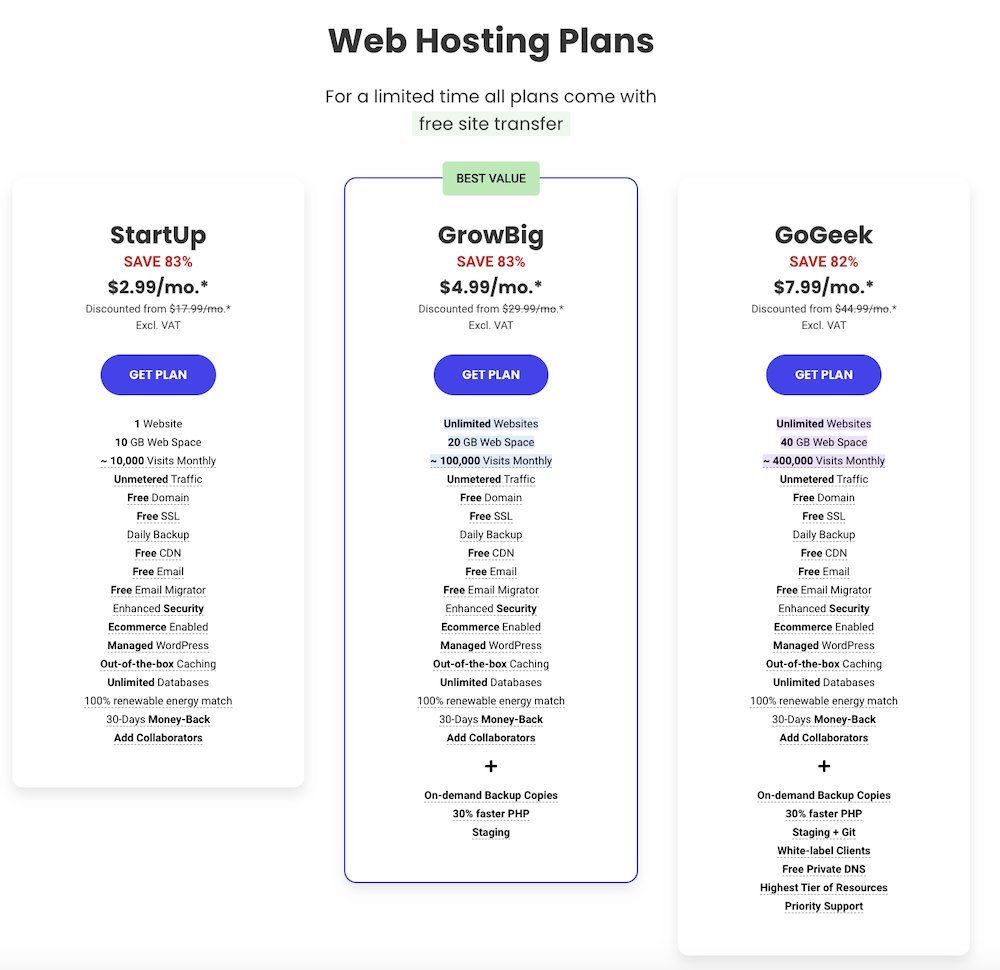
SiteGround's three plan tiers—StartUp, GrowBig, GoGeek—showing storage, visits, and pricing.
Credit: www.ryrob.com
Greengeeks Hosting
Choosing the right web hosting service is crucial for your blog's success. GreenGeeks Hosting is a reliable and eco-friendly option. They offer fast performance, great features, and competitive pricing.
Performance Overview
GreenGeeks Hosting stands out for its excellent performance. They use SSD storage and optimized LiteSpeed servers. This ensures your blog loads quickly. Their uptime is also impressive, averaging 99.9%. This means your blog will almost always be available to readers.
Pricing And Features
GreenGeeks offers competitive pricing for their web hosting plans. Here is a breakdown of their most popular plan:
Feature Details
Price $2.95/month (with a 3-year commitment)
Storage Unlimited SSD
Bandwidth Unmetered
Free Domain Yes, for the first year
SSL Certificate Free
Email Accounts Unlimited
Their plans come with a 30-day money-back guarantee . This allows you to try their service risk-free. GreenGeeks also offers 24/7 support through chat, email, and phone. Their team is ready to help you with any issues.
GreenGeeks Hosting is not just fast and reliable. They are also committed to the environment. They match 300% of the energy they consume with renewable energy credits. This makes them a great choice for eco-conscious bloggers.
https://www.youtube.com/watch?v=L-58Vk3HZgU
Wp Engine Hosting
Choosing the right web hosting is crucial for your blog's success. One of the top choices is WP Engine Hosting . It provides excellent performance, features, and pricing. Let's dive into its benefits and see why it's a great option for bloggers.
Performance Overview
WP Engine Hosting is known for its fast load times. This is essential for keeping your readers engaged. Here are some key performance features:
High-speed servers
Built-in caching
Global CDN (Content Delivery Network)
These features ensure your blog loads quickly. Fast loading times improve user experience and help your SEO rankings.
Pricing And Features
WP Engine offers various pricing plans. This helps you choose the best plan for your needs. Here is a quick overview:
Plan Price Features
Startup $25/month
- 1 site
- 25,000 visits/month
- 10GB storage
- 50GB bandwidth
Growth $95/month
- 10 sites
- 100,000 visits/month
- 20GB storage
- 200GB bandwidth
Scale $241/month
- 30 sites
- 400,000 visits/month
- 50GB storage
- 500GB bandwidth
Each plan includes premium WordPress themes and 24/7 support. This ensures your blog is always running smoothly.
WP Engine Hosting also offers daily backups and one-click restore options. These features protect your data and make it easy to recover from any issues.
Overall, WP Engine Hosting provides a robust solution for bloggers. Its performance, features, and pricing make it an excellent choice for any blog.
Kinsta Hosting
Choosing the right web hosting is crucial for your blog's success. Kinsta Hosting stands out as a top choice for many bloggers due to its performance, features, and pricing. Let's dive into what Kinsta has to offer.
Performance Overview
Kinsta Hosting is known for its high-speed performance. It uses Google Cloud Platform for its infrastructure. This means your blog will load quickly for visitors around the world.
Additionally, Kinsta provides a strong content delivery network (CDN) and server-level caching . These features further enhance your blog's speed and reliability. Kinsta also guarantees 99.9% uptime , ensuring your blog is always accessible.
Pricing And Features
Kinsta offers various plans to suit different needs and budgets. Below is a table summarizing the main features of each plan:
Plan Price (per month) Features
Starter $30
- 1 WordPress install
- 25,000 visits
- 10 GB disk space
- Free SSL and CDN
Pro $60
- 2 WordPress installs
- 50,000 visits
- 20 GB disk space
- Free SSL and CDN
Business 1 $100
- 5 WordPress installs
- 100,000 visits
- 30 GB disk space
- Free SSL and CDN
All plans include key features such as daily backups , staging environments , and expert 24/7 support . Kinsta also offers a 30-day money-back guarantee , so you can try it risk-free.
Comparison of Top Blog Hosting Providers
To help you decide at a glance, here is a side-by-side comparison of the key features of the nine hosting providers covered above. Prices shown are the introductory rates for the lowest tier plan, current as of 2026.
Provider Starting Price Storage (Basic Plan) Uptime Guarantee Free SSL Free Domain Key Differentiator
SiteGround $3.99/mo 10 GB SSD 99.99% Yes No Staging environment on GrowBig plan
Bluehost $2.95/mo 50 GB SSD 99.9% Yes Yes (1 year) Beginner-friendly with official WordPress recommendation
HostGator $2.75/mo Unmetered 99.9% Yes No Unlimited bandwidth on all plans
A2 Hosting $2.99/mo 100 GB SSD 99.9% Yes No Turbo Servers for up to 20x faster speeds
InMotion Hosting $6.99/mo 50 GB SSD 99.9% Yes Yes (1 year) 90-day money-back guarantee
DreamHost $2.59/mo Unlimited 100% (credit guarantee) Yes Yes (1 year) 97-day money-back guarantee
GreenGeeks $2.95/mo Unlimited SSD 99.9% Yes Yes (1 year) Eco-friendly (300% renewable energy match)
WP Engine $25/mo 10 GB 99.99% Yes No Premium managed WordPress focus
Kinsta $30/mo 10 GB 99.9% Yes No Google Cloud Platform infrastructure
When comparing plans, remember that introductory prices often renew at a higher rate. Look for hosts that offer transparent renewal pricing. For a more detailed comparison of the very best deals available right now, check our guide to the best web hosting deal.
Key Features to Prioritise in 2026
As of 2026, a few technical features have become essential for any blog that aims to rank well and keep visitors happy. Here is what you should look for when evaluating a host today:
Core Web Vitals Support – Google's page experience signals now heavily weigh metrics like Largest Contentful Paint (LCP), First Input Delay (FID), and Cumulative Layout Shift (CLS). Choose a host that offers server-level caching, a CDN, and lightweight server configurations. You can test your blog's performance using Google's Pagespeed Insights tool.
PHP 8.x Compatibility – The latest versions of PHP are significantly faster and more secure than older releases. Make sure your host supports PHP 8.1 or higher and lets you switch versions easily from the control panel.
Automatic Daily Backups – Even with the best security, accidents happen. A host that automatically backs up your blog daily (and keeps at least 30 days of backups) can save you from disaster.
Staging or Development Environment – This lets you test theme and plugin updates without breaking your live site. Many managed WordPress hosts include this, but some shared hosts now offer it as an add-on.
Free SSL Certificate and CDN – Both are non-negotiable in 2026. An SSL certificate encrypts data between your blog and its visitors, and a CDN reduces latency for users far from your host's data centers.
A common mistake is to assume that a higher price automatically means better performance. In practice, a well-optimized shared hosting plan with LiteSpeed caching can outperform a poorly configured VPS. Start with the provider that best fits your current traffic level and upgrade only when you consistently exceed 80% of your plan's resource limits.
When you evaluate these features, it pays to look beyond the marketing copy. For example, some hosts advertise "unlimited storage" but throttle your site if you exceed a certain number of files (inodes). Similarly, a "free CDN" might only be available on higher-tier plans. Always check the fine print in the terms of service or ask support directly before committing.
Choosing The Right Hosting
Choosing the right web hosting is crucial for your blog's success. It affects your site's speed, security, and uptime. With many options available, it can be overwhelming. This guide will help you make an informed decision.
Comparing Features
First, compare the features of different hosting providers. Look at storage space, bandwidth, and server speed. These factors impact your blog's performance. Some hosts offer unlimited storage and bandwidth. Others may have limits. Check what each plan includes.
Also, consider the type of hosting. Shared hosting is budget-friendly. But it means sharing resources with other sites. VPS hosting offers more control and resources. Dedicated hosting provides the highest performance. But it is also the most expensive.
Security features are important too. Look for hosts with SSL certificates, backups, and malware protection. These features keep your blog safe from threats. Customer support is another key factor. Choose a host that offers 24/7 support. This ensures help is available when needed.
Making The Final Decision
Once you compare features, consider your blog's needs. A small personal blog may not need advanced features. But a business blog may require more resources and security. Think about your budget too. Some hosts offer discounts for long-term plans. Weigh the pros and cons of each option.
Read reviews from other users. They provide insights into the host's reliability and performance. Look for feedback on uptime, speed, and customer service. Make sure the host has a good reputation.
Finally, test the host's customer support. Contact them with questions and see how they respond. This gives you a sense of their support quality. Choose the host that meets your needs and fits your budget.
If you are running a business blog, you might need additional features such as dedicated IP addresses, PCI compliance, or priority support. Our article on WordPress business hosting breaks down the best options for professional setups. For smaller sites on a tight budget, consider a small website hosting plan that still includes the essentials.
Frequently Asked Questions
What Is The Best Web Hosting For Blogs?
The best web hosting for blogs depends on your needs. Popular choices include Bluehost, SiteGround, and HostGator. These providers offer reliable uptime, good customer support, and user-friendly features.
How Much Does Blog Web Hosting Cost?
Blog web hosting costs vary. Basic plans start around $3 to $10 per month. Prices increase for more advanced features and higher traffic capabilities.
Which Web Host Offers Free Domain For Blog?
Bluehost offers a free domain for the first year. Other hosts like HostGator and SiteGround also provide this benefit with certain plans.
Is WordPress Good For Blog Hosting?
Yes, WordPress is excellent for blog hosting. It is user-friendly, highly customizable, and widely supported. Many web hosts offer one-click WordPress installation.
Can I switch web hosts after starting my blog?
Yes, you can migrate your blog to a different host at any time. Most reputable providers offer free site migration services, especially if you are moving from another host. The process usually involves transferring your files, database, and domain settings. It is a good idea to create a full backup before starting any migration.
What is the difference between managed and unmanaged hosting?
Managed hosting means the provider handles server maintenance, security updates, caching, and performance tuning for you. Unmanaged hosting gives you full control but requires you to handle these tasks yourself. For bloggers who do not want to learn server administration, managed WordPress hosting is almost always the better choice.
Do I need a dedicated IP address for my blog?
A dedicated IP address is rarely necessary for a standard blog. It can be useful if you need to run custom SSL configurations or if your blog is on a shared server that hosts a high-risk site, but most bloggers will never need one. A shared SSL certificate that covers your domain is sufficient.
How do I know when it is time to upgrade my hosting plan?
Monitor your blog's performance in your hosting control panel. If you see high CPU usage, regularly hit your visitor limit, or notice slower page loads during traffic spikes, it is time to upgrade. Many hosts provide resource usage graphs so you can spot trends before your blog becomes inaccessible.
What is a content delivery network (CDN) and do I need one?
A CDN stores copies of your blog's static files (images, CSS, JavaScript) on servers around the world. When a visitor loads your blog, the files are served from the nearest server, which reduces load times. Most modern hosting plans include an integrated CDN, and we recommend enabling it for any blog with an international audience.
Can I host multiple blogs on one hosting plan?
Yes, many plans allow you to host multiple websites under a single account. Bluehost's Plus plan and above, A2 Hosting's Drive plan, and InMotion's Power plan all support multiple domains. Just make sure you have enough storage and bandwidth for all your blogs.
How do I move my blog from one host to another without losing data?
Most hosts offer a free migration service where their team moves your files and database for you. If you prefer to do it yourself, you can use a plugin like Duplicator or All-in-One WP Migration. The key steps are: (1) back up your entire site, (2) export your database, (3) upload the files to the new host, and (4) update your domain's DNS settings to point to the new server. Allow up to 48 hours for DNS propagation to complete.
Should I choose a host based in my target audience's country?
It can help. Hosting your blog on servers near your primary audience reduces latency. If most of your readers are in Europe, a host with data centers in London or Amsterdam will typically deliver faster load times than one with servers only in the U.S. Many of the providers listed above offer multiple regional data center options.
Do blog hosting plans include email hosting?
Some do, but not all. Bluehost, HostGator, and DreamHost include free email accounts with their plans. Others, like Kinsta and WP Engine, do not include email hosting because they prefer to focus on site performance. In those cases, you can use a separate email service like Google Workspace or Zoho Mail, which is often more reliable than bundled email anyway.
Conclusion
Choosing the best web hosting for your blog is essential. It affects speed, security, and user experience. Make sure to select a host that fits your needs and budget. Look for reliable customer support and strong performance. Your blog deserves the best foundation.
With the right web hosting, you can focus on creating great content. Happy blogging! Ready to get started? Compare the plans above side by side and pick the one that gives you the best mix of speed, security, and price for your blog's future growth. Start with a 30-day free trial where available to test performance before committing long-term — your readers will thank you for it.


2 thoughts on “Discover the Best Web Hosting for Blog: Fast, Secure & Affordable Plans”