Small Website Hosting: Affordable Solutions for Your Needs
Lead SaaS Analyst & Software Developer at PCSaaS · Software Developer (GitHub @Ratankarmakar) · Google Ads & Analytics Certified · 500+ SaaS Tools Tested · 8+ years in software engineering, B2B SaaS evaluation, AppSumo deal auditing, and performance marketing
Title: Small Website Hosting: Affordable Solutions for Your Needs
Finding the right small website hosting can be daunting. It's crucial to choose a reliable service.
Whether you're starting a blog, a portfolio, or a small business site, hosting matters. Small website hosting offers tailored solutions for modest needs. These hosting plans are cost-effective and easy to manage. They provide the essential tools and resources without overwhelming you.
With the right hosting, your website can load quickly, stay secure, and grow with your needs. This blog post will guide you through the world of small website hosting. You'll learn what to look for and how to make the best choice for your site. Ready to find a plan that is fast, secure, and affordable? Let's walk through the options and pick the right fit for your small website.

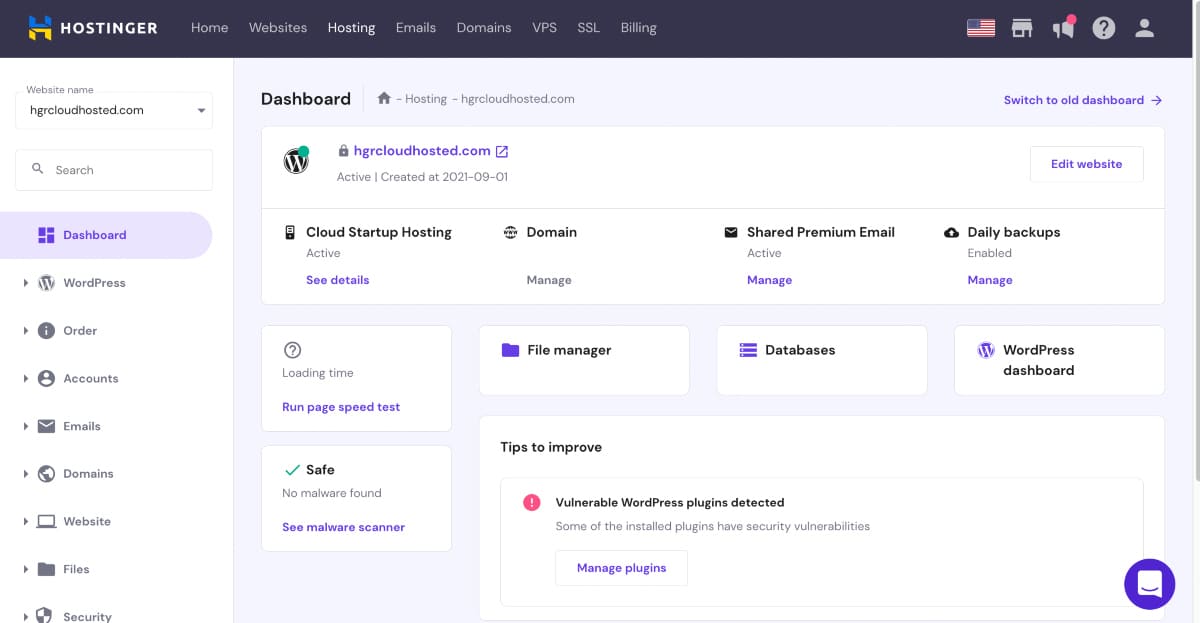
A typical small-business hosting dashboard with plan details and resource usage.
Credit: codeconfig.dev
Introduction To Small Website Hosting
Starting a website can be a daunting task. One of the first decisions is choosing the right hosting service. For small websites, this decision is crucial. In this post, we will introduce you to small website hosting.
In 2026, the hosting market offers more affordable entry points than ever before, but also more complexity with the rise of cloud-native platforms. Understanding what small website hosting actually includes—and what it doesn't—will save you from overpaying for features you never use.
What Is Small Website Hosting?
Small website hosting is a service for websites with limited needs. This service is ideal for personal blogs, portfolios, and small business sites. It offers essential features without the complexity of larger hosting plans. Users get enough resources to run their site smoothly.
Small website hosting typically covers shared server environments where your site lives alongside a handful of other small sites. The provider handles server maintenance, security patches, and network uptime so you only worry about your content. If you are running a simple content site, consider what this service category offers for both performance and value.
Benefits Of Small Website Hosting
Small website hosting is cost-effective. These plans are affordable and fit tight budgets. They offer easy setup, making it simple for beginners to launch their site. With fewer features, users can focus on what matters most.
Small website hosting services often include user-friendly control panels. This allows for easy website management. Site owners can handle updates, backups, and other tasks without much hassle. The simplicity of these plans reduces the learning curve.
Scalability is another benefit. As your website grows, you can upgrade your hosting plan. This ensures your site can handle more traffic and features. You don't need to switch providers, making the transition seamless.
Beyond simple upgrades, the best small hosting plans let you add resources—such as extra storage or email accounts—without changing your core plan. This granular flexibility is a practical feature that many first-time site owners overlook. Many providers also offer seamless migration paths to higher tiers, so you never lose your configuration data or email records during growth.
Types Of Small Website Hosting
Before comparing providers, decide which type of hosting fits your site. The right choice depends on your traffic, technical skills, and budget.
Shared Hosting
Shared hosting is the most common starting point. Multiple sites share one server, which keeps the cost low and the setup simple. For a personal blog or a small business site, a shared plan is usually enough. A common mistake is choosing the cheapest package without checking storage, email, and database limits; the plan that fits today should also allow a little room to grow.
If your site is mostly text and a few images, look for plans designed for blogs rather than buying more server power than you need.
In practice, shared hosting works well for sites receiving up to a few thousand daily visitors. Beyond that, you may start seeing "resource limit reached" errors during peak hours. Plan accordingly and monitor your resource usage panel monthly so you can upgrade before performance degrades.
VPS And Cloud Hosting
A VPS (virtual private server) gives you dedicated resources inside a shared server. Cloud hosting spreads your site across multiple servers, so traffic spikes are less likely to take it down. Both cost more than shared hosting, but they become the right choice when your site consistently runs into performance limits.
One practical difference: VPS plans typically come with a fixed core and RAM allocation, while cloud hosting bills based on actual consumption. If your traffic is unpredictable (seasonal spikes, product launches), cloud hosting may be more cost-efficient even though its base rate looks higher. Evaluate your traffic patterns honestly before committing to a VPS vs. a cloud solution; switching mid-year can be disruptive.
Managed WordPress Hosting
Managed WordPress hosting takes care of updates, caching, and backups for you. This removes most maintenance work, so you can focus on writing and promoting your content. Many small sites begin with shared plans tuned for WordPress that include the same caching and update features without the managed price tag.
The trade-off is control: managed hosts restrict which plugins you can install and may limit custom .htaccess rules. If your site runs specialized e-commerce or membership plugins, verify compatibility with the managed host's environment before signing up. Some managed providers also limit staging environments to higher-tier plans, which can be a dealbreaker for developers.
Choosing The Right Hosting Provider
Choosing the right hosting provider is crucial for your website's success. A good host ensures your site is fast, secure, and always available. Here, we will discuss key features to look for and compare popular providers.
Key Features To Look For
When selecting a hosting provider, consider the following key features:
Uptime Guarantee: Aim for a provider that offers at least 99.9% uptime.
Speed: Fast loading times improve user experience and SEO.
Customer Support: 24/7 support is ideal for resolving issues quickly.
Security: Look for features like SSL certificates and daily backups.
Scalability: Your hosting should grow with your website.
Pricing: Ensure the cost fits your budget without compromising quality.
Comparing Popular Providers
| Provider | Uptime | Speed | Support | Security | Pricing |
|---|---|---|---|---|---|
| Provider A | 99.9% | Fast | 24/7 | High | Affordable |
| Provider B | 99.8% | Moderate | 24/7 | High | Moderate |
| Provider C | 99.7% | Slow | Limited | Low | Cheap |
In summary, choosing the right hosting provider involves evaluating uptime, speed, support, security, scalability, and pricing. Use the table above to compare popular providers and make an informed decision.
In practice, the table above is a framework, not a verdict. Every provider advertises great uptime; the real difference shows in how quickly support reacts when something breaks. Test support before you commit by sending a pre-sales question and timing the reply. You can also check side-by-side hosting comparisons to see how actual speeds and support quality stack up among popular providers.
Performance Benchmarks That Matter
Beyond advertised features, pay attention to real-world performance indicators. Look for providers that publish independent speed tests or share transparent data about their server infrastructure—specifically whether they use NVMe SSD storage and support HTTP/3 for faster content delivery. A host that operates its own data centers (rather than reselling from a third party) typically has better control over network latency and can resolve routing issues faster when they arise.
Cost-effective Hosting Plans
Choosing the right hosting plan can make or break a small website. Cost-effective hosting plans offer a balance between affordability and quality. This section will explore budget-friendly options and how to evaluate pricing models.
Budget-friendly Options
Many hosting providers offer plans tailored to small websites. These plans usually cost less than premium packages. They provide essential features without unnecessary extras. Shared hosting is often the most affordable option. It allows multiple websites to share a single server.
Free hosting services exist too. They come with limitations like ads and fewer resources. Paid plans, even at the lowest tier, often include better support and more features. Look for discounts and promotions. Many providers offer reduced rates for new customers.
Evaluating Pricing Models
Not all hosting plans are created equal. Some charge monthly, while others offer annual pricing. Monthly plans provide flexibility. Annual plans often come with discounts. Calculate the total cost over time. Hidden fees can add up.
Some plans include free domain registration and SSL certificates. These can save money. Check the renewal rates. Introductory prices may be lower. Renewal rates can be higher. Read the fine print.
Consider the scalability of the plan. Your website may grow. Ensure the plan can accommodate increased traffic. Upgrading should be easy and affordable.
Hidden Costs To Watch For
Even a cheap hosting plan can become expensive if you ignore renewal and upgrade fees. Watch for:
Renewal pricing: the introductory rate usually applies to the first term only; renewals are often two to three times higher.
Free domains: they are normally free for year one, then renew at the registrar's standard price.
Backups and SSL: some plans include automated backups and SSL certificates, others charge extra for them.
Overage fees: exceeding bandwidth, storage, or inode limits can trigger automatic charges.
To compare fairly, estimate the total cost over three years instead of the first month. Many month-to-month hosting plans let you test a host without a long commitment. If you are comfortable doing your own updates, low-cost WordPress setups can keep your bill very small.
Long-Term Value Assessment
When evaluating long-term value, look beyond the headline price. A slightly more expensive plan that includes automated daily backups, free SSL certificates, and a staging environment can save you hundreds of dollars in add-on fees over two years. Similarly, a host that charges for site migration may negate any first-year savings if you plan to move an existing site. Calculate the total cost including all likely add-ons for the full period you expect to stay with that provider.
Scalability And Flexibility
Scalability and flexibility are essential for small website hosting. These features ensure your website grows with your business. Small websites need hosting that adapts to changing needs. This makes it easier to handle more traffic and add new features. The right hosting provider can offer both scalability and flexibility. This means your website can expand without any disruptions. Let's explore how scalability and flexibility benefit small website hosting.
Scaling Your Website
Scaling your website involves increasing resources as your traffic grows. Small websites often start with limited resources. As your audience expands, you need more bandwidth and storage. A good hosting provider allows you to upgrade your plan easily. This way, your website can handle more visitors without slowing down. No one likes a slow website. Faster load times keep visitors happy. Scaling ensures your website performs well as it grows.
In practice, scaling isn't only about plan size. Check whether the provider lets you add bandwidth, storage, or CPU without switching to an entirely new package. A scalable cloud platform can absorb sudden growth more smoothly than a traditional shared plan, which matters if your site gets a traffic spike from a social post or press mention.
Flexible Hosting Solutions
Flexible hosting solutions offer various plans to suit different needs. Small websites may begin with basic plans. As your needs change, you can switch to more advanced plans. Flexible hosting means you can add features like e-commerce or blogs. This allows your website to evolve with your business. Some hosting providers offer custom plans. You can choose exactly what you need. This saves money and avoids unnecessary features.
Flexibility also includes support for different technologies. Your website might need specific software or applications. A flexible host supports these requirements. This makes it easier to manage your website. Flexibility ensures your website can adapt to any changes. Choose a hosting provider that offers both scalability and flexibility. This will help your website grow and thrive.
Resource Allocation Control
A key aspect of flexibility that beginners often miss is resource allocation control. Some providers let you adjust PHP memory limits, MySQL connections, or cron job intervals directly from the control panel. This matters if you run resource-intensive plugins, image optimization scripts, or scheduled email newsletters. Before buying, check whether the panel gives you access to php.ini settings or if you need to contact support for every configuration change. A host that locks down these settings can become frustrating as your site becomes more dynamic.
Security And Reliability
Small website hosting is a great option for individuals and small businesses. Security and reliability are crucial factors to consider. A secure and reliable hosting service ensures your website stays safe and performs well. Let's dive into these two essential aspects.
Ensuring Website Security
Your website's security is vital. A secure hosting provider protects your site from hackers and malware. Look for features like SSL certificates and regular backups. These tools help keep your data safe. Many providers offer firewalls and security monitoring. These features add an extra layer of protection. Strong security measures give you peace of mind. Your visitors will trust your site more.
Reliable Uptime And Performance
Reliable uptime means your website is always available. Downtime can hurt your business and your reputation. Choose a hosting service with a high uptime guarantee. A good provider ensures your site loads quickly. Fast loading times improve user experience. They can also boost your search engine ranking. Performance matters. Your visitors expect a smooth and quick browsing experience. Reliable hosting keeps your site running smoothly.
Small-Site Security Basics
You do not need enterprise tools to secure a small website. The NIST security fundamentals cover the same essentials: strong passwords, regular updates, and verified backups. In practice, most small-site compromises happen because of an unpatched plugin or a reused password, not because the hosting provider was weak.
Follow these four habits:
Turn on automatic backups and test a restore at least once.
Update the content management system, theme, and plugins as soon as patches are available.
Use unique passwords and enable two-factor authentication on the hosting account.
Keep an eye on uptime with a free status monitoring tool so you notice problems early.
Content Delivery Network Integration
For small websites, a CDN (content delivery network) can dramatically improve both security and performance. A CDN caches your site's static files across servers worldwide, so visitors load faster content from a location closer to them. It also absorbs some types of DDoS attacks before they reach your hosting server. Many hosting providers now include a basic CDN tier in their small website plans at no extra cost, or integrate seamlessly with free Cloudflare setups. If your audience is geographically spread, enabling a CDN should be one of the first optimizations you make after launching.
User-friendly Control Panels
Managing a small website can be challenging without the right tools. User-friendly control panels make this task easier. They offer simple interfaces and intuitive features. This helps even beginners navigate and manage their sites effectively.
Ease Of Use
Ease of use is a primary feature of user-friendly control panels. These panels have clean layouts and organized menus. This helps users quickly find and use the tools they need. Simple drag-and-drop functions are often included. This minimizes the learning curve for new users.
Popular Control Panel Options
Several control panels are popular for their user-friendly designs. cPanel is one of the most widely used options. It offers a straightforward interface and a variety of features. Plesk is another favorite. It supports both Linux and Windows hosting. This makes it versatile and accessible for different users. DirectAdmin is also preferred for its simplicity and speed. It provides a lightweight option for managing smaller sites.
Whichever control panel you choose, look for three things: a one-click installer for content management systems, an email account manager, and a file manager. These cover the daily tasks of a small-site owner, so you rarely need command-line experience. In practice, a well-designed control panel lets you run a simple business site without hiring a developer.
Custom Panel vs. Industry Standard
Some hosting providers build their own custom control panels rather than using cPanel or Plesk. These custom panels can be more intuitive for beginners, with simplified menus and less clutter. However, they may lack the extensive community tutorials and third-party integrations that cPanel offers. If you plan to manage your site independently for years, consider whether the custom panel will still meet your needs as you grow. Industry-standard panels also make it easier to switch providers because the interface remains familiar; a custom panel means learning a new system if you ever migrate.
Support And Customer Service
Choosing the right hosting provider is crucial for small websites. One key factor to consider is support and customer service . This ensures your site runs smoothly and issues are resolved quickly. Let's dive into the importance of quality support and the benefits of 24/7 customer service.
Importance Of Quality Support
Quality support can make or break your online presence. Having access to knowledgeable staff helps solve problems faster. This means less downtime and more productivity.
There are several benefits to good support:
Fast issue resolution
Expert advice
Peace of mind
Consider these points when evaluating a hosting provider. Quality support can save you time and money.
24/7 Customer Service
24/7 customer service ensures help is available whenever you need it. This is especially important if your site serves a global audience.
Here are some benefits of round-the-clock support:
| Benefit | Explanation |
|---|---|
| Anytime assistance | Get help during off-peak hours |
| Immediate response | Resolve issues without delay |
| Global accessibility | Support for different time zones |
24/7 customer service is a must for small website hosting. It ensures your site remains functional and reliable.
Before you buy, test the support team the way customers will. Open a sales chat or raise a ticket and see how long it takes to get a useful answer rather than an automated reply. This matters even more with small-business-grade hosting choices, where every minute of downtime can cost real revenue.

Helpful support is the difference between a quick fix and a day of downtime.
Credit: autoleap.com
Support Channel Variety
Beyond availability, consider the range of support channels offered. Live chat is fastest for simple billing or account questions, while phone support is better for complex technical issues that require back-and-forth troubleshooting. Email ticketing works well for non-urgent requests but can be slow during peak hours. Some providers also offer community forums or knowledge bases where you can find answers to common questions without waiting for a human agent. Ideally, choose a host that provides at least live chat and ticketing, with phone support available during business hours at minimum.
Quick Checklist Before You Buy
Use this checklist when you compare hosting plans:
Match the hosting type to your traffic: shared for simple sites, cloud or VPS for growth, managed WordPress for low-maintenance blogs and stores.
Compare the total three-year cost, not just the first-month price.
Confirm that support is available 24/7 and includes human agents.
Check the uptime guarantee and the money-back period.
Make sure the plan can be upgraded without migrating your account.
Verify that essential features (SSL, backups, email accounts) are included at your chosen tier.
Compare a few candidates against these five points before you pay for the first year.
Frequently Asked Questions
What Is Small Website Hosting?
Small website hosting refers to services designed for websites with lower traffic. It is cost-effective and provides essential features like storage and bandwidth.
How Much Does Small Website Hosting Cost?
The cost of small website hosting varies. It typically ranges from $3 to $10 per month, depending on the provider and contract length.
What Features Are Included In Small Website Hosting?
Small website hosting usually includes essential features like domain registration, email accounts, storage, and basic security measures.
Is Small Website Hosting Reliable?
Yes, small website hosting is reliable for low-traffic websites. Providers offer dependable uptime and support for smaller sites.
How Much Traffic Can Small Website Hosting Handle?
A basic shared plan can comfortably handle a few thousand visits per day, depending on how well the site is optimized. Heavy image galleries, video files, or poorly cached plugins can slow it down long before traffic becomes a problem. If your site regularly exceeds a shared plan's resource limits, upgrade to a VPS or cloud plan instead of hoping the next month will be quieter.
Can I Host More Than One Website On A Small Plan?
Many small hosting plans allow add-on domains, meaning you can point several sites at one account. Watch the resource limits, though: each site consumes database connections and storage, so a single account that hosts five active sites will hit limits sooner than one that hosts a single site.
Do I Need To Buy A Domain Name Separately?
Most hosts include a free domain for the first year when you sign up. After that, the domain renews at the registrar's standard price. You can always register the domain separately and point it to your host, which keeps ownership independent of the provider.
How Do I Migrate An Existing Website To A New Host?
If you already have a site, look for a host that offers free site migration. In practice, the quickest path is to install a backup plugin, export a full backup, then let the new host's team restore it on their server. Always check your DNS records and email settings after the move.
Should I Choose Linux Or Windows Hosting For My Small Site?
Linux hosting is the standard choice for most small websites because it supports PHP, MySQL, and WordPress natively and is almost always cheaper than Windows hosting. Choose Windows hosting only if your site requires ASP.NET, MSSQL databases, or other Microsoft-specific technologies. For 95% of small websites, Linux is the right and more affordable option.
What Happens If I Exceed My Hosting Plan's Resource Limits?
When you exceed allocated CPU, RAM, or inode limits, the host may throttle your site speed, display a resource-limit error page to visitors, or automatically suspend your account. Most providers send a warning email first. The best response is proactive: monitor your control panel's resource usage monthly and upgrade before hitting limits, especially during seasonal traffic increases.
Conclusion
Choosing small website hosting offers many benefits. It's cost-effective and reliable. Perfect for personal blogs or small businesses. You get flexibility and control. Easy to scale as your site grows. User-friendly interfaces make management simple. With good support, issues are quickly resolved.
So, start small and grow with confidence. Small website hosting can meet your needs efficiently. Ready to launch? Compare two or three providers from this guide and start your 30-day trial today—most hosts will refund you if you're not satisfied. From evaluating your specific needs to selecting the right plan, small website hosting puts the power of the internet within reach. The affordable solutions covered in this guide ensure you don't have to compromise on quality while staying within budget. Whether you choose shared hosting for simplicity, a VPS for dedicated resources, or managed WordPress for a hands-off experience, the key is matching the hosting type to your actual requirements. Start with a plan that fits your current traffic and budget, monitor your growth, and upgrade when your site demands more. Your small website deserves a hosting partner that grows with you—not one that holds you back.

Similar Posts