Best Website Hosting for Small Business: Fast, Secure & Scalable
Lead SaaS Analyst & Software Developer at PCSaaS · Software Developer (GitHub @Ratankarmakar) · Google Ads & Analytics Certified · 500+ SaaS Tools Tested · 8+ years in software engineering, B2B SaaS evaluation, AppSumo deal auditing, and performance marketing
Find the best website hosting for small businesses offering fast speeds, strong security, and scalable solutions.
For small business owners, finding the right hosting can be daunting. There are countless options, each promising unique features and benefits. But not all hosting services are created equal. Your website needs a reliable, fast, and secure host to thrive.
Good hosting can improve load times, keep your site secure, and handle your growth. It can also save you from technical headaches. In this blog, we will explore the best website hosting options for small businesses. We'll help you find a solution that fits your needs and budget. Let's dive in and make your decision easier.
Introduction To Website Hosting
Starting a small business involves many steps. One key step is choosing the right website hosting . Your website is your online storefront. You need it to be fast, reliable, and secure. This is where website hosting comes into play.
Importance For Small Businesses
Small businesses need a strong online presence. A good website host can help. Here are some reasons why:
Reliability : Your website needs to be up and running all the time. A good host ensures minimal downtime.
Speed : Fast loading times improve user experience. They can also boost your SEO rankings.
Security : Protect your data and your customer's data. Look for hosts that offer strong security features.
Support : Problems can arise at any time. Good customer support can resolve issues quickly.
A reliable host also directly impacts your bottom line. In practice, a one-second delay in page load can reduce conversions by as much as 7%. For a small business, that lost revenue compounds quickly. Choosing a provider with robust infrastructure and a proven track record is one of the smartest investments you can make.
Key Features To Look For
Choosing a website host can be overwhelming. Focus on these key features:
Uptime Guarantee : Look for hosts that offer at least 99.9% uptime. This ensures your site is always accessible.
Scalability : As your business grows, your hosting needs may change. Choose a host that can scale with you.
Bandwidth and Storage : Ensure you have enough bandwidth and storage for your website's content and traffic.
SSL Certificates : These are crucial for securing your website. They help protect sensitive information.
Backups : Regular backups ensure you do not lose data. This is vital for recovery in case of a mishap.
Customer Support : 24/7 support is crucial. It ensures you can get help when you need it.
Here is a comparison table for quick reference:
Feature Importance
Uptime Guarantee High
Scalability Medium
Bandwidth and Storage High
SSL Certificates High
Backups Medium
Customer Support High
These features ensure your website runs smoothly. They also provide peace of mind. Choose wisely to help your business thrive online.
Shared vs. VPS vs. Cloud: Choosing the Right Fit
Before you choose a specific provider, it helps to know the different types of hosting available. Shared hosting places your site on a server with many others — it is the most affordable but can be slower during traffic spikes. Virtual Private Server (VPS) hosting gives you dedicated resources within a shared environment, while dedicated hosting provides an entire server for your site alone. Cloud hosting spreads your site across multiple servers, offering excellent scalability. For most small businesses starting out, a shared WordPress hosting plan provides a good balance of cost and performance. If you anticipate rapid growth, consider cloud-based shared hosting as a flexible middle ground.
Each tier has trade-offs that directly affect your day-to-day experience. With shared hosting, you share CPU and RAM with neighbors, so a sudden spike in another site’s traffic can slow yours. VPS eliminates that risk by carving out guaranteed resources, but it often requires some technical comfort to manage the server environment. Cloud hosting excels at scaling — you can add resources in minutes — but pricing can become unpredictable if you don’t monitor usage closely. A common mistake is picking the cheapest plan without factoring in future traffic growth. When in doubt, choose a host that lets you upgrade seamlessly, and consider a monthly billing cycle to retain flexibility as you evaluate performance.
Criteria For Choosing Hosting
Choosing the right website hosting for your small business is crucial. It impacts your website's performance, security, and overall user experience. Let's explore the key criteria you should consider.
Performance And Speed
Website performance and speed are critical. A slow website can drive away visitors. Look for hosting services with:
Fast server response times
Solid-state drives (SSD) for quicker data access
High uptime guarantees (99.9% or above)
These features ensure your website loads quickly. This improves user experience and SEO rankings .
Beyond the basics, a Content Delivery Network (CDN) can further accelerate your site by caching static files on servers around the world. Many top hosts include a free CDN or offer an easy integration. Following web performance best practices — such as image optimization and browser caching — will also help you maintain fast load times as your site grows.
Security Features
Security is a top concern. Your hosting provider should offer:
SSL certificates to encrypt data
Regular backups to prevent data loss
Firewall protection and malware scanning
These features protect your site from hackers and data breaches. They also build trust with your visitors.
A common mistake is relying solely on the host’s security. You should also enforce strong passwords, keep your CMS and plugins updated, and consider a Web Application Firewall (WAF) for an extra layer of protection. The best business hosting plans include proactive monitoring and free daily backups, so you can recover quickly from any incident.
For additional guidance, the U.S. Cybersecurity and Infrastructure Security Agency offers free resources tailored to small business cybersecurity. Following their recommended practices can significantly reduce your risk of a breach.
https://www.youtube.com/watch?v=Fr3TzqIaWsE
Bluehost Overview
Bluehost is a popular web hosting provider. It is known for its easy-to-use services and affordable pricing. Many small businesses choose Bluehost for its reliability and features. In this section, we will look at the pros and cons and see who benefits the most from using Bluehost.
Pros And Cons
Pros Cons
Affordable plans
24/7 customer support
Free domain for the first year
One-click WordPress install
30-day money-back guarantee
Higher renewal rates
Limited storage on basic plans
Extra cost for site migrations
Best For
Bluehost is ideal for small businesses just starting online. It is also great for those who need affordable and reliable hosting with good support. If your business uses WordPress , Bluehost offers easy integration.
Bluehost's account dashboard makes site management straightforward for beginners.
Credit: www.sitesaga.com
Siteground Analysis
When it comes to reliable hosting for small businesses, SiteGround often stands out. This section provides an in-depth analysis of SiteGround, focusing on its pros and cons, and who it is best for.
Pros And Cons
Below is a table summarizing the pros and cons of SiteGround:
Pros Cons
High Uptime : 99.99% uptime ensures your site is always accessible.
Excellent Support : 24/7 customer support with knowledgeable agents.
Fast Load Times : Servers are optimized for speed.
Free Daily Backups : Keep your data safe with automatic backups.
Enhanced Security : Advanced security features to protect your site.
Higher Cost : More expensive than some other hosts.
Limited Storage : Storage limits on some plans.
No Free Domain : Does not include a free domain with plans.
Renewal Rates : Higher renewal rates after the initial term.
Best For
SiteGround is best for:
Small Businesses : Ideal for businesses needing reliable uptime and speed.
eCommerce Sites : Great for online stores needing enhanced security and fast load times.
Developers : Offers advanced tools and features for web developers.
Bloggers : Perfect for bloggers requiring good support and performance.
Growing Sites : Suitable for sites expecting to scale and grow over time.
SiteGround provides a balanced mix of performance, support, and security. It remains a top choice for many small businesses.
SiteGround user dashboard showing site management and performance metrics.
Credit: www.sitesaga.com
Hostgator Breakdown
HostGator is a popular choice for small business website hosting. Known for its reliability, it provides a range of hosting plans. This flexibility makes it suitable for different business needs. Let's dive into the details.
Pros And Cons
Pros:
Easy to use interface
24/7 customer support
Affordable pricing plans
99.9% uptime guarantee
Free website migration
Cons:
Limited features in basic plans
Additional costs for backups
Mixed reviews on customer support
Best For
HostGator is ideal for small businesses. Especially those new to website hosting. Its user-friendly interface helps beginners set up their site quickly. The affordable plans make it a good choice for budget-conscious businesses. The 24/7 support ensures help is always available.
When comparing HostGator with other providers, detailed hosting comparisons can help you weigh features like included backups and support response times against your specific needs.
A2 Hosting Features
A2 Hosting stands out as one of the best website hosting options for small businesses. Known for its speed and reliability, it offers a range of features that cater to the needs of small business owners. Let's dive deeper into what A2 Hosting has to offer.
Pros And Cons
Pros Cons
High Speed: A2 Hosting offers fast loading speeds.
99.9% Uptime: Reliable uptime ensures your site is always accessible.
Free SSL: Secure your website with a free SSL certificate.
24/7 Support: Get help anytime with their 24/7 customer support.
Easy Migration: Free site migration makes switching hosts simple.
Higher Cost: Pricing can be higher than some competitors.
Renewal Rates: Renewal prices are higher than initial rates.
Limited Basic Plan: The basic plan has some limitations.
Best For
A2 Hosting is best for small businesses needing fast and reliable hosting. It suits those who prioritize site speed and uptime. It's ideal for e-commerce sites that require secure transactions. It's also great for businesses needing 24/7 customer support.
For those looking to migrate their website, A2 Hosting's free migration service is a big plus. If you want a hosting provider that values speed, security, and support, A2 Hosting is a solid choice.
Comparison table of hosting features across different providers for small business.
Credit: www.hostingadvice.com
Inmotion Hosting Benefits
Choosing the right hosting provider is crucial for small businesses. InMotion Hosting offers various benefits tailored to meet small business needs. Known for its reliable performance and excellent customer support, InMotion Hosting stands out as a solid choice for many.
Pros And Cons
Pros Cons
24/7 Customer Support : Always available to help.
Free Backups : Your data is safe and secure.
High Uptime : Reliable performance, minimal downtime.
Free Website Migration : Easy to switch hosting providers.
Higher Cost : More expensive than some competitors.
Limited Data Centers : Fewer locations worldwide.
No Windows Hosting : Only supports Linux-based hosting.
Best For
InMotion Hosting is ideal for small businesses needing reliable performance. Its robust features are perfect for those who value security and support. Businesses looking to migrate their website will benefit from the free migration service.
In summary, InMotion Hosting offers excellent features for small businesses. Despite a few drawbacks, its benefits make it a strong contender.
Illustration of website hosting infrastructure with servers and data flow.
Credit: www.hostingadvice.com
Greengeeks Review
GreenGeeks is a popular web hosting service known for its eco-friendly approach. They offer a range of hosting plans aimed at small businesses. Their focus on green energy makes them stand out. Let's dive into the details.
Pros And Cons
Pros:
Environmentally friendly with 300% green energy match.
Fast loading times with SSD storage.
24/7 customer support via chat, phone, and email.
Free nightly backups for data security.
Free domain registration for the first year.
Cons:
Higher renewal rates after the first term.
Limited data centers compared to competitors.
No dedicated hosting plans.
Best For
GreenGeeks is best for small businesses focused on sustainability. It's ideal for those who want fast, reliable hosting. Entrepreneurs who prioritize customer support will also benefit. Businesses needing free nightly backups will find it useful. It's a good choice for those needing a free domain name for the first year.
Dreamhost Assessment
DreamHost is a well-known name in the web hosting world. It offers various hosting plans to meet the needs of small businesses. Known for its reliable performance and customer support, DreamHost is a solid choice. Let’s dive into the details.
Pros And Cons
Pros Cons
Unlimited Bandwidth: No worries about traffic spikes.
Free SSL Certificate: Keeps your site secure.
99.9% Uptime: Reliable and dependable hosting.
30-Day Money-Back Guarantee: Risk-free trial period.
24/7 Customer Support: Get help anytime.
Higher Renewal Rates: Initial rates are low, but renewals cost more.
No cPanel: Custom control panel can be confusing.
Limited Data Centers: Less global reach compared to competitors.
Additional Costs for Email: Email hosting is not included in all plans.
Best For
DreamHost is ideal for small businesses that need reliable and secure hosting. It is best for those who prioritize uptime and customer support. It suits businesses that expect traffic growth due to its unlimited bandwidth. Those who prefer a customized control panel will benefit from DreamHost's interface.
Businesses that want a risk-free trial will appreciate the 30-day money-back guarantee. It is also a good fit for those who want to avoid the hassle of SSL certificate setup. DreamHost provides it for free. If your business relies on continuous support, the 24/7 customer service is a great advantage.
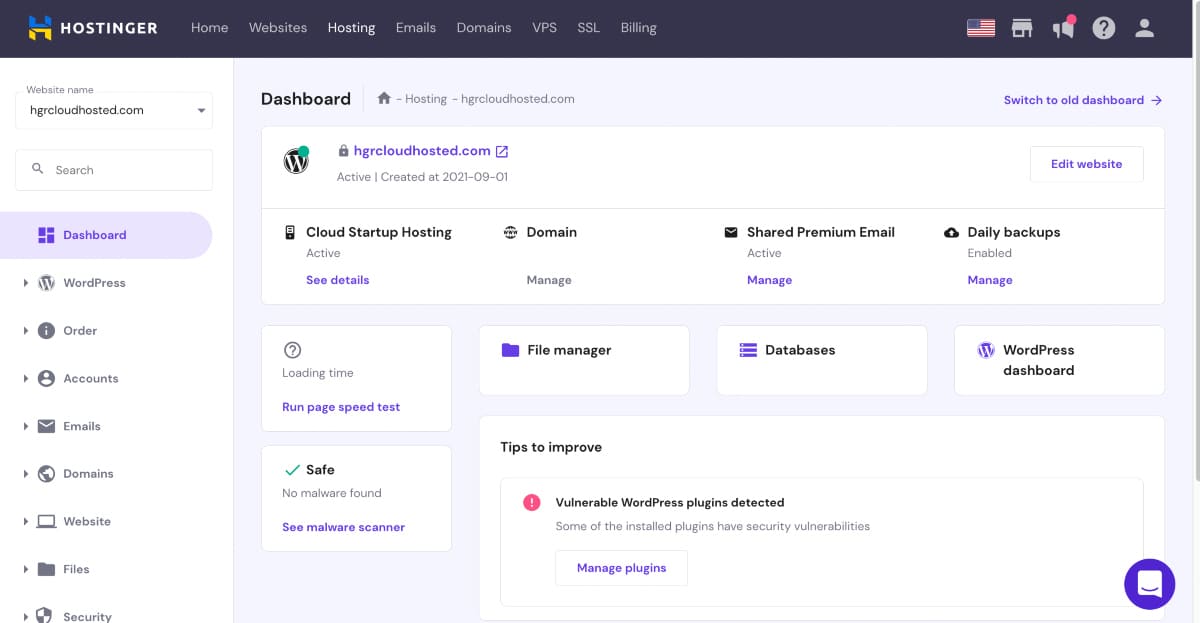
DreamHost control panel showing hosting plan details and account features.
Credit: www.websitebuilderexpert.com
Performance and Security Enhancements for 2026
The hosting landscape continues to evolve. As of 2026, most reputable providers now include HTTP/3 support, automatic PHP updates, and integrated caching as standard features. When evaluating hosts, check whether they offer a free CDN, a staging environment for testing changes, and automated malware scanning. These enhancements reduce maintenance overhead and keep your site running smoothly. For businesses that need flexibility without long-term commitments, exploring monthly hosting plans can be a smart way to test a provider before committing to a yearly contract.
Take the next step: compare our top picks and choose the plan that fits your business goals.
Evaluating Customer Support and Migration Options
Even the best hosting plan is only as good as the support behind it. When you run a small business, every minute of downtime can cost you a sale or damage your reputation. Before signing up, test the provider’s support by asking a pre-sales question via live chat or phone and noting the response time. A common mistake is assuming that “24/7 support” means instant resolution — look for hosts that offer phone, chat, and ticket support with a published average response time.
Migration is another area where small businesses often get stuck. Many hosts offer free migration for new accounts, but the process can vary. Some providers assign a dedicated migration team that moves your files and databases for you; others give you a plugin and expect you to handle the technical steps. If you are not comfortable with manual migrations, choose a host that lists “free site migration” as a fully managed service. This is especially important if you are moving a live e-commerce store where even a few hours of misconfiguration could lead to lost orders.
Frequently Asked Questions
What Is The Best Hosting For Small Business?
The best hosting for small business depends on your needs. Look for reliability, speed, and customer support. Popular options include Bluehost, SiteGround, and HostGator. These providers offer affordable plans and excellent features.
How Much Does Small Business Hosting Cost?
Small business hosting typically costs between $3 to $20 per month. The price varies based on features and resources. Many providers offer discounts for the first term. Compare plans to find the best value.
Do Small Businesses Need Dedicated Hosting?
Most small businesses do not need dedicated hosting. Shared hosting is usually sufficient. Dedicated hosting is more expensive and offers more resources. Consider dedicated hosting if you have high traffic or specific requirements.
What Features Should Small Business Hosting Have?
Small business hosting should include good uptime, fast loading speeds, and strong security. Look for features like SSL certificates, daily backups, and customer support. Scalability is also important as your business grows.
Can I switch hosting providers later without losing data?
Yes, most hosts offer free website migration services. You can also do it manually by exporting your site files and database. Just ensure your new host supports the same platform (e.g., WordPress). A smooth migration is easier if you choose a provider with a dedicated migration team, which many of the hosts above provide.
How important is email hosting for my small business website?
Email hosting is critical if you want professional addresses like you@yourbusiness.com. Some hosting plans include email accounts, while others charge extra or require a third-party service. Before signing up, confirm whether your plan includes email hosting or if you need to purchase it separately.
What is the benefit of a money-back guarantee?
A money-back guarantee lets you test a hosting provider risk-free. Most hosts offer a 30‑day refund window, giving you time to evaluate speed, support, and features. If the service doesn’t meet your expectations, you can cancel and get a full refund (excluding any add‑ons like domain names). This is especially helpful for small businesses that want confidence before committing.
Should I choose a host that offers a free domain name?
Many providers include a free domain for the first year, which can save you $10–$15. However, renewal prices for domains are typically standard across registrars, and the host may require you to keep the domain with them to maintain the free offer. If you already own a domain or plan to use a separate registrar, a free domain isn’t a deciding factor. Focus instead on core hosting performance and support.
Conclusion
Choosing the best website hosting matters for small business success. With the right hosting, your site runs smoothly and loads quickly. This keeps visitors happy and improves search rankings. Focus on uptime, speed, and support when selecting a host. Reliable hosting can help your business grow online.
Invest time in finding the perfect fit. Your small business deserves the best foundation. Make the right choice today and watch your business thrive.
Ready to launch your small business website? Pick a hosting provider from the list above and sign up for a plan that matches your needs and budget. For a more detailed look at what Hostinger offers, read our dedicated review to see if their business‑focused plans are right for you.

Similar Posts

















[…] to managed cloud infrastructure without a redesign. For a founder just starting out, the choice of where your marketing site lives is still worth making early — moving hosts later is far more disruptive than choosing well the […]