

See our in-depth comparison of website builders to find the perfect platform for your needs. Choose the best website builder today!
In today's digital age, choosing the right website builder is crucial. Whether you are a small business owner, a blogger, or an artist, the right tool can make all the difference. Different builders offer various features, designs, and ease of use.
Some are perfect for beginners, while others cater to advanced users. With so many options available, deciding which one to use can be overwhelming. This comparison will help you understand the strengths and weaknesses of popular website builders. By the end, you will have a clearer idea of which builder suits your needs best. Let's dive into the world of website builders and find your perfect match.
Introduction To Website Builders
Website builders have changed the way we create websites. They are user-friendly and require no coding skills. This makes them perfect for beginners and small businesses.
Website builders offer many templates and tools. These help you design a professional-looking site. You can customize your site to fit your brand's style and needs.
Many website builders also include hosting services. This means you can manage your site in one place. It simplifies the process and saves time.
As of 2026, website builders have evolved significantly, now integrating AI-powered design assistants and advanced e-commerce features that rival custom development. Whether you are building a personal blog or a full-fledged online store, the right platform can save you weeks of work. For developers and entrepreneurs looking to extend functionality, exploring affordable software deals for web developers can complement your builder choice with cost‑effective tools.
Purpose Of Website Builders
Website builders serve a simple purpose. They help people create websites easily. Whether you need a blog, an online store, or a business site, a website builder can help.
They are designed to be accessible. This means even those with no technical skills can use them. This opens the door for many to have their own online presence.
Key Features To Look For
When choosing a website builder, consider key features. The first is ease of use. The platform should have a simple and intuitive interface.
Customization options are also important. Look for a builder that offers various templates and design tools. This allows you to make your site unique.
SEO tools are crucial. They help improve your site's visibility on search engines. Good SEO features can drive more traffic to your site.
Also, ensure the builder offers reliable customer support. This can be a lifesaver if you encounter issues.
Wix: Drag-and-drop Ease
If you’re seeking a user-friendly website builder, Wix might be the answer. With its intuitive drag-and-drop interface, Wix makes website creation accessible to everyone, even those without technical skills. Let’s explore how Wix stands out in terms of customization options and design flexibility.
Customization Options
Wix offers a plethora of customization options. You can easily add text, images, videos, and even interactive elements to your site. The best part? You don’t need to know any coding.
Widgets and apps enhance functionality. From booking systems to contact forms, Wix’s App Market has it all. You can tailor your website to meet your specific needs.
Feeling creative? Wix allows you to tweak almost every element. Adjust fonts, colors, and layouts to match your vision. Your website can truly reflect your brand.
Templates And Design Flexibility
Wix provides over 500 designer-made templates. Whether you’re running a blog, an online store, or a portfolio, there’s a template for you. Each template is fully customizable.
Switching templates is seamless. Unlike other builders, Wix lets you change your template without losing your content. This flexibility is a game-changer.
Design flexibility goes beyond templates. With the drag-and-drop editor, you can position elements precisely where you want them. This level of control ensures your website looks exactly how you envision it.
Have you ever found a website builder that offers this much freedom? Wix’s design flexibility lets you create a unique and professional site without the headache of complex tools.
Whether you’re new to website building or looking to switch platforms, Wix’s drag-and-drop ease, combined with its robust customization options and design flexibility, makes it a strong contender. Ready to start building?
A common mistake with Wix is neglecting SEO settings; the platform’s built‑in SEO wizard can help you optimize page titles and meta descriptions, but you should still manually review your site structure. For budget‑conscious creators, pairing Wix with a reliable shared hosting plan for backup and additional storage can be a smart move.
Squarespace: Sleek And Modern
Squarespace is known for its sleek and modern design. It offers a user-friendly interface with stunning templates. Many people prefer Squarespace because of its clean aesthetic. It is ideal for showcasing portfolios, blogs, and e-commerce sites.
Design Quality
Squarespace templates are visually appealing. They use high-quality images and fonts. Every template is designed with attention to detail. Users can easily customize layouts and color schemes. The drag-and-drop editor makes changes simple. This ensures your website looks professional and stylish.
E-commerce Capabilities
Squarespace offers robust e-commerce tools. You can create an online store in minutes. Add products, manage inventory, and track orders. The built-in payment processing is seamless. Squarespace supports various payment methods. This makes it easy for customers to shop.
Squarespace also includes marketing tools. You can create email campaigns and social media posts. These tools help promote your products effectively. Analytics provide insights into customer behavior. This helps you improve your sales strategy.
 An overview of popular website builders and their key capabilities at a glance.
One area where Squarespace shines is blogging — its editor handles rich media and formatting elegantly. However, its template lock‑in can be limiting if you later want to switch designs. If you need advanced integrations, consider supplementing with no‑code automation tools to connect your site with other services.
WordPress: Power And Flexibility
WordPress offers unmatched power and flexibility for building websites. Its customizable features make it stand out among website builders. Ideal for both beginners and advanced users.
WordPress stands out as a robust website builder. It offers unmatched power and flexibility. It is ideal for both beginners and advanced users. WordPress powers over 40% of websites on the internet. This speaks volumes about its capabilities.
Themes And Plugins
WordPress offers a vast library of themes. These themes cater to various industries and styles. You can find themes for blogs, businesses, and portfolios. Themes are easy to install and customize. They help you create a unique website.
Plugins extend the functionality of your website. WordPress has over 58,000 plugins available. These plugins help with SEO, security, and performance. You can also add contact forms, galleries, and e-commerce features. Plugins make your website more versatile.
User Experience
WordPress focuses on user experience. The platform is user-friendly and intuitive. Even beginners can navigate it with ease. The dashboard is clear and well-organized. This makes managing your website simple.
WordPress also provides regular updates. These updates improve security and performance. They also add new features. Users can rely on continuous support and development.
WordPress offers extensive documentation and tutorials. This helps users learn and solve issues quickly. An active community is always ready to help. The user experience in WordPress is smooth and supportive.
Because WordPress is self‑hosted, you need to choose a reliable hosting provider. Managed WordPress hosts can handle updates and caching for you. For an in‑depth look at one popular option, check our Cloudways WordPress hosting review. The trade‑off is that you’ll spend more time on maintenance compared to all‑in‑one builders.
Shopify: E-commerce Focus
Shopify is a website builder designed with e-commerce in mind. It offers tools tailored to online store owners. If you want to sell products, Shopify could be a great choice. It's known for its user-friendly interface and robust features.
Store Management Tools
Shopify offers powerful store management tools. These tools help you manage inventory, track sales, and process orders. You can add products with ease. Shopify also provides detailed analytics. This helps you understand your customers better. It simplifies managing an online store.
Payment Integration
Shopify excels in payment integration. It supports multiple payment gateways. This includes PayPal, Stripe, and Shopify Payments. These options make transactions smooth for customers. You can also accept various currencies. This flexibility is beneficial for international sales.
 Logos and user ratings for major website building platforms.
A practical consideration with Shopify is its transaction fees — unless you use Shopify Payments, you’ll incur an additional 0.5%–2% per sale. To offset these costs, many store owners leverage lifetime‑deal memberships for marketing and inventory tools that integrate with Shopify.
Weebly: Simple And Affordable
Are you looking for a website builder that won't break the bank? Weebly might be your answer. It's designed for simplicity and affordability, making it a favorite among beginners and small business owners. Let's explore why Weebly stands out in the crowded world of website builders.
Ease Of Use
Weebly is incredibly user-friendly. You don't need any technical skills to create a stunning website. The drag-and-drop editor allows you to add elements like text, images, and videos effortlessly.
Imagine you're building a website for the first time. Weebly's intuitive interface guides you through each step. You can see changes in real-time, making it easy to tweak your design until it's just right.
Ever felt overwhelmed by too many options? Weebly keeps it simple. You get just enough tools to create a professional-looking website without getting lost in complexity.
Basic Features
Weebly offers a variety of essential features. You can start with a free plan that includes basic tools to get your website live. Even the paid plans are affordable, giving you access to more advanced features without a hefty price tag.
Want to sell products online? Weebly has built-in e-commerce functionality. You can set up an online store, manage inventory, and track orders easily.
Need to optimize your site for search engines? Weebly's SEO tools help you improve your site's visibility. From meta tags to alt text, you can ensure your website ranks well on search engines.
So, what are you waiting for? Dive into Weebly and see how easy and affordable it can be to create your own website. Have you tried other website builders before? How does Weebly compare?
Weebly’s mobile editor is particularly straightforward — you can preview and tweak the mobile layout separately. However, its template library is smaller than competitors’. For those who eventually outgrow Weebly, comparing web hosting options can help you plan a migration to a more scalable platform.
https://www.youtube.com/watch?v=nENuIE5PRJs
Comparison Of Pricing Plans
When choosing a website builder, one of the most crucial factors is the pricing plan. Understanding the costs can help you make a well-informed decision. Let's dive into the different pricing options available.
Free Vs Paid Options
Many website builders offer free plans. These can be a good starting point if you're on a tight budget. Free plans usually come with limitations, such as fewer templates and a branded domain (e.g., yoursite.builder.com).
Paid options provide more flexibility and features. You get access to custom domains, advanced analytics, and customer support. Paid plans often include e-commerce capabilities, making it easier to sell products online.
Think about your long-term goals. While free plans are tempting, investing in a paid plan might save you time and offer better functionality.
Value For Money
Not all paid plans are created equal. Some website builders offer more bang for your buck. Compare what each plan includes—like storage, bandwidth, and additional features.
For instance, Wix offers a basic plan that starts at $14 per month, while Squarespace starts at $12 per month but includes more templates and customization options. Evaluate what you need and choose accordingly.
Consider the hidden costs too. Some builders might charge for extra storage or premium templates. Make sure you know what you're paying for.
Have you ever opted for a free plan and found yourself upgrading later? Share your experiences in the comments. Would you recommend starting with a free plan or investing in a paid one right from the start?
As of 2026, many builders have introduced annual‑only discount tiers and removed some entry‑level options. Always check the latest pricing on the official site — and if you’re comparing several builders, note that promotional rates often increase after the first term. For a broader look at cost‑effective tools, see alternative platforms that may offer similar features at lower entry points.
SEO Capabilities Comparison
Search engine optimization is a critical factor when choosing a website builder. Each platform handles SEO slightly differently, and the right choice depends on your technical comfort level.
- Wix provides a dedicated SEO Wizard that guides you through meta tags, alt text, and URL customization. Its automatic sitemap submission is helpful for beginners.
- Squarespace offers clean, semantic code and automatic sitemaps, but manual control over redirects and advanced schema markup is limited compared to WordPress.
- WordPress (especially with plugins like Yoast SEO) gives you full control over technical SEO — from canonical URLs to structured data. This makes it the preferred choice for advanced users.
- Shopify handles most e‑commerce SEO well (product pages, collections, and blog), but you may need apps for advanced tweaks like JSON‑LD schema.
- Weebly includes basic SEO settings (page titles, meta descriptions) but lacks granular control over redirects and canonical tags.
In practice, the best SEO results come from a combination of platform features and your own content strategy. No builder can automatically rank your site — consistent, high‑quality content and backlinks are still essential.
Choosing The Right Builder For You
Compare features, pricing, and ease of use to find the best website builder for your needs. Evaluate customer support and templates. Make an informed choice.
Choosing the right website builder can feel like a daunting task. With so many options available, how do you know which one will best suit your needs? It’s crucial to select a builder that aligns with your goals, skills, and budget. Let's dive into what you should consider before making your choice.
Assessing Your Needs
First, identify what you want your website to accomplish. Are you creating a blog, an online store, or a portfolio? Different builders offer various features tailored to specific types of websites.
Think about your technical skills. If coding sounds intimidating, opt for a user-friendly drag-and-drop builder like Wix or Weebly. These platforms are intuitive, making it easy for beginners to build professional-looking websites.
Consider your budget. While some builders offer free plans, they often come with limitations. Paid plans usually provide more features, custom domains, and better support. Make a list of must-have features and compare the costs across different platforms.
Making The Final Decision
Once you've assessed your needs, it’s time to narrow down your choices. Test out a few builders by signing up for their free trials. This hands-on experience will give you a feel for their user interface and capabilities.
Seek out reviews and testimonials from other users. They can provide valuable insights into what works well and what doesn’t. Pay attention to both positive and negative feedback to get a balanced view.
Ask yourself: Will this builder grow with me? Your needs might evolve, so choose a platform that can scale as your site expands. Look for builders that offer flexible templates, third-party integrations, and robust customer support.
In your decision-making process, don’t overlook the importance of aesthetics. A builder with beautiful, customizable templates can save you time and ensure your site looks polished and professional.
By carefully considering these factors, you’ll be well on your way to selecting the right website builder for you. Your website is a reflection of you—make it count.
Scalability and Growth Potential
As your online presence grows, your website builder must keep pace. Consider how each platform handles increased traffic, additional pages, and expanded functionality.
- Wix offers automatic scaling on its paid plans, but migrating to a self‑hosted solution later can be challenging due to proprietary code.
- Squarespace is best for sites that stay within its template ecosystem; it doesn’t support custom code modifications as easily as WordPress.
- WordPress is the most scalable — you can start with a basic shared host and later move to a VPS or dedicated server as traffic grows.
- Shopify handles high‑volume stores well, but enterprise‑level features require upgrading to Shopify Plus, which can be costly.
- Weebly is suitable for small, low‑traffic sites; scaling beyond a few hundred products may require a platform migration.
If you anticipate rapid growth, choosing a builder with open architecture (like WordPress) or a strong ecosystem (like Shopify) will save you headaches later. For a deeper dive into hosting performance, read our Cloudways WordPress hosting review to see how managed hosting supports scalability.
Case Studies And User Experiences
Choosing the right website builder can make or break your online presence. In this section, we dive into real-life case studies and user experiences to help you understand the practical implications of different website builders. From success stories to common challenges, these insights will guide you in making an informed decision.
Success Stories
Many small business owners have turned their dreams into reality using website builders. Take Sarah, for example, who launched her handmade jewelry store using Wix. Within six months, her online traffic grew by 200%, and she was able to quit her day job.
Another notable success story is John's photography portfolio on Squarespace. The clean, professional design attracted several high-profile clients, boosting his freelance career. His website now serves as a lead generation tool, bringing in new opportunities regularly.
These stories highlight how user-friendly features and customizable templates can lead to tangible growth. Have you considered how a website builder could accelerate your business goals?
Common Challenges
While success stories are inspiring, it's essential to be aware of common challenges. One frequent issue is the learning curve associated with new platforms. For instance, users often find WordPress overwhelming due to its plethora of plugins and customization options.
Another challenge is limited flexibility with certain builders. Users of Weebly, for example, often feel constrained by its design limitations. This can be frustrating if you have a specific vision for your website.
These challenges emphasize the importance of choosing a builder that aligns with your technical skills and design needs. What obstacles have you faced with your current website builder?
Customer Support and Community
Reliable support can make or break your experience with a website builder. Here’s how the major platforms compare:
- Wix: 24/7 phone and email support, plus a comprehensive knowledge base and community forum.
- Squarespace: Email and live chat support (24/7 for some plans), with extensive video tutorials.
- WordPress: No official support line — you rely on community forums, documentation, and third‑party developers. This can be a barrier for non‑technical users.
- Shopify: 24/7 phone, email, and live chat, with a large app ecosystem and active community.
- Weebly: Email and phone support during business hours; knowledge base is decent but less detailed.
For beginners, Wix and Shopify offer the most accessible support. If you prefer a self‑help approach, WordPress’s community is unmatched — you can find answers for almost any issue. To further extend your toolkit, explore Appsumo lifetime memberships for tools that complement your builder’s native support.
Future Trends In Website Building
Website builders are evolving rapidly, offering user-friendly tools and advanced features. Comparing different platforms reveals varying strengths in customization, ease of use, and pricing.
The world of website building is evolving rapidly. New technologies are shaping the future of online presence. Businesses and individuals want efficient, user-friendly tools. The trends are pushing the boundaries of what is possible. Let’s explore some key future trends in website building.
Ai And Automation
Artificial Intelligence (AI) is changing website building. AI can create websites quickly. It uses algorithms to design layouts. It can even write content. Automation tools help manage sites. They handle updates and backups. They improve site performance. AI and automation make building websites easier. They save time and reduce errors.
Mobile Optimization
More people use mobile devices than desktops. Websites must be mobile-friendly. Future trends focus on mobile optimization. Builders use responsive design. Sites adjust to screen sizes. Mobile optimization improves user experience. It helps with search engine rankings. Fast loading times are crucial. Mobile optimization is no longer optional. It is a necessity for modern websites.
Beyond AI and mobile, we are seeing the rise of voice search optimization and progressive web apps (PWAs). Builders like Wix and WordPress now support PWA features, allowing sites to load instantly even on slow connections. Staying ahead of these trends will ensure your website remains competitive in 2026 and beyond.
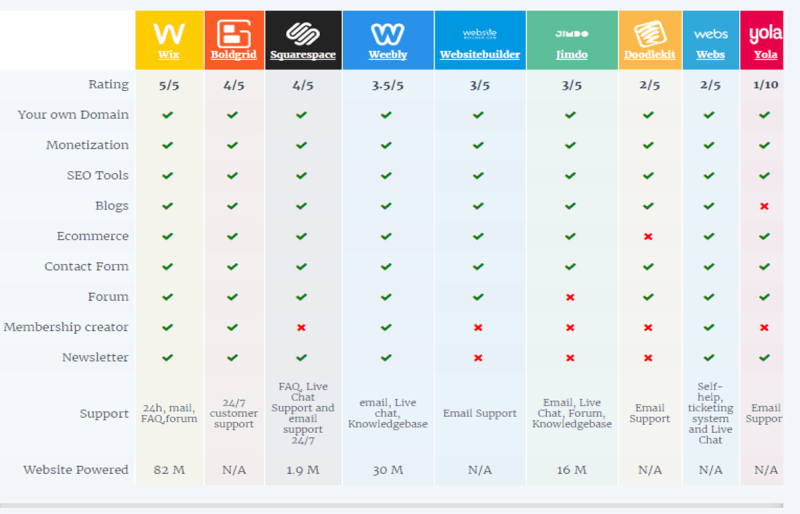
 A visual summary comparing core features across leading website building platforms.
Frequently Asked Questions
Which Website Builder Is The Best?
The best website builder depends on your needs. Wix is great for beginners, while WordPress offers more customization. Squarespace is excellent for design-focused sites.
Which Is The Best Site To Make A Website?
The best site to make a website is Wix. It offers user-friendly tools, customizable templates, and powerful features for beginners and professionals alike.
How Much Should I Pay For A Website Builder?
Website builder costs range from free to $300 annually. Premium plans offer advanced features and better support.
Is It Worth Paying Someone To Do Your Website?
Yes, paying a professional for your website is worth it. It ensures a polished, functional, and SEO-optimized site.
Can I switch website builders after launching?
Yes, but it often requires rebuilding your site manually. Some builders offer migration tools (e.g., WordPress exports content, Wix can import from other platforms), but design and customizations usually don’t transfer. Plan ahead to avoid a painful migration.
Do I need coding skills to use a website builder?
Most modern builders are code‑free. However, adding advanced features (like custom checkout flows or unique animations) may require HTML/CSS knowledge. WordPress users often rely on plugins instead of coding.
Which builder is best for SEO?
WordPress with a plugin like Yoast SEO offers the most control. For beginners, Wix’s built‑in SEO Wizard is very effective. Squarespace and Shopify also provide solid SEO foundations but with less granularity.
How do I choose between a drag‑and‑drop builder and WordPress?
If you want simplicity and an all‑in‑one solution, choose Wix or Squarespace. If you need total control, scalability, and a huge plugin ecosystem, go with WordPress. Consider your long‑term goals — WordPress requires more upkeep but offers more freedom.
Conclusion
Choosing the right website builder depends on your needs. Consider features, pricing, and ease of use. Each builder offers unique benefits. Think about your goals and budget. Test a few options if needed. A good website builder makes the process smoother.
Create your website with confidence and start building your online presence today. Try a free trial of your top choice and see which platform feels right for you — there’s no substitute for hands‑on experience.

