
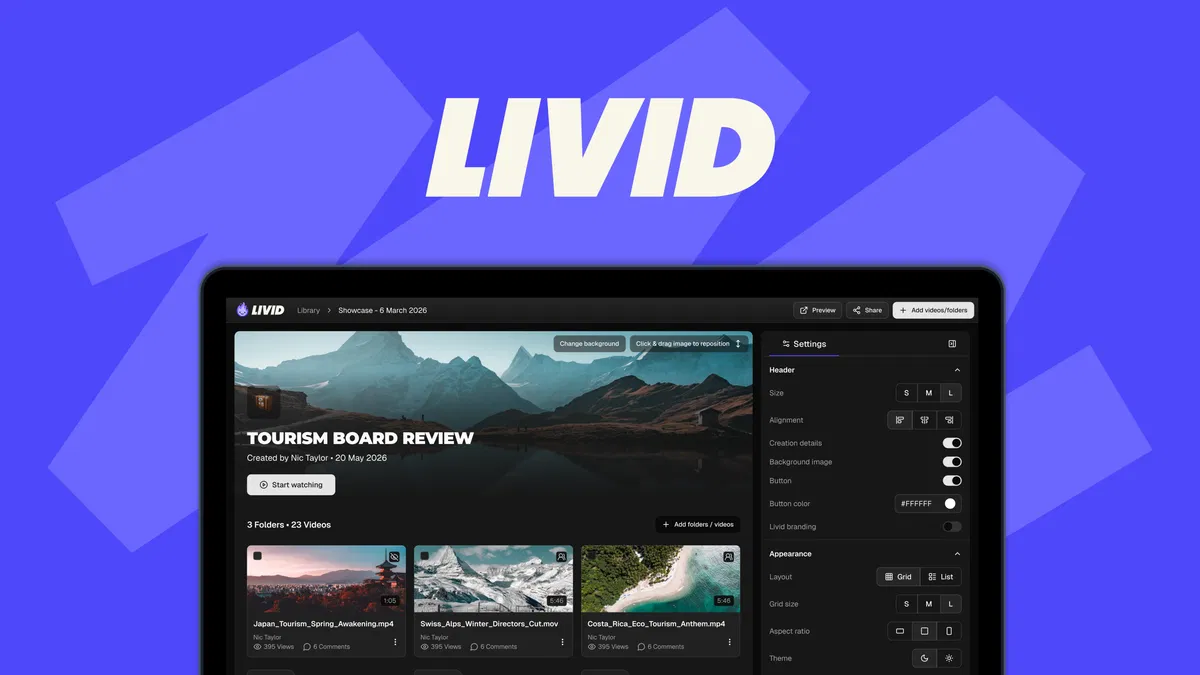
Livid is a video hosting platform that lets you ditch Vimeo's monthly fees without losing your library or your brand look. What sets it apart from the dozens of hosting tools on the market is its free L.O.V.E. migration app, which bulk-imports an entire Vimeo account with folders and metadata intact, plus a fully customizable, ad-free player.
Disclosure: This article contains affiliate links. We may earn a small commission at no extra cost to you when you sign up via our links, it's how this site stays free to run.
TL;DR Verdict
- Who it's for: Content creators, videographers, and small businesses that want ad-free, branded hosting without Vimeo's rising monthly bill.
- Headline price: $39 one-time for Tier 1 (200 GB storage, 1 TB monthly bandwidth) through the current AppSumo deal.
- Biggest pro: The free L.O.V.E. (Livid One-click Video Exporter) app migrates your entire Vimeo library with folders and metadata intact.
- Biggest con: Tier 1 caps playback at 1080p and only includes 1 TB of monthly bandwidth.
- Free trial status: No traditional trial, but purchases are refundable up to 60 days.
- Bottom line: If you are paying Vimeo monthly and want every video to carry your brand instead of theirs, Try It Free → and put the migration tool through its paces while the refund window is open.
What Is Livid?
Livid is a video hosting and player customization platform designed for creators and small teams who are tired of ads, third-party watermarks, and unpredictable Vimeo pricing. The founding team came out of StreamYard, and you can see that DNA in the product's focus on live-ish controls, sharing permissions, and embed flexibility rather than enterprise broadcast features.
The problem it solves is straightforward. When you embed a YouTube video on your site, Google dictates the player, injects related videos, and can serve ads ahead of your content. When you host on Vimeo, you get clean playback but pay monthly for storage and bandwidth, and you have limited control over how the player looks.
If you already run your own hosting stack (see our take on picking the right place to host your site), adding a video tool that behaves with the same logic makes sense. Livid slots in as the video layer that matches your brand instead of fighting it.
Beyond playback, Livid handles the workflow that surrounds a finished video edit: secure client review, password-protected sharing, URL-stable replacements, and basic viewer analytics. Those are the same jobs you might otherwise chain together with a data extraction tool for reporting plus a separate review platform. Livid bundles them so you are not juggling three subscriptions.
Key Features That Matter
One-Click Vimeo Migration via L.O.V.E.
The Livid One-click Video Exporter is a free desktop app for Windows, Mac, and Linux that connects to your Vimeo account and pulls down your entire library in bulk. Folders, titles, descriptions, and metadata come along for the ride, so you are not re-creating the structure by hand. You can route exports straight to Google Drive or push them into Livid directly, avoiding the manual re-upload grind that kills most migrations.
Fully Branded, Ad-Free Player
Every embed runs without ads and without the Livid watermark once you are on the paid plan. You upload your own logo, pick brand colors, and swap the play button style to match your site. Bulk branding is supported too, meaning you can apply a new logo or color scheme to dozens of videos at once instead of editing each one.
Granular Sharing Controls
Each video gets its own access rule: public, unlisted, or password-protected. You can disable sharing entirely when a clip needs to stay locked down, and you can flip a video from public to private without breaking any existing embeds. For agencies handling embargoed client work, that level of control replaces the awkward "please do not share this link" email.
Stable URLs and Instant Video Swaps
You can replace the file behind a video without changing its URL, so every embed, link, and landing page keeps working. Editors fixing a typo or swapping a voiceover no longer need to chase webmasters. Public feedback from the vendor's changelog confirms the swap keeps the same analytics history attached to the new file.
Timestamped Review Feedback
Reviewers can leave comments tied to a specific moment in the video, so you know exactly where a note applies. That alone removes a dozen "at around 2:14, maybe it's 2:20?" back-and-forths. It is the same pattern tools like Frame.io built their reputation on, wrapped into the same dashboard as your hosting.
Viewer Analytics and Transcripts
The dashboard shows when viewers drop off, replay, or stop watching entirely. Transcripts are included on both license tiers, which helps with accessibility and indexable on-page content. For solo creators, that is a quick way to spot whether a hook is losing people in the first 30 seconds.
Pricing Tiers (starts $39)
| Tier | Price | Best For | Free trial? |
|---|---|---|---|
| License Tier 1 | $39 one-time (list $120) | Solo creators and single-brand sites under 200 GB | Refundable up to 60 days |
| License Tier 2 | $119 one-time (list price higher) | Agencies and 4K workflows up to 500 GB | Refundable up to 60 days |
The current promotion drops Tier 1 by 68%, from $120 down to $39. Both tiers come with lifetime access and future Pro Plan updates, which is unusual for a hosting tool where subscription creep is the norm. Compare that with what you pay annually for Vimeo's starter plans and the math is easy to run.
For teams already juggling recurring software bills (see our lifetime software deals coverage), a one-time video hosting payment removes a line item from the monthly ledger.
The main trade-off between tiers is resolution and capacity. Tier 1 tops out at 1080p HD with 1 TB per month of bandwidth. Tier 2 bumps you to 4K and 2 TB per month, plus more headroom for larger libraries.
Activate your license within 60 days of purchase, and note that downgrades between tiers are allowed within the same 60-day window.
Pros and Cons
Pros
- Ad-free playback on every embed, no third-party branding forced on viewers
- One-click bulk Vimeo migration keeps folders and metadata
- Logo, colors, and play button customization with bulk apply
- Password, unlisted, and fully disabled sharing options per video
- Video swaps keep the same URL, embeds, and analytics intact
- Timestamped feedback streamlines client review cycles
- Lifetime access with future Pro Plan updates on both tiers
Cons
- Tier 1 limits playback to 1080p and 1 TB monthly bandwidth
- The company was founded in 2026, so the public review base is still small
- No live streaming capability in the current license terms
- Analytics are useful but lighter than dedicated enterprise video tools
- Requires license activation within 60 days of purchase
- Direct subscription pricing outside the AppSumo deal can be higher
Who Should Use Livid?
Solo Creators Publishing Weekly
If you publish at least a few videos per month and pay for Vimeo, Livid's Tier 1 pays for itself inside the first billing cycle. You get ad-free playback, your own logo on the player, and a migration tool that does the heavy lifting. For creators already running paid campaigns, the email platforms for early-stage teams that tie back to your site analytics make a good companion for driving traffic.
Small Business Marketing Teams
Marketing teams of 2 to 10 people get the most out of the sharing controls and timestamped reviews. You can circulate a password-protected review link to stakeholders, collect feedback in one place, and publish once approved. The whole flow replaces three tool subscriptions most teams currently stitch together.
Videographers and Freelance Editors
Freelancers who hand off finished videos to clients will appreciate URL-stable swaps. You fix a small edit without the client having to re-embed anything. Combined with expanding your audience through consistent publishing, Livid turns your delivery workflow into something that looks more professional than a Dropbox link.
Skip Livid if you need live streaming, enterprise DRM, or a mature analytics suite with team-level reporting. It is a hosting and review tool, not a broadcast studio.
Alternatives to Consider
Vimeo remains the obvious comparison point, and it still has a larger ecosystem of integrations and stock video. The trade-off is monthly billing that keeps climbing and a player that carries Vimeo's own branding unless you pay extra. For a wider picture of recurring software costs, our breakdown of budget-friendly hosting picks shows where the money leaks.
YouTube is free but injects ads, related videos, and Google's UI into every embed. If you need clean playback with no distractions, YouTube will never fully deliver that. Wistia sits in the premium branded-video space and charges accordingly, with plans that scale past what most small teams want to spend.
For an agency managing client billing alongside video projects, tying your toolset to a proper invoicing and billing tools stack keeps the paperwork out of your video workflow.
Final Verdict
Livid fills a real gap. It takes the features creators actually use from Vimeo (clean playback, password sharing, reviews) and strips out the ad-driven economics and monthly pricing model. The L.O.V.E. migration app is the kind of thing that usually costs extra or does not exist.
Reviews on G2 and Trustpilot for the broader video hosting category show that buyers consistently rate migration ease and player branding as their top priorities, and both are where Livid plays strongest.
The honest caveats are the young company age, the 1080p ceiling on Tier 1, and bandwidth that will not suit heavy libraries. If you fit inside those limits, the value is hard to beat.
Ready to move your library off Vimeo and put your brand back on every embed? Try It Free →
Frequently Asked Questions
Does Livid have a free plan?
No. There is no permanent free tier. The current AppSumo offer gives you lifetime access for a one-time $39 or $119 payment, and purchases are refundable up to 60 days.
That refund window functions as your risk-free trial.
How does Livid compare to Vimeo?
Both host videos and offer clean embeds. Vimeo bundles stock footage, a larger integration directory, and a mature review suite, but charges monthly and shows its own branding on lower tiers. Livid gives you a fully branded, ad-free player and lifetime pricing, with a free migration app to move your existing Vimeo library over.
Can I cancel anytime?
The AppSumo lifetime deals are one-time purchases, so there is no recurring charge to cancel. Downgrades between Tier 1 and Tier 2 are allowed within 60 days of purchase, and refunds are issued within the same window under the vendor's guarantee.
Is Livid worth the price?
At $39 for 200 GB of storage and 1 TB of monthly bandwidth with lifetime access, the price undercuts almost every comparable Vimeo tier within a single year. It is worth it if you need branded, ad-free hosting and do not require 4K or enterprise-grade analytics. Teams working with 4K footage should look at Tier 2.
Can I migrate my entire Vimeo library at once?
Yes. The free L.O.V.E. app connects to Vimeo and bulk-exports your library with folders and metadata preserved, on Windows, Mac, or Linux. You can route the exports to Google Drive or push them directly into Livid.
For teams also managing CRM-side workflows, tying your CRM to email campaigns or running side-by-side host comparisons helps you map out the wider stack Livid will slot into.

