
Helploom sells live chat, a shared inbox, and a 24/7 AI agent for a one-time $109, with unlimited seats and unlimited threads. That pricing model is the whole story here, because per-agent billing is what quietly punishes small teams as they grow. If you have ever watched your helpdesk bill climb faster than your headcount, this review walks through what you actually get.
Disclosure: This article contains affiliate links. We may earn a small commission at no extra cost to you when you sign up via our links, it's how this site stays free to run.
TL;DR Verdict
- Who it's for: Small support teams, solopreneurs, and bootstrapped SaaS founders who need real helpdesk software without paying per seat.
- Headline price: $109 one-time for Tier 1, down from $720, roughly 85% off while the deal runs.
- Biggest pro: Unlimited users, unlimited threads, and unlimited help center pages on a single license.
- Biggest con: AI automation is capped (5,000 automated AI messages and 1,000 AI Assist credits monthly), so very busy inboxes will need the $49 add-on.
- Trial status: No free trial. Instead, AppSumo's 60-day money-back guarantee covers the purchase.
- Bottom line: If your team lives in one shared inbox and hates seat-based pricing, Get the Lifetime Deal →.
What Is Helploom?
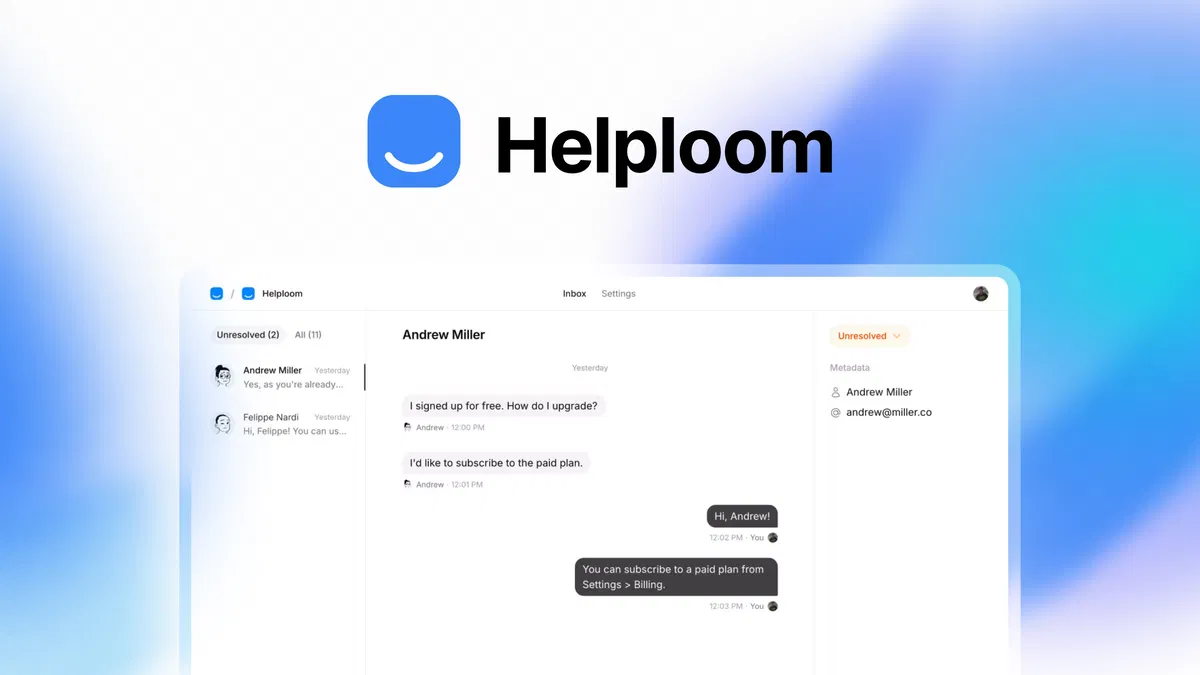
Helploom is a customer support platform that combines live chat, a shared team inbox, an AI agent, and a self-serve help center into one product built for small teams.
The jobs it solves are pretty specific. First, catching inbound questions before they turn into lost sales, which is why the widget asks visitors for a name and email before a conversation starts. Second, keeping every reply visible to the whole team instead of buried in one person's personal inbox.
Third, deflecting repeat questions with AI and a searchable knowledge base so your two or three agents can focus on the messy tickets.
Helploom was founded on January 7, 2025 by Sujan Patel, a US-based, bootstrapped startup operating out of Austin, Texas, with a team of 1 to 10 people. That context matters: this is a young product from a small team, not a decade-old enterprise suite. According to the vendor's documentation, the platform supports Slack notifications, a custom email domain, and unlimited help center articles on the base license.
If you are already comparing tools that skip monthly fees, our breakdown of similar one-time-payment software picks covers how that model tends to play out over a two-year window.
Key Features That Matter
Unlimited Live Chat With No Seat Tax
Add the chat widget to any site with a single copy-paste snippet, no developer needed. The important part is what is missing: no cap on live chat conversations and no charge per agent added. A five-person support rota costs the same as a one-person rota, which is the exact opposite of how Help Scout and Intercom structure their plans.
A Shared Inbox Where Nothing Gets Lost
Every conversation lands in one shared inbox that the whole team can see, assign, and answer. Instead of forwarding screenshots of customer emails between colleagues, agents pick up threads directly. For teams where the founder still answers tickets at 11pm, that visibility is the difference between a clean handoff and a dropped customer.
An AI Agent Trained on Your Own Content
You feed the AI your PDFs, docs, URLs, and Q&A pairs, then it answers from that material rather than inventing facts. It handles common questions around the clock and escalates to a human when confidence drops. You can also write custom instructions for edge cases, for example routing an angry customer to a phone call instead of letting a bot keep replying.
That escalation control is the feature most AI chatbots get wrong.
A Help Center That Lives Inside the Chat
You can build articles, group them into collections, and brand the help center to match your site. The smarter touch is that help content surfaces inside the chat widget itself, so a visitor can jump to the right article without leaving the conversation. Fewer dead-end chats, fewer "let me find that for you" delays.
Slack and Email in One Stream
New messages trigger an instant Slack notification, and customer emails arrive at a dedicated support address that sits beside live chat in the same queue. According to the vendor's documentation, the AI can auto-respond to incoming emails too, so questions get answered even when nobody is at a desk. If your team already runs on Slack, this removes one more tab from the day.
Visitor Capture Before the Chat Begins
The widget prompts visitors for their name and email up front, which turns an anonymous chat into a contact record. For a small business, that is pipeline, not just support. Chat becomes a lead capture channel rather than a cost center.
Pricing Tiers (starts $109)
| Tier | Price | Best For | Free trial? |
|---|---|---|---|
| Tier 1 (Plus) lifetime license | $109 one-time | Solo founders and small support teams | No, 60-day refund instead |
| Unlimited AI Messages add-on | +$49 | Busy inboxes that blow past 5,000 automated AI messages | No |
| White label add-on | +$89 | Agencies reselling support as their own | No |
| Standard retail pricing | $720 | Reference price without the deal | No |
Every tier includes unlimited threads, unlimited users, unlimited help center pages, a custom email domain, and Slack integration on the base $109 license. The base plan also ships with 5,000 automated AI messages per month, 1,000 AI Assist credits per month, and 250MB of knowledge base storage for one website, one workplace, and one AI agent.
In plain English: $109 buys you the full helpdesk, and the add-ons only matter if you run unusually high AI volume or want to strip out Helploom branding. Activation must happen within 60 days of purchase, and the deal terms state that upgrades or downgrades between license tiers are not allowed once you buy. The vendor also notes that access to future AI models may come at a discount or require an add-on, which is worth reading carefully before you commit.
One adjacent cost worth planning for is what happens when support and billing start touching each other. Tools that handle invoice chasing workflows usually sit next to your helpdesk, so budget a little time for connecting them.
Pros and Cons
Pros
- Unlimited agents and unlimited chat threads on one $109 license
- AI agent escalates to humans instead of trapping customers in loops
- Help center content surfaces inside the chat widget during conversations
- Slack notifications and a shared email address keep everyone in sync
- Visitor capture turns support chats into contact records
- 60-day money-back guarantee softens the risk of a young product
- Activate within 60 days, so you can buy now and deploy later
Cons
- No free tier or free trial, only a refund window
- AI message caps (5,000/month) will frustrate high-volume inboxes
- Only one website and one AI agent per license, which limits agencies
- Native integrations are thin outside Slack, so expect Zapier-type bridges
- Future AI model access may cost extra, per the deal terms
- Few public reviews so far, so long-term reliability is unproven
Who Should Use Helploom?
Solopreneurs and One-Person Businesses
If you answer your own tickets, you need a chat widget and a knowledge base, not a per-seat contract. Helploom gives you a branded help center, AI deflection for repeat questions, and email plus Slack alerts at a flat cost. At $109 once, it pays for itself against almost any monthly helpdesk within a few months.
Small Support Teams of Two to Ten
This is the core audience. A shared inbox with assignments, unlimited seats, and AI that hands off to humans means your whole team works from one queue. You can onboard a new agent without emailing finance first, which is the real advantage over seat-priced rivals.
Teams comparing this against broader stacks often pair it with a proper customer database for the sales side.
Agencies Wanting a White-Label Helpdesk
The $89 white-label add-on lets you run support under your own branding for clients. Unlimited users means you can give every client contact access without counting seats. Just note the one-workplace limit on the base license and price accordingly.
Who Should Skip Helploom
Skip it if you need phone support, advanced SLA routing, or dozens of native integrations with enterprise systems. Skip it too if you burn through tens of thousands of AI replies a month, since the add-on math changes. And if you require a mature, battle-tested vendor with years of uptime history, a five-month-old product is not that yet.
Alternatives to Consider
Help Scout offers a polished shared inbox and a strong knowledge base, but it charges per contact and per user, so costs climb as your team and customer base grow.
Intercom brings deep automation, a messenger, and a wide app marketplace, but entry pricing is high for small teams and AI features sit behind premium tiers.
Crisp covers live chat, a shared inbox, and a bot builder with a usable free tier, though the AI quality and help center depth lag what Helploom bundles into one license.
If you are shopping across categories, our roundup of early-stage outreach stacks explains how support tools slot into a broader growth setup.
Final Verdict
Helploom's pitch is simple and it mostly delivers on paper: one payment, unlimited seats, a shared inbox, and an AI agent that knows when to step aside. The trade-offs are real, namely AI message caps, one website per license, and a product young enough that its long-term track record is still being written. For a two-to-ten person team paying per agent elsewhere, the math favors this deal quickly.
The 60-day refund window means the risk sits with the vendor, not you, for the first two months. If your support volume is modest and your main pain is seat pricing, this is one of the cleaner lifetime deals in the helpdesk category right now.
Frequently Asked Questions
Does Helploom have a free plan?
No. There is no free tier and no free trial. The only way to test it is to buy the lifetime license and use the 60-day money-back guarantee if it does not fit.
That refund window is longer than most SaaS trials, so it functions as a paid trial with an escape hatch.
How does Helploom compare to Help Scout?
Help Scout is more mature and has a deeper email workflow, but it charges per user and per contact. Helploom gives you unlimited seats and unlimited threads on one $109 license, plus a built-in AI agent. You trade some polish and integration depth for a much lower long-term cost.
Can I cancel anytime?
There is nothing to cancel. You pay once for lifetime access, so there is no recurring subscription to stop. Your only action window is the 60-day refund period after purchase, which is why you should activate and test the license early rather than letting it sit.
Is Helploom worth the price?
For small teams currently paying per agent, yes. At $109 once versus typical seat pricing of $15 to $50 per agent per month, a three-person team breaks even in roughly one to three months. It is less compelling if you need phone support, complex routing, or very high AI message volume.
Does Helploom limit how many support agents I can add?
No. Unlimited users are included on the base Tier 1 license, along with unlimited threads and unlimited help center pages. What is capped is AI usage (5,000 automated AI messages and 1,000 AI Assist credits monthly) and knowledge base storage at 250MB, plus one website and one AI agent per license.
How does the AI agent decide when to hand off to a human?
According to the vendor, the AI answers from your trained knowledge base and escalates when it cannot answer confidently. You can also write custom instructions for specific scenarios, such as sending an upset customer to a phone call. That control layer is what separates it from chatbots that keep guessing.
If you run a WordPress storefront, it is worth checking how chat sits alongside taking payments on WordPress before you rebuild your checkout flow, and if you are still sorting out infrastructure, our notes on site hosting choices cover what small teams actually need.


1 thought on “Helploom Review (2026): Honest Take After Real Research”