Best Accounting Software Integrations: Boost Efficiency Today
Founder & Lead SaaS Analyst at PCSaaS · Google Ads & Analytics Certified · SaaS Stack Architect · 500+ Software Tools Tested · 8+ years in B2B SaaS evaluation, AppSumo lifetime deal curation, performance marketing, and AI workflow automation
In today's fast-paced business world, efficiency is key. Best Accounting software integrations can streamline your financial tasks.
Accounting software can handle much more than just bookkeeping. Integrations allow these tools to connect with other software, improving your workflow. Imagine your CRM, payroll, and inventory systems all working together with your accounting software. This ensures data accuracy and saves time.
With the right integrations, your business can run more smoothly. You can focus on growth rather than manual data entry. In this post, we will explore the best accounting software integrations. Discover which ones can help you manage your business finances better. Keep reading to discover which integrations will save you the most time and help you make smarter financial decisions.
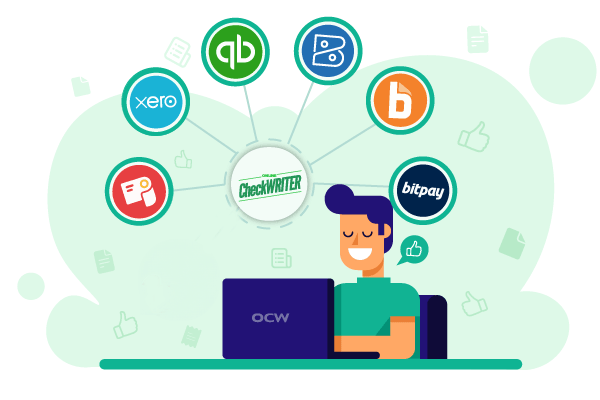 Integration between your bank and accounting platform eliminates duplicate data entry.
Credit: onlinecheckwriter.com
Introduction To Accounting Software Integrations
In today's business world, accounting software is essential. It helps manage finances, track expenses, and ensure accurate reporting. But the true power of accounting software lies in its integrations. Integrating with other tools streamlines processes and improves efficiency.
Importance Of Integrations
Integrations connect your accounting software with other business tools. This means less manual data entry and fewer errors. Integrations save time and effort. They also provide a unified view of your business data.
For example, integrating with CRM systems allows seamless tracking of sales and expenses. Connect with payroll services for automated salary calculations. Link with e-commerce platforms to sync sales data directly into your books.
In practice, a well-integrated accounting system can cut month-end close times by several days. Business owners often report that bank feed integrations alone eliminate hours of manual reconciliation each week. When you also connect your expense management and invoicing tools, the entire financial workflow becomes nearly hands-off.
Common Challenges
Integrating accounting software can be challenging. Compatibility is a major issue. Not all tools work well together. Finding compatible tools requires research and time.
Data security is another concern. Sharing data between systems must be secure. Always use trusted platforms and follow best practices for data protection.
Lastly, complex setups can be daunting. Some integrations need technical skills. This may require extra training or hiring experts.
Challenge Description Solution
Compatibility Not all tools are compatible Research compatible tools
Data Security Risk of data breaches Use trusted platforms
Complex Setups Requires technical skills Hire experts if needed
By understanding these challenges, you can better prepare for integration. Remember, the right integrations make your accounting processes smoother and more efficient.
Benefits Of Accounting Software Integrations
Integrating accounting software with other business tools can greatly benefit your company. It streamlines processes and enhances efficiency. Here are some key benefits of accounting software integrations.
Enhanced Productivity
Accounting software integrations help automate many tasks. This frees up time for your team. They can focus on more important work. Automation reduces the need for manual data entry. This speeds up processes and improves productivity. Your team can complete tasks faster and with greater accuracy.
Reduced Errors
Manual data entry is prone to errors. Accounting software integrations minimize these mistakes. Accurate data is crucial for making informed decisions. Integrations ensure data consistency across different platforms. This leads to reliable financial reports. Fewer errors mean fewer headaches for your accounting team.
Real-Time Financial Visibility
With integrations, your financial data updates automatically across platforms. You can see cash flow, outstanding invoices, and profit margins at a glance without waiting for manual updates. This real-time view helps you make faster, more informed decisions about spending and growth.
Popular Accounting Software Options
Choosing the right accounting software is crucial for your business. There are several popular options available. Each offers unique features to help manage your finances efficiently. In this section, we will explore two of the most popular accounting software options: QuickBooks and Xero.
Quickbooks
QuickBooks is one of the most widely used accounting software. It is suitable for small to medium-sized businesses. QuickBooks offers both desktop and cloud-based versions.
Easy to use and learn
Comprehensive financial management tools
Integrates with many third-party apps
Provides detailed financial reports
QuickBooks includes features such as:
Invoicing
Expense tracking
Payroll management
Inventory management
These features help streamline your accounting processes. QuickBooks also supports multiple users, making it ideal for teams.
Xero
Xero is another popular accounting software option. It is known for its user-friendly interface and powerful features. Xero is cloud-based, which means you can access it from anywhere.
Real-time financial data
Automatic bank feeds
Easy invoicing
Multi-currency support
Xero offers several key features:
Bill payment
Bank reconciliation
Project tracking
Expense claims
Xero's integrations with over 700 apps make it a versatile choice. It is perfect for businesses that require flexibility and scalability.
Top Payment Processing Integrations
Choosing the right payment processing integration can greatly enhance your accounting software's efficiency. Seamless payment processing helps streamline your financial tasks. It reduces manual data entry and minimizes errors. In this section, we will explore some top payment processing integrations.
Paypal
PayPal is a popular choice for many businesses. It offers secure transactions and is easy to integrate with most accounting software. PayPal supports multiple currencies. This makes it ideal for businesses dealing with international clients. The integration process is simple and user-friendly. You can track payments and manage invoices directly within your accounting platform.
PayPal also provides detailed transaction reports. These reports help with financial analysis and forecasting. Using PayPal with your accounting software can save time. It can also improve the accuracy of your financial records.
Stripe
Stripe is another excellent payment processing integration. It is known for its flexibility and developer-friendly features. Stripe supports a wide range of payment methods. These include credit cards, bank transfers, and mobile wallets. This makes it a versatile option for businesses of all sizes.
Integrating Stripe with your accounting software is straightforward. It allows you to automate payment tracking and reconciliation. This reduces the risk of human error. Stripe also offers advanced security measures. These measures protect your business and your customers' data.
Stripe's detailed analytics and reporting tools are valuable. They provide insights into your financial performance. Using Stripe with your accounting software can enhance your financial management processes. It simplifies payment handling and ensures accurate financial records.
Customer Relationship Management (crm) Integrations
Integrating your accounting software with a Customer Relationship Management (CRM) system can save time and increase efficiency. This integration helps streamline processes, providing a comprehensive view of your customers. Here, we explore two popular CRM integrations: Salesforce and HubSpot.
Salesforce
Salesforce is one of the most widely used CRM systems. Integrating it with your accounting software can offer many benefits. You can automate the flow of financial data between the two systems. This ensures accurate and up-to-date information. Here are some key features:
Automated invoicing
Real-time financial reporting
Customer financial history tracking
Improved data accuracy
These features can help improve your business's financial management. You can also gain better insights into customer behavior. This integration helps you make informed decisions quickly.
Hubspot
HubSpot is another popular CRM that integrates well with accounting software. This integration can help you manage your business finances more effectively. Some of the key features include:
Seamless data synchronization
Automated billing and invoicing
Detailed financial analytics
Enhanced customer insights
These features help streamline your financial processes. You can easily track and manage customer transactions. This makes it easier to maintain accurate records and improve customer relationships.
 Evaluate compatibility and data flow before committing to a new integration.
Credit: synder.com
E-commerce Platform Integrations
Integrating your e-commerce platform with accounting software can save you time and reduce errors. It ensures seamless data flow between your sales channels and your accounting system. This integration helps streamline processes like order tracking, inventory management, and financial reporting. Let's explore two popular e-commerce platforms and their integrations with accounting software: Shopify and WooCommerce.
Shopify
Shopify is a leading e-commerce platform favored by many businesses. Integrating Shopify with accounting software like QuickBooks or Xero is straightforward. This integration helps you automate tasks like syncing sales data, managing inventory, and tracking expenses. It also provides real-time financial reports. This enables better decision-making and efficient financial management.
Woocommerce
WooCommerce is a flexible e-commerce platform built on WordPress. Integrating WooCommerce with accounting software simplifies your financial processes. Popular integrations include QuickBooks, Xero, and FreshBooks. This connection automatically syncs sales, expenses, and customer data. It also helps manage inventory and provides detailed financial reports. Using these integrations ensures accuracy and saves time, making your business run smoother.
Payroll and HR Integrations
Connecting your accounting software with payroll and HR systems ensures employee compensation, tax withholdings, and benefits are recorded accurately without double entry. Common integrations include Gusto, ADP, and BambooHR. These tools sync payroll data directly into your general ledger, so you can run payroll and close the books in fewer steps. For small businesses, using a dedicated payroll integration reduces the risk of IRS penalties caused by manual calculation errors. If you are evaluating different setups, comparing features like those covered in our QuickBooks Advanced vs QuickBooks Core article can help you choose the right tier for payroll needs. Always verify that your payroll integration uses the latest tax tables from the IRS Employer's Tax Guide to avoid under- or over-withholding.
Inventory Management Integrations
For product-based businesses, inventory integration keeps stock levels aligned with purchase orders, sales, and returns. Platforms like TradeGecko, Zoho Inventory, and Fishbowl sync with accounting software to update cost of goods sold automatically. This prevents stockouts and over-ordering while maintaining accurate balance sheet records. A common mistake is neglecting to set up real-time sync, which leads to discrepancies between warehouse counts and financial reports. Using a reliable cloud hosting infrastructure that supports these connections ensures your integrations run without downtime.
Project Management Tool Integrations
Project management tool integrations can streamline accounting processes. They help teams stay organized and efficient. Connecting your accounting software with project management tools saves time. It reduces errors and increases productivity. Let's explore some of the best options available.
Trello
Trello is a popular project management tool. It uses boards, lists, and cards to organize tasks. Integrating Trello with your accounting software is easy. You can track expenses and budgets within Trello. This helps in managing project costs effectively. Teams can see financial data alongside project tasks. This integration provides a clear view of project finances. It ensures that everyone is on the same page.
Asana
Asana is another powerful project management tool. It helps teams plan, organize, and track work. Integrating Asana with accounting software brings many benefits. You can sync tasks and financial data seamlessly. This integration allows for better budget tracking. Project timelines and costs stay aligned. Teams can see project progress and financial status together. This helps in making informed decisions quickly. It simplifies managing project expenses and invoices.
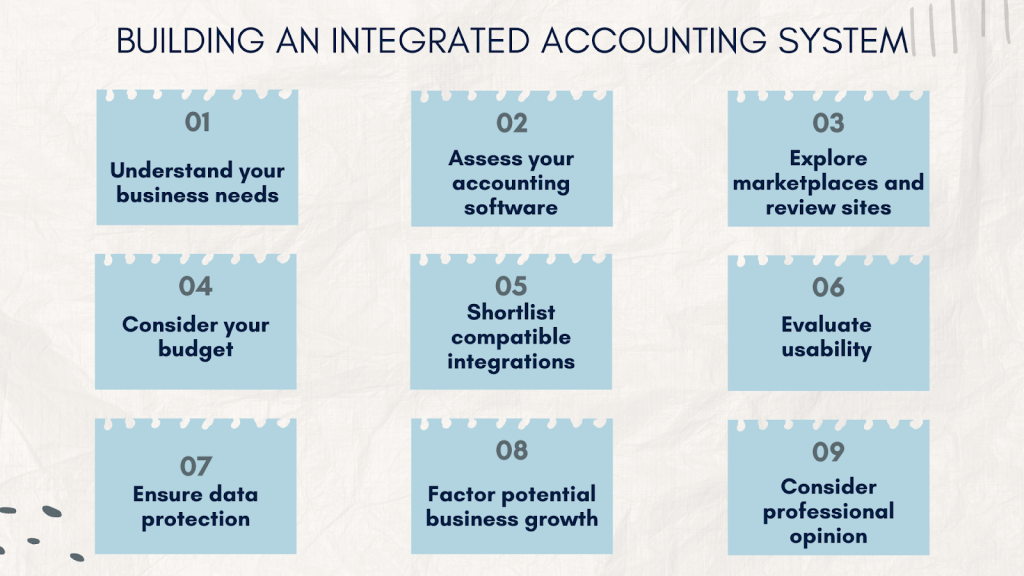
 A structured approach prevents common integration failures.
Credit: synder.com
Steps To Implement Software Integrations
Implementing software integrations can transform your accounting processes. The right integrations streamline tasks, improve accuracy, and save time. Follow these steps to implement accounting software integrations effectively.
Choosing The Right Tools
First, identify your business needs. What tasks need automation? Look for software that integrates seamlessly with your current systems. Compatibility is key. Check for user reviews and ratings. They provide insights into the software's performance. Also, consider the cost. Ensure it fits your budget without compromising quality.
Ensuring Data Security
Data security is crucial during integration. Choose software with robust security features. Look for encryption and secure data transfer protocols. Also, check the vendor's reputation. A trustworthy vendor will have strong security measures in place. Regularly update software to protect against vulnerabilities. Ensure your team follows best practices for data security.
Common Integration Mistakes to Avoid
Even with careful planning, integration projects can go wrong. The most frequent errors include:
- Skipping data cleansing: Dirty data in one system propagates to all connected apps. Always clean your data before connecting.
- Over-integrating: Adding too many integrations at once creates confusion. Start with the highest-impact connections.
- Ignoring security protocols: Ensure every integration uses encrypted transmission and follows the PCI Data Security Standard if handling payment data.
- Failing to train staff: Your team must understand how the integrated system works. Provide clear documentation and a test period.
Future Trends In Accounting Software Integrations
The world of accounting software is evolving rapidly. Integrations are becoming more advanced and interconnected. This change is driven by the need for efficiency and accuracy. Future trends in accounting software integrations are exciting. They promise to transform the way businesses handle finances.
Ai And Machine Learning
AI and machine learning are key trends in accounting software. They help automate repetitive tasks. This saves time and reduces errors. AI can analyze large datasets quickly. It can provide insights that humans might miss. Machine learning improves over time. It learns from data and becomes more accurate. This technology can predict financial trends. It can also detect anomalies in transactions. This helps in fraud prevention.
Blockchain Technology
Blockchain technology is another significant trend. It offers a secure way to record transactions. Blockchain is transparent and tamper-proof. This increases trust in financial data. It can streamline processes like auditing and compliance. Blockchain reduces the need for intermediaries. This can lower costs and speed up transactions. Businesses can benefit from faster and more secure financial operations.
Frequently Asked Questions
What Is Accounting Software Integration?
Accounting software integration connects your accounting tools with other business applications. It ensures seamless data flow and improved efficiency. This integration eliminates manual data entry, reduces errors, and saves time.
Why Is Accounting Software Integration Important?
Accounting software integration is crucial for streamlining business operations. It improves data accuracy and enhances decision-making. It also reduces redundancy and manual errors, saving time and resources.
Which Accounting Software Integrations Are Most Popular?
Popular accounting software integrations include QuickBooks with PayPal, Xero with Stripe, and FreshBooks with Gusto. These integrations enhance functionality and streamline financial processes.
How Do Accounting Integrations Improve Business Efficiency?
Accounting integrations automate data entry and synchronization. They eliminate manual tasks, reduce errors, and provide real-time financial insights. This leads to improved business efficiency and better decision-making.
How do I ensure my integrations are secure?
Use software that offers end-to-end encryption and supports multi-factor authentication. Regularly review access permissions and conduct security audits. Referencing the PCI Security Standards helps you align with industry best practices.
Conclusion
Choosing the right accounting software integrations simplifies your business processes. These tools save time and reduce errors. They enhance efficiency and streamline operations. Carefully consider your business needs before selecting an integration. Look for features that match your goals. Remember, the best software should support your growth.
Invest in integrations that offer value and ease of use. This ensures smoother financial management and better decision-making. Ultimately, the right accounting software integration boosts your productivity.
https://www.youtube.com/watch?v=Nvw1lM8PUoY
Quick Comparison: Integrations by Business Type
| Business Type | Priority Integrations | Primary Benefit |
|---|---|---|
| E-commerce store | Shopify/WooCommerce plus PayPal or Stripe | Automated order-to-cash flow |
| Agency or consultancy | Asana/Trello plus Salesforce | Project profitability tracking |
| Retail or wholesale | Inventory management plus payroll | Reduced stock and payroll discrepancies |
| Freelancer or solopreneur | PayPal/Stripe plus invoicing tools | Faster payment reconciliation |
Use this table as a starting point. Your own workflow may benefit from combining integrations across categories, especially once your business grows beyond a single sales channel.
Integration Readiness Checklist
Before you connect any new tool to your accounting software, run through this checklist:
- Back up all financial data in your current system.
- Clean up duplicate vendors, customers, and chart-of-account entries.
- Create a test environment using a sandbox or trial account.
- Confirm the integration supports two-way sync if you need it.
- Review required user permissions on both platforms.
A common mistake is skipping the backup step. One misconfigured sync can overwrite clean data in both directions, turning a reversible mistake into a multi-day cleanup. Also confirm your internet connection and your accounting platform's hosting are reliable enough to handle real-time syncs. Budget-friendly platforms may work fine at first but can slow down as your business grows. Starting with cost-effective web hosting works well early on, but plan to upgrade to a more robust hosting provider as transaction volume increases. If you are new to managing these systems, review a few beginner-friendly hosting choices to ensure uptime is not the weak link in your integration stack.
Start with your single most time-consuming task today — connect one integration, test it, and build from there. Small, deliberate steps lead to a fully connected finance workflow without the chaos of a big-bang rollout.

Similar Posts