
The Best cloud hosting for Ecommerce can transform your eCommerce business. It ensures speed, reliability, and security.
But how do you choose the best one? Selecting the right cloud hosting for your eCommerce site is crucial. It impacts your site's performance, user experience, and sales. With countless options available, it can be overwhelming to decide. This guide will help simplify your search.
We'll explore top cloud hosting providers tailored for eCommerce. You'll learn what features to look for and how they benefit your business. By the end, you'll be better equipped to make an informed decision. Let's dive in and find the perfect cloud hosting for your eCommerce needs.
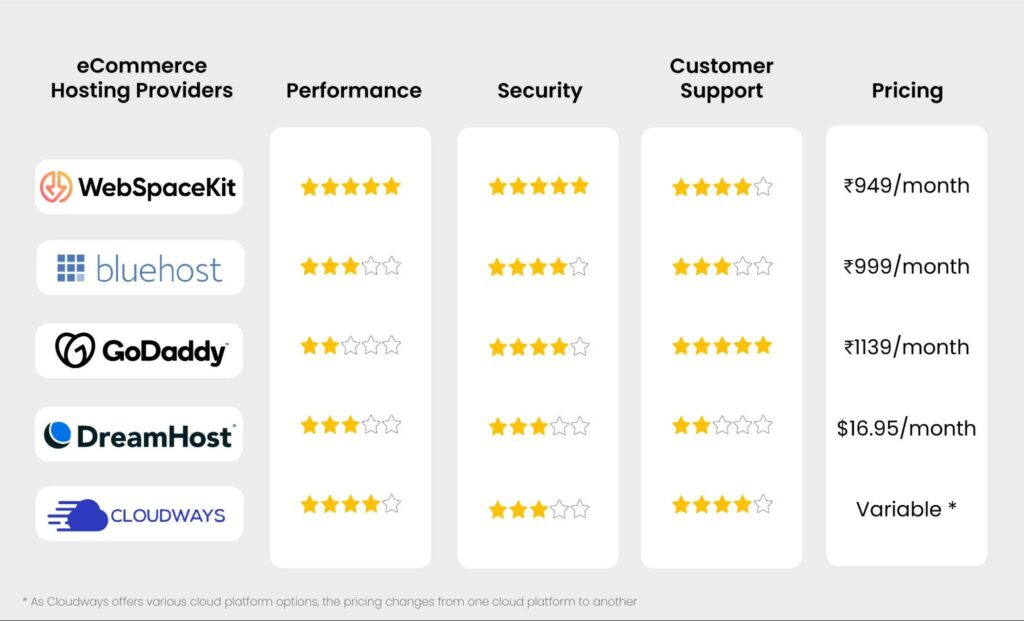 Cloud hosting infrastructure with multiple servers in a data center.
An overview of leading cloud hosting platforms for ecommerce businesses.
Credit: websitelearners.com
Introduction To Cloud Hosting For Ecommerce
Cloud hosting offers a powerful solution for ecommerce businesses. It provides scalable, flexible, and reliable hosting services. Traditional hosting solutions can’t meet the demands of growing online stores. Cloud hosting steps in to fill this gap. It ensures your ecommerce site runs smoothly, even during high traffic periods. This makes it a critical choice for online businesses.
Why Cloud Hosting Matters
Cloud hosting matters for several reasons. First, it offers scalability. As your ecommerce business grows, your hosting needs will change. Cloud hosting adapts to these changes. Second, it provides reliability. Cloud hosting minimizes downtime, ensuring your site is always available. Third, it enhances security. Cloud hosting services offer advanced security measures. These keep your customer data safe. Fourth, it improves performance. Cloud hosting uses multiple servers. This ensures your site loads quickly for all users.
In practice, the ability to spin up additional server instances during flash sales or seasonal peaks—without any manual hardware provisioning—is the single biggest advantage store owners report. A common mistake is underestimating traffic spikes on Black Friday or Cyber Monday; with cloud hosting, you can auto-scale resources in real time and avoid the revenue loss that comes from a crashed site.
Benefits For Online Stores
Ecommerce stores benefit greatly from cloud hosting. It offers flexibility. You can easily adjust resources based on demand. This means you only pay for what you use. It also provides better uptime. Your store remains accessible, even during peak times. Cloud hosting ensures faster load times. This improves user experience. It increases customer satisfaction. It also boosts search engine rankings. Better security is another benefit. Cloud hosting providers offer top-notch security features. This protects your online store and customer data. Lastly, cloud hosting supports growth. It allows your ecommerce business to scale effortlessly.
Beyond these basics, cloud hosting enables real-time inventory syncing across multiple sales channels and integrates seamlessly with content delivery networks (CDNs) to serve product images and videos from edge locations near your shoppers. This reduces latency and further lifts conversion rates.
Top Cloud Hosting Providers
Choosing the best cloud hosting for your ecommerce store is crucial. It ensures your store runs smoothly, loads quickly, and stays secure. Let's explore the top cloud hosting providers that can meet your needs.
Amazon Web Services (aws)
Amazon Web Services (AWS) offers a range of cloud hosting solutions. AWS is known for its reliability and scalability. This makes it a popular choice for ecommerce businesses. With AWS, you can handle high traffic volumes with ease. It also provides robust security features. This helps keep your customers' data safe. AWS's global reach ensures your site loads quickly, no matter where your customers are.
For ecommerce teams already using a lightweight WordPress theme, combining AWS with a fast frontend can yield excellent results. Many store owners pair AWS with a performance-optimized stack like Astra Pro to further reduce load times and simplify server management.
Google Cloud Platform (gcp)
Google Cloud Platform (GCP) is another top choice for ecommerce hosting. GCP offers powerful tools for data management and analytics. This can help you better understand your customers. GCP's infrastructure is designed for high performance. It ensures fast load times for your website. With GCP, you also get strong security measures. This keeps your ecommerce site secure from threats.
GCP’s BigQuery and AI/ML services are particularly valuable for stores running personalized product recommendations or demand forecasting models—capabilities that traditional hosting cannot match.
Microsoft Azure
Microsoft Azure is a reliable option for cloud hosting. Azure offers a variety of services tailored for ecommerce. This includes tools for scaling your business. Azure's global network ensures quick load times. It also provides excellent security features. This keeps your customers' information safe. Azure's integration with other Microsoft products can be a plus. It allows for a seamless experience if you already use Microsoft tools.
Azure is especially well-suited for enterprises that rely on .NET frameworks or Dynamics 365. For smaller stores, the managed WordPress hosting options on Azure can also simplify maintenance while still delivering the cloud’s inherent scalability.
https://www.youtube.com/watch?v=B3G2xFFR8Wg
Managed vs Unmanaged Cloud Hosting
When evaluating cloud hosting for ecommerce, one key decision is whether to choose a managed or unmanaged plan. Managed cloud hosting means the provider handles server setup, security patches, performance monitoring, and backups. Unmanaged hosting gives you full control but requires you to manage the server yourself.
For most ecommerce store owners, managed cloud hosting is the better choice—it frees you to focus on products and marketing rather than server administration. A managed plan also includes proactive monitoring for security threats and automatic scaling during traffic surges. If you prefer a hands-off approach, look for providers that offer managed cloud packages specifically for ecommerce platforms like WooCommerce, Magento, or Shopify.
On the other hand, if your team has in-house DevOps expertise, unmanaged cloud hosting from AWS, GCP, or Azure can be more cost-effective for high-volume stores that need custom server configurations.
A practical middle ground is a semi-managed plan where the provider handles uptime and security patches while you retain full root access for custom software. For example, Hostinger's cloud hosting offers a well-documented hybrid approach that many small-to-medium stores find ideal. Whichever route you choose, confirm the level of support included—some unmanaged providers charge separately for emergency troubleshooting.
Key Features To Look For
Choosing the best cloud hosting for your eCommerce store is crucial. Your business relies on a stable and secure online presence. Knowing the key features to look for can make your decision easier. Let's explore these key features in detail.
Scalability
Scalability ensures your hosting can grow with your business. During peak shopping seasons, traffic can surge. A scalable cloud hosting service adjusts resources to handle this increase. This prevents slowdowns and keeps your site running smoothly.
Auto-scaling is a critical feature—your hosting should automatically add server capacity when traffic spikes and reduce it when demand drops, so you never pay for idle resources.
Beyond auto-scaling, look for horizontal scaling (adding more server instances) versus vertical scaling (upgrading to a larger instance). Horizontal scaling is generally more resilient for ecommerce because it distributes load across multiple nodes. Also, ensure your provider offers a load balancer to route traffic evenly; many major clouds include this at no extra cost. Pairing these capabilities with a reliable SEO tool for WordPress can help you monitor performance gains in real time.
Security
Security is vital for an eCommerce site. Customers trust you with their personal and payment information. Your cloud hosting service should offer robust security measures. Look for features like SSL certificates, firewalls, and regular security updates. These protect your site from threats and build customer trust.
Two-factor authentication (2FA) for admin access and web application firewalls (WAF) are now standard expectations for any cloud host serving ecommerce stores. In addition, schedule quarterly security audits—many providers offer guided vulnerability scanning. As of 2026, the most secure cloud environments also provide automated compliance reporting for PCI DSS and GDPR, reducing your manual overhead.
Performance
Performance affects user experience and SEO rankings. Fast loading times keep visitors on your site. They also improve your search engine ranking. Choose a cloud hosting provider with high-speed servers and reliable uptime. Your site should be accessible and fast at all times.
For maximum performance, pair your cloud hosting with a lightweight, well-coded theme. Many ecommerce site owners find that switching to a theme like GeneratePress can shave off valuable milliseconds from their page load times, especially when combined with cloud server resources.
Object caching (Redis or Memcached) and database query optimization are additional layers that make a measurable difference. Test your store with tools like GTmetrix after implementing each change to validate improvements.
Cost Considerations
Choosing the right cloud hosting for ecommerce involves many factors. One critical aspect is cost. Businesses need to balance their budget while ensuring top performance and reliability. Understanding cost considerations can help make an informed decision.
Pricing Models
Cloud hosting providers offer different pricing models. Pay-as-you-go is popular. You only pay for the resources you use. This can be cost-effective for small businesses. Another model is reserved instances. You pay upfront for a set amount of resources over time. This can lead to savings for long-term projects.
Hidden Costs
Beware of hidden costs. Data transfer fees can add up quickly. Ensure you understand the charges for moving data in and out of the cloud. Also, consider support costs. Some providers charge extra for advanced support. Lastly, check for any additional fees for scaling resources during peak times.
Cost Vs. Value
Cost is important, but so is value. A cheaper option might lack essential features. Look for a balance. Evaluate the performance, security, and support offered. Sometimes paying a bit more can result in better uptime and customer satisfaction. Weigh the costs against the value provided to make the best choice.
A common mistake is selecting a plan solely on the monthly price tag without accounting for traffic growth. Always request a pricing calculator or projected bill based on your estimated usage. For seasonal stores, consider snagging seasonal discounts during Black Friday when many cloud hosts offer reduced rates on annual plans.
Cloud Hosting vs Traditional Hosting for Ecommerce
A comparison table can help clarify the trade-offs between cloud hosting and traditional shared or VPS hosting for ecommerce.
Feature Cloud Hosting Traditional Hosting
Scalability Auto-scale on demand, pay per use Fixed resource limits, manual upgrades
Uptime guarantee 99.9%–99.99% SLA Often 99.5% or lower
Security Built-in firewalls, encryption, compliance Basic protections, often require add-ons
Cost Variable; can be higher at scale but flexible Fixed monthly; cheaper entry but rigid
Management Managed options available Typically unmanaged or limited support
Most growing stores outgrow traditional hosting within their first year. Cloud hosting’s ability to handle sudden traffic spikes without manual intervention makes it the recommended choice for any serious ecommerce operation.
Performance And Uptime
When choosing the best cloud hosting for ecommerce, performance and uptime are crucial. Fast load times and minimal downtime ensure a smooth shopping experience. Let's dive into the specifics.
Load Times
Load times affect how quickly your ecommerce website displays content. Slow load times can frustrate users and lead to abandoned carts. Here are some key points:
Fast load times improve user experience .
Better load times boost search engine rankings .
Cloud hosting providers use CDNs (Content Delivery Networks) to speed up delivery.
Consider the following average load times:
Hosting Provider Average Load Time (seconds)
Provider A 1.2
Provider B 1.5
Provider C 1.8
Downtime Statistics
Downtime refers to periods when your site is unavailable. This can hurt sales and customer trust. Key points:
Minimal downtime ensures continuous sales .
Reliable hosting improves customer satisfaction .
Most top providers offer 99.9% uptime .
Here are typical downtime statistics:
Hosting Provider Downtime per Month (minutes)
Provider A 4
Provider B 6
Provider C 10
CDN and Global Edge Networks
To further boost performance, many cloud hosting providers integrate with Content Delivery Networks such as Cloudflare or Fastly. A CDN caches static assets—like product images, CSS, and JavaScript—on servers located around the world. When a customer visits your store, the files are served from the nearest edge node, cutting load times dramatically.
For international stores, this global distribution is essential. A shopper in Tokyo should experience the same fast loading as one in New York. When evaluating cloud hosting, ask whether the provider includes a CDN at no extra cost or if it integrates seamlessly with third-party CDNs.
In practice, choose a CDN that supports custom SSL certificates and real-time purging so you can update product images instantly. Some providers now offer multi-CDN strategies that route traffic through the fastest available network. Testing your store’s CDN performance from different global locations can reveal latency issues before they affect sales.
Security Measures
Choosing the best cloud hosting for eCommerce is crucial. One key aspect to consider is security measures . Keeping your online store safe is essential. Let's dive into the vital components of security in cloud hosting.
Data Encryption
Data encryption is a must for any eCommerce platform. It ensures that sensitive information, such as customer details and payment information , remains secure. Encrypted data is unreadable to unauthorized users. This adds a significant layer of protection.
There are two types of data encryption:
In-transit encryption : Protects data during transfer.
At-rest encryption : Secures data stored on servers.
Both types are essential for comprehensive security.
Ddos Protection
DDoS (Distributed Denial of Service) attacks can cripple an online store. They flood the server with traffic, causing downtime. DDoS protection helps mitigate these attacks. It ensures your site remains accessible to genuine users.
Key features of DDoS protection include:
Traffic filtering : Blocks malicious traffic.
Load balancing : Distributes traffic evenly to prevent overload.
These features keep your eCommerce site running smoothly.
Compliance Standards
Adhering to compliance standards is crucial for any eCommerce business. It ensures your site meets legal and industry requirements. Common standards include:
PCI DSS : Protects payment card data.
GDPR : Safeguards customer privacy.
Compliance helps build trust with customers. It also protects your business from legal issues.
In summary, robust security measures are vital for the best cloud hosting for eCommerce. Ensure your chosen provider offers data encryption, DDoS protection, and compliance with standards. This will keep your online store safe and secure.
For a deeper look at payment security requirements, refer to the official PCI Security Standards Council guidelines. Meeting these standards is non-negotiable for any ecommerce store that processes credit card transactions.
Backup and Disaster Recovery
Even the most secure cloud setups can experience data loss due to human error, software bugs, or rare hardware failures. Reliable cloud hosting for ecommerce should include automated daily backups and a clear disaster recovery plan. Look for:
Automated backups – daily, with the ability to restore to a specific point in time.
Off-site replication – copies of your data stored in multiple geographic regions.
Recovery time objective (RTO) – the target time to restore your store after a failure (ideally under 30 minutes).
Recovery point objective (RPO) – the maximum age of data you may lose (ideally less than 1 hour).
Stores using a popular builder like Divi often find that regular backups are essential because custom layouts and third-party plugins can break after updates. Cloud hosting with snapshot-based backups makes rolling back quick and painless.
Testing your restore process quarterly is a best practice that many store owners overlook. Set a calendar reminder to perform a dry-run restoration in a staging environment to verify that both your RTO and RPO are achievable. In 2026, several cloud providers offer one-click restore testing as part of their managed plans.
Customer Support
Customer support is crucial for any ecommerce business. Reliable support can help resolve issues quickly. It ensures your online store runs smoothly. Let's break down what to look for in customer support for cloud hosting.
Availability
Support should be available 24/7. Your online store never sleeps. You need help at any time, day or night. Check if the cloud hosting provider offers round-the-clock support. This ensures you can get help even during off-hours.
Support Channels
Multiple support channels are important. Look for email, phone, and live chat options. Some providers also offer support through social media. The more options you have, the easier it is to get help. Choose a provider that fits your preferred communication method.
Response Time
Quick response times are essential. You can't afford to wait long for a solution. Check the average response time of the provider. Faster responses mean quicker resolutions. This keeps your store operational and your customers happy.
 Customer support agents monitoring cloud infrastructure around the clock.
24/7 customer support is critical for ecommerce uptime.
Credit: cyberpanel.net
Choosing The Right Plan
Choosing the right cloud hosting plan for your ecommerce business is crucial. With many options available, it can be overwhelming. The right plan ensures your website runs smoothly, handles traffic, and supports growth.
Assessing Your Needs
Before you choose a plan, understand your needs. Consider your website's traffic. High traffic sites need more resources. Look at your storage requirements. Large product catalogs need more space. Think about bandwidth. More visitors mean more data transfer. Assess your budget. Balance cost with features.
Also consider your sales channels: if you run multiple stores or sell on marketplaces like Amazon and eBay, ensure your hosting can handle API calls and inventory syncing. A deal management software integration may also require additional server resources during flash promotions.
Future Growth
Your ecommerce business will grow. Plan for it. Choose a hosting plan that can scale. Look for flexible options. Ensure it can handle sudden traffic spikes. Check if you can upgrade easily. Growth should not disrupt your service.
Trial Periods
Many hosting providers offer trial periods. Use them. Test the service. Check the speed. See if it meets your needs. Evaluate customer support. A trial helps you make an informed choice. It reduces risk.
During a trial, simulate a traffic spike using a load-testing tool to confirm the auto-scaling works as promised. Take advantage of our curated cloud hosting comparison to find a provider that offers a risk-free trial—start your evaluation today.
Choosing the Right Cloud Hosting for Your Ecommerce Platform
The best cloud hosting for a WooCommerce store may differ from what works best for Shopify or Magento. Consider these platform-specific tips:
WooCommerce (WordPress) – Look for cloud hosts that offer one-click WordPress installation, server-level caching, and compatibility with popular page builders. A Kadence or similar lightweight theme will further optimize performance.
Shopify – Since Shopify is fully managed, you don’t choose the underlying cloud. Instead, focus on the plan’s features: unlimited bandwidth, CDN inclusion, and advanced reporting.
Magento / Adobe Commerce – Requires robust cloud infrastructure with high RAM, fast SSD storage, and support for PHP 8.x and Elasticsearch. Managed AWS or GCP instances are often the best fit.
BigCommerce – Like Shopify, it’s a SaaS solution. Evaluate the built-in cloud hosting based on uptime, security, and API rate limits.
If you are building a custom store with a cloud-based builder like Brizy Cloud, check its scalability limits and whether it supports custom code for ecommerce functionality. A detailed Brizy Cloud Lifetime Deal review can help you decide if that platform meets your hosting needs.
For a side-by-side look at popular managed cloud hosts, read our InMotion Hosting review—it covers performance benchmarks and real-world uptime data from an actual ecommerce deployment.
Migrating To Cloud Hosting
Migrating to cloud hosting can transform your ecommerce business. It offers scalability, flexibility, and cost-effectiveness. Moving your ecommerce site to the cloud may seem challenging. But with the right approach, it can be smooth and rewarding.
Migration Process
The migration process starts with choosing the right cloud provider. Evaluate your business needs and budget. Next, plan the migration in detail. Map out the current infrastructure and decide what to move first. Backup all your data to avoid any loss during the transition.
After that, set up the new cloud environment. Configure the servers, databases, and applications. Test everything in the new environment before switching. Gradually move your data and applications. Monitor the performance throughout the process to ensure everything works correctly.
Common Challenges
Migrating to cloud hosting comes with challenges. Data security is a major concern. Ensure your data is encrypted during the transfer. Compatibility issues may arise with older applications. Test all applications to ensure they work in the new environment.
Downtime can also be a problem. Schedule the migration during off-peak hours to minimize impact. Lastly, there may be a learning curve for your team. Provide proper training to help them adapt to the new system.
Best Practices
Follow best practices for a smooth migration. First, plan thoroughly. A detailed plan can prevent many issues. Second, communicate with all stakeholders. Keep everyone informed about the migration process and timeline.
Third, test extensively. Before making the final switch, test everything in the new environment. Fourth, ensure data security. Encrypt your data and use secure transfer protocols. Finally, provide training. Help your team understand the new system to ensure smooth operations.
By following these best practices, you can make the migration process easier and more efficient.
 Cloud hosting encryption protecting sensitive payment data.
Cloud hosting ensures data security and fast load times.
Credit: www.sender.net
Additional Considerations for 2026
As cloud hosting technology rapidly evolves, ecommerce store owners should keep a few forward-looking points in mind. First, serverless computing (AWS Lambda, Google Cloud Functions) is becoming a cost-effective way to run dynamic tasks like order processing without maintaining idle servers. Second, edge computing is reducing latency further by running small application functions at CDN nodes. Finally, always review your provider’s sustainability commitments—many now offer carbon-neutral or net-zero cloud options that can align with your brand values. For a thorough assessment of modern cloud performance, refer to the Amazon Web Services official documentation.
Frequently Asked Questions
What Is Cloud Hosting For Ecommerce?
Cloud hosting for ecommerce uses virtual servers to host online stores. It offers scalability, reliability, and fast performance.
Why Choose Cloud Hosting For Ecommerce?
Choose cloud hosting for ecommerce for its scalability, reliability, and cost-effectiveness. It ensures high performance and uptime.
How Does Cloud Hosting Benefit Ecommerce?
Cloud hosting benefits ecommerce by providing scalable resources, improved security, and excellent uptime. It enhances user experience.
Is Cloud Hosting Secure For Ecommerce Sites?
Yes, cloud hosting is secure for ecommerce sites. It offers advanced security features and regular updates to protect data.
Can I migrate my existing ecommerce store to cloud hosting without downtime?
Yes, with proper planning you can achieve near-zero downtime. Use a staged migration approach—move your database first, then files, and finally switch DNS records during a low-traffic window. Many cloud providers offer migration tools or professional services to assist.
How much does cloud hosting for ecommerce typically cost in 2026?
Pricing varies widely based on resources. Small stores may start at $20–$50/month for a managed cloud plan, while high-traffic enterprises can spend thousands. Pay-as-you-go models can be unpredictable, so estimate your average traffic and test during trial periods.
What is the difference between cloud hosting and VPS for ecommerce?
VPS (Virtual Private Server) offers a fixed slice of a physical server with dedicated resources, but scaling requires manual upgrades. Cloud hosting pools resources from multiple servers and can auto-scale instantly. For stores with unpredictable traffic, cloud hosting is usually the superior choice.
How do I ensure my cloud host complies with regional data privacy laws?
Verify that the provider offers data centers in the regions where you operate and supports data residency options. Look for certifications like ISO 27001, SOC 2, and GDPR compliance badges. Ask specifically about data encryption at rest and in transit.
What happens if I exceed my allocated cloud resources?
In a properly configured cloud environment, exceeding resources typically triggers auto-scaling rather than downtime—but costs can spike. Set billing alerts and spending caps in your cloud dashboard to avoid surprises.
Conclusion
Choosing the best cloud hosting for eCommerce is crucial. It impacts your site's speed, security, and reliability. Good hosting keeps your store running smoothly. Customers will enjoy quick load times and safe transactions. Research your options and pick a trusted provider.
Your eCommerce success depends on it. Happy selling!
Ready to take your online store to the next level? Compare our top-rated cloud hosting picks and start your free trial today to see the difference in performance and reliability.











5 comments
[…] cloud computing helps you make smarter tech choices. Explore reliable options like this cloud computing service to improve your digital experience today. The cloud is simple, efficient, and ready to support your […]
[…] your budget and business size first. Check if the platform integrates with your ecommerce system. Look for user-friendly design and automation features. Evaluate reporting options to track email […]
[…] a solid foundation to run your integrated store, consider the best cloud hosting for ecommerce to ensure fast page loads and reliable […]
[…] to 36‑month terms; month‑to‑month rates are significantly higher. If you run an online store, compare the best cloud hosting for your specific platform before […]
[…] businesses that rely on a specific tech stack, checking the best cloud hosting for ecommerce can ensure your email platform works seamlessly with your store’s infrastructure. In practice, […]