A Guide to VPN Services for Online Privacy
Lead SaaS Analyst & Software Developer at PCSaaS · Software Developer (GitHub @Ratankarmakar) · Google Ads & Analytics Certified · 500+ SaaS Tools Tested · 8+ years in software engineering, B2B SaaS evaluation, AppSumo deal auditing, and performance marketing
Most people start looking for virtual private network services after something nudges them. A sketchy hotel Wi-Fi network. A streaming library that suddenly says "not available in your region." A note from IT about remote access.
The market answers with hundreds of near-identical claims. That makes choosing feel harder than it should be.
The biggest differences between providers rarely come down to raw encryption strength. Almost every serious service now runs AES-256-GCM or ChaCha20-Poly1305 through WireGuard or OpenVPN. NIST's remote-access architecture guidance points somewhere else entirely: key management, logging behavior, and jurisdiction.
Those three things decide whether a service genuinely protects you.

Image source: Web (Bing) / abzu2.com (Web image (fair-use with source credit))
Quick Answer
Virtual private network services encrypt your traffic and route it through a remote server. That hides your real IP address from sites and your ISP. A good provider publishes independent no-logs audits.
It also offers WireGuard, a kill switch, and clear jurisdiction details. Free options usually sell your data instead.
What Actually Matters When You Compare VPN Services
Price is the worst place to start. A two-dollar monthly plan from an unknown operator in a surveillance-heavy jurisdiction isn't a bargain. It's a liability.
Start with your threat model instead. Ask what you're actually protecting against.
- Public Wi-Fi snooping: any reputable paid service handles this.
- ISP tracking: needs a real no-logs policy and a working kill switch.
- Censorship: needs obfuscation, and not every provider offers it.
- Remote work access: needs business-grade identity controls, not a consumer app.
Jurisdiction comes next. Where a provider is legally based decides what it can be forced to hand over. Panama, Switzerland, and the British Virgin Islands sit outside the Five Eyes alliance.
The US, UK, Canada, Australia, and New Zealand do not.
Then check the audit trail. Anyone can write "no logs" on a homepage. Only a named, independent audit makes that claim credible.
Protocol support matters too. WireGuard is fast and lean, OpenVPN is battle-tested, and IKEv2 reconnects cleanly when your phone jumps between networks.
Account hygiene counts as well. We've covered keeping your login credentials safe, and that pairs naturally with a tunnel.
If a provider can't name its auditor, treat the privacy claim as marketing.
How a VPN Service Works: Encryption, Tunnels, and Logs Explained
A VPN builds an encrypted tunnel between your device and a server the provider operates. Your traffic enters one end and exits the other, wrapped in a layer outsiders can't read.
The handshake comes first. Your app and the server agree on keys using a key exchange like Diffie-Hellman. After that, every packet gets encrypted with a symmetric cipher.
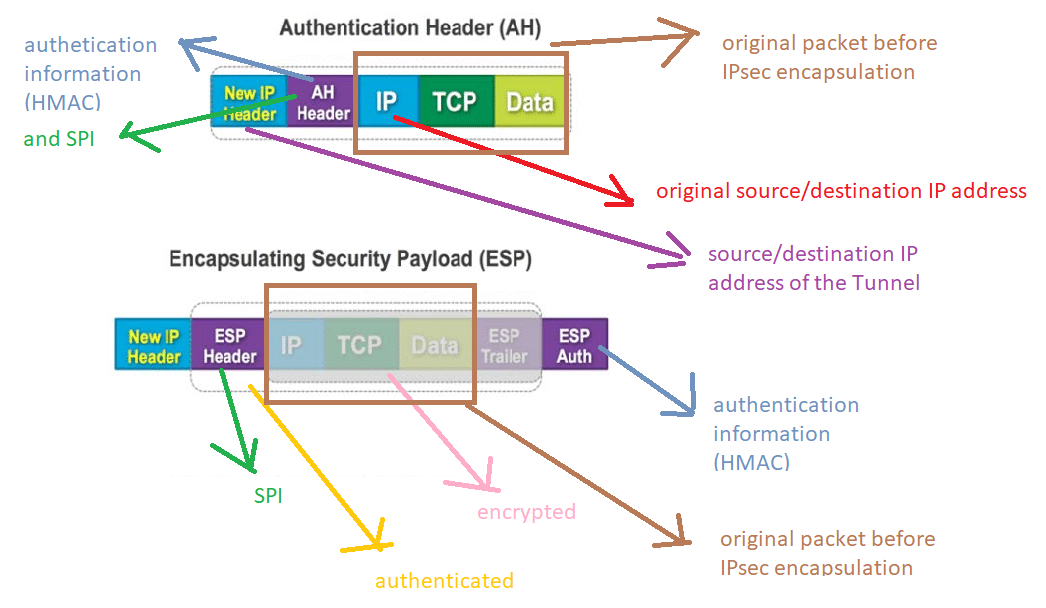
Image source: Bing (Web (fair-use with source credit))
Most modern services settle on one of three setups:
| Protocol | Strength | Best for |
|---|---|---|
| WireGuard | Fast, small codebase | Streaming, mobile, daily browsing |
| OpenVPN | Mature, highly configurable | Restrictive networks, older hardware |
| IKEv2/IPsec | Reconnects in under a second | Phones switching Wi-Fi to cellular |
WireGuard's design keeps its codebase deliberately small. That makes it easier to audit and quicker to run.
Then there's DNS. If your device leaks DNS requests outside the tunnel, the encryption stops mattering. Your ISP still sees every site you visit.
That's why kill switches and leak protection exist. A kill switch cuts your connection if the tunnel drops. Leak protection forces DNS and IPv6 traffic back through the tunnel.
The Comparison Framework: Protocols, Jurisdiction, Ownership, and Audits
How to Verify a No-Logs Claim
A no-logs policy is only as good as the auditor behind it. Look for a named accounting firm, a published date, and a scope that covers server infrastructure rather than just the website. Big Four audits carry more weight than a self-published policy page.
Ownership, Jurisdiction, and Feature Checks
Ownership often hides behind shell companies. Search the provider's terms for the parent entity, then check where that entity is registered.
On features, four matter for everyday use: kill switch, DNS leak protection, split tunneling, and obfuscation. Split tunneling lets selected apps bypass the tunnel. Obfuscation disguises VPN traffic so it looks like ordinary HTTPS.
Side-by-Side: Consumer VPNs vs Business VPNs vs Self-Hosted and Mesh Options
Different buyers need different things. The category you pick matters more than the brand.
| Category | Best for | What it costs you |
|---|---|---|
| Consumer VPN | Individuals, travelers, streamers | Shared IPs, little control |
| Business VPN | Teams reaching internal systems | Admin overhead, per-seat fees |
| Self-hosted | People who want full control | You become the admin and the liability |
| Mesh VPN | Device-to-device access for small teams | Fewer exit-node choices |
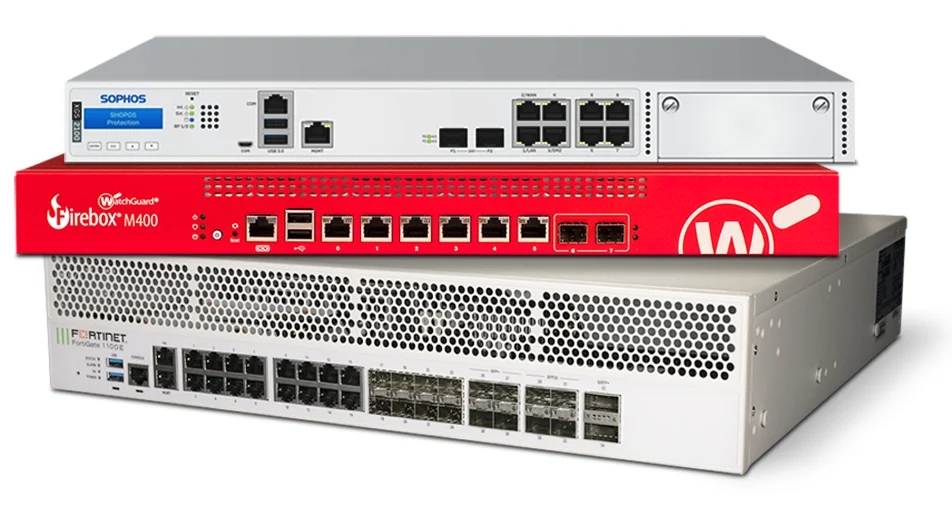
Image source: Bing (Web (fair-use with source credit))
Consumer services win on convenience. You install an app, hit connect, and you're done.
Business tiers win on accountability. They add single sign-on, device management, and a paper trail auditors accept. Teams already working out of a central document repository usually want that tier anyway.
Self-hosted setups suit people who don't want to trust a third party. Just be honest about the trade-off. You're now responsible for patching, uptime, and key rotation.
Mesh options like Tailscale and ZeroTier shine for linking a handful of devices. Don't confuse them with a mesh Wi-Fi setup. One links devices to each other across the internet.
The other blankets your house in signal.
Free vs Paid VPNs, Proxies, Tor, and Smart DNS: When Each Makes Sense
Free VPNs rarely survive on goodwill. Most monetise through ads, data resale, or tight bandwidth caps. Aggregate reviews also flag a chunk of free apps for shipping adware and worse.
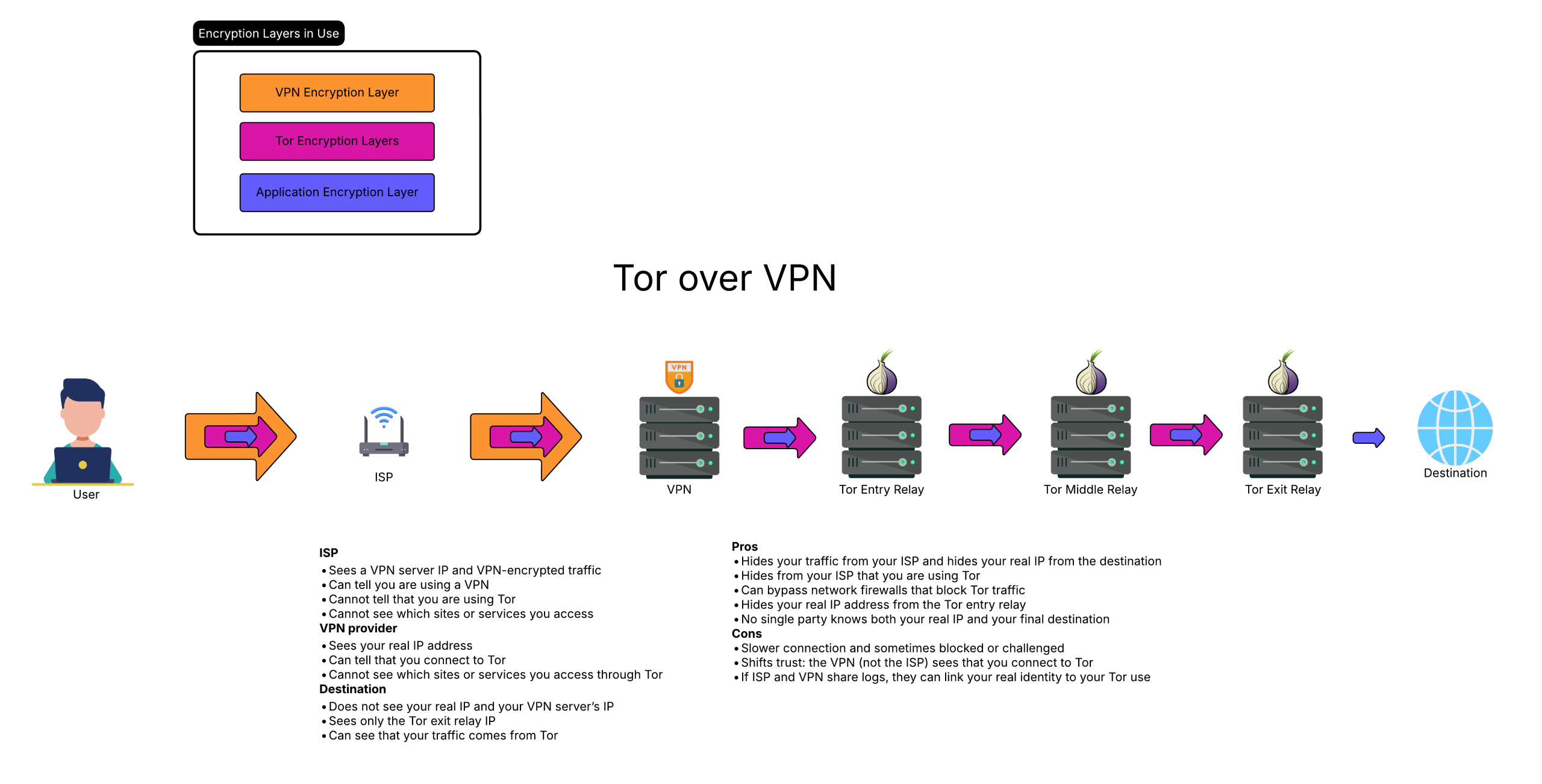
Image source: Bing (Web (fair-use with source credit))
- Paid VPN: best for ongoing privacy, streaming, and travel. As of 2026, annual plans run roughly $3 to $8 a month.
- Proxy: best for unblocking a single site. It encrypts nothing at all.
- Tor: best for anonymity across a few sensitive searches. Far too slow for streaming.
- Smart DNS: best for geo-restricted video on a smart TV. No encryption, by design.
If you need encryption everywhere, only the paid tier delivers it. If you're just unlocking one catalogue, Smart DNS is lighter and faster.
Among the paid names, a brand we reviewed sits comfortably in that price band, and so do most of its rivals.
One warning worth repeating. Never stack Tor on top of a VPN you don't trust. The exit node still sees your unencrypted traffic either way.
Pricing, Server Counts, Device Limits, and Speed Benchmarks You Should Compare
Pricing only means something once you normalise it. Divide the total cost by the months covered, then double-check the renewal rate. Intro offers look cheap because the second year usually doubles.
- Monthly plans: $10 to $13 per month, no commitment.
- Annual plans: $3 to $8 per month, the sweet spot for most buyers.
- Two-year plans: sometimes below $2.50, but lock you in.
- Renewal rate: read it before checkout, not after.
Server count is a weaker signal than people think. Ten thousand servers spread across 60 countries sounds impressive until you learn 4,000 of them sit in the US and Germany.
What actually matters is coverage where you need it. A provider with 12 Tokyo servers beats one with 8,000 servers everywhere except Japan.
Device limits vary from 5 devices to unlimited. Households running a lot of connected gear should check that number carefully. A full home automation setup can exhaust a five-device limit fast.
Speed benchmarks deserve scepticism. Providers test on their own hardware against their own servers. Independent testing generally shows 60 to 85 percent of your baseline throughput on WireGuard, and less on OpenVPN.
Best VPN by Use Case: Streaming, Torrenting, Travel, Remote Work, and Censorship Circumvention
Streaming needs servers that aren't blocked by Netflix, BBC iPlayer, or Disney+. Provider marketing oversells this constantly. Independent testing shows a rotating handful of providers reliably unblock the major catalogues.
The rest fail more often than they admit.
Torrenting needs P2P-friendly servers and a jurisdiction unlikely to forward copyright complaints. Look for explicit P2P support and a port-forwarding option. Skip providers that bury torrenting in a footnote.
Travel rewards protocol flexibility. IKEv2 reconnects instantly when you jump from hotel Wi-Fi to mobile data. Obfuscation matters if your destination blocks VPN traffic outright.
Remote work needs business-tier features, not a consumer app. Single sign-on, device posture checks, and admin logs sit in that bracket. Pair it with solid cloud-based file handling and your remote stack is genuinely secure.
Censorship circumvention is the hardest use case. China, Russia, Iran, and Turkmenistan actively detect and block VPN protocols. Stealth protocols that mimic HTTPS traffic work best.
Even those need regular updates.
If you fit two use cases, pick the harder one and let the easier one ride along.
Mistakes to Avoid: IP Leaks, Fake Audits, Auto-Renew Traps, and Legal Risks
Assuming encryption equals anonymity is the biggest error. A VPN hides your IP from websites. It doesn't stop you logging into your own Google account, and it won't protect against browser fingerprinting.
Leaks are the second trap. Test for IP, DNS, and WebRTC leaks after every setup. Run a leak test before you trust the tunnel with anything sensitive.
Auto-renewal catches people constantly. Providers bill the second-year rate silently. Cancel reminders help, and so does paying with a card you can dispute.
Fake audits are common. A "security review" from an unnamed firm is not an audit. A Big Four attestation with a published date is.
GDPR, Five Eyes, and VPN Bans in China, Russia, and India
Jurisdiction decides what a provider can legally be forced to do. Five Eyes countries share intelligence widely. Providers there can receive lawful intercept orders even with a strong no-logs policy.
GDPR protects EU residents but doesn't stop criminal investigations. Providers in Panama, Switzerland, or the British Virgin Islands sit outside those alliances. That's why privacy-focused services cluster there.
Country bans cut both ways. Russia restricts VPN use for specific content. China bans unauthorised VPNs outright.
India requires providers to log user data, which pushed several major services to pull their servers.
If you're travelling to any of these, know the local law before you connect.
Frequently Asked Questions
Are virtual private network services legal?
Yes, in most countries, including the US, UK, and EU. Legality hinges on what you do through the tunnel, not the tunnel itself. A handful of countries restrict or ban VPN use.
Check local rules before travelling to China, Russia, Iran, or Turkmenistan.
How much should I pay for a VPN?
Budget $3 to $8 a month on an annual plan. Anything under $2 usually means data resale or heavy bandwidth caps. Anything over $12 monthly is fine for short-term use but expensive long-term.
Compare the renewal rate, not just the intro price.
Do free VPNs actually work?
They connect, but the trade-offs are steep. Free services commonly cap bandwidth at 500 MB to 2 GB per month. Aggregate reviews flag many for ad injection or data resale.
A paid plan costs less than a coffee per month and removes those risks.
Will a VPN slow down my internet?
Yes, usually by 10 to 40 percent on WireGuard. OpenVPN typically loses more. Latency rises based on server distance.
Picking a server closer to you, and using WireGuard or IKEv2, keeps the hit small.
Can my ISP see what I do with a VPN?
No. Your ISP sees encrypted traffic flowing to a single VPN server IP. It can't read the sites or content inside the tunnel.
It can still see that you're using a VPN. It can also see how much data you're moving.
Does a VPN hide me from my employer?
Not on a work device. Company-managed laptops often run monitoring agents that sit above the VPN layer. On your own device, a VPN hides traffic from your home ISP.
It doesn't hide anything from websites you log into.
Final Verdict: How to Pick a VPN in Under 10 Minutes
Start with jurisdiction. If the provider sits in a Five Eyes country and you want privacy from those governments, move on. Switzerland, Panama, and the British Virgin Islands are safer bets.
Then confirm three things. A named independent audit within the last two years. WireGuard support and a working kill switch.
A published, plain-English no-logs policy.
Now match it to your use case:
- Streaming: pick from the shortest list of providers that unblock your catalogue.
- Torrenting: filter for P2P support and port forwarding.
- Remote work: move up to a business tier with SSO.
- Censorship: prioritise obfuscation over server count.
Finally, buy the shortest plan that reaches the renewal cycle. Test for leaks on day one. Test speed on your usual networks.
If anything fails, use the 30-day refund window and try the next one.
The best VPN isn't the one with the most servers. It's the one that fits your threat model, keeps its promises, and stays out of your way.

Similar Posts