Cloud File Storage Explained: How It Works & What to Pick
Lead SaaS Analyst & Software Developer at PCSaaS · Software Developer (GitHub @Ratankarmakar) · Google Ads & Analytics Certified · 500+ SaaS Tools Tested · 8+ years in software engineering, B2B SaaS evaluation, AppSumo deal auditing, and performance marketing
Cloud file storage sounds simple until you actually have to pick one. Every provider promises the same thing: your files, everywhere, safe and synced. Then you read the fine print and the picture changes fast.
Take encryption. AES-256 is the baseline most services advertise, and it's the algorithm set out in NIST FIPS 197. Client-side keys are a different story, and they're rare outside a handful of providers.
Sync isn't backup either, and that gap is where most people get hurt.
Quick Answer
Cloud file storage keeps your files on remote servers and syncs them across devices. Three types matter: sync, backup, and archive. Sync mirrors folders.
Backup keeps recoverable copies. Archive stores cold data cheaply for files you rarely touch.

Image source: Bing (Web (fair-use with source credit))
Why the Comparison Isn't About Storage Size
Most buyers start with gigabytes and end up regretting it. Capacity is the easiest number to compare and the least useful one. A 2 TB plan that can't restore a deleted folder is worth less than a 200 GB plan that can.
What separates providers is everything around the file. Recovery options, permission controls, encryption model, admin tooling, and the cost of leaving. Get those right and capacity becomes a rounding error.
Miss them and you're paying for storage you can't safely use.
The five things worth comparing:
- Recovery window: how far back can you restore, and for how long?
- Encryption model: server-side keys versus client-side, zero-knowledge options
- Permission granularity: link expiry, watermarking, guest access controls
- Admin and audit: SSO, SCIM, retention policy, legal hold, audit logs
- Exit cost: egress fees, export tools, format portability
Free tiers distort the decision too. They cap file sizes, throttle transfers, and rarely include version history worth relying on. For anything you'd be upset to lose, treat free as a trial, not a home.
That's why this comparison runs on use case rather than capacity. If you'd rather start with a shortlist of hosted services, that's a fine shortcut. Just check the five factors above against each one.
Sync vs Backup vs Archive: Get This Wrong and Nothing Else Matters
If your laptop dies and the only copy of a file lives in a synced folder, you've lost it everywhere at once. Sync propagates changes, including deletions. Remove a file on one device and it disappears from the rest within seconds.
Backup works differently. It keeps point-in-time copies you can restore later, stored somewhere the original can't reach. The long-standing 3-2-1 rule still holds: three copies, two different media, one offsite.
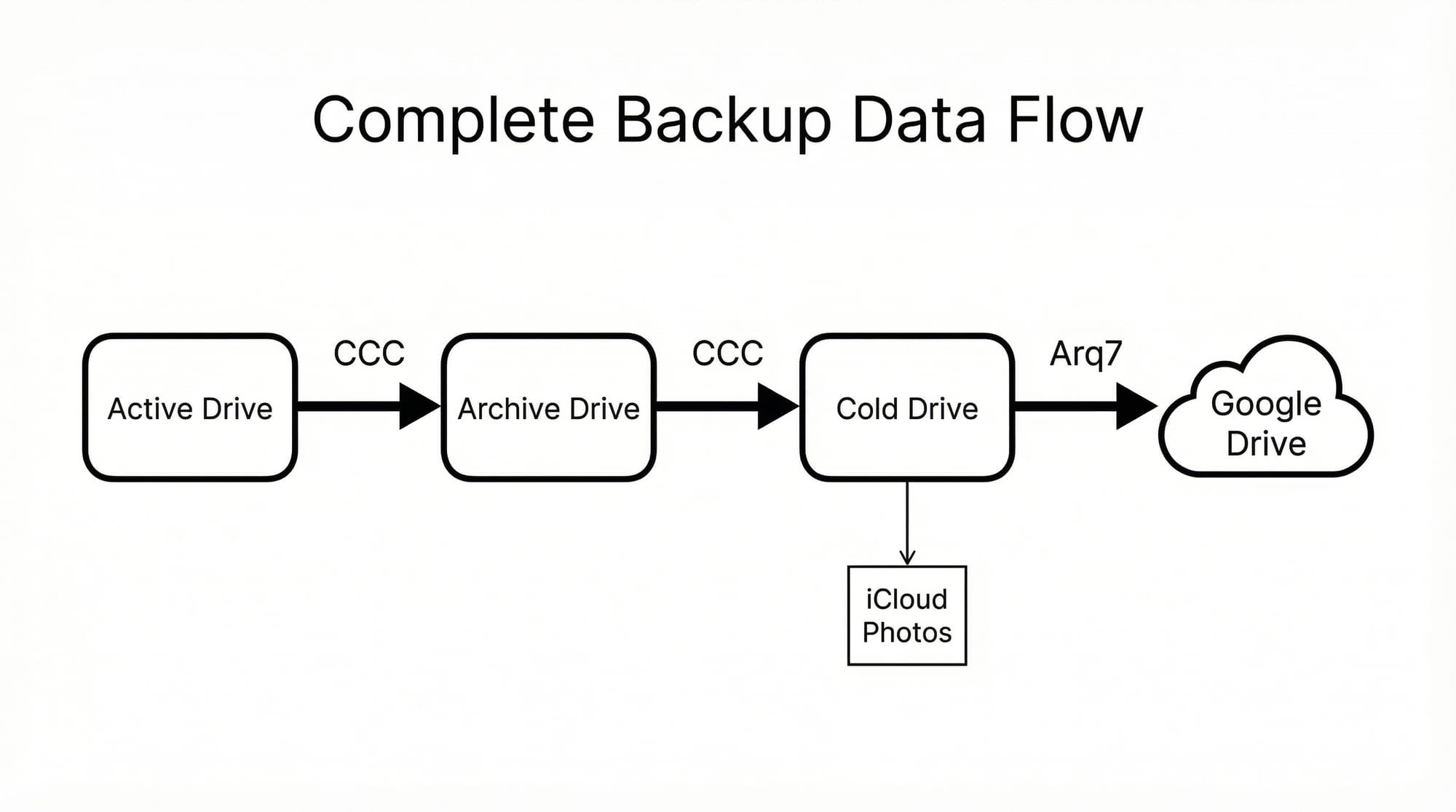
Image source: Bing (Web (fair-use with source credit))
| Job | What it does | What it doesn't do | | Sync | Mirrors folders across devices in near real time | Protect against deletion or ransomware | | Backup | Keeps dated, restorable copies | Give instant access to every version | | Archive | Stores cold files at low cost per GB | Deliver fast retrieval or live editing |
Archive is the third leg. It's cheap per gigabyte but slow to retrieve, which is fine for finished projects and compliance records. It's a terrible place for the file you edit every week.
One more trap: cloud-to-cloud backup. If your whole business runs inside a sync platform, a deleted account can take the data with it. Independent copies still matter.
Ransomware makes this concrete. CISA guidance is blunt about it. Isolated, tested backups are what let organisations recover without paying.
And blocking malicious files before they encrypt anything is only half the job.
The Main Categories of Cloud File Storage
Providers split into three rough groups, and the group matters more than the brand.
Consumer Sync-and-Share
Google Drive, Microsoft OneDrive, Apple iCloud Drive, and Dropbox sit here. You get generous free tiers, easy sharing, and cross-device sync. You don't get client-side encryption, deep audit logs, or meaningful retention controls.
Fine for photos, schoolwork, and personal documents. Thin for anything regulated.
Business Collaboration Platforms
Box, Egnyte, SharePoint, and Dropbox Business add admin consoles, SSO, retention policy, and eDiscovery. This is where compliance features live. Pricing runs per user, so a 200-person company pays for 200 seats whether or not everyone logs in.
Object Storage and Enterprise Tiers
Amazon S3, Azure Blob Storage, and Google Cloud Storage aren't file storage in the desktop sense. They're APIs. You get durability figures like 99.999999999% and tiered pricing, but you build the interface yourself.
Managed platforms wrap that up for you, which is often the smarter route.
Most teams end up in the middle group. The mainstream paid tiers cost a few dollars per user each month and cover the gap between a personal drive and a full enterprise platform. Self-hosted options like Nextcloud and Seafile exist too.
You trade monthly fees for servers, patching, and backups you now own.
Side-by-Side: How the Big Options Actually Stack Up
Here's how the categories compare on the things that actually bite.
Image source: Bing (Web (fair-use with source credit))
| Factor | Consumer | Business platform | Object storage | | Encryption keys | Provider-managed | Provider or customer-managed | Customer-managed | | Version history | 30 days typical | 180 days to unlimited | Versioning toggle, billed | | Admin controls | Minimal | SSO, SCIM, audit logs | IAM policies, no interface | | Recovery | Trash folder | Retention and legal hold | Replication, lifecycle rules | | Exit cost | Free, manual | Varies, export tools | Egress fees apply |
Encryption, Versioning, and Recovery Compared
Encryption is where marketing gets loose. As of 2026, AES-256 at rest is standard across the board. The real question is who holds the key.
Server-side keys mean the provider can technically read your files. Client-side keys mean they can't, and you lose password reset as a safety net.
Version history windows vary wildly. Consumer plans often keep 30 days. Business plans run 180 days or longer.
Recovery from ransomware depends on that window more than any other spec.
Collaboration and Admin Controls Compared
Permissions matter just as much. Link expiry, watermarking, and guest controls are usually business-tier features. If your team shares files with clients, those controls aren't optional extras.
They're the difference between a controlled share and a link floating around forever.
What Cloud File Storage Really Costs
Per-User vs Per-Terabyte Pricing
Consumer plans price by storage. Business plans price by seat. A 2 TB individual plan might cost less than five business seats with 1 TB each.
That flips once you have a team, because seat pricing scales with headcount, not with how much data you store.
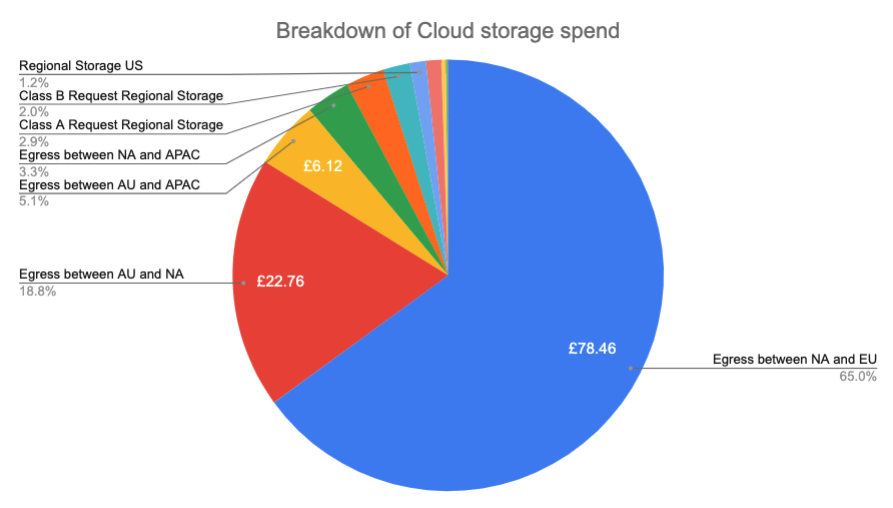
Image source: Bing (Web (fair-use with source credit))
The Hidden Fees
Egress is the one that surprises people. Many object storage providers charge nothing to upload and a per-gigabyte fee to download. API request charges, retrieval fees from archive tiers, and minimum storage duration rules add up too.
Some archive tiers bill you for 90 or 180 days even if you delete the file on day three.
Watch for unlimited plans as well. "Unlimited" almost always comes with a fair-use clause, and providers can throttle accounts that trip it.
Choosing a provider on headline price alone rarely works out. If you plan to move data out later, model the exit cost before you sign. It's often the biggest line item in a five-year total cost of ownership.
Alternatives worth weighing, including hybrid setups and self-hosted servers, shift costs rather than remove them.
Which Cloud File Storage Fits Your Situation
The right pick depends far more on your situation than on the spec sheet.
For Individuals, Families, and Freelancers
Choose on simplicity and price. If you already use Google or Apple services, Google Drive or iCloud Drive keeps everything in one place with no extra logins. Dropbox earns its keep when you share files with clients often.
Whichever you pick, add a second copy somewhere else. Sync alone isn't a safety net.
For Small and Mid-Sized Teams
A business tier is worth the jump once two or more people touch the same files. You're paying for the admin console, SSO, retention policy, and audit logs, not just capacity. SharePoint makes sense if you're already on Microsoft 365.
Box or Egnyte fit teams that need tighter sharing controls.
Budget per seat, not per gigabyte. Seat pricing scales with headcount, and that's the number that grows.
For Regulated and Enterprise Environments
If you handle patient records, legal files, or financial data, the compliance checklist leads. Look for a signed Business Associate Agreement, data residency options, legal hold, eDiscovery, and certifications like SOC 2 Type II or ISO 27001. Client-side encryption is worth the trade-off in password recovery.
FedRAMP authorization matters if you sell to US federal agencies.
The Verdict: A Simple Decision Path
Use if/then logic and stop overthinking it.
- One person, personal files: consumer plan plus a separate backup
- Team under 50: per-user business tier from your existing suite
- Regulated sector: platform with the certifications your auditor wants
- Developer or data-heavy workload: object storage with a managed layer on top
Still weighing options? These other approaches cover hybrid and self-hosted setups. Plenty of teams run two providers side by side, and that's not paranoia.
It's cheap insurance against one vendor's outage or price hike.
Mistakes That Cost You Data, Money, or Compliance
Most of these show up in post-mortems, not in marketing copy.
- Treating sync as backup. A deleted file propagates everywhere in seconds. Keep dated copies somewhere the original can't reach.
- Assuming the trash folder counts. Thirty days is a common default, and ransomware often sits undetected longer than that.
- Ignoring egress fees. Uploads are usually free. Downloads often aren't, and a full migration out can cost more than a year of storage.
- Sharing with permanent public links. Set expiry dates and passwords. An open link is a leak waiting for a search engine.
- Skipping multi-factor authentication. Account takeover is the most common route into cloud data. Turn MFA on for every admin account today.
- Leaving offboarded staff with access. Deprovision on the last day, then review shared folders for orphaned permissions.
- Never testing a restore. An untested backup is a hope, not a plan. Restore one folder this quarter and time it.
- Trusting "unlimited". Fair-use clauses allow throttling. Read the terms before you move 4 TB.
- Using public Wi-Fi without protection. Encrypted tunnels still matter when you're working from a hotel or cafe. A reliable connection layer closes that gap on untrusted networks.
One habit beats all of these. Write down your recovery plan, then actually run it once a year. Teams that test recover faster, and the difference shows up on the worst day.
Frequently Asked Questions
Is cloud file storage the same as cloud backup?
No. Cloud file storage syncs your files across devices and mirrors every change, including deletions. Cloud backup keeps dated, restorable copies stored separately.
You need both if the data matters. Sync gives you convenience. Backup gives you recovery when something goes wrong.
How much cloud file storage do I need?
Start with what you actually store today, then double it. Most people overestimate by counting files they never open. Check your current drive usage first.
For documents and photos, 100 GB to 1 TB covers most households. Video and design work need far more.
Is cloud file storage safe for sensitive documents?
It's safe if the provider encrypts at rest and in transit, and you enable MFA. AES-256 is the standard baseline. For genuinely sensitive material, look for client-side or zero-knowledge encryption, where the provider never holds your keys.
That removes password recovery as a fallback, so store your recovery phrase safely.
Can I use more than one provider at once?
Yes, and plenty of teams do. Run one platform for daily collaboration and a second for archival or backup. Just avoid syncing the same folder to two services at once.
That causes conflicts, duplicates, and confusing version histories.
What happens to my files if I stop paying?
Most providers drop you to a free tier or lock the account into read-only mode for a set period. Some delete data after 30 to 90 days. Export everything before the renewal date.
Confirm the deletion timeline in the terms, and keep proof of your export.

Similar Posts

















[…] you're mainly syncing documents across devices, that's a different job from backing up a server. Treat them as separate […]