The Best Translation App for Travel, Work, and Daily Use
Lead SaaS Analyst & Software Developer at PCSaaS · Software Developer (GitHub @Ratankarmakar) · Google Ads & Analytics Certified · 500+ SaaS Tools Tested · 8+ years in software engineering, B2B SaaS evaluation, AppSumo deal auditing, and performance marketing
Finding the best translation app comes down to one question. What are you translating, and where? A free app that handles menus in Lisbon may fall apart on a medical consent form in Osaka.
Most people install two or three, then quietly abandon the ones that guess wrong.
In our research, language coverage is the biggest divider. Google Translate lists more than 240 languages. DeepL covers roughly 30, yet wins consistently on European pairs.
Benchmarks such as COMET and chrF show gaps of 10 to 20 points between top apps on low-resource languages, so the right pick depends on your situation.

Image source: Bing (Web (fair-use with source credit))
Quick Answer
The best translation app depends on your main use case. Google Translate wins on language coverage and offline camera work. DeepL produces the most natural text for European languages.
Apple Translate is the smoothest pick on iPhone. For live back-and-forth conversation, Microsoft Translator and dedicated earbuds hold up better.
Why the Best App Changes Based on What You're Translating
Translation apps are built around different priorities. Some chase language count. Others chase natural phrasing in a handful of language pairs.
A few focus on privacy, offline speed, or live conversation. Two people can ask for the best app and both get correct but different answers.
The Four Questions That Decide It for You
Run through these before you download anything.
- Which languages? If you need Tagalog, Uzbek, or Swahili, Google Translate and Microsoft Translator cover far more ground than DeepL. If your work is English, German, French, and Spanish, DeepL usually reads better.
- Text, voice, or camera? Camera translation is the deciding feature for menus, signs, and labels. Voice conversation mode matters for face-to-face talks.
- Online or offline? If you'll be without data, offline pack quality beats cloud accuracy. Download packs before you fly, not at the airport.
- Who sees the content? Confidential contracts, patient notes, and legal filings change the answer completely.
Where Free Apps Quietly Fall Short
Free tiers rarely fail on a short phrase. They fail on volume. Google Translate caps spoken conversation length, and several apps hide document translation behind a subscription.
In our research, the most common complaint across aggregate app store reviews is not accuracy. It's hitting a paywall mid-conversation.
Accuracy is also not a single number. A model that scores well on news text can struggle with slang, sarcasm, or regional dialect. Our research on aggregate reviews shows dialect complaints cluster around Arabic, Hindi, and Portuguese, where regional variation is wide.
The Main Contenders and What Each Does Best
Here's how the leading apps actually differ. Each one has a clear strength and a matching weakness.
Google Translate
The widest net by far. Google Translate handles over 240 languages, plus camera, voice, and offline packs. Accuracy on low-resource languages is uneven, and the interface is busier than most rivals.
Aggregate reviews still rank it first for travel.
DeepL
Built for quality over quantity. DeepL covers roughly 30 languages and produces noticeably more natural prose in European pairs. Language coverage and offline support are the trade-offs.
For contracts and marketing copy, it's usually the better read.
Apple Translate
Apple-only, and that's the point. Apple Translate handles offline mode well and integrates cleanly with iOS. Language count is smaller, and there's no Android or web version.
If you're on iPhone, it's the lowest-friction option.
Microsoft Translator
Best for groups and business. Microsoft Translator supports multi-device conversation rooms and solid offline packs. It also fits neatly into that same office suite your team may already use daily.
Meeting transcripts are a standout.
AI Chatbots and Dedicated Hardware
ChatGPT, Gemini, and Copilot handle nuance well when you give them context. They're slower and pricier per word, and they sit alongside other AI assistants in most people's toolkits. Dedicated devices like Pocketalk and Timekettle earbuds shine in noisy, hands-free situations.
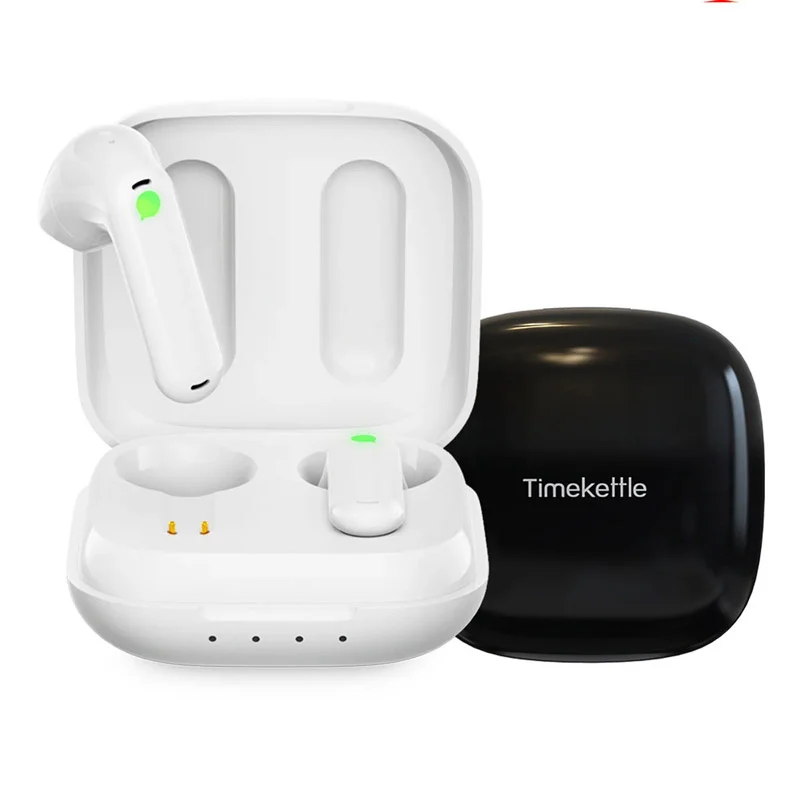
Image source: Bing (Web (fair-use with source credit))
As of 2026, all of these cover the top 20 world languages. The real differences start past that point, and in how they handle messy, real-world speech.
Side-by-Side Comparison: Languages, Offline Mode, Privacy, and Price
Numbers make this easier than adjectives. Here's how the main apps stack up on the things that actually change your experience.
| App | Languages | Offline support | Notable limit |
|---|---|---|---|
| Google Translate | 240+ | Yes, downloadable packs | Conversation length caps |
| DeepL | ~30 | Limited, paid only | Document translation is paid |
| Apple Translate | ~20 | Yes | Apple devices only |
| Microsoft Translator | 100+ | Yes | Best features need sign-in |
| ChatGPT / Gemini | 90+ | No | Slower, usage limits |
Accuracy and Dialect Coverage
No app wins every pair. In our research, DeepL leads on German, French, and Spanish into English. Google Translate leads on breadth, especially across Asian and African languages.
Benchmarks like COMET and chrF, used by researchers to score translation output, show these gaps clearly.
Privacy and Data Retention
This is where free apps get expensive. Google Translate and Microsoft Translator process most requests in the cloud by default. Apple Translate and newer on-device models keep more of the work on your phone.
If you're handling patient data or contracts, read the retention policy first. On shared Wi-Fi, a solid privacy layer is worth the setup.
Regulators are catching up. The NIST AI Risk Management Framework treats data governance as a first-class risk, and translation apps fall squarely inside it. For anything sensitive, on-device processing is the safer default.
Free Tiers Versus Paid Plans
Most people never need to pay. Free tiers cover casual travel, short messages, and camera translation. Paid plans start around $5 to $10 per month and unlock document translation, longer conversations, and offline packs.
Only upgrade if you hit a limit twice in one trip.
Image source: Bing (Web (fair-use with source credit))
Best Translation App by Use Case
Match the app to the job. The right answer changes fast once you name the situation.
| Use case | Best pick | Why |
|---|---|---|
| Travel and menus | Google Translate | Camera and offline packs |
| Business writing | DeepL | Cleaner European prose |
| iPhone daily use | Apple Translate | Deep integration, offline |
| Group meetings | Microsoft Translator | Multi-device rooms |
| No signal at all | Google or Apple | Downloaded packs |
| Learning a language | Google plus DeepL | Compare two outputs |
Medical and Clinical Settings
Never rely on a consumer app for diagnosis, dosage, or consent. Machine translation errors in medical text can flip meaning, and the stakes are too high. Use a qualified medical interpreter instead.
If you work in US healthcare, review the language access guidance published by the Department of Health and Human Services.
Legal, Immigration, and Official Documents
Apps are fine for understanding a document. They are not fine for submitting one. USCIS, courts, and most immigration authorities require certified translation with a signed statement of accuracy.
No app produces that. Keep source and translated files together in shared cloud storage so a reviewer can compare them.
Low-Connectivity and Offline Travel
Download language packs before you leave home, not at the airport. Offline models are smaller and less accurate than cloud versions, so keep sentences short. On a weak hotel signal, a stronger connection can be the difference between cloud accuracy and offline guessing.
Language Learning and Study
Language learners get more from two apps than one. Running the same sentence through Google Translate and DeepL shows you where meaning is stable and where it's guesswork. That comparison builds intuition faster than any single answer.
Sideloaded free apps from unofficial stores carry real malware risk, so stick to official stores.

Image source: Bing (Web (fair-use with source credit))
Where Translation Apps Fail: Accuracy Limits, Privacy, and Legal Risks
Machine translation has a hard ceiling. It works well on short, plain sentences and falls apart on anything loaded with context. Knowing the failure points saves you from a bad moment.
Idioms, Slang, and Dialect Gaps
Idioms almost never survive a direct translation. "Break a leg" turns into an injury report in several languages. Our research on aggregate reviews shows dialect complaints cluster around Arabic, Hindi, and Portuguese, where regional variation is wide.
Most models default to one standard form. If a phrase reads oddly, rephrase it plainly instead of translating again.
Latency, Accents, and Background Noise
Live conversation mode lags. Expect a delay of one to three seconds, longer on weak connections. Background noise and heavy accents cut accuracy sharply.
In a busy restaurant or a train station, type instead of speaking. It's slower, but far more reliable.
When Machine Translation Isn't Legally Valid
Courts, immigration authorities, and most government agencies do not accept machine translation. USCIS requires a certified translation with a signed statement of accuracy from a competent translator. No app produces that.
Medical consent forms, legal filings, and official records sit in the same bucket. Use an app to understand a document. Never use it to submit one.
Privacy Risks with Sensitive Content
Free apps often process requests in the cloud and may retain them. That's fine for a menu. It isn't fine for a contract, a patient record, or a passport scan.
On-device processing keeps text on your phone. If the content is confidential, check the retention policy before you paste anything in.
Setting Up, Testing, and Maintaining Your App
Five minutes of setup saves a lot of fumbling later. Do it at home, on Wi-Fi, before you travel or start a project.
Download the offline language packs you'll actually need. Google Translate and Apple Translate both let you grab packs per language, usually 30 to 50 MB each. Grab them for every country on your route, not just the first stop.
Grant microphone and camera permissions in advance. Apps that ask mid-conversation break your flow. Test the mic once in a quiet room so you know the level is right.
Add a glossary if you're translating for work. DeepL and Microsoft Translator both support custom term lists, which keep product names and job titles consistent. Set the formality level too.
Many apps default to informal, which reads oddly in business or legal text.
How to Test Accuracy Before You Trust It
Run the back-translation test first. Translate a sentence into the target language, then translate the result back. If the meaning shifts, the pair is weak.
Compare two apps on the same sentence. Google Translate and DeepL disagreeing on a phrase means the meaning is unstable. Agreement usually means you're on solid ground.
Check numbers, names, and dates. Apps sometimes swap digits or mangle proper nouns. Those errors matter in addresses, prices, and appointments.
Keeping Your Setup Sharp Over Time
Update the app every few weeks. Cloud models update server-side, so accuracy can shift without any download. Offline packs are different.
Those only refresh when you update them manually.
Clear the cache when translations feel off. Corrupted local data can cause weird output. A quick reset often fixes it.
Review your glossary twice a year. Job titles, product names, and preferred terms change. A stale glossary causes more harm than none.
Check privacy settings after major app updates. Policies and defaults change. If you handle sensitive content, confirm on-device processing is still switched on.
Final Verdict: How to Pick in Under Five Minutes
A Simple Decision Guide
Run through these if/then rules and you'll have your answer fast.
- If you travel and need camera translation, pick Google Translate.
- If you write for work in European languages, pick DeepL.
- If you're on iPhone and want zero setup, pick Apple Translate.
- If you run group meetings, pick Microsoft Translator.
- If the content is confidential, pick an on-device option.
The Two-App Setup Most People Should Run
Most people do better with two apps than one. Run Google Translate for coverage and camera work. Add DeepL for anything you actually need to read well.
That pair covers travel, work, and study without a subscription.
Skip the paid upgrade until you hit a limit twice. Then buy only the app that ran out. As of 2026, free tiers handle almost every casual use case, so start there and upgrade later if you genuinely need to.
Frequently Asked Questions
What is the best free translation app?
Google Translate is the strongest free option overall. It covers over 240 languages and includes camera and offline modes at no cost. DeepL produces better European text, but its free tier is narrower.
For most people, the two together cover everything without paying.
Is DeepL more accurate than Google Translate?
For European language pairs, usually yes. DeepL produces more natural phrasing in German, French, and Spanish. Google Translate wins on language count and low-resource languages.
The right pick depends on which languages you actually use.
Can I use a translation app for legal documents?
No. Courts and immigration agencies require certified translation with a signed accuracy statement. Apps can help you understand a document, but they cannot produce a legally valid one.
Always use a qualified translator for anything you submit.
Do translation apps work without internet?
Yes, if you download the language packs first. Google Translate and Apple Translate both support offline mode. Offline models are smaller and less accurate than cloud versions.
Keep sentences short when you're offline.
Are translation apps private?
It depends on the app. Many free apps process text in the cloud and may retain it. Apple Translate and newer on-device models keep more work on your phone.
Never paste confidential content into an app without checking its retention policy.
What is the best translation app for travel?
Google Translate is the practical pick. Camera translation handles menus and signs, and offline packs cover you without data. Pair it with a downloaded phrasebook for the languages you'll actually meet.
Test it on a sign before you need it. It takes ten seconds and tells you whether the camera mode reads local fonts.
Download packs for every country on your route before you leave, not at the airport gate.
Store them on your phone, not in the cloud, and check that each one opens without a signal.
If a pack won't open offline, re-download it before you leave.
A quick test at home beats a broken camera mode in a foreign city.

Similar Posts