Cloud Data Storage: How It Works and Why It Matters
Lead SaaS Analyst & Software Developer at PCSaaS · Software Developer (GitHub @Ratankarmakar) · Google Ads & Analytics Certified · 500+ SaaS Tools Tested · 8+ years in software engineering, B2B SaaS evaluation, AppSumo deal auditing, and performance marketing
Cloud data storage sounds simple until you're staring at a pricing page with forty line items. You just want your files safe, accessible, and not quietly costing you a fortune. That's where most people get stuck.
Per the NIST definition of cloud computing, this is really just on-demand network access to a shared pool of configurable resources. In our research, the gap between a clean setup and an expensive mess comes down to one thing: matching the storage model to how often you actually touch the data. Let's break that down.

Image source: Web (Bing) / pexels.com (Web image (fair-use with source credit))
Quick Answer
Cloud data storage keeps your files on remote servers you reach over the internet. You rent capacity instead of buying drives. Providers handle hardware, replication, and uptime.
Costs scale with how much you store and how often you move it. Pick the model that matches your access pattern.
Why Cloud Data Storage Isn't One Decision: It's a Match Game
Two people can pay the same monthly bill and get wildly different value from it. One stores 500 GB of photos they open twice a year. The other runs a database that needs 20,000 IOPS around the clock.
Same price. Completely different job.
That's why asking for the best storage is the wrong question. The better one is simpler: what does your data actually do? Answer that and the model picks itself.
- If you open files daily and edit them, hot storage with low latency earns its premium.
- If you touch them once a month, nearline tiers cut the bill hard.
- If the data only exists for compliance, archive tiers cost pennies per gigabyte.
- If you need block-level access for a database, object storage won't work at all.
Get the access pattern wrong and you pay twice. Once for the wrong tier, then again for retrieval fees when you need the data back fast.
Storage isn't a product you buy. It's a set of trade-offs between speed, durability, and cost. Every provider sells the same three levers, just priced differently.
If you're mainly syncing documents across devices, that's a different job from backing up a server. Treat them as separate decisions.
The Main Cloud Storage Models and What Each One Actually Does
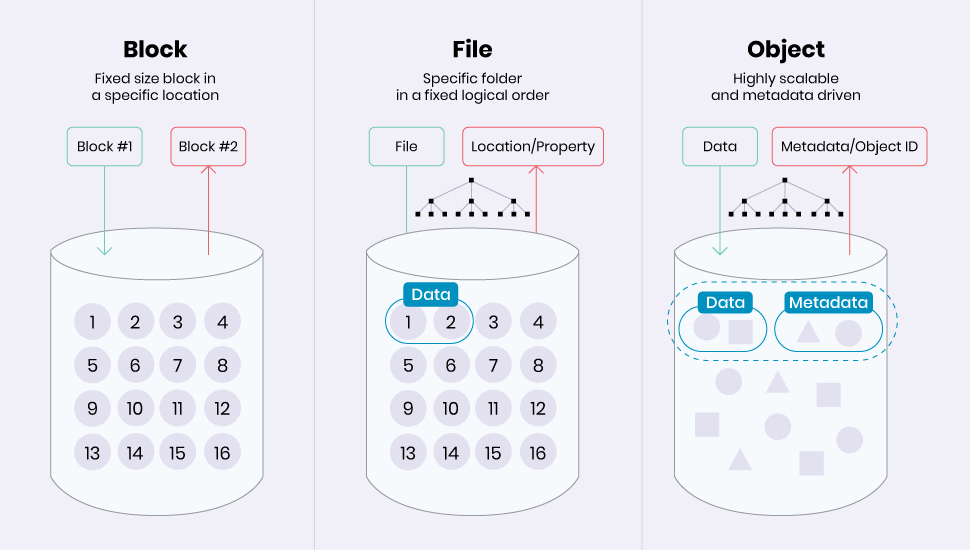
Image source: Bing (Web (fair-use with source credit))
Most storage falls into three families. Object, block, and file. They're not interchangeable, and picking the wrong one causes most of the pain people blame on the cloud itself.
Object storage keeps data as discrete objects in a flat namespace. Each object carries a unique key and its own metadata. Amazon S3, Azure Blob Storage, and Google Cloud Storage all work this way.
It scales to exabytes and handles unstructured data, media, backups, and analytics beautifully. You just can't mount it as a drive natively.
Block storage gives you raw volumes attached to a virtual machine. AWS EBS and Azure Disk Storage are the big names. Databases, boot volumes, and anything needing high IOPS live here.
You manage the filesystem on top of it.
File storage presents a shared network filesystem over NFS or SMB. Amazon EFS, Azure Files, and Google Filestore fit here. Team shares, home directories, and older apps that expect a mounted drive work best with it.
Then there's the layer people confuse most. Cloud sync keeps copies in step across devices. Cloud backup keeps a separate, recoverable version.
Cloud archive parks cold data cheaply for years. Three different jobs, often sold under one label.
Plenty of hosted platforms blur those lines on purpose. Read the spec sheet, not the marketing page.
Side-by-Side: Storage Classes, Providers, and Hidden Cost Traps
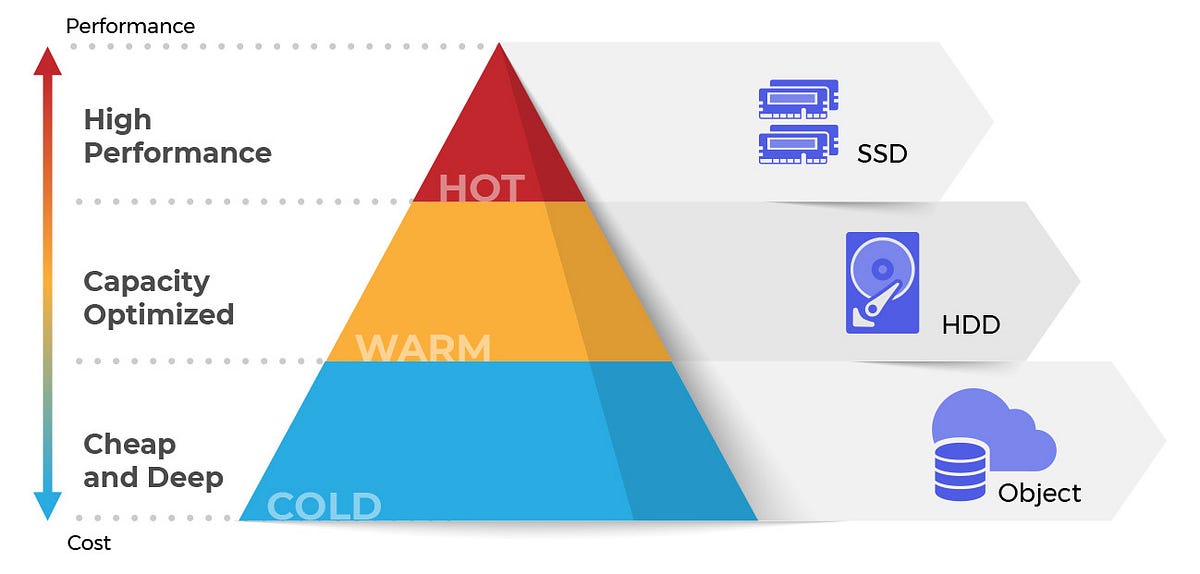
Image source: Bing (Web (fair-use with source credit))
Every major provider splits the same hardware into tiers. The tier you pick sets your monthly rate and your retrieval speed.
| Tier | Access pattern | Retrieval speed | Typical monthly cost per TB |
|---|---|---|---|
| Hot | Daily | Instant | Highest |
| Cool or nearline | Monthly | Instant to minutes | Roughly 40 to 60% less |
| Cold | Quarterly | Minutes to hours | Around 70% less |
| Archive | Rarely, or never | Hours | Pennies per GB |
The sticker price isn't the real price, though. Three charges catch people out.
- Egress fees. Moving data out of AWS S3 costs roughly $0.09 per GB for the first 10 TB. That adds up fast on a 5 TB restore.
- Minimum storage duration. S3 Standard-IA wants 30 days. Glacier Flexible Retrieval wants 90. Deep Archive wants 180. Delete early and you pay the difference anyway.
- API request charges. Small files hammered by an app can cost more in requests than in storage.
As of 2026, providers like Cloudflare R2 and Backblaze B2 waive egress entirely. If your workload moves data out often, that single difference can beat a cheaper per-GB rate.
If your bill keeps climbing with no obvious cause, switching providers isn't always the fix. Sometimes the tier is the problem. Before you migrate anything, run the numbers on what actually leaves your account each month.
Which Cloud Storage Fits Your Situation?
The right answer changes with who you are and what the data is for. Here's how we'd map it.
- Personal photos and phone backups. A consumer sync service is fine. You want versioning and two-factor authentication turned on.
- Small teams sharing documents. File storage or an enterprise file sync and share tool. Look for per-user permissions and audit logs.
- Developers storing build artifacts and container images. Object storage with lifecycle rules to push old layers to colder tiers.
- Databases and virtual machines. Block storage. Don't put a live database on a synced folder.
- Regulated industries. Anything touching HIPAA, PCI DSS, or GDPR data needs a signed BAA or DPA, plus encryption keys you control.
- Media and video production. Object storage plus a CDN. Egress pricing matters more here than raw capacity.
- Long-term legal or compliance retention. Archive tier with object lock enabled. Immutability is the whole point.
If you're choosing a provider for the first time, start with capacity and access frequency. Then check data residency. Then check the exit costs.
If you already have storage and it works, don't move it for a small saving. Migration downtime and re-upload time usually eat the difference. Only switch when egress, compliance, or performance genuinely blocks you.
If you want to compare plans side by side before committing, that's the smart order to do it in. Match the tier to how often you open the file, and check what leaving costs before you sign up.
The Mistakes That Cost Real Money and Data
These are the ones we see repeatedly, and they all have the same shape. They look harmless until the day they aren't.
- Treating sync as backup. Ransomware encrypts synced files on every device within minutes. Sync copies the damage, it doesn't undo it.
- Skipping versioning. Without it, an overwritten file is gone. Most providers offer it free and most people leave it off.
- Forgetting object lock. If ransomware or a rogue admin can delete your backups, they aren't backups.
- Leaving buckets public. Misconfigured S3 buckets remain one of the most common causes of large-scale data leaks.
- Never testing a restore. An untested backup is a guess. Run a restore drill at least twice a year and time it.
- Ignoring the shared responsibility model. The provider secures the platform. You secure your keys, permissions, and data.
- Assuming the SLA covers you. A 99.99% uptime credit refunds a fraction of your bill. It doesn't refund lost revenue.
- Using weak account security. Turn on MFA. It's the single highest-value step you can take.
Keeping malware off the devices that sync to your storage matters just as much as the storage itself. A clean endpoint stops the problem before it ever reaches the cloud.
If you want one rule to remember: back up to a place your main account can't delete. Immutable, separate, and tested.
Compliance, Security, and Long-Term Optimization You Can't Skip
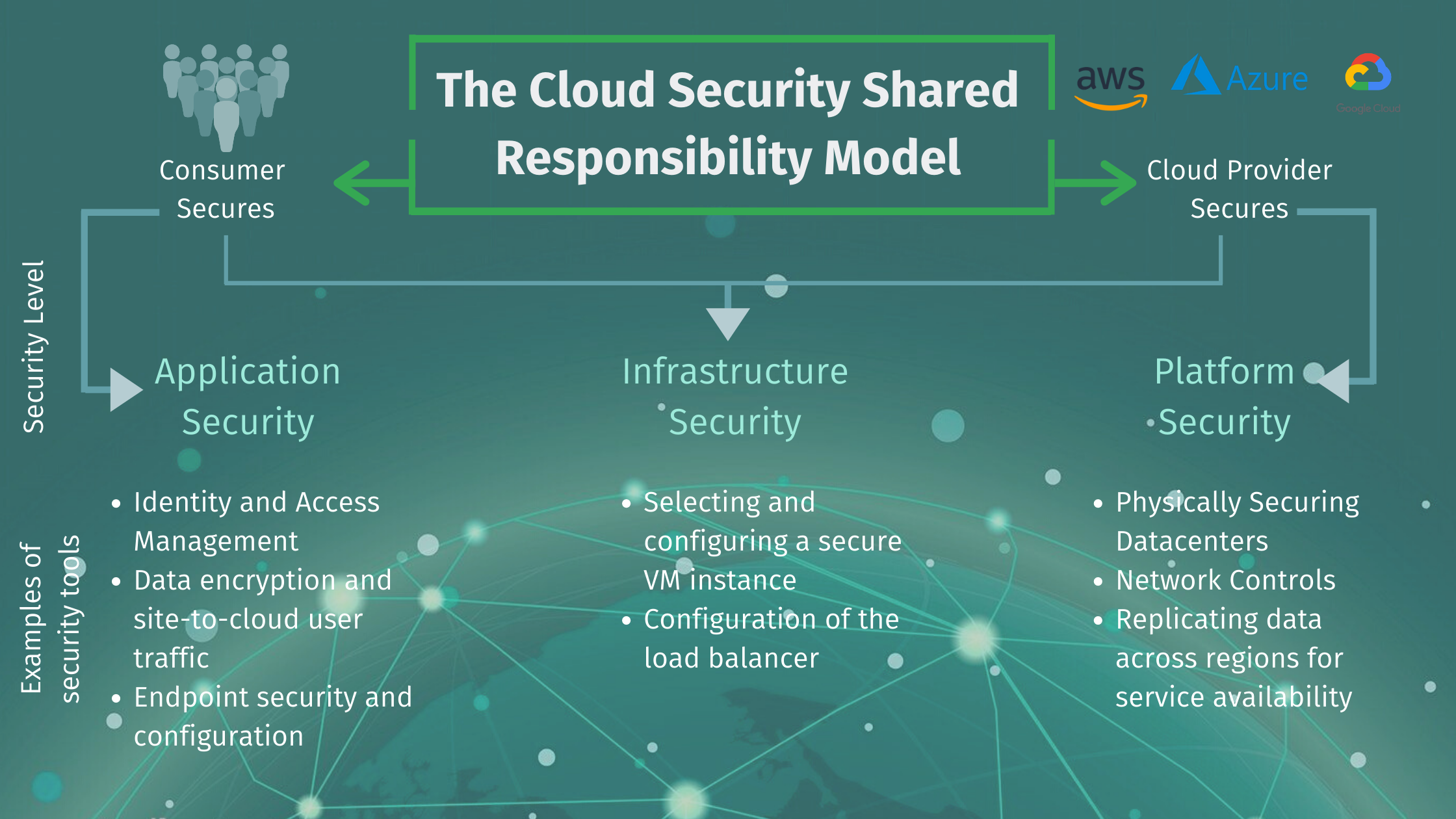
Image source: Bing (Web (fair-use with source credit))
The shared responsibility model is where most security assumptions fall apart. Your provider secures the physical hardware and the platform. You secure your keys, your permissions, and your data.
Encryption at rest and in transit is table stakes now. Every major provider offers AES-256 at rest and TLS 1.2 or 1.3 in transit. The real question is who holds the keys.
Provider-managed keys are easy. Customer-managed keys give you control, and more work.
If you're in a regulated industry, compliance isn't optional. HIPAA needs a signed BAA. PCI DSS has its own audit trail.
GDPR and UK GDPR restrict where data can live and how it moves. Ask for SOC 2 Type II reports, ISO/IEC 27001 certification, and FedRAMP authorization if you sell to government.
Long-term, cost optimization is mostly discipline. Turn on lifecycle policies so cold data drops to cheaper tiers automatically. Enable versioning, but set an expiration so old versions don't pile up.
Rotate keys on a schedule. Review access logs quarterly.
That last one matters more than people think. A compromised laptop with sync access is a direct line into your account. Pair it with a trusted VPN on public networks and you close the easiest gap first.
FAQs: Egress Fees, Durability, RTO/RPO, and Vendor Lock-In
Do I still pay to download my own data?
Usually, yes. AWS, Azure, and Google all charge egress fees when data leaves their network. Rates vary by region and volume, but expect roughly $0.08 to $0.12 per GB.
Providers like Cloudflare R2 and Backblaze B2 waive egress entirely. Always check that line before you commit.
How durable is cloud storage, really?
Major providers publish 99.999999999% durability, often called eleven nines. Losing a single object is statistically rare across millions of drives. Durability isn't availability, though.
Availability is whether the service answers right now. Most SLAs sit between 99.9% and 99.99% uptime.
What RTO and RPO should I aim for?
RPO is how much data you can afford to lose. RTO is how long you can stay down. A small business might accept a 24-hour RPO and a 4-hour RTO.
A payment processor can't. Set both before you pick a tier, because they decide whether you need live replication or just nightly backups.
Can I move my data to another provider later?
Yes, but it costs time and money. Egress fees apply on the way out, and re-uploading terabytes takes days. Providers using the S3-compatible API make migration easier.
Proprietary APIs and custom metadata make it harder. Test a small migration before you sign a long contract.
Is client-side encryption worth the hassle?
It depends on what you're storing. Client-side encryption means you hold the keys, so the provider can't read your files. That's powerful for sensitive data.
It also means losing your key means losing your data forever. For personal photos, provider-managed keys are usually enough.
Final Verdict: How to Pick Without Regret
No right answer exists in the abstract. There's only the right answer for your data.
If your files are personal and you open them often, a mainstream sync service works fine. Turn on versioning and MFA, and you're set.
If you're running a business, separate sync from backup. Use object storage for scale. Use block storage for databases.
Use archive tiers for anything you're keeping only for compliance.
Check three numbers before you sign anything. The per-GB storage rate, the egress rate, and the minimum storage duration. Those three decide what your bill looks like at year end.
Then test the exit. Upload a small dataset, delete it, restore it, and time the whole thing. If that process feels painful, migration later will be worse.
The providers that win long-term aren't always the cheapest per gigabyte. They're the ones whose pricing you can predict and whose data you can get back out. Predictability beats a discount every time.
If you want to weigh up other services worth a look before deciding, do it now, not after you've migrated everything. Start with access frequency. It answers more questions than any feature list.

Similar Posts
















[…] CSV export. If you want a long record, people typically screenshot trends or sync notes into long-term data archives they control. That's a genuine limitation if you're trying to correlate air quality with […]
[…] you export statements regularly, an encrypted backup location keeps your financial records safe and separate from the app […]
[…] scheduled tests and log trends over weeks. That's how you catch peak-hour drops. If you keep offsite backups running overnight, a scheduled test shows whether your upload window is actually […]
[…] Computing: The delivery of computing services—including servers, storage, databases, networking, software—over the […]