LeadRocks Lifetime Deal Review: Get Unlimited B2B Leads Instantly
Founder & Lead SaaS Analyst at PCSaaS · Google Ads & Analytics Certified · SaaS Stack Architect · 500+ Software Tools Tested · 8+ years in B2B SaaS evaluation, AppSumo lifetime deal curation, performance marketing, and AI workflow automation
Discover how LeadRocks Lifetime Deal Review helps you access 100M+ verified B2B contacts to grow your business faster with enriched data and automation.
In this post, we'll dive into the LeadRocks Lifetime Deal, exploring its features and benefits. With over 100 million records, including emails, phone numbers, and LinkedIn profiles, LeadRocks aims to streamline your lead generation process. We'll examine how it simplifies finding and contacting high-quality leads, helping you boost your sales efforts. Stay tuned to see if LeadRocks is the right tool for your business needs. For more details, visit the official page here.
Introduction To Leadrocks
In the digital age, finding the right leads can be a daunting task. This is where LeadRocks steps in. It's a robust B2B contact database and email outreach software designed to streamline your lead generation efforts. With over 100 million records, including emails, phone numbers, and LinkedIn profiles, LeadRocks is a reliable partner for your sales team.
What Is Leadrocks?
LeadRocks is a comprehensive tool that offers a reliable B2B contact database. It simplifies the lead generation process by providing high-quality leads for hyper-targeted outreach. Here are some key features:
Search and Filter Leads : Search leads based on job title, company name or URL, location, industry, and team size.
Data Enrichment : Upload LinkedIn profile URLs to pull emails and phone numbers, save results in LeadRocks or export to a CSV.
Email Verification : Verify emails directly within the LeadRocks dashboard.
CRM Integration : Upload CSV files into your CRM or any automation tool.
Email Outreach : Connect Gmail or Outlook to send automated email sequences.
Data Storage : Store contact information in LeadRocks lists and export data.
Compliance : GDPR-compliant data sourcing from official and legal sources.
Integrations : Compatible with Chrome, Google Sheets, and LinkedIn.
The Purpose Of Leadrocks
The main goal of LeadRocks is to make the lead generation process as easy as possible. It offers a user-friendly interface with powerful features to enhance your prospecting efforts.
Benefits Description
Time-Saving Streamlines the lead generation process, allowing users to focus on negotiations.
High-Quality Data Continuously updated and verified data to drive sales.
Ease of Use Simple interface and powerful features for efficient prospecting.
Automation Automated email sequences for effective outreach campaigns.
Customizable Searches Multiple filters for precise lead searches.
By integrating with popular tools like Gmail, Outlook, and various CRM systems, LeadRocks offers seamless workflow integration. This ensures your sales team can access the most up-to-date contact information and focus on closing deals.
For example, a sales team can sync enriched contacts directly into their CRM, trigger automated follow-up sequences, and track engagement — all without leaving the LeadRocks environment. This seamless workflow saves hours of manual data entry each week.
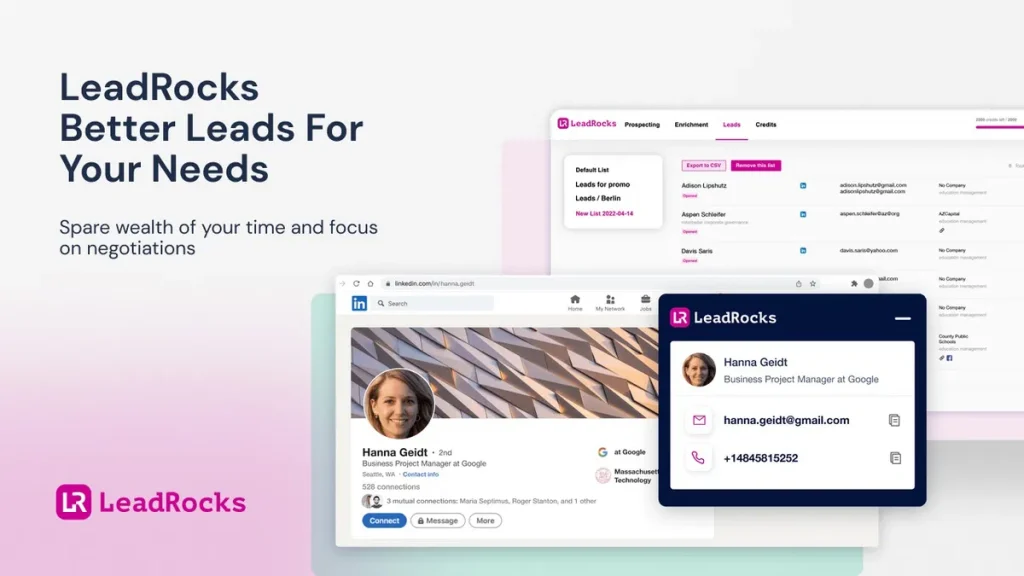
LeadRocks main interface overview.
Credit: appsumo.com
Key Features Of Leadrocks
Leadrocks offers a range of powerful features that make lead generation efficient and effective. This section explores the key features of Leadrocks in detail.
Unlimited Lead Generation
With Leadrocks, you get access to a vast B2B contact database. This database includes over 100 million records with emails, phone numbers, and LinkedIn profiles. This ensures you always have high-quality leads for your outreach campaigns.
Advanced Search Filters
Leadrocks simplifies the process of finding the right leads. You can search leads based on various criteria such as:
Job title
Company name or URL
Location
Industry
Team size
You can use one filter or a combination of multiple filters for more precise searches. This helps in finding the most relevant leads for your business.
Contact Data Enrichment
Enrich your contact data by uploading LinkedIn profile URLs. Leadrocks pulls emails and phone numbers available in their database for every profile. You can save results in Leadrocks or export them to a CSV file.
Feature Description
Data Enrichment Upload LinkedIn profile URLs and get emails and phone numbers.
Save Results Store data in Leadrocks or export to a CSV file.
Crm Integration
Leadrocks integrates seamlessly with your CRM and other automation tools. Upload your CSV files into your CRM to streamline your prospecting process. This ensures all your contact information is in one place.
User-friendly Interface
Leadrocks boasts a simple and intuitive interface. This makes it easy for anyone to use the tool efficiently. The platform is designed to be user-friendly, ensuring a smooth experience for all users.
In practice, the dashboard places the most used actions — search, enrichment, and verification — front and center, reducing the number of clicks needed to complete a task. A common mistake is to rely solely on the default search filters; taking time to combine multiple criteria, such as industry and job title, yields significantly more targeted results.
Pricing And Affordability
Choosing the right lead generation tool can be challenging, especially with many options available. LeadRocks offers an attractive lifetime deal, making it a cost-effective choice for businesses. Let’s explore the pricing and affordability aspects of LeadRocks.
Lifetime Deal Overview
LeadRocks provides three lifetime plans, each designed to fit different business needs. These plans offer significant savings compared to regular prices.
Plan Original Price Lifetime Deal Price Features Included
Plan 1 $1,740 $79
- 5,000 contact credits per month
Plan 2 $3,480 $158
10,000 contact credits per month
10,000 email verification credits per month
1 email marketing seat
API access for email verification
Plan 3 $5,220 $237
15,000 contact credits per month
15,000 email verification credits per month
1 email marketing seat
API access for email verification
Cost Comparison With Competitors
LeadRocks stands out in the market due to its competitive pricing. Here’s a comparison with some popular lead generation tools:
Tool Monthly Cost Features
LeadRocks $79 (Lifetime)
5,000 contact credits
Email verification
CRM integration
Competitor A $150/month
5,000 contact credits
Email verification
Competitor B $200/month
10,000 contact credits
Email verification
Value For Money
LeadRocks offers excellent value for businesses aiming to enhance their lead generation efforts. The lifetime deal ensures you get continuous access to high-quality data and features without recurring costs.
Lifetime Access : Enjoy all future updates and features without extra charges.
Money-Back Guarantee : 60-day money-back guarantee provides peace of mind.
Stackable Codes : Increase feature limits by purchasing additional codes.
With LeadRocks, you invest once and benefit for a lifetime, making it a smart choice for businesses of all sizes.
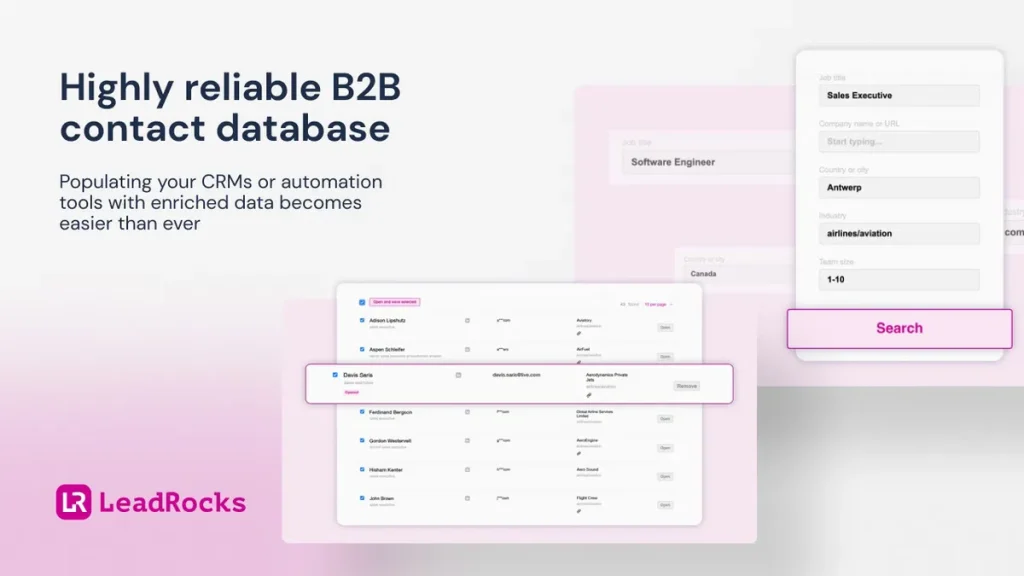
LeadRocks lifetime pricing plans comparison.
Credit: appsumo.com
Pros And Cons Of Leadrocks
LeadRocks is a popular tool for B2B contact management and email outreach. Below, we explore the advantages and disadvantages of using LeadRocks.
Advantages Of Using Leadrocks
High-Quality Data : LeadRocks provides continuously updated and verified data.
Time-Saving : Streamlines the lead generation process, letting you focus on negotiations.
Easy to Use : Simple interface with powerful features for efficient prospecting.
Customizable Searches : Multiple filters for precise lead searches.
Automation : Automated email sequences for effective outreach campaigns.
Integration : Compatible with CRM tools, Chrome, Google Sheets, and LinkedIn.
GDPR Compliance : Data sourced from official and legal sources.
Custom Email Verification : Verify emails directly within the dashboard.
Drawbacks And Limitations
Cost : The initial cost may be high for small businesses.
Limited Free Trial : Only a 60-day money-back guarantee; no free trial period.
Learning Curve : New users might need time to get familiar with all features.
Contact Credit Limits : Monthly contact credits may limit extensive outreach campaigns.
Feature Limits : Higher tiers needed for additional features like API access.
One trade-off worth noting: the monthly contact credit limit means you need to plan your outreach budget carefully. If you anticipate high-volume campaigns, consider the Plan 2 or Plan 3 tier from the outset, as upgrading later may require purchasing additional codes. Many users find that starting with Plan 2 provides a good balance between cost and capacity.
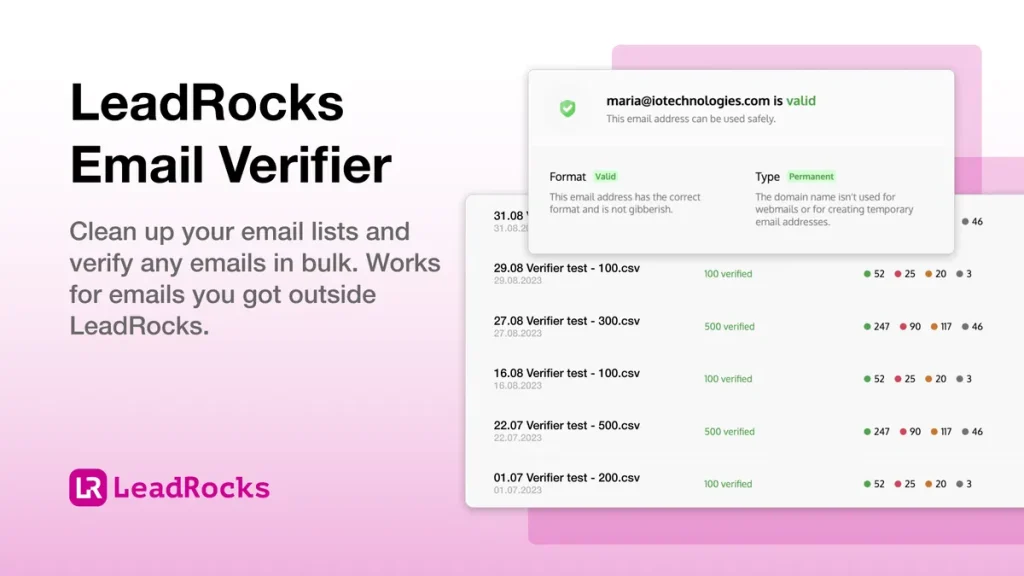
LeadRocks data enrichment and verification features.
Credit: appsumo.com
Ideal Users For Leadrocks
Leadrocks is a powerful tool designed for B2B professionals seeking high-quality leads for targeted outreach. With its extensive features, Leadrocks is suitable for various users who need reliable contact information and efficient prospecting capabilities.
Best Scenarios For Using Leadrocks
Leadrocks excels in multiple scenarios, making it a versatile choice for businesses:
Sales Teams: Quickly find and contact potential clients using job title, company name, or location filters.
Marketing Departments: Generate targeted email lists for campaigns, ensuring high engagement rates.
Recruiters: Locate candidates with specific skills and experience through LinkedIn profile searches.
Small Businesses: Save time on lead generation and focus on closing deals with high-quality leads.
Startups: Efficiently build a contact database to kickstart outreach efforts and grow the business.
Who Will Benefit The Most?
Several user groups will find Leadrocks particularly beneficial:
Sales Professionals: Access to a large database of verified contacts helps close deals faster.
Marketing Experts: Use enriched data for precise targeting in email marketing campaigns.
Recruitment Agencies: Simplify the candidate search process with accurate and up-to-date profiles.
Business Development Managers: Identify new opportunities and build strong relationships with potential partners.
Freelancers: Use Leadrocks to find and approach new clients efficiently.
Here is a table summarizing the key features and who benefits from them:
Feature Beneficiaries
Search and Filter Leads Sales Teams, Marketing Departments
Data Enrichment Recruiters, Small Businesses
Email Verification Marketing Experts, Sales Professionals
Email Outreach Freelancers, Startups
CRM Integration Business Development Managers, Sales Teams
By leveraging the features of Leadrocks, users can streamline their lead generation and outreach processes, resulting in more efficient operations and better results.
How to Get Started with LeadRocks
Getting started with LeadRocks is straightforward, but following a clear workflow helps you avoid wasting credits and ensures you hit the right prospects. Here’s a step-by-step guide based on common use cases.
Step 1: Define Your Ideal Customer Profile
Before you search, list the criteria that describe your best-fit customer: job title (e.g., “Head of Sales”), industry (e.g., “SaaS”), company size, and location. Combining these filters inside LeadRocks will narrow the database to the most relevant contacts.
Step 2: Run Your First Search
Navigate to the Search and Filter Leads section. Enter your criteria and click “Search.” LeadRocks will return a list of matching profiles with available emails, phone numbers, and LinkedIn URLs. Each result consumes one contact credit.
Step 3: Enrich Existing Contacts
If you already have a list of LinkedIn profile URLs, use the Data Enrichment feature. Paste the URLs, and LeadRocks will pull emails and phone numbers for each profile. This is especially useful for complementing your existing CRM data — you can later export the enriched records into a CSV and sync them with your workflow.
Step 4: Verify Email Addresses
Before sending any outreach, run the collected emails through the built-in Email Verification tool. This step reduces bounce rates and protects your sender reputation. Verified emails are marked with a green check inside your dashboard.
Step 5: Set Up Email Sequences
Connect your Gmail or Outlook account to the Email Outreach module. Create a sequence of follow-up messages, personalize them with merge tags, and schedule the campaign. The platform automatically pauses outreach to invalid addresses if you’ve verified them.
Step 6: Integrate with Your CRM
Export your leads as a CSV file, then upload it into your CRM or use a direct integration with tools like HubSpot or Salesforce. If you’re using a marketing automation platform, the CSV import method works seamlessly.
Pro tip: Start with a small test batch of 50–100 contacts to validate your messaging and filters before scaling up. This approach helps you fine-tune your targeting without consuming too many credits.
LeadRocks sources its data in compliance with GDPR, ensuring that the contacts you acquire are legally obtained. You can confidently use the data for outreach campaigns without worrying about regulatory issues.
Additional Tips for Maximizing LeadRocks
To get the most out of your lifetime deal, consider these practical strategies that experienced users employ.
Use Advanced Filters Together
Don’t just search by job title alone. Combine it with industry, company size, and location. For example, filtering for “Sales Director” in the “Fintech” industry within companies of 50–200 employees yields a much more actionable list than a broad title search.
Monitor Your Credit Usage
The dashboard shows your remaining contact credits for the month. If you consistently hit the limit, review your search criteria — you may be extracting contacts that don’t meet your strictest filters. Alternatively, consider stacking another code to increase your monthly allowance.
Enrich Before You Export
If you have a list of LinkedIn URLs from social media prospecting, enrich them in LeadRocks before adding them to your CRM. Many users find that using a social media prospecting tool alongside LeadRocks speeds up the initial data collection phase.
Pair with a Separate Email Verification Tool (Optional)
While LeadRocks’ built-in verification is reliable, running a second verification pass through a dedicated service can catch marginal addresses. This is especially important for high-volume campaigns where every bounce damages deliverability.
Keep Your Lists Organized
Create separate LeadRocks lists for different campaigns or buyer personas. Tagging and naming lists clearly saves time when you need to revisit a certain segment later. You can also export lists periodically to back up your data.
Take Advantage of the 60-Day Guarantee
The money-back guarantee gives you a full two months to test the tool against your real sales workflows. Use this period to evaluate whether the data quality and outreach features meet your expectations. If you’re unsure, start with Plan 1 and upgrade after testing.
Frequently Asked Questions
What Is Leadrocks Lifetime Deal?
Leadrocks Lifetime Deal is a one-time purchase offer that provides lifetime access to Leadrocks, a powerful lead generation tool.
How Does Leadrocks Work?
Leadrocks works by collecting and verifying contact information from various sources, helping businesses find high-quality leads efficiently.
Is Leadrocks Suitable For Small Businesses?
Yes, Leadrocks is ideal for small businesses. It helps them generate leads and grow their customer base affordably.
What Features Does Leadrocks Offer?
Leadrocks offers features like lead generation, email verification, contact management, and integration with popular CRM tools.
Can I upgrade my plan later?
Yes, you can purchase additional stackable codes on AppSumo to increase your contact credits, email verification credits, or add an email marketing seat. Each code is applied to your existing account, so you can start with Plan 1 and expand as your needs grow.
Does LeadRocks integrate with LinkedIn Sales Navigator?
LeadRocks does not natively connect to Sales Navigator, but you can copy LinkedIn profile URLs from any LinkedIn page and paste them into the Data Enrichment field. This indirect method works well for targeted prospecting.
What happens if I don’t use all my credits in a month?
Unused contact credits do not roll over to the next month. To avoid waste, plan your outreach campaigns to align with your monthly credit allocation. If you consistently have leftover credits, you may be able to downsize to a lower tier.
Conclusion
LeadRocks offers an efficient solution for lead generation. Its user-friendly interface makes it easy to find and manage leads. With features like data enrichment and automated email outreach, it saves time and effort. The continuous data updates ensure high-quality leads. Plus, the lifetime deal provides great value. For more information, check out LeadRocks. This tool can be a valuable asset for your business. Happy prospecting!

Similar Posts