Cloud Service Management: Cut Costs & Boost Efficiency in 2026
Founder & Lead SaaS Analyst at PCSaaS · Google Ads & Analytics Certified · SaaS Stack Architect · 500+ Software Tools Tested · 8+ years in B2B SaaS evaluation, AppSumo lifetime deal curation, performance marketing, and AI workflow automation
Struggling with skyrocketing cloud bills and chaotic multi-cloud setups? Master Cloud Service Management to slash costs by up to 40%, strengthen security, and streamline operations. Discover proven strategies top companies use to dominate the cloud!
That’s where effective Cloud Service Management steps in. It helps you take charge of your cloud environment—making it simpler, safer, and more efficient. You’ll discover how managing your cloud services the right way can save you time, reduce risks, and boost your business performance.
Ready to unlock the full power of the cloud? Let’s dive in.
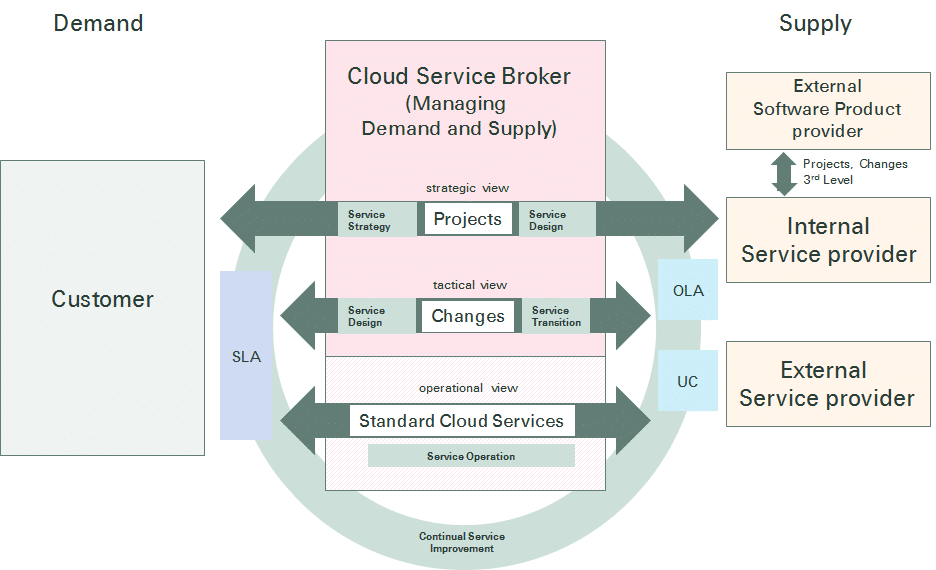
Credit: blog.itil.org
Cloud service management connects strategy, people, and operational delivery.
Cloud Service Models
Cloud service models define how cloud resources are delivered and managed. They vary by the level of control and management they offer to users. Understanding these models helps in choosing the right cloud service for specific needs.
The four main types of cloud services are Infrastructure as a Service, Platform as a Service, Software as a Service, and Serverless Computing. Each model offers a different way to access and use cloud technology.
Infrastructure As A Service (iaas)
IaaS provides basic computing resources like virtual machines, storage, and networks. Users manage the operating systems and applications on these resources. This model offers flexibility and control over the IT environment.
Platform As A Service (paas)
PaaS removes the need to manage hardware and operating systems. It offers a platform to develop, run, and manage applications easily. This model lets developers focus on coding without worrying about infrastructure.
Software As A Service (saas)
SaaS delivers fully managed software over the internet. Users access applications through web browsers without installation. The provider handles maintenance, updates, and security for the software.
Serverless Computing
Serverless computing lets users run code without managing servers. The cloud provider automatically handles resource allocation and scaling. This model simplifies deployment and reduces infrastructure management.
Credit: www.researchgate.net
This diagram shows how service management maps across the main layers of cloud computing.
Cloud Deployment Options
Cloud deployment options define how organizations use and manage their cloud resources. Choosing the right deployment affects cost, security, and control. Each model offers unique benefits and suits different business needs. Understanding these options helps in planning effective cloud service management.
Public Cloud
The public cloud is a shared environment managed by third-party providers. It offers easy access to computing resources over the internet. Users pay for what they consume, making it cost-effective. Scalability and flexibility are key strengths. Security is managed by the provider, but users share infrastructure.
Private Cloud
A private cloud is a dedicated environment for a single organization. It provides more control over security and data privacy. Resources are not shared with others, enhancing compliance with regulations. Private clouds can be hosted on-premises or by a service provider. They suit businesses with strict security needs.
Hybrid Cloud
Hybrid cloud combines public and private clouds into one system. It allows data and applications to move between environments. This model offers greater flexibility and optimization of existing infrastructure. Organizations can keep sensitive data private while using public cloud for other tasks. Hybrid cloud supports diverse workloads efficiently.
Multicloud
Multicloud uses multiple cloud services from different providers. It avoids dependency on a single vendor. This approach increases redundancy and reduces risk. Organizations can choose the best services from each provider. Multicloud also helps optimize costs and improve performance across workloads.
Matching Cloud Models And Deployment Options To Workloads
The lowest-risk way to cut cloud costs is to stop treating every workload the same. Efficiency begins before pricing negotiations: it begins with a clear match between the workload requirement and the service or deployment model.
| Workload pattern | Service model to consider | Deployment option to consider | Why it helps |
|---|---|---|---|
| Internal dashboards with sensitive data | PaaS or IaaS | Private or hybrid | Lets you control data location and access while reducing setup work |
| Bursty batch processing | Serverless | Public | Scales to zero between runs so you only pay for execution |
| Stateless web applications | PaaS | Public | Auto-scaling and managed runtimes cut maintenance work |
| Legacy applications with compliance rules | IaaS | Private or hybrid | Gives control over patching, location, and access |
| Experimentation and prototyping | Serverless or PaaS | Public | Low commitment and fast teardown avoid stranded investment |
In practice, most organizations run a portfolio rather than a single model. Data-heavy analytics workloads, for instance, often work best on managed platforms with a centralized analytics portal so finance and engineering teams can see usage, cost, and performance in one place. Periodic reviews of this mix prevent the slow drift toward overprovisioned legacy setups.
Key Cloud Management Challenges
Managing cloud services involves several challenges that can affect business operations and growth. Understanding these challenges helps in planning better strategies and avoiding common pitfalls. The key areas of concern include security, costs, performance, and resource handling. Each of these plays a critical role in successful cloud management.
Security And Compliance
Security remains a top priority in cloud management. Protecting data from breaches and cyber threats is essential. Compliance with legal and industry regulations adds complexity. Cloud environments require continuous monitoring and strong access controls. Ensuring data privacy builds trust with customers and partners.
Security decisions hold up better when they are anchored to a recognized framework. NIST's cloud guidance covers identity, access control, encryption, and continuous monitoring. Aligning your cloud controls to that guidance makes audits simpler and gives security and engineering teams a common language for risk.
Cost Control
Cloud costs can quickly spiral out of control without careful management. Unused resources and over-provisioning lead to wasted expenses. Tracking spending and setting budgets are necessary tasks. Cost control tools help identify inefficiencies and optimize resource use. Transparent billing supports better financial planning.
That is where FinOps comes in. A FinOps framework treats cloud spending as a shared responsibility across finance, engineering, and product teams. In practice, the highest-impact habit is tagging every resource with an owner, a project, and an environment so charges can be allocated to the team that created them. Once you can see who owns what, unused storage, orphaned load balancers, and oversized virtual machines become visible and can be decommissioned instead of merely reported.
Performance Monitoring
Maintaining optimal cloud performance is challenging but vital. Slow response times or downtime impact user experience and productivity. Continuous monitoring detects issues before they escalate. Performance metrics guide adjustments to improve service quality. Automated alerts enable faster problem resolution.
Resource Provisioning
Provisioning the right resources at the right time is complex. Over-provisioning wastes money, while under-provisioning causes delays. Automation can streamline resource allocation and scaling. Proper planning aligns resources with workload demands. Efficient provisioning supports business agility and growth.

Credit: www.geeksforgeeks.org
Cloud management and monitoring tools cover provisioning, performance, and cost in one view.
Strategies To Boost Efficiency
Boosting efficiency in cloud service management requires smart strategies. These strategies help reduce manual work, control costs, secure data, and improve system performance. Implementing them leads to smoother operations and better resource use.
Automation And Orchestration
Automation cuts down repetitive tasks. It speeds up workflows and reduces errors. Orchestration links different automated tasks. This helps systems work together without delays. Together, they free up time for teams to focus on important projects.
Effective Cost Management
Tracking cloud expenses is key to saving money. Set budgets and alerts to avoid overspending. Choose the right cloud resources for your needs. Turn off unused services to reduce waste. Cost management keeps cloud use affordable and efficient.
Robust Security Practices
Strong security protects your cloud data and apps. Use multi-factor authentication to stop unauthorized access. Regularly update software to fix security gaps. Encrypt sensitive data to keep it safe. Good security builds trust and prevents costly breaches.
Continuous Monitoring And Optimization
Monitor cloud systems in real time to find issues fast. Track performance and resource use to spot improvements. Use insights to optimize workloads and reduce delays. Continuous monitoring keeps your cloud running smooth and cost-effective.
Building A FinOps Practice To Sustain Savings
One-time cost cuts rarely survive contact with a growing business. The discipline of keeping cloud spend aligned with business value is known as FinOps, and by 2026 most mature cloud organizations run it as a permanent, cross-functional practice. In practice, the teams that sustain savings follow the same four-step rhythm.
Tag Everything And Know Who Owns What
Cost allocation starts with resource tags. Assign every resource an owner, a project, an environment, and a cost center. Untagged resources should be flagged automatically and, if they remain unowned for a set period, terminated. Until you know who owns a resource, you cannot hold anyone accountable for what it costs.
Rightsize Against Measured Demand
Rightsizing means matching resource capacity to real utilization, not to what an engineer guessed at deployment time. It is common to find instances running for a year at 5 percent CPU because the original sizing was a precaution. Review utilization metrics over a 30-day window, downsize oversized instances, remove unattached storage volumes, and delete stale snapshots.
Use Commitment Discounts On Stable Workloads Only
Reserved instances and savings plans trade flexibility for a lower rate. They make sense for predictable workloads such as production databases and core application servers; they are wasted on experimental projects that may not exist next quarter. A sensible starting rule is to cover roughly two-thirds of your stable baseline with committed-use discounts, then revisit each quarter.
Run A Regular Waste Review
Set a recurring monthly or quarterly meeting where finance, engineering, and product leads walk through the top cost items together. Ask why each resource exists, who uses it, and what it would take to remove it. Track the outcome with the same discipline you would apply to any financial audit, so the meeting produces closed tickets rather than conversation.
Tools For Cloud Service Management
Managing cloud services efficiently requires the right set of tools. These tools help control resources, monitor performance, automate tasks, and secure environments. Selecting the appropriate tools simplifies cloud operations and reduces errors.
Many tools specialize in different aspects of cloud service management. Each tool type serves a unique purpose and supports better decision-making. Understanding these tools helps businesses improve their cloud strategy and maintain smooth workflows.
Avoiding Tool Sprawl
A common mistake is adopting a separate tool for every problem until the management stack becomes harder to operate than the cloud itself. Consolidate around a small set: one observability platform, one cost management tool, one security posture manager, and one infrastructure-as-code engine. Make sure each tool integrates with your provider's native APIs, so you are not stitching together conflicting data sources.
Cloud Management Platforms
Cloud management platforms offer a single interface to manage multiple cloud services. They help organize resources, track usage, and control costs. These platforms support hybrid and multi-cloud environments, making management easier. Popular platforms include VMware vRealize, Microsoft Azure Arc, and Google Cloud Console.
Monitoring And Analytics Tools
Monitoring tools track cloud performance and detect issues early. They collect data on server health, application uptime, and user activity. Analytics tools analyze this data to provide insights and trends. Tools like Datadog, New Relic, and CloudWatch help maintain service reliability and optimize usage.
Native cloud dashboards answer tactical questions well, but executives and finance teams usually need a broader view of cost, uptime, and capacity across the entire estate. Connecting those metrics to your board-level reporting workflow turns operational data into decisions without handing leadership a console login.
Automation Solutions
Automation tools reduce manual work by handling routine cloud tasks. They manage deployments, scaling, and backups automatically. Automation increases speed and consistency in cloud operations. Examples include Terraform, Ansible, and AWS Lambda, which streamline workflows and improve efficiency.
Security Tools
Security tools protect cloud services from threats and vulnerabilities. They monitor access, enforce policies, and detect suspicious activities. These tools help maintain compliance and secure sensitive data. Popular security solutions include Palo Alto Prisma Cloud, AWS Security Hub, and Azure Security Center.
Best Practices For Expert Management
Expert management of cloud services demands clear strategies and consistent effort. Best practices help teams maintain control, boost efficiency, and reduce risks. These guidelines guide organizations to handle cloud resources wisely and stay aligned with business goals.
Effective cloud service management requires governance, skills, vendor support, and scalable systems. Each area plays a key role in smooth operations and long-term success.
Establishing Governance Policies
Set clear rules for cloud usage and access control. Define who can manage resources and how changes are approved. Enforce security standards to protect data and prevent breaches. Monitor compliance regularly to ensure policies remain effective. Governance policies create order and minimize errors in cloud environments.
Regular Training And Skill Development
Provide ongoing education to keep teams updated on cloud tools and trends. Schedule workshops and hands-on sessions to build practical skills. Encourage certifications to validate expertise and improve confidence. Skilled staff can solve problems faster and optimize cloud performance. Training reduces mistakes and supports innovation.
Leveraging Vendor Expertise
Use vendor resources like support teams, documentation, and best practice guides. Collaborate with providers for custom solutions and troubleshooting help. Stay informed about new features and updates from vendors. Vendor insights improve cloud service reliability and efficiency. Strong vendor relationships add value and reduce downtime.
Implementing Scalable Architectures
Design cloud systems that grow with your business needs. Use flexible resources that adjust automatically to demand changes. Plan for future expansion without disrupting current services. Scalable architectures lower costs by using resources only when needed. They ensure consistent performance even during peak loads.
Building A Cloud Center Of Excellence
Organizations that manage cloud well at scale usually centralize standards without centralizing every decision. A cloud center of excellence sets approved patterns for architecture, security, and cost, then lets product teams move quickly within those guardrails. It maintains a shared catalog of reusable modules, such as logging pipelines, CI/CD templates, and hardened network configurations, so teams do not reinvent the same wheels.
Practical First Steps: A 2026 Action Plan
Strategy is useful only when it translates into a first action. If you are starting from scratch, pick one team, one environment, and one budget line rather than attempting to transform the entire estate at once.
- Inventory your current estate. Export a list of all resources and tag them by owner, project, and environment.
- Identify the top 10 cost items. Ask why each exists and whether it is still needed at its current size.
- Turn off or downsize what is unjustified. Start with idle instances, orphaned volumes, and stale snapshots.
- Set budget alerts at 80 percent of forecast. Alerts should reach a named owner, not a shared inbox.
- Schedule a monthly waste review. Make it a recurring calendar event with finance and engineering present.
Start with one workload and one budget owner. The savings you prove in that small corner of the estate will fund the case for expanding the practice.
Future Trends In Cloud Management
The future of cloud service management holds exciting changes. New technologies and strategies will shape how businesses manage their cloud resources. These trends focus on making cloud management smarter, faster, and greener.
Understanding these future trends helps businesses stay competitive. They can improve efficiency, reduce costs, and meet sustainability goals. Below are some key trends to watch.
Ai And Machine Learning Integration
AI and machine learning are becoming core parts of cloud management. They help automate routine tasks and predict system issues before they occur. This reduces downtime and improves system reliability.
Smart algorithms can optimize resource use and balance workloads automatically. They learn from data patterns to enhance performance. This leads to faster response times and lower operational costs.
Teams building these capabilities internally usually start by acquiring hands-on machine learning skills — model selection, data preparation, and evaluation — before wiring AI into production operations. The same pattern works in marketing, where teams use AI-driven lead scoring to prioritize prospects; feeding historical data into a model that predicts future outcomes transfers directly to cloud capacity forecasting.
Serverless And Edge Computing
Serverless computing frees developers from managing servers. They only write code, and the cloud handles the rest. This speeds up development and reduces infrastructure costs.
Edge computing moves data processing closer to users. It reduces latency and improves application speed. Combined with serverless models, it supports real-time data handling and better user experience.
The practical consequence for 2026 is a shift in architecture: teams design for event-driven, stateless functions that can run close to the user, which changes how they provision, monitor, and pay for capacity.
Increased Focus On Sustainability
Sustainability is becoming a major concern in cloud management. Companies seek to reduce their carbon footprint and energy use. Cloud providers are adopting greener data centers and renewable energy sources.
Efficient resource management and waste reduction are priorities. Sustainable cloud strategies help businesses meet environmental regulations and appeal to eco-conscious customers.
Carbon-aware workload scheduling — running batch jobs when renewable energy is plentiful — is moving from pilot projects to mainstream practice. Ask your provider whether its sustainability tooling lets you shift non-critical work to cleaner energy periods.
Enhanced Multi-cloud Strategies
Using multiple cloud providers offers flexibility and risk reduction. Businesses avoid vendor lock-in and can choose the best services for each task. This improves resilience and cost management.
Advanced tools for managing multi-cloud environments are emerging. They provide unified control, security, and monitoring across clouds. This simplifies complex setups and improves cloud governance.
The catch is complexity: every additional provider adds another set of permissions, billing structures, and operational procedures. A common mistake is adopting a second cloud before the first is well governed, so most organizations begin multi-cloud with one secondary provider for a specific workload, not a broad split.
Read More : Cloud Based Business Intelligence: Transform Your Data Strategy Today
Frequently Asked Questions
What Are The 4 Types Of Cloud Services?
The four types of cloud services are Infrastructure as a Service (IaaS), Platform as a Service (PaaS), Software as a Service (SaaS), and Serverless Computing. Each offers different levels of control, from managing hardware to running complete applications without server management.
What Are The Big 3 Cloud Services?
The big 3 cloud services are Infrastructure as a Service (IaaS), Platform as a Service (PaaS), and Software as a Service (SaaS). IaaS offers virtual machines and storage. PaaS provides a platform for app development. SaaS delivers ready-to-use software managed by providers.
What Does A Cloud Service Manager Do?
A cloud service manager oversees cloud resources, ensures service reliability, manages vendor relationships, and optimizes cloud operations. They monitor performance, control costs, and implement security measures to support business goals.
What Is An Example Of Cloud Management?
An example of cloud management is using Platform as a Service (PaaS) to deploy and manage applications without handling infrastructure.
How Quickly Can Cloud Cost Optimization Show Results?
Some savings appear within days. Idle instances, unattached storage, and oversized virtual machines can be identified and removed in the first sprint. Deeper gains, such as renegotiating commitment discounts or rearchitecting workloads, typically take one to three billing cycles because they require coordination across teams.
What Is The Difference Between Cloud Cost Management And FinOps?
Cost management is the technical practice of tracking, controlling, and reducing cloud spend. FinOps is the operating model around it — the people, processes, and accountability that keep costs low over time. One is a toolset; the other is a culture.
How Do I Start FinOps Without Hiring New Staff?
Start small. Assign one existing person as the cost owner, use the free cost tools your cloud provider already offers, and run a monthly waste review. You do not need a dedicated FinOps team until the cloud bill is large enough that the savings from a full-time owner exceed their salary.
Conclusion
Effective cloud service management improves efficiency and reduces costs. It helps businesses control resources and secure data. Choosing the right service model fits your needs best. Regular monitoring keeps your cloud environment healthy and reliable. Clear strategies make cloud management simpler and more productive.
Stay informed about new tools to enhance your cloud use. Good management supports growth and adapts to changing demands. Cloud services offer flexibility but require careful oversight. Embrace cloud management to keep your systems running smoothly.

Similar Posts