WP Timetics Lifetime Deal – Best WordPress Meeting Booking Plugin
Founder & Lead SaaS Analyst at PCSaaS · Google Ads & Analytics Certified · SaaS Stack Architect · 500+ Software Tools Tested · 8+ years in B2B SaaS evaluation, AppSumo lifetime deal curation, performance marketing, and AI workflow automation
Grab the WP Timetics Lifetime Deal to schedule meetings, sync calendars, and manage bookings easily.
Introducing WP Timetics – your ultimate solution to seamless scheduling. With WP Timetics, you can wave goodbye to the endless back-and-forth emails and calendar mishaps that often accompany appointment setting. This powerful AI-driven plugin is designed to streamline your booking process, offering over 50 robust features and more than 13 integrations with popular tools like Zoom and Google Meet. Whether you're an educator, marketer, or running a small business, WP Timetics provides you with the flexibility to set up various meeting types, from one-on-one consultations to one-to-many workshops. Plus, it ensures that your team is always in sync with automatic calendar syncing and smart notifications. But the best part? You can get lifetime access to this game-changing tool. Ready to transform the way you schedule meetings? Click here to grab the lifetime license and put your booking calendar on autopilot today!
Introduction To Wp Timetics
Welcome to the world of WP Timetics , an innovative scheduling plugin for WordPress. Designed to streamlinescheduling, it helps you set appointments directly from your WordPress site. Say goodbye to the hassle of scattered emails and calendars. This plugin promises ease and efficiency in managing your meetings.
Understanding Wp Timetics And Its Purpose
WP Timetics serves as an AI-powered tool for scheduling meetings and appointments. It offers a comprehensive solution for educators, marketers, and small businesses. It provides an alternative to platforms like Acuity Scheduling and Calendly.
With WP Timetics, scheduling is simple. Book one-on-one consultations or one-to-many workshops. The plugin supports various meeting types, ensuring flexibility in organizing your events.
How Wp Timetics Enhances WordPress Scheduling
The plugin enhances your WordPress scheduling by automating your booking processes. It integrates seamlessly with platforms such as Zoom and Google Meet. This integration ensures all your calendars sync automatically, reducing the risk of double-booking.
Manage team schedules with ease.
Assign specific meetings to team members.
Enable team members to view their schedules independently.
WP Timetics also supports custom seating plans for one-to-many meetings. Use a drag-and-drop canvas to design venue layouts. Allow attendees to select their preferred seats, enhancing the user experience.
With GDPR-compliance and AI capabilities, WP Timetics ensures your scheduling remains efficient and secure. Whether managing daily, weekly, or monthly views, this plugin meets your scheduling needs.
Feature Description
Integrations Google Calendar, PayPal, WooCommerce, Zapier, Zoom
Team Management Manage team members' availability and schedules
Custom Seating Create visual seating plans for events
WP Timetics combines functionality with simplicity. It is your go-to plugin for scheduling efficiency on WordPress.
Unique Features Of Wp Timetics
WP Timetics offers a seamless scheduling experience directly from your WordPress site. It helps you manage meetings and appointments efficiently, whether you're handling one-on-one consultations or large workshops. With its advanced features, this plugin ensures your scheduling process is smooth and organized.
Easy Integration With WordPress
Integrate WP Timetics effortlessly with your WordPress site. It connects with popular calendars like Google Calendar, Apple Calendar, and Outlook. This integration reduces the chance of double-booking and simplifies cross-referencing tasks.
Google Calendar synchronization for seamless updates.
Automatic syncing with Apple Calendar and Outlook .
Calendar Integration Type
Google Calendar Automatic Sync
Apple Calendar Automatic Sync
Outlook Automatic Sync
In practice, setting up these integrations takes just a few clicks from the plugin settings panel — no shortcode editing or API key hunting required. This is a common pain point with competing plugins, where calendar sync often requires manual token generation.
Customizable Scheduling Options
WP Timetics provides flexible scheduling solutions. Set up meetings and appointments with ease. Customize each meeting type based on your needs, whether it's a one-on-one session or a group seminar.
Schedule one-on-one meetings for personalized interactions.
Organize one-to-many meetings for larger audiences.
Create custom seating plans with a drag-and-drop canvas. Let attendees select their seats, enhancing the user experience.
You can also define buffer times between appointments, set minimum notice periods, and cap the maximum number of bookings per day. These granular controls help prevent overbooking and respect your personal preparation time — a detail often missing from simpler scheduling tools like the one covered in our Tidycal Lifetime Deal Review.
Automated Notifications And Reminders
Keep your team informed with automated notifications. WP Timetics sends smart email alerts to ensure everyone is updated about their schedules. It detects time zones automatically, so everyone stays on track.
Smart email notifications for timely updates.
Timezone auto-detection for accurate scheduling.
These features help reduce the risk of missed appointments and enhance communication within teams.
Another practical advantage is the ability to customize reminder timing — send a confirmation immediately after booking, a reminder 24 hours before, and a final nudge one hour ahead. Each notification can include a personalized message and direct calendar links, making it easy for clients to add the event without friction.
Pricing And Affordability Of Wp Timetics Lifetime Deal
WP Timetics offers a compelling lifetime deal for users seeking an efficient scheduling solution. This plugin allows seamless appointment and meeting bookings directly from your WordPress site. The lifetime access deal offers significant value, making it a cost-effective choice for educators, marketers, and small businesses.
Cost-effective Lifetime Access
WP Timetics provides a one-time payment option for lifetime access. Users benefit from 50+ features and 13+ integrations without ongoing subscription costs. This includes integrations with popular platforms like Zoom and Google Meet .
One-time payment for lifetime access
Includes 50+ features and 13+ integrations
Integrates with Zoom , Google Meet , and more
With the lifetime deal, users avoid monthly fees. This is ideal for small businesses managing tight budgets.
Comparison With Subscription-based Models
Let's compare WP Timetics' lifetime deal with subscription-based models. Subscription models often require monthly or annual payments. These can add up over time, increasing long-term costs.
Feature WP Timetics Lifetime Deal Subscription-Based Models
Payment One-time payment Recurring monthly/annual
Cost Over Time Fixed Increases
Features 50+ included Varies by plan
With WP Timetics, users enjoy a stable cost structure. In contrast, subscription models often increase expenses as features expand.
Overall, WP Timetics' lifetime deal provides a budget-friendly alternative to recurring subscriptions. This makes it an attractive option for businesses looking to streamline scheduling without ongoing costs.
How The Deal Stacks Up Against Competitors
When evaluating scheduling tools, it helps to compare WP Timetics against other lifetime deal options available in the market. The table below shows how this plugin measures up against similar lifetime-pricing alternatives.
Feature WP Timetics Calendly (Free) Acuity (Paid)
Pricing Model Lifetime one-time Monthly subscription Monthly subscription
Number of Integrations 13+ 4+ 6+
Team Management Yes (unlimited members) Limited in free plan Yes (per-seat cost)
AI Features Yes No No
Custom Seating Plans Yes No No
GDPR Compliant Yes Yes Yes
This comparison highlights that WP Timetics offers capabilities — like AI assistance and custom seating — that competing platforms either lack or charge extra for.
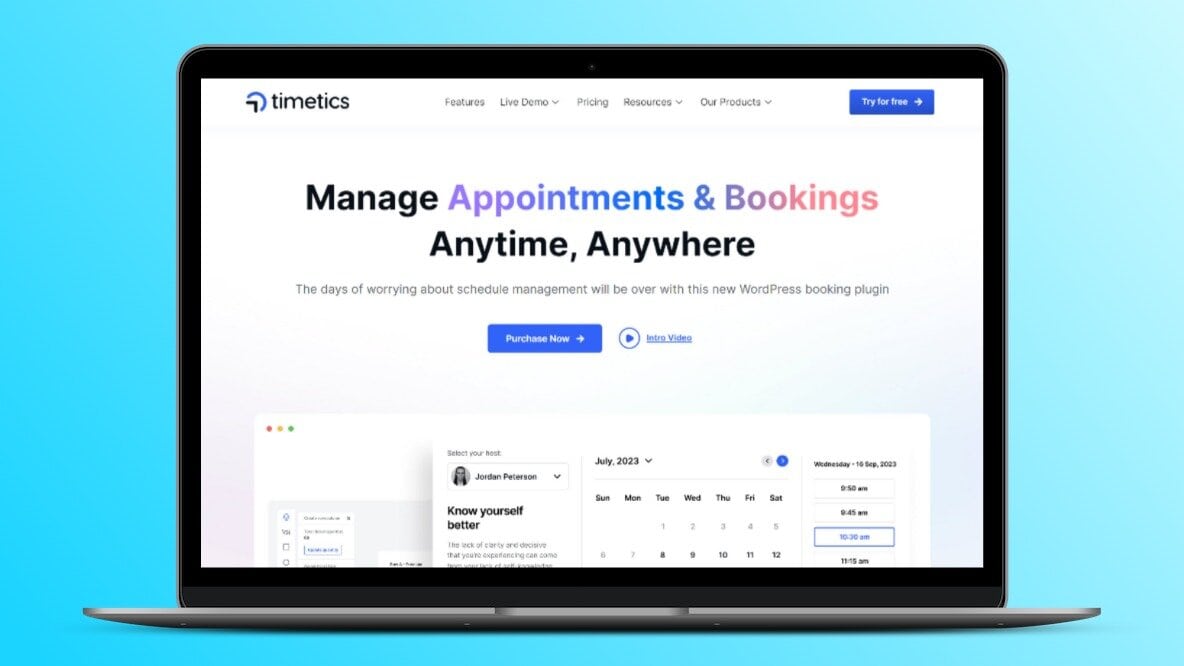
The WP Timetics dashboard showing its clean scheduling interface and calendar sync options.
Credit: lifetimo.com
Pros And Cons Of Wp Timetics
WP Timetics offers a comprehensive solution for scheduling meetings directly from your WordPress site. This plugin simplifies the booking process and automates scheduling, helping educators, marketers, and small businesses manage appointments efficiently. Before deciding if WP Timetics is right for you, consider its advantages and potential drawbacks.
Advantages Of Using Wp Timetics
Automated Booking Process: WP Timetics automates scheduling with over 50 features and 13 integrations, including Zoom and Google Meet.
Versatile Meeting Types: Schedule various meetings like one-on-one consultations or one-to-many workshops.
Team Management: Add multiple team members, set their availability, and assign meetings with ease.
Calendar Integration: Sync appointments across Google, Apple, and Outlook calendars to avoid double-booking.
Custom Seating Plans: Design seating plans for conferences or classes with a drag-and-drop interface.
GDPR Compliance: Ensures user data protection and privacy.
Potential Drawbacks To Consider
Complex Features: The extensive features might overwhelm users unfamiliar with advanced scheduling tools.
Learning Curve: New users might require time to learn and adapt to the plugin's functionalities.
Integration Limitations: While it integrates with major platforms, some niche tools might not be supported.
WP Timetics is designed to streamline scheduling and enhance productivity. Evaluate these pros and cons to determine if it fits your business needs.
Ideal Users And Scenarios For Wp Timetics
WP Timetics is an AI-powered scheduling plugin for WordPress. It is designed to streamline booking meetings and appointments directly from your website. This tool is perfect for anyone who needs to manage multiple meeting types and synchronize calendars effortlessly.
Read More: Tidycal Lifetime Deal Review: Unbeatable Scheduling Solution
Who Benefits Most From Wp Timetics?
WP Timetics is ideal for educators , marketers , and small businesses . Educators can schedule one-on-one tutoring sessions or group classes efficiently. Marketers can organize webinars, workshops, and client meetings with ease. Small businesses can streamline their appointment scheduling process, reducing administrative tasks and boosting productivity.
Educators: Schedule classes and manage student bookings.
Marketers: Coordinate promotional events and client meetings.
Small Businesses: Handle customer appointments and team meetings.
Scenarios Where Wp Timetics Shines
WP Timetics shines in scenarios where seamless integration and automation are crucial. It syncs with Google Calendar , PayPal , WooCommerce , and Zoom , making it highly versatile.
Scenario Features
Online Courses Book one-to-many meetings, create custom seating plans.
Customer Support Schedule consultations, synchronize team calendars.
Team Management Manage team availability, auto-detect time zones.
In addition, WP Timetics reduces the risk of double-booking with automatic calendar synchronization. It allows users to manage appointments with daily, weekly, or monthly views, and lets attendees choose their preferred seats for events, ensuring a smooth booking process.
Use Case: A Coaching Business
Consider a life coach running a WordPress site. They offer 30-minute discovery calls, 60-minute coaching sessions, and monthly group workshops. With WP Timetics, the coach can embed a booking page directly on their site, set different durations for each service, and let clients self-schedule based on real-time availability shown in the plugin's weekly view. The coach can also assign team members to handle follow-up calls using the plugin's round-robin assignment feature. This eliminates the need for a separate virtual assistant to manage the calendar.
How To Set Up WP Timetics On Your WordPress Site
Getting started with WP Timetics is straightforward, even if you're not particularly technical. Follow these step-by-step instructions to begin accepting bookings within minutes.
Step 1: Install And Activate The Plugin
After purchasing the WP Timetics lifetime deal and downloading the plugin file, log into your WordPress dashboard. Navigate to Plugins → Add New → Upload Plugin, select the downloaded ZIP file, and click Install Now. Once installed, click Activate.
Step 2: Configure General Settings
Go to the new Timetics menu in your WordPress admin sidebar. Under Settings, configure your default time zone, working hours, and buffer times. WP Timetics automatically detects time zones for visitors, so you can leave that setting enabled for client convenience.
Step 3: Set Up Calendar Integrations
Under the Integrations tab, connect your Google Calendar, Outlook, or Apple Calendar. Click the "Connect" button for each service and authorize the connection. Once linked, all bookings created through WP Timetics will automatically appear on your external calendar, and existing events (such as personal appointments) will be respected as busy slots.
Step 4: Create Your First Meeting Type
Navigate to Meeting Types and click Add New. Choose between one-on-one, one-to-many, or round-robin meeting types. Set the duration, pricing (if using WooCommerce integration), and availability window. You can also toggle whether clients need to confirm via email or if booking is instantly confirmed.
Step 5: Embed The Booking Form
WP Timetics provides a shortcode that you can place on any page or post. Copy the shortcode from the plugin dashboard and paste it into a WordPress page editor. Alternatively, use the dedicated block editor element if your site runs on a modern WordPress version. The front-end booking form will display available slots based on your configured settings.
Step 6: Test The Booking Flow
Before going live, schedule a test booking from a separate browser or incognito window. Confirm that the appointment appears on both your WordPress dashboard and your synced external calendar. Check that the confirmation email arrives with the correct time, date, and meeting link (if you integrated Zoom or Google Meet).
Frequently Asked Questions
What Is Wp Timetics Lifetime Deal?
Wp Timetics Lifetime Deal offers users lifetime access to advanced scheduling tools. It allows seamless integration with WordPress websites. Users can manage appointments and bookings efficiently. This deal is cost-effective, eliminating recurring subscription fees. Ideal for small businesses and freelancers looking for long-term solutions.
How Does Wp Timetics Integrate With WordPress?
Wp Timetics integrates effortlessly with WordPress. It provides a plugin that users can install easily. The integration ensures smooth operation of scheduling features. It maintains the website's functionality without disrupting existing setups. This makes it convenient for users to manage bookings directly from their WordPress dashboard.
Can Wp Timetics Handle Multiple Bookings?
Yes, Wp Timetics can manage multiple bookings efficiently. It supports simultaneous appointment scheduling for various services. Users can customize booking slots to avoid overlaps. The tool is designed to handle high traffic seamlessly. This feature benefits businesses with diverse service offerings.
Is Customer Support Included In The Deal?
Wp Timetics Lifetime Deal includes customer support. Users receive assistance for technical issues and setup queries. Support ensures smooth operation of the scheduling tool. It helps users maximize the benefits of the deal. This enhances user experience and satisfaction.
Does WP Timetics Support WooCommerce Payments?
Yes, WP Timetics integrates directly with WooCommerce, allowing you to accept payments at the time of booking. This is particularly useful for paid consultations, course registrations, or deposit-based services. You can set different prices for different meeting types and even offer promotional discounts through WooCommerce coupon codes.
Can I Use WP Timetics With Multiple Team Members?
Absolutely. WP Timetics supports unlimited team members under the lifetime deal. Each team member can set their own availability, receive separate notifications, and manage their individual booking queue. Managers can assign specific meeting types to specific team members, ensuring that client requests are routed to the right person automatically.
How Secure Is My Data With WP Timetics?
WP Timetics is built with GDPR compliance in mind. All booking data is stored locally on your WordPress database, not on a third-party server. The plugin encrypts data transmission using standard SSL protocols and follows WordPress security best practices. If you're running a site that handles sensitive client information, you can find similar security considerations covered in our Seturon Lifetime Deal review.
Conclusion
WP Timetics transforms scheduling on your WordPress site seamlessly. It simplifies booking, manages team calendars, and syncs across platforms. No more scheduling chaos. It's perfect for educators, marketers, and small businesses. Get lifetime access now and streamline your booking process. Click here to explore WP Timetics on AppSumo. Enhance your scheduling experience today!

Similar Posts