Best Seo Tools for YouTube to Boost Rankings and Grow Your Channel Fast
Lead SaaS Analyst & Software Developer at PCSaaS · Software Developer (GitHub @Ratankarmakar) · Google Ads & Analytics Certified · 500+ SaaS Tools Tested · 8+ years in software engineering, B2B SaaS evaluation, AppSumo deal auditing, and performance marketing
Discover the top Seo Tools for YouTube to rank higher, find keywords, analyze competitors, and grow your channel faster with smarter optimization.
The right SEO tools for YouTube can make all the difference in getting your content noticed, ranked higher, and watched by the right audience. Whether you're struggling to find the best keywords, optimize your titles and tags, or analyze your competition, these tools give you a clear advantage. For more on this, see our guide on affordable seo tools.
You'll discover the top SEO tools designed specifically for YouTube creators like you—tools that simplify your work and help your channel grow faster than ever. Ready to unlock your channel's full potential? Start implementing these strategies today and watch your video performance transform. Keep reading to find out which tools can transform your YouTube strategy now.
Top Youtube Seo Tools
Choosing the right SEO tools for YouTube can boost your channel's visibility. These tools help with keyword research, competitor analysis, and content optimization. Using them can improve your video rankings and attract more viewers. For more on this, see our guide on saas seo tools.
Here are some of the top YouTube SEO tools that many creators trust.
Tubebuddy Features
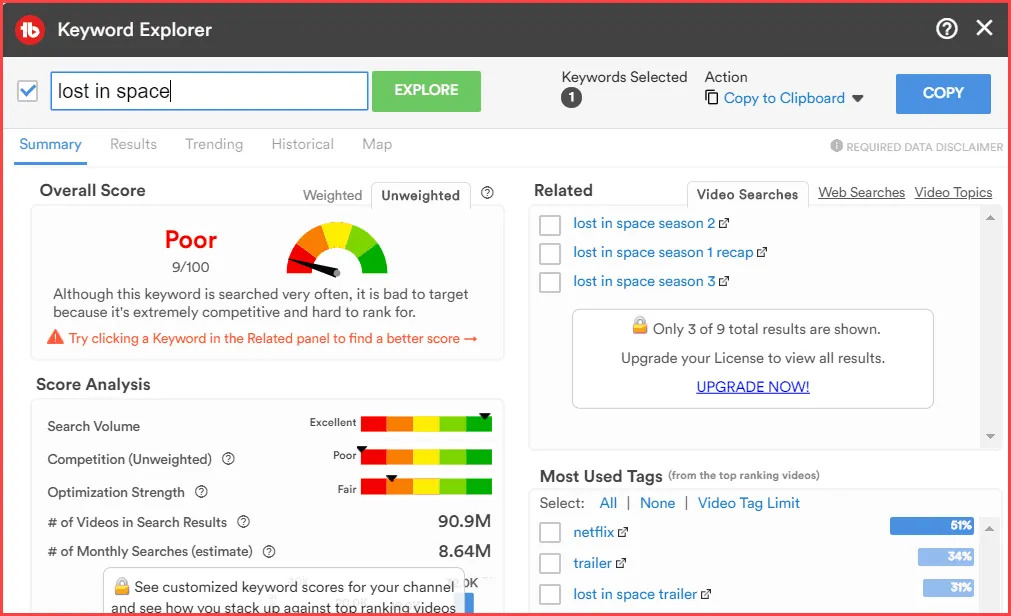
TubeBuddy is a browser extension that works inside YouTube. It helps with keyword research and tag optimization. You can test thumbnails and titles with A/B testing. It also allows bulk editing of video metadata. This saves time and improves video SEO.
In practice, creators who publish multiple videos weekly find TubeBuddy's batch processing invaluable—you can update dozens of descriptions or end screens in one go rather than editing each video individually. A common mistake is ignoring TubeBuddy's "SEO Studio" feature, which scores your title, description, and tags against best practices before you publish. For more on this, see our guide on best seo report tools.
Vidiq Benefits
VidIQ offers data on keywords and competitor performance. It helps analyze video engagement and search rankings. Creators use it to find the best tags and optimize their content. VidIQ provides real-time insights to boost channel growth.
Beyond basic keyword data, VidIQ's "Trending Alert" feature notifies you when a topic in your niche is gaining traction—letting you film and publish before the competition saturates the space. Many successful creators check VidIQ's "Channel Audit" weekly to spot underperforming videos that could be revived with updated titles or thumbnails. For more on this, see our guide on ai seo tools for small business.
Google Trends Insights
Google Trends shows the popularity of search terms over time. You can find trending topics on YouTube easily. This tool helps creators align content with audience interests. It reveals what viewers want to watch right now.
For more precise targeting, use Google Trends' "YouTube Search" filter instead of the default web search—the data shifts noticeably between platforms. You can also compare up to five keywords to see which has sustained interest versus a one-time spike, helping you choose evergreen topics over viral fads.
Ahrefs Keyword Explorer
Ahrefs Keyword Explorer is a powerful tool for keyword research. It finds relevant keywords to increase video discoverability. The tool provides search volume and competition data. This helps choose the best keywords for your videos.
Morningfa.me Strategy
Morningfa.me focuses on channel analysis and strategy. It offers detailed insights into channel performance. Creators get data to improve content and grow their audience. The tool supports business-focused YouTube channels with metrics and advice.
TubeBuddy's keyword explorer interface displaying search volume and competition scores for video optimization
Credit: opencontabilidade.com
Browser Extensions And Platforms
Browser extensions and platforms simplify YouTube SEO tasks directly within your browser. These tools offer features to improve video visibility and channel growth. They save time by integrating keyword research, tag optimization, and competitor analysis. Using them helps creators make data-driven decisions quickly. Let's explore key functions these tools provide.
Keyword Research And Tag Optimization
Keyword research tools find popular and relevant search terms for your videos. They suggest keywords that attract more viewers. Tag optimization improves video metadata, helping YouTube understand your content. Browser extensions like TubeBuddy and VidIQ show keyword scores and tag suggestions. Adding effective tags boosts your video's chances of appearing in search results.
When researching keywords, prioritize phrases with high "search volume" but moderate "competition scores"—these are the sweet spots where your video can realistically rank. TubeBuddy's "Tag Explorer" also groups related tags so you cover semantic variations without repeating exact phrases, which YouTube's algorithm recognizes as keyword stuffing.
A/b Testing For Thumbnails And Titles
A/B testing tools let you compare different thumbnails and titles to see which performs better. This process helps increase click-through rates and viewer engagement. TubeBuddy offers easy A/B testing features within YouTube's interface. Testing multiple versions lets you choose the most appealing thumbnail or title for your audience.
Run each A/B test for at least 48 hours to gather statistically significant data—shorter tests can mislead you due to day-of-week viewing patterns. A practical workflow is to test three thumbnail variants simultaneously and let the winning version automatically apply after the test concludes.
Competitor Analysis Tools
Competitor analysis tools reveal how other creators succeed on YouTube. They provide insights into popular keywords, tags, and video strategies used by competitors. VidIQ and TubeBuddy analyze competitor videos and channels for trends. Understanding competitors helps you refine your content and SEO tactics. This knowledge improves your chances of outranking similar videos.
Beyond surface-level keywords, examine competitors' "top-performing videos by engagement rate" rather than by raw views—a video with 10,000 views and 500 comments is often more instructive than one with 100,000 views and 200 comments. Also note the publishing frequency patterns; some niches reward daily uploads while others perform better with weekly deep-dives.
Keyword And Trend Analysis
Keyword and trend analysis plays a crucial role in optimizing YouTube videos. It helps creators understand what topics and search terms attract viewers. Knowing popular keywords increases the chances of videos appearing in search results. Trend analysis reveals shifts in audience interest, guiding timely content creation.
Using the right tools, creators can find keywords that match their niche. These insights support making videos that people actively search for. Combining keyword research with trend tracking enhances visibility and engagement on YouTube.
Discovering Popular Search Terms
Popular search terms show what audiences type into YouTube. These keywords often relate to current interests or common questions. Tools like TubeBuddy and VidIQ reveal high-traffic keywords relevant to your channel.
Finding popular terms helps tailor video titles, descriptions, and tags. This increases the chance of appearing in suggested videos and search results. Consistently using trending keywords can build steady viewer growth.
Using Google Trends For Content Ideas
Google Trends tracks the popularity of search queries over time. It shows rising topics and seasonal interest changes. Creators can spot trending subjects before they peak.
Google Trends compares multiple keywords to find the best option. It also highlights related queries that can inspire new video topics. Using this data helps maintain content relevance and freshness.
Keyword Keg Suggestions
Keyword Keg offers keyword suggestions based on real search data. It provides search volume, competition, and cost-per-click metrics. These details help pick effective keywords for YouTube videos.
Using Keyword Keg, creators discover long-tail keywords with less competition. These phrases can attract niche audiences and improve ranking chances. The tool supports better targeting of video content to viewer interests.
Combining Multiple Keyword Sources For Maximum Impact
Relying on a single keyword tool can give you an incomplete picture. Cross-reference suggestions from TubeBuddy, VidIQ, and Google Trends to identify terms that appear across multiple datasets—these are your highest-confidence keywords. For example, if a phrase shows rising interest on Google Trends and has moderate competition in TubeBuddy, it's worth prioritizing even if the search volume seems modest initially. This triangulation approach reduces the risk of targeting keywords that only one tool's algorithm favors.
Advanced Channel Analytics
Advanced channel analytics help YouTube creators understand their audience and content performance deeply. These insights reveal what works and what needs improvement. Knowing this data guides smarter decisions for growth and engagement.
Tracking the right metrics shows how your channel progresses. Using specialized SEO tools simplifies managing these analytics and applying effective strategies.
Performance Metrics To Track
Watch time reveals how long viewers stay on your videos. Higher watch time means better engagement and ranking potential. Audience retention shows where viewers drop off, helping improve content. Click-through rate measures how many viewers click your video from thumbnails or titles. Impressions show how often your videos appear in search or recommendations. Subscriber growth tracks how many new followers you gain over time. Engagement includes likes, comments, and shares, indicating viewer interaction.
Using Semrush For Seo Management
Semrush offers powerful tools to manage YouTube SEO. It helps find keywords that your audience searches for. You can analyze competitors to see what works for them. Semrush tracks your rankings on YouTube search results. It also provides ideas for video topics based on trends. Use it to optimize titles, descriptions, and tags for better visibility. The tool makes managing SEO tasks easier and more organized.
Growth Strategies With Morningfa.me
Morningfa.me focuses on business growth through detailed channel analysis. It provides insights on revenue, audience demographics, and content performance. Use it to identify which videos bring the most value. The platform helps plan content that aligns with viewer interests. It tracks trends and competitor data for smarter strategies. Morningfa.me supports creators who want to grow sustainably and profitably.
Setting Up A Weekly Analytics Review Routine
A common mistake is checking analytics sporadically without a consistent review cadence. Set aside 30 minutes each Monday to review the previous week's data: compare your top three and bottom three videos by retention rate, note any unusual traffic source changes, and export your keyword rankings before they shift. Documenting these weekly snapshots creates a historical baseline that reveals long-term patterns—something daily checking often misses because of short-term noise.
Youtube Native Tools
YouTube offers several built-in tools that help creators improve their video SEO and channel growth. These native tools provide valuable data and suggestions directly from the platform. They are free to use and easy to access. Using these tools effectively can improve video visibility and audience engagement.
Leveraging Youtube Analytics
YouTube Analytics shows detailed reports about your videos and audience. It tracks views, watch time, and traffic sources. You can see which videos perform best and where viewers come from. This data helps tailor your content to your audience's interests. It also reveals when viewers stop watching, so you can improve your videos. Regularly checking analytics guides smarter content decisions and SEO strategies.
Utilizing Youtube Autosuggest
YouTube Autosuggest shows keyword ideas as you type in the search bar. These suggestions are based on popular and recent searches by users. They help find relevant keywords to use in titles, descriptions, and tags. Using these keywords can increase your video's chances of appearing in search results. Autosuggest is a quick way to discover trending topics and phrases in your niche. It supports better keyword targeting without extra tools.
Using Youtube Studio's "Video Reach" Report
Within YouTube Studio, the "Reach" tab under Analytics shows exactly how viewers found your video—whether through YouTube search, suggested videos, browse features, or external sites. Pay special attention to the "YouTube Search" section: it lists the exact search terms viewers used to find your video. Cross-reference these terms with your intended keywords to see if YouTube's algorithm understood your content correctly. If viewers are finding you through unexpected queries, consider adjusting your tags and description to reinforce your actual topic.
Free Vs Paid Seo Tools
Choosing between free and paid SEO tools for YouTube depends on your needs and budget. Free tools offer basic features that help beginners understand SEO. Paid tools provide more detailed data and advanced options. Both types can improve your video rankings but in different ways.
Limitations Of Free Tools
Free SEO tools often have limited keyword data and fewer analytics. They may restrict daily searches or the number of videos you can analyze. Some features like competitor tracking or A/B testing are missing. These limits can slow your channel growth if you want to scale. Free tools work best for small channels or testing ideas.
Benefits Of Premium Features
Paid SEO tools unlock full keyword databases and detailed competition analysis. They offer in-depth video optimization tips and trend alerts. Features like bulk processing and advanced A/B testing save time. You get access to real-time data and personalized support. Premium tools help creators make smarter decisions and grow faster.
When To Upgrade From Free To Paid
Consider upgrading once you publish four or more videos per month and your channel has at least 500 subscribers. At that scale, the time saved by batch processing and the competitive edge from deeper keyword data typically justifies the monthly investment. Many paid tools offer tiered pricing—start with the lowest paid plan and upgrade only when you consistently hit the limits of the cheaper tier.
Boosting Channel Growth Quickly
Growing a YouTube channel fast needs smart strategies and the right tools. SEO tools help you reach more viewers and gain subscribers quickly. They guide you in making your videos easier to find and more engaging. Using these tools saves time and improves your content's success.
Optimizing Video Titles And Tags
Good titles catch attention and include key words viewers search for. SEO tools suggest popular and relevant keywords to add. Tags help YouTube understand your video's topic and connect it to similar videos. Using the right tags increases your video's chances of appearing in search results and recommendations.
Improving Viewer Engagement
Viewer interaction boosts your video's rank on YouTube. Tools track likes, comments, and watch time to show how engaged your audience is. They also offer tips to improve these metrics. Creating content that keeps viewers watching longer and encourages comments helps grow your channel faster.
Tracking Competitor Performance
Watching what top channels do helps you learn and improve. SEO tools analyze competitors' keywords, tags, and video performance. This data reveals gaps and opportunities for your content. Following trends and adapting strategies based on competitor insights speeds up your channel growth.
 VidIQ's keyword score interface showing suggested tags and search volume estimates for video optimization
Credit: contentmarketinginstitute.com
Credit: newterritory.media
Read More: Best Local Seo Tools: Ultimate Guide to Boost Your Rankings
Comparison Table: Top YouTube SEO Tools At A Glance
| Tool | Best For | Key Feature | Pricing Model | Free Tier |
|---|---|---|---|---|
| TubeBuddy | All-around optimization | A/B testing, batch editing | Free / Paid plans from $7.20/month | Yes (limited) |
| VidIQ | Keyword & competitor analysis | Trending alerts, channel audit | Free / Paid plans from $7.50/month | Yes (limited) |
| Google Trends | Trend discovery | Real-time search interest data | Free | Full access |
| Ahrefs Keyword Explorer | Deep keyword research | Search volume & competition data | Paid only from $99/month | Limited trial |
| Morningfa.me | Business channel strategy | Revenue and demographic insights | Paid plans | Limited trial |
| Semrush | Comprehensive SEO management | Cross-platform keyword tracking | Paid only from $119.95/month | Limited trial |
Frequently Asked Questions
Which Tool Is Best For Youtube Seo?
TubeBuddy and VidIQ are the best YouTube SEO tools, offering keyword research, tag optimization, A/B testing, and competitor analysis. Google Trends and Ahrefs Keywords Explorer also help identify trending topics and effective keywords. Use YouTube Analytics for native performance insights.
How Do I Seo My Youtube Video?
Optimize your YouTube video by researching keywords with tools like TubeBuddy or VidIQ. Use relevant titles, descriptions, and tags. Create engaging thumbnails and monitor performance with YouTube Analytics. Align content with trending topics using Google Trends to boost visibility and rankings.
Are Free Youtube Seo Tools Effective?
Free YouTube SEO tools offer useful features like keyword research and competitor analysis. They help improve video visibility but may lack advanced options. Combining free tools with paid ones often yields better results for optimizing your channel effectively.
Can Yt Seo Tools Improve Views?
Yes, YouTube SEO tools can improve views by optimizing keywords, tags, and content for better search rankings. They reveal trending topics and analyze competitors, helping creators tailor videos to audience interests. Using these tools boosts video discoverability and engagement, driving more organic traffic to your channel.
How Often Should I Re-optimize Old Videos?
Revisit your older videos every three to six months. Search trends shift, and keywords that ranked well a year ago may have dropped in relevance. Use TubeBuddy or VidIQ to scan your back catalog for videos with declining impressions but decent watch time—these are prime candidates for title and tag updates. A single re-optimized video can regain lost traffic within two weeks.
Do Youtube Tags Still Matter In 2026?
Yes, though their role has evolved. YouTube's algorithm now relies more on video content analysis (speech recognition, visual cues) and description text than on tags alone. However, tags still help YouTube categorize your video quickly, especially during the first hours after upload when the algorithm is still learning your content. Prioritize 5–10 highly relevant tags over 20 generic ones.
Conclusion
Using the right SEO tools can boost your YouTube channel's success. Choose tools that fit your needs and goals. Focus on keyword research, trend analysis, and competitor insights. Regularly check your video performance to improve results. Simple steps lead to better visibility and more viewers.
Start small, learn, and grow your channel steadily. Consistency and smart use of SEO tools make a difference. Keep exploring new tools to stay ahead in YouTube SEO.

Similar Posts