Syncmonster Lifetime Deal Review – Automate Your Syncs Like a Pro
Founder & Lead SaaS Analyst at PCSaaS · Google Ads & Analytics Certified · SaaS Stack Architect · 500+ Software Tools Tested · 8+ years in B2B SaaS evaluation, AppSumo lifetime deal curation, performance marketing, and AI workflow automation
Read this Syncmonster Lifetime Deal Review to discover how to automate and manage your data easily! Are you tired of spending countless hours and dollars trying to translate and lip-sync your videos perfectly? SyncMonster could be the game-changer you've been searching for.
Imagine being able to instantly translate your content into over 35 languages with flawless lip-syncing, giving your videos a natural and authentic feel. Whether you're a content creator, marketer, or educator, SyncMonster offers a powerful solution to break through language barriers and reach global audiences effortlessly. With cutting-edge AI technology, voice cloning, and intuitive editing features, you can preserve your unique tone and style without the hassle of manual edits or reshoots. Are you ready to elevate your video content and make an emotional impact worldwide? Discover the incredible features and benefits of SyncMonster in this comprehensive review, and learn how you can grab this revolutionary tool at its lowest price. Don't miss out on transforming your video production—click here to explore the SyncMonster Lifetime Deal and unleash your content's full potential!

The main workspace allows you to upload a video, select a target language, and preview the lip-synced result.
Credit: www.youtube.com
Introduction To Syncmonster
In the world of video production and content creation, overcoming language barriers is a significant challenge. SyncMonster emerges as a remarkable solution, offering a blend of translation and lip-sync technology. This powerful tool is designed to ensure your videos reach a global audience without losing their authenticity or impact. Let's explore what makes SyncMonster a unique asset for content creators.
What Is Syncmonster?
SyncMonster is an innovative AI-powered tool that translates and lip-syncs videos into over 35 languages. It enables seamless synchronization of lip and jaw movements with dubbed audio, creating natural and authentic visuals. Whether you are a marketer, educator, or filmmaker, SyncMonster helps you craft professional multilingual content with ease.
Since its launch, SyncMonster has expanded its language support and refined its AI models. As of early 2026, it remains a top choice for creators seeking affordable multilingual video production, with regular updates that improve accuracy for tonal languages and complex dialogue.
Purpose And Use Cases
The primary purpose of SyncMonster is to break language barriers and extend the reach of your content. With its advanced features, it serves a variety of use cases:
Content Creators: Enhance video blogs and tutorials with multilingual support.
Marketers: Expand ad campaigns to a global audience without losing the original tone.
Educators: Translate educational content for students worldwide, keeping the learning experience intact.
SyncMonster offers a Blitz Interface for quick edits and a Pro Interface for detailed frame-by-frame editing. This flexibility makes it suitable for both novice users and advanced post-production professionals.
Feature Benefits
Multilingual Translation Reach audiences in 35+ languages.
AI Lip Syncing Ensure flawless and natural lip movements.
Voice Cloning Preserve unique voice tone across languages.
Whether you're aiming for speed with the Blitz feature or precision with the Pro interface, SyncMonster adapts to your needs, offering a comprehensive solution for multilingual video content.
🔥 Limited Spots Left – Grab Your Lifetime Deal Before It’s Gone Forever!

License tiers range from $59 to $289, with higher credits and 4K resolution at the top tier.
Credit: lifetimedealhub.net
Key Features Of Syncmonster
SyncMonster offers a cutting-edge solution for video translation and lip-syncing. This AI-powered tool ensures seamless synchronization of audio with lip and jaw movements. With the ability to translate videos into over 35 languages, it provides authentic and natural visuals. The platform is ideal for content creators, marketers, and educators looking to reach global audiences with ease.
Seamless Data Synchronization
SyncMonster excels in seamless data synchronization . Users can instantly translate content into multiple languages. This feature ensures that your videos maintain their original tone and style across different markets. The AI handles synchronization, preserving the emotional impact of the content.
Instant translation into 35+ languages.
Flawless synchronization of lip and jaw movements.
Authentic visuals without uncanny valley effects.
Behind the scenes, SyncMonster uses deep learning models trained on thousands of hours of multilingual footage. This allows it to match phoneme shapes across languages—a task that manual editors would find painstaking. For best results, ensure your source video has clear frontal face shots and good lighting.
Multi-platform Integration
The tool's multi-platform integration capabilities are impressive. SyncMonster is compatible with Amazon S3, GitHub, Google Analytics, and Google Search Console. This flexibility allows users to streamline their workflow and enhance productivity.
Integration Platforms Benefits
Amazon S3 Secure data storage and management.
GitHub Efficient version control and collaboration.
Google Analytics Insightful data analysis and tracking.
Google Search Console Improved search visibility and performance.
Beyond these integrations, SyncMonster also supports direct export to popular social platforms, though you'll need to handle the final upload manually. In practice, the GitHub integration is particularly useful for teams that version-control their video project assets alongside code.
Real-time Updates
SyncMonster provides real-time updates for quick content creation. The Blitz Interface allows fast editing, making it perfect for marketers and influencers. Users can preview and fine-tune their videos in real-time, ensuring consistent quality.
Upload video and select language.
Choose voice and let AI handle translation.
Use real-time preview for adjustments.
The Pro Interface offers advanced editing for those needing precise control. Users can tweak sync intensity and adjust facial movements for pixel-perfect edits.
💰 Pay Once, Use Forever – Save Thousands with This Exclusive LTD!
Pricing And Affordability
SyncMonster provides a cost-effective solution for video translation and lip-syncing. This AI-powered tool offers various pricing tiers to accommodate different needs and budgets. Let's explore the pricing and affordability of SyncMonster through a detailed review.
Understanding The Lifetime Deal
The SyncMonster Lifetime Deal offers three license tiers, each designed to meet specific user requirements. Here's a quick breakdown:
License Tier Price Credits Per Year Resolution
License Tier 1 $59 (normally $120) 1,800 credits 1080p
License Tier 2 $139 (normally $504) 7,400 credits 1080p
License Tier 3 $289 (normally $1,956) 18,000 credits 4K
Each plan includes 1-year access and support. Users can upgrade or downgrade within 60 days. This flexibility allows you to choose a plan that best fits your needs.
Comparing Costs With Competitors
When comparing SyncMonster with other translation and lip-syncing tools, it stands out in affordability. The annual savings are significant compared to monthly subscription models available on other platforms.
Competitors often charge high fees for similar features.
SyncMonster's pricing is competitive, providing more value for money.
The lifetime deal eliminates the need for recurring payments.
When evaluating total cost, consider that many competitors charge per-minute fees that can exceed $10 for professional results. SyncMonster's credit system works out to roughly $0.03–$0.05 per minute on the Tier 3 plan, making it a clear winner for high-volume users. The 60-day guarantee lets you test the platform before committing fully. If you're evaluating multiple tools, you might also find value in our roundup of the best file-sharing services for storing and distributing your final videos.
With a 60-day money-back guarantee , SyncMonster provides a risk-free opportunity to test its features. Users can activate their license within 60 days and renew at the purchased price after the term ends, ensuring cost-effectiveness in the long run.
Pros And Cons Of Syncmonster
Choosing the right tool for video translation and lip-syncing is crucial. SyncMonster offers a powerful AI-driven solution. It promises seamless multilingual translation and flawless lip synchronization. Understanding its pros and cons can help decide if SyncMonster meets your needs.
Advantages Of Using Syncmonster
Multilingual Translation: Instantly translates video content into over 35 languages.
AI Lip Syncing: Ensures natural synchronization of lip and jaw movements.
Voice Cloning: Combines translation with voice cloning for authentic videos.
Blitz Interface: Enables quick content creation and editing for rapid results.
Pro Interface: Offers advanced editing capabilities for precision.
Integrations: Compatible with Amazon S3, GitHub, and Google Analytics.
Global Reach: Allows creators to reach audiences worldwide.
Time Savings: Reduces manual editing and reshoot needs.
Potential Drawbacks And Limitations
Annual Plans: SyncMonster focuses on yearly subscriptions, not monthly options.
Initial Setup: New users must create accounts, excluding existing ones.
Credit Usage: Plans limit credits per year, affecting frequent users.
Resolution Limits: Only License Tier 3 offers 4K resolution.
Advanced Features: Pro interface designed for experienced users.
Pricing: Higher tiers may be costly for some users.
One trade-off worth noting: the Blitz interface prioritises speed over precision, so for videos with complex dialogue or multiple speakers, you may need to switch to the Pro interface to correct timing errors. Additionally, the voice cloning feature works best when your original audio is clean and free of background noise. Investing in a good microphone setup will improve output quality.
SyncMonster offers a 60-day money-back guarantee. Users can try the product risk-free. Understanding these aspects can guide your decision-making process.
How to Get Started with SyncMonster
Getting up and running with SyncMonster takes only a few minutes. Here's a step-by-step workflow to turn your first video into multilingual content.
- Sign up and activate your license – Create an account on the SyncMonster platform and enter the license code you received with your lifetime deal purchase.
- Upload your source video – SyncMonster supports MP4, MOV, and AVI files. For best results, use footage with good lighting and a clear view of the speaker's face.
- Select the target language and voice – Choose from over 35 languages and pick a voice profile. You can also clone your own voice if you have a clean audio sample.
- Let the AI process – The translation and lip-sync take roughly one minute for every minute of video, depending on file size and server load.
- Preview and fine-tune – Use the Blitz interface for quick checks or switch to Pro mode for frame-by-frame adjustments of jaw movements and sync timing.
- Export your video – Download the finished file in the resolution your license supports (up to 4K for Tier 3).
Keeping your production pipeline streamlined is key. Consider pairing SyncMonster with other tools that help you stay productive throughout the entire content creation process.
Tips for Best Results
To get the most out of SyncMonster, follow these practical recommendations:
- Lighting matters – Well-lit, front-facing shots allow the AI to track lip movements accurately. Avoid backlighting or shadows across the speaker's face.
- Keep dialogue concise – Fast speech or overlapping dialogue can confuse the lip-sync model. Record with clear pauses and moderate pace.
- Review the translated script – Automatic translation may miss cultural nuances. Have a native speaker proofread the generated subtitles before final export.
- Prepare a voice sample – For voice cloning, record 30–60 seconds of clear, quiet speech. Using a high-quality external microphone improves clone fidelity.
- Test with short clips – Run a 30-second segment first to verify sync quality before processing a longer video.
If your project also needs background music or sound effects, you can source royalty-free audio from a trusted audio library to complement your dubbed video.
SyncMonster vs Traditional Dubbing Services
Choosing between an AI-powered tool like SyncMonster and a human dubbing service depends on your budget, timeline, and quality expectations. The table below highlights the key differences.
| Feature | SyncMonster | Traditional Dubbing |
|---|---|---|
| Cost | One-time payment (LTD) | Per-minute fees ($10–$50) |
| Turnaround | Hours to days | Days to weeks |
| Language Support | 35+ languages | Typically limited to major languages |
| Lip-Sync Accuracy | AI-driven, good for most content | Manual, highest accuracy but expensive |
| Control | Blitz (fast) & Pro (detailed) | Only via director feedback |
| Licensing | Lifetime deal, no recurring | Pay per project |
While traditional dubbing offers the highest accuracy for cinematic releases, SyncMonster's AI has improved significantly since its launch. For social media, educational content, and marketing videos, the trade-off in quality is often negligible compared to the cost and time savings. If you're exploring other lifetime deal options that complement video production, consider tools that automate your distribution and analytics.
Technical Requirements and Compatibility
Before diving in, ensure your setup meets these basic requirements:
- Internet connection – All processing happens in the cloud; a stable 50+ Mbps connection is recommended for large uploads.
- Supported input formats – MP4 (H.264), MOV, and AVI. Output maintains the same container.
- Maximum resolution – Up to 4K (Tier 3 only), with 1080p available on all tiers.
- Operating systems – Works via any modern browser on Windows, macOS, or Linux. No desktop app required.
- File size limit – Each video can be up to 2 GB or 60 minutes in length, whichever comes first.
For the latest system updates and compatibility information, visit the official SyncMonster homepage directly.
Ideal Users And Scenarios
SyncMonster is an innovative AI tool designed for seamless video translation and lip-syncing. It translates videos into over 35 languages, ensuring natural synchronization. This section explores who benefits most from SyncMonster and its best use cases.
Who Benefits Most From Syncmonster?
SyncMonster is ideal for a wide range of professionals:
Content Creators: Effortlessly reach global audiences with multilingual content.
Marketers: Promote brands across different languages without losing the original message.
Educators: Share educational videos with students worldwide, breaking language barriers.
Ad Agencies: Produce international ad campaigns with authentic localization.
Tracking the performance of those campaigns across regions becomes easier when you pair SyncMonster with a robust analytics platform for measuring reach and engagement.
Best Use Cases For Maximum Efficiency
SyncMonster shines in various scenarios. Here are the best use cases:
Scenario Benefit
Vlogs and Social Media Enhance engagement by speaking directly to diverse audiences.
Online Courses Deliver lessons in multiple languages to broaden reach.
Advertising Campaigns Create ads that resonate with different cultural groups.
Film and Post-Production Ensure precise lip-syncing for an authentic viewing experience.
For those seeking quick results, the Blitz interface provides rapid editing capabilities. Advanced users benefit from the Pro interface for detailed, frame-by-frame adjustments.
SyncMonster's advanced features and intuitive design make it suitable for anyone aiming to produce high-quality multilingual videos.
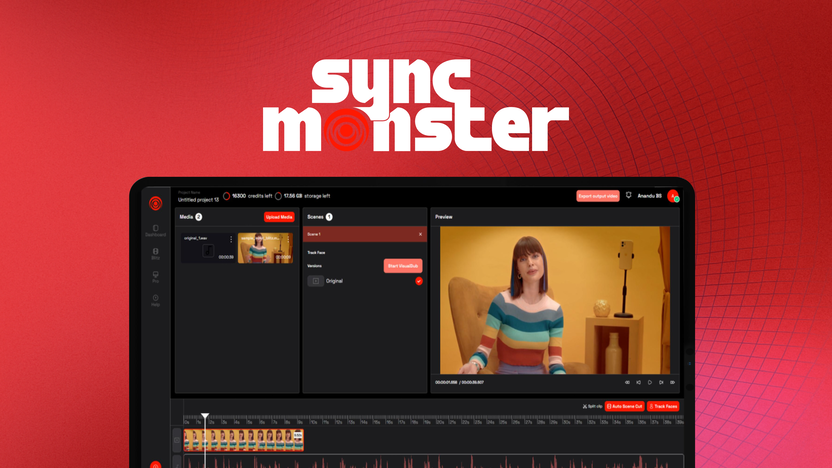
The Pro interface enables frame-by-frame adjustment of sync points for precise control.
Credit: appsumo.com
Final Verdict: Is The Syncmonster Lifetime Deal Worth It?
SyncMonster offers an innovative solution for video translation and lip-syncing. With its powerful AI, it translates and syncs videos in over 35 languages. This tool is perfect for marketers, influencers, and educators. But is the lifetime deal truly valuable? Let's dive deeper into the evaluation.
Evaluating Value For Money
The SyncMonster Lifetime Deal comes with various pricing tiers. Each tier offers unique features and credits:
License Tier Price Credits/Year Resolution
Tier 1 $59 (normally $120) 1,800 1080p
Tier 2 $139 (normally $504) 7,400 1080p
Tier 3 $289 (normally $1,956) 18,000 4K
Each license tier offers significant savings on the regular price. The deal includes a 60-day money-back guarantee. This makes it a risk-free investment. Users can upgrade or downgrade their tier within 60 days. This flexibility adds to the overall value.
Recommendations For Potential Buyers
Who should consider SyncMonster? Here are some recommendations for potential buyers:
Content Creators: Perfect for those wanting to reach global audiences. Create multilingual content easily.
Marketers and Educators: Ideal for fast and efficient content creation. Use the Blitz feature for quick turnarounds.
Advanced Users: The Pro interface offers precision editing. Customize every frame for detailed outputs.
SyncMonster is also suitable for those without existing accounts. The lifetime deal provides annual plans at reduced rates. This ensures ongoing improvements and reliable support.
For content creators who also need to repurpose video scripts into written posts, a writing assistant tool can help you turn transcripts into blog articles with minimal effort.
In summary, SyncMonster offers excellent value for various user needs. Its advanced features and flexible pricing make it a worthy investment.
⏳ This Deal Expires Soon – Lock in Lifetime Access Today!
Frequently Asked Questions
What Is Syncmonster's Main Feature?
Syncmonster offers seamless data synchronization across platforms. It ensures data consistency and accuracy in real-time. This tool eliminates manual data entry, saving time and reducing errors. Its user-friendly interface makes integration simple and efficient for businesses of all sizes.
How Does Syncmonster Improve Productivity?
Syncmonster automates data synchronization processes, minimizing manual tasks. By reducing data entry errors, it streamlines workflows. This efficiency boosts productivity, allowing teams to focus on strategic tasks. Syncmonster's real-time updates keep information current and reliable across all platforms.
Is Syncmonster Easy To Use?
Yes, Syncmonster is designed with user-friendliness in mind. Its intuitive interface simplifies data synchronization. Users can easily set up integrations without technical expertise. The platform offers clear instructions, making it accessible for all skill levels.
Does Syncmonster Support Multiple Platforms?
Syncmonster supports a wide range of platforms for synchronization. It integrates seamlessly with popular tools like CRM systems, databases, and cloud applications. This versatility ensures comprehensive data management, providing a unified view across all connected platforms.
Can I use SyncMonster for offline processing?
No, all translation and lip-sync processing is performed in the cloud and requires an active internet connection. You cannot batch-process videos offline.
Is there a limit on video length per upload?
Each upload is capped at 60 minutes or 2 GB. For longer projects, you can split the video into segments and process them individually, then stitch them together with your video editor.
Conclusion
SyncMonster offers a unique solution for multilingual video creation. Its AI-powered features simplify translation and lip-syncing across 35+ languages. Content creators can save time while maintaining authenticity. Affordable pricing tiers make it accessible for different needs. Whether you're a marketer, educator, or influencer, SyncMonster helps you connect with global audiences effortlessly. Explore the lifetime deal for cost-effective access to this powerful tool. Don't miss the chance to enhance your content with precision and ease. Check out the SyncMonster Lifetime Deal today!
https://www.youtube.com/watch?v=97X7XJgeMpIThe embedded video above walks through the full SyncMonster workflow from upload to final export for a sample project.
Common Mistakes to Avoid
Even experienced users can run into quality issues with AI lip-sync tools. Here are the most frequent pitfalls and how to avoid them:
- Poor lighting – The AI needs to track facial landmarks. Avoid backlit shots or heavy shadows across the mouth area. A simple ring light positioned in front of the speaker makes a noticeable difference.
- Background noise in source audio – Voice cloning degrades rapidly when the original track contains echo, fans, or street noise. Record in a quiet room with a close microphone.
- Choosing the wrong interface – Beginners often start with the Pro interface and become overwhelmed. Use Blitz mode for your first few projects, then graduate to Pro once you understand the sync parameters.
- Over-relying on automatic translation – The AI handles general vocabulary well, but idioms, slang, and region-specific terms may translate awkwardly. Always review the generated subtitles before exporting.
- Ignoring credit usage – Processing a single 10-minute video in 4K can consume hundreds of credits. Track your remaining credits in the dashboard to avoid running out mid-project.
How SyncMonster Compares to Other Tools
If you are evaluating multiple AI video translation tools, consider these key differences between SyncMonster and its closest competitors:
| Feature | SyncMonster | Competitor A | Competitor B |
|---|---|---|---|
| Lifetime deal pricing | $59–$289 (one-time) | Monthly subscription ($29–$99/mo) | Pay-per-minute ($5–$15/min) |
| Languages supported | 35+ | 50+ | 20+ |
| Voice cloning | Included (Tier 2+) | Add-on fee | Add-on fee |
| 4K export | Tier 3 only | All plans | All plans |
| Blitz mode (fast) | ✅ | ❌ | ✅ |
| Pro mode (frame-by-frame) | ✅ | ✅ | ❌ |
| 60-day money-back | ✅ | ❌ (7-day only) | ❌ (no refund) |
Final Thoughts on the Lifetime Deal
The SyncMonster lifetime deal represents a rare opportunity in the AI video space. Most competitors require monthly or annual subscriptions that quickly exceed the one-time cost of this tool. For anyone producing multilingual content regularly—whether for YouTube, online courses, or ad campaigns—the ROI is clear within the first few months of use.
The key differentiator is SyncMonster's dual-interface approach. The Blitz mode lets you produce results in minutes when speed matters, while the Pro interface gives you the control needed for professional-grade work. Few tools at any price point offer this flexibility.
If you are still unsure, the 60-day money-back guarantee removes the risk. Process a few short videos in your target languages, test the voice cloning quality, and evaluate the output resolution. If it meets your standards, you have locked in a tool that will serve you for years without recurring fees.
Don't wait until the deal expires—pricing for lifetime access typically increases or disappears once the promotional window closes.

Similar Posts