
TubeOnAI turns a 90-minute podcast, a two-hour webinar, or a 40-page PDF into a week of blogs, threads, and newsletters for a one-time $59 payment. The AppSumo listing carries a 4.13-star average across 47 reviews, and the founding team has come back for a second launch with features early users specifically asked for. If you repurpose long-form source material for a living, that pitch deserves a closer look.
Disclosure: This article contains affiliate links. We may earn a small commission at no extra cost to you when you sign up via our links, it's how this site stays free to run.
TL;DR Verdict
- Who it's for: Bloggers, newsletter writers, course creators, and social media managers who consume more source material than they can write up.
- Headline price: $59 one-time for License Tier 1, against a $108 list price (a 45% launch discount).
- Biggest pro: It ingests YouTube, Instagram, TikTok, PDFs, and articles, then outputs blogs, threads, newsletters, and scripts from one workspace.
- Biggest con: Credit-based limits mean heavy daily use on Tier 1 (3,000 credits/month) will run dry before the month ends.
- Free trial status: No free trial, but AppSumo's 60-day money-back guarantee covers the purchase.
- Bottom line: At $59 lifetime with BYOK support on higher tiers, Get the Lifetime Deal → is a low-risk entry point if repurposing is already part of your workflow.
What Is TubeOnAI?
TubeOnAI is an AI content repurposing platform that converts videos, podcasts, PDFs, and web articles into publish-ready written assets. It sits between your research pile and your publishing calendar, so you stop copying transcripts into a chat window and start working from an organized source library.
The job it solves is specific. You find a great 45-minute interview, a competitor's webinar replay, or a dense research PDF. You know there's a newsletter, three LinkedIn posts, and a blog draft buried inside it.
Manually extracting that is a half-day of work. TubeOnAI pulls the transcript, indexes it, and lets you generate the formats you actually publish.
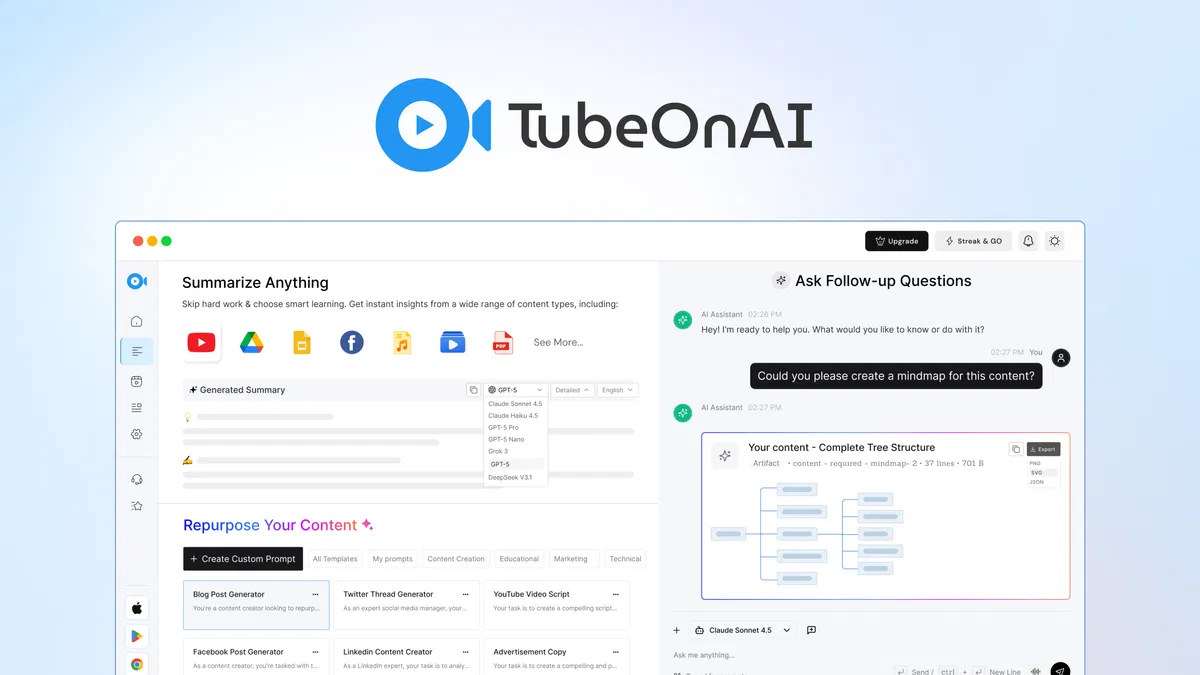
The vendor's own documentation describes four moving parts: auto-capture from creators you subscribe to, a transcription layer covering 40+ languages, a prompt and template engine with 150+ presets, and a knowledge library that groups sources into topic collections. According to the AppSumo listing, the newest version adds a Chrome extension, bulk analysis of entire YouTube playlists, content scheduling, and an infographic generator.
TubeOnAI competes most directly with repurposing and writing tools like Copy.ai, Descript, and Jasper, though its closest structural match is the combination of a transcription tool plus a long-form writing assistant. If you already follow AI writing categories closely, the model-routing approach here is similar to what you'll find in a tool that lets you switch engines mid-task.
Key Features That Matter
Auto-Capture and Channel Subscriptions
You subscribe to a creator's channel and TubeOnAI pulls each new upload automatically, generating a summary without you lifting a finger. Tier 1 allows 3 subscriptions, Tier 2 allows 10, and Tier 3 removes the cap entirely. For anyone monitoring five or six industry voices, this replaces a manual bookmark-and-forget routine.
Knowledge Library Collections
Sources get sorted into topic-based collections rather than sitting in a flat list. You can feed an entire collection into the AI and pull one specific output from it. This matters most when you're building a course or an ebook where 30 sources need to resolve into a single consistent voice.
150+ Templates and Custom Prompts
The template library covers blogs, social threads, newsletters, and video scripts out of the box. Custom prompts let you lock in your own structure, tone rules, and formatting so outputs stay consistent across a batch. That's the difference between a tool you try twice and one you keep in your production loop.
Multi-Model Switching
You choose which underlying AI model handles which task, and you can route different jobs to different engines. Summarizing a transcript and drafting a polished newsletter are different problems, and the platform treats them that way. Teams that already pay for API access will recognize the logic immediately.
BYOK for Unlimited Lifetime Credits
Bring Your Own Key lets you plug in your own model API credentials and generate against your own account balance. The vendor lists this as an unlimited lifetime credit path, which effectively removes the monthly credit ceiling if you're willing to manage your own spend. It's the single most requested feature from the first launch, and it's now live.
Ask AI Agent and Real-Time Voice Chat
The agentic query mode searches your whole source library and can pull from real-time web results alongside it. Real-time voice chat lets you talk through a source instead of typing prompts. For research-heavy workflows, this is faster than re-reading transcripts, and if you're used to voice-first tools, the interaction pattern will feel familiar.
Pricing Tiers (starts $59)
| Tier | Price | Best For | Free trial? |
|---|---|---|---|
| License Tier 1 | $59 one-time (list $108) | Solo bloggers and part-time creators | No, 60-day refund window |
| License Tier 2 | $149 one-time | Full-time creators and small marketing teams | No, 60-day refund window |
| License Tier 3 | $379 one-time | Agencies and high-volume content operations | No, 60-day refund window |
Every tier includes the full feature set: the content editor assistant, custom prompts, transcription, bulk video summary, 25+ source analysis, repurposing, webhooks, and the Ask AI agent. What changes is volume. Tier 1 gives you 3,000 credits per month and 3 channel subscriptions.
Tier 2 raises that to 10,000 credits and 10 subscriptions. Tier 3 jumps to 60,000 credits with unlimited subscriptions.
In plain terms, the $59 tier is a real product, not a crippled demo, but it's sized for someone publishing a handful of pieces a week. If you're running a daily newsletter plus social output for multiple clients, Tier 2 is the honest floor. All three are covered by AppSumo's 60-day money-back guarantee, so the risk of picking wrong is time, not money.
Pros and Cons
Pros
- Lifetime pricing at $59 removes recurring subscription pressure entirely.
- Handles YouTube, Instagram, TikTok, PDFs, and web articles in one intake flow.
- BYOK support lets high-volume users escape monthly credit ceilings.
- 40+ language translation and summarization covers international source material.
- AppSumo lists a 4.13-star average across 47 verified buyer reviews.
- Bulk playlist processing turns an entire channel into a research library.
- Custom prompts keep output tone consistent across large batches.
Cons
- Tier 1's 3,000 monthly credits run out fast under daily use.
- Lifetime deals on AppSumo carry no SLA guarantees for future feature delivery.
- Output quality still depends heavily on how clean the source transcript is.
- The 47-review sample is small compared to mainstream writing tools.
- No free tier means you commit $59 before testing the output quality.
- Long-form editing polish still needs a human pass before publishing.
Who Should Use TubeOnAI?
Solo Creators Publishing Weekly
If you're a blogger or newsletter writer putting out three to five pieces a week, the repurposing math works immediately. One podcast episode can feed a blog post, a thread, and a newsletter section without three separate writing sessions. Given how tight most solo writers run on research time, this is the highest-value use case.
Marketing Teams of 2 to 10
Small teams producing content across multiple channels benefit most from the shared knowledge library and template presets. When three people need to sound like one brand, locked custom prompts do more work than style guides nobody reads. Tier 2's 10,000 credits comfortably covers a team publishing daily.
Course Creators and Researchers
Course builders accumulate source material faster than they can structure it. Feeding a 30-source collection into the AI agent and pulling structured module outlines saves the tedious part of curriculum design. If your work involves organizing client research, the collection system pairs well with the kind of pipeline tracking you'd use in a client management platform.
Skip TubeOnAI if you need enterprise compliance documentation, dedicated account management, or guaranteed uptime SLAs. AppSumo lifetime deals are built for individuals and small teams, not procurement departments. Also skip it if you want a tool that publishes finished content with zero editing, because the drafts still need your judgment.
Alternatives to Consider
Copy.ai offers stronger brand-voice training and a broader go-to-market workflow toolset. The trade-off is recurring pricing and no native video or podcast transcription layer.
Descript is the better pick if editing video and audio is the core job. It handles timeline editing and overdub work that TubeOnAI doesn't attempt, but it's weaker as a bulk written-content repurposing engine.
Jasper brings deeper marketing-specific frameworks and team collaboration features. You pay a monthly subscription for that, which is roughly ten months of TubeOnAI's lifetime price before you break even.
Final Verdict
TubeOnAI earns its 4.13-star AppSumo average by doing one job well: turning long-form source material into written drafts you can actually publish. The multi-source intake, knowledge collections, and BYOK option give it more depth than the typical repurposing wrapper, and the $59 lifetime price makes the decision easy to reverse within 60 days.
It is not a replacement for a human editor, and Tier 1 credit limits are real. But if you already spend hours extracting content from podcasts, videos, and PDFs, the time saved pays for the license in the first week.
Frequently Asked Questions
Does TubeOnAI have a free plan?
No. There is no free tier or trial on the AppSumo listing, though the vendor's site may offer limited free usage. Your safety net is AppSumo's 60-day money-back guarantee, which covers all three lifetime tiers if the output doesn't fit your workflow.
How does TubeOnAI compare to Jasper?
Jasper focuses on marketing copy with brand voice controls and team collaboration. TubeOnAI focuses on ingesting video, audio, and PDF sources and converting them into multiple formats. If your bottleneck is source material rather than copywriting frameworks, TubeOnAI solves a problem Jasper doesn't address directly.
Can I cancel anytime?
Lifetime deals are one-time purchases, so there's no subscription to cancel. You pay once and keep access under the license terms. If you want your money back, you request it through AppSumo within the 60-day refund window.
Is TubeOnAI worth the price?
At $59 one-time against a $108 list price, it undercuts most monthly AI writing subscriptions within two billing cycles. It's worth it if you consume more video, podcast, and PDF content than you can write up. It's not worth it if you only need occasional short-form copy.
Does TubeOnAI work with YouTube playlists and content in other languages?
Yes. According to the vendor's update notes, bulk video analysis processes entire YouTube playlists, and the platform translates and summarizes across 40+ languages. That makes it usable for non-English source material you'd otherwise need to transcribe and translate separately.

