

Introduction
Managing finances effectively is a cornerstone of any successful business. With the evolution of technology, accounting software has become a game-changer, simplifying complex tasks like bookkeeping, invoicing, tax calculations, and financial reporting. But with so many options available, which software is best for accounting? In this guide, we’ll explore top contenders, their features, and factors to consider when making your choice.
Why Accounting Software is Essential
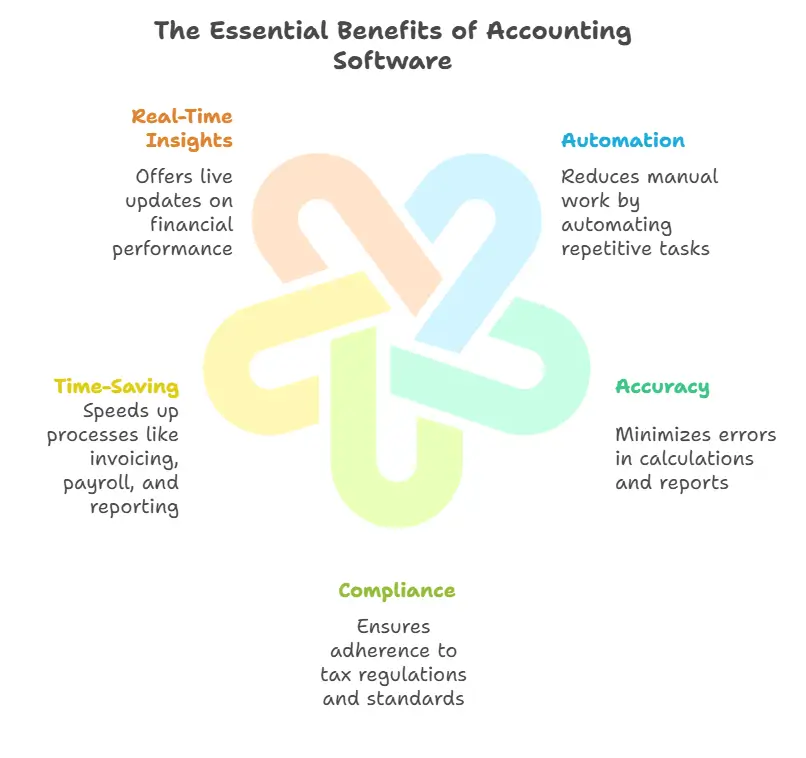
Accounting software is more than a convenience; it's a necessity for efficient financial management. Key benefits include:
Automation : Reduces manual work by automating repetitive tasks.
Accuracy : Minimizes errors in calculations and reports.
Compliance : Ensures adherence to tax regulations and standards.
Time-Saving : Speeds up processes like invoicing, payroll, and reporting.
Real-Time Insights : Offers live updates on financial performance.
In practice, automation alone can cut data entry time by over 50%, freeing you to focus on strategic decisions. Compliance features automatically update when tax rules change—such as the IRS small business tax guidelines—reducing the risk of costly penalties. Even a small bookkeeping error can snowball, so accuracy tools like bank reconciliation that flag mismatches are worth their weight in gold.
A common mistake small business owners make is neglecting monthly reconciliations; even the best software can't fix data that never gets verified. Setting a recurring calendar reminder to review your transactions can prevent surprises come tax time. The American Institute of CPAs offers resources on accounting standards that guide software compliance features.
A professional reviewing financial performance on a tablet in a modern office setting.
Best Accounting Software for Small Businesses
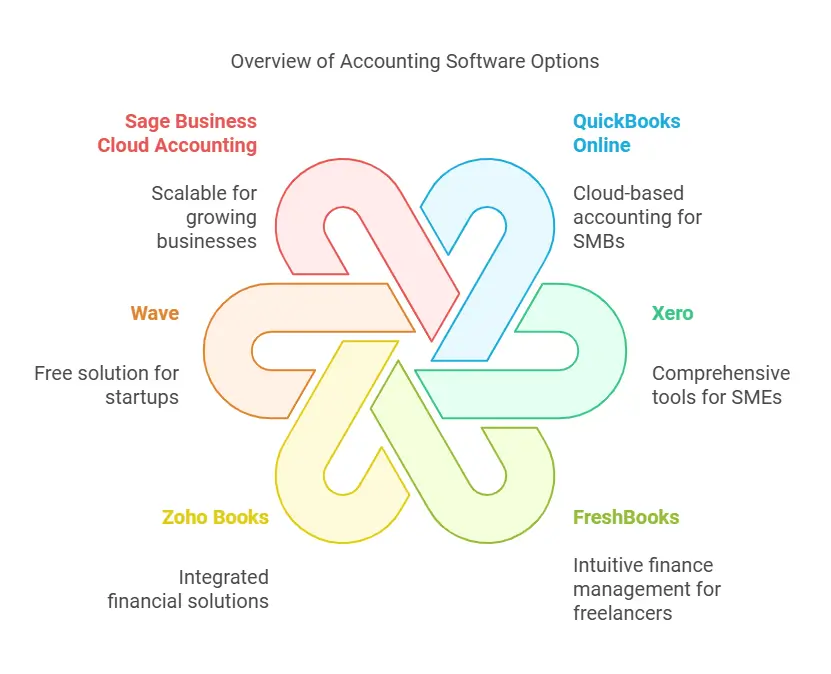
Leading accounting software options reviewed in this section.
QuickBooks Online: The All-Rounder
Why It Stands Out QuickBooks Online is widely regarded as one of the best accounting tools for small businesses due to its robust features and user-friendly interface. It’s cloud-based, allowing for accessibility from any device.
Key Features
Automated invoicing and payment reminders
Expense tracking and bank integration
Real-time collaboration with accountants
Comprehensive reporting tools
Pricing Starts at $25/month, with higher-tier plans offering advanced features like project management and inventory tracking.
For businesses that outgrow QuickBooks Online, enterprise-grade solutions for larger operations provide deeper financial controls and multi-entity support.
👉 Start your free QuickBooks trial and see how automation can reduce your bookkeeping time by half.
FreshBooks: Tailored for Freelancers and Small Teams
Why It Stands Out FreshBooks is especially popular among freelancers and service-based businesses. Its intuitive design makes managing invoices and expenses a breeze.
Key Features
Customizable invoices with automated follow-ups
Time tracking for project-based billing
Integrates with over 100 apps for expanded functionality
Simple, clean dashboard
Pricing Starts at $17/month, scaling with the number of clients managed.
Wave: Free for Sole Proprietors
Why It Stands Out Wave is a completely free accounting platform designed for freelancers and sole proprietors who need basic bookkeeping without ongoing subscription costs. It covers invoicing, expense tracking, and bank reconciliation at no charge.
Key Features
Unlimited invoice creation with automated payment reminders
Receipt scanning via mobile app
Bank-grade security with 256-bit encryption
Optional paid add-ons for payroll and payment processing
Pricing Core accounting tools are free. Payment processing fees apply (2.9% + $0.30 per transaction), and payroll starts at $20/month.
Wave is a solid starting point for solopreneurs, but if your business grows beyond 10 transactions a day you may outgrow its reporting depth. For those needing integrated tax filing for freelancers, pairing Wave with a separate tax tool is a common approach.
Best Accounting Software for Medium-Sized Businesses
Xero: Perfect for Growing Businesses
Why It Stands Out Xero is a powerful accounting solution known for its scalability. It’s ideal for businesses that need more robust tools as they grow.
Key Features
Multi-currency support
Advanced inventory management
Payroll integration with Gusto
Over 800 third-party app integrations
Pricing Starts at $13/month, with plans designed for larger transaction volumes and additional users.
Sage Intacct: Focused on Financial Professionals
Why It Stands Out Sage Intacct caters to medium-sized businesses with complex financial needs, offering advanced automation and financial reporting tools.
Key Features
AI-powered financial insights
Seamless integration with CRM and ERP systems
Customizable dashboards and reports
Automation of revenue recognition
Pricing Custom pricing is available based on business size and requirements.
Best Accounting Software for Enterprises
NetSuite ERP: Comprehensive Business Management
Why It Stands Out NetSuite ERP combines accounting, CRM, and inventory management into a single platform. It’s ideal for enterprises seeking an all-in-one solution.
Key Features
Advanced financial planning and budgeting tools
Real-time data analytics and dashboards
Robust tax compliance and global financial capabilities
Tailored modules for specific industries
Pricing Custom pricing is determined based on business needs.
Microsoft Dynamics 365: Scalable and Customizable
Why It Stands Out Microsoft Dynamics 365 offers a suite of enterprise-level tools, making it a top choice for organizations with diverse operational needs.
Key Features
Seamless integration with Microsoft Office Suite
AI-driven financial insights
Real-time collaboration across departments
Powerful forecasting and analytics tools
Pricing Custom pricing is available based on your organization’s requirements.
Quick Comparison of Top Accounting Software
| Software | Starting Price | Best For | Key Differentiator |
|---|---|---|---|
| QuickBooks Online | $25/month | Small to mid-size businesses | Most comprehensive bank integration and accountant collaboration |
| FreshBooks | $17/month | Freelancers and service teams | Intuitive time-tracking and invoice customization |
| Xero | $13/month | Growing businesses with multi-currency needs | Over 800 third-party app integrations |
| NetSuite ERP | Custom pricing | Large enterprises with complex operations | All-in-one ERP with industry-specific modules |
| Wave | Free | Sole proprietors on a tight budget | No monthly fee for core accounting |
If you run a business with property management needs, none of the generalist tools handle tenant ledgers out of the box—consider a vertical-specific solution instead. For those on a strict budget, evaluating lifetime access deals can eliminate recurring subscription costs.
Ready to decide? Take advantage of free trials from your top two contenders and compare workflows firsthand before committing.
Factors to Consider When Choosing Accounting Software
Business Size and Needs
Evaluate the volume of transactions and the complexity of your operations. Small businesses may prioritize simplicity, while enterprises need scalability and advanced features.
Certain industries also have unique accounting requirements. For example, property management businesses need tenant ledger tracking and maintenance cost allocation that generic tools don’t always offer.
Budget
Accounting software varies significantly in cost. Consider both subscription fees and any additional costs for integrations or add-ons.
Because pricing plans and feature sets change frequently—especially as of 2026—always verify current rates on the vendor’s website before committing. What looks affordable today may shift as your user count grows.
For businesses that want to cap their software spending, exploring lifetime access deals can eliminate monthly fees while still providing robust accounting features.
Usability
An intuitive interface can save time and reduce errors. Opt for software with a trial period to test its user experience.
Integration Capabilities
Ensure the software integrates seamlessly with other tools like CRMs, payment gateways, or tax filing systems.
A strong integration ecosystem can save hours each week. For instance, understanding ecommerce integration setups between your store and accounting platform helps automate order-to-revenue recording.
Customer Support
Reliable customer service is crucial, especially during tax season or financial audits.
Why Cloud-Based Accounting Software Dominates
Cloud-based accounting software has become the standard due to its accessibility, scalability, and regular updates. Here’s why businesses are making the switch:
Accessibility : Access your financial data from anywhere, anytime.
Cost-Effectiveness : Reduced need for on-premises infrastructure.
Collaboration : Easily share data with accountants and teams.
Data Security : Regular backups and advanced encryption.
The shift to the cloud also relies on dependable cloud infrastructure to keep your financial data always available and protected from outages.
Cloud-Based vs. Desktop Accounting Software
Pros and Cons
Cloud-Based : Offers flexibility, automatic updates, and remote access but requires a stable internet connection.
Desktop : Provides greater control over data but lacks the mobility of cloud solutions.
A growing number of providers now offer hybrid modes—cloud sync with a local offline cache—so you can work during internet outages and then reconcile later. Evaluate whether your team frequently travels or works from locations with unreliable connectivity; that will steer you toward one camp or the other.

Cloud deployments provide remote access; desktop setups offer offline reliability.
How to Choose the Best Accounting Software
Selecting the right accounting software depends on your business size, industry, and specific needs. Create a checklist of must-have features, consider your budget, and test demos before committing.
Assess Your Business Needs
Size of the Business : Software for freelancers differs from enterprise solutions.
Budget : Ensure the software fits your financial capacity.
Industry-Specific Features : Some industries require niche functionalities.
Beyond the obvious, factor in your growth trajectory. If you plan to incorporate soon, you may also need help with company formation requirements and linking your corporate structure to your accounting system from day one.
Evaluate Features
Cloud vs. On-Premises : Cloud solutions offer flexibility, while on-premises provide control.
Scalability : Choose a tool that grows with your business.
Customer Support : Accessible support can save time during troubleshooting.
Consider Integrations
Seamless integration with CRM, payroll, and other business tools enhances productivity.
https://www.youtube.com/watch?v=G4H-h2WI5fs
Industry-Specific Accounting Software
While generalist tools work for many businesses, vertical-specific software often delivers better workflows for niche operations.
Property Management – Handle tenant billing, security deposits, and maintenance cost allocation with dedicated tools. See the dedicated guide on property management accounting software for deeper insights.
Retail & Ecommerce – Look for software with built-in inventory tracking, sales tax calculation across states, and direct Shopify/WooCommerce connectors.
Nonprofits – Choose a solution that supports fund accounting, grant tracking, and Form 990 preparation.
Construction – Job costing, progress billing, and subcontractor payments are critical; many standard packages omit these.
If your industry isn’t listed, check whether your core software supports custom fields and report builders so you can adapt it without switching platforms.
For ecommerce businesses, integrating with a reliable ecommerce platform hosting ensures your accounting software receives real-time order data and can automatically reconcile sales tax.
Emerging Trends in Accounting Software (2026)
The accounting software landscape evolves rapidly. In 2026, several trends are reshaping the market:
AI-Powered Automation – Beyond basic rules, modern tools now use machine learning to categorize expenses, flag anomalies, and even suggest journal entries based on historical patterns.
Real-Time Collaboration – Gone are the days of emailing spreadsheets. Cloud platforms allow your accountant to view your books live and make adjustments with version history.
Blockchain for Audit Trails – Some enterprise solutions are experimenting with immutable ledgers to simplify auditing and fraud detection.
Embedded Financial Services – Software now integrates payment processing, lending offers, and even payroll advances directly into the dashboard, reducing the need for separate providers.
Keep an eye on these developments when evaluating long-term investments—what feels cutting-edge today may become table stakes tomorrow.
Many of these AI capabilities are also available through specialized AI-powered business tools that can integrate with your existing accounting platform to enhance workflows.
FAQs
What is the most user-friendly accounting software? FreshBooks and QuickBooks Online are often praised for their intuitive interfaces and ease of use, especially for beginners.
Which accounting software is best for startups? Xero is a great option for startups due to its scalability and affordable entry-level plans. Some startups also explore budget-friendly lifetime access options to cut ongoing subscription costs.
Can I use free accounting software? Yes, free tools like Wave offer basic accounting functionalities, but they may lack advanced features required by growing businesses.
How secure is cloud-based accounting software? Reputable providers use industry-standard encryption and regular backups to protect your data.
Do I need accounting software if I hire an accountant? Yes, accounting software complements the work of an accountant, offering streamlined data management and collaboration.
Which accounting software supports international transactions? Xero and NetSuite ERP are excellent choices for businesses handling multiple currencies and global operations.
How do I migrate from one accounting software to another? Most providers offer guided migration wizards or dedicated support teams. Export your chart of accounts, customers, and vendor lists as CSV files, then import into the new system. Always run a trial period in parallel with your old software to catch data mismatches before cutting over.
What AI features are available in modern accounting software? As of 2026, many tools include AI-driven bank reconciliation suggestions, automated expense categorization, and cash-flow forecasting. Some even generate draft financial statements from raw transactions, which your accountant then reviews and approves.
What is the best accounting software for ecommerce businesses? Platforms like QuickBooks Online and Xero offer strong inventory tracking and sales-tax calculation across multiple states. For deeper integration, look for solutions that connect directly with your shopping cart. You can also complement them with dedicated sales tax compliance solutions to automate state-level filings.
Can I handle payroll within my accounting software? Several tools offer built-in or add-on payroll modules. QuickBooks Online includes full payroll features for an extra fee, while Xero integrates with Gusto. If you run a small team, check whether the payroll option covers your state’s tax reporting requirements.
Conclusion
Choosing the best accounting software depends on your business’s size, industry, and specific needs. From small businesses to large enterprises, options like QuickBooks Online, Xero, and NetSuite ERP offer tailored solutions. By assessing your requirements and budget, you can find the perfect tool to streamline your financial management.
Ready to Simplify Your Finances?
Take the next step: compare your top two or three picks side-by-side with a free trial. Most platforms offer a 30-day test period, so you can see which interface saves you the most time before making a commitment.










One comment
[…] business sites, the Premium plan offers the best value‑to‑performance ratio, and you can always keep the correct fluid level of your hosting resources by monitoring usage in the […]