
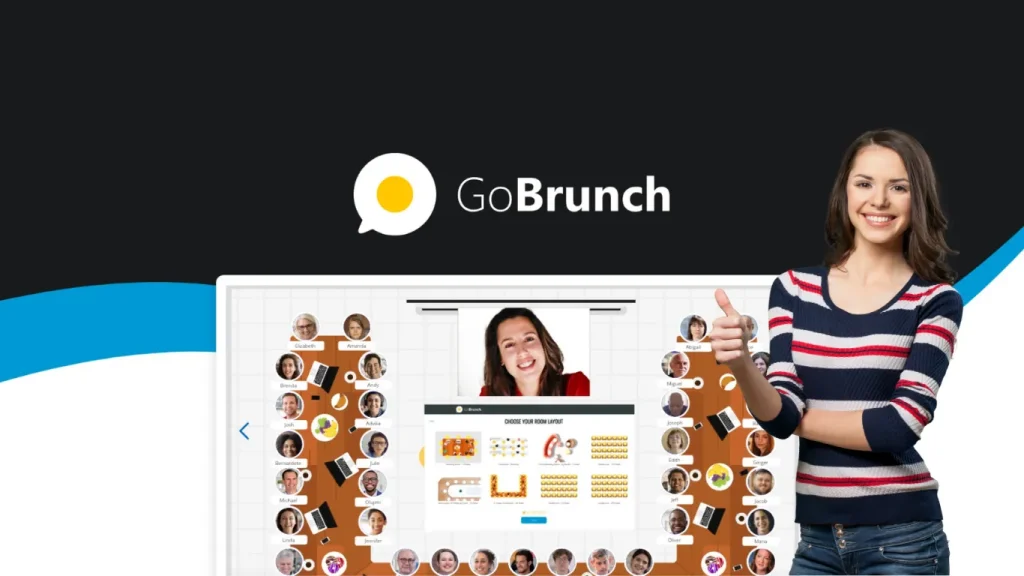
Get the GoBrunch Lifetime Deal and transform your virtual meetings with interactive webinars, breakout rooms, and immersive event spaces. Say goodbye to Zoom fatigue!
Say goodbye to the fatigue of standard online meetings and hello to a platform that brings dynamism and fun back to webinars, classrooms, and seminars. GoBrunch offers you the tools to create immersive virtual environments, complete with breakout rooms, customizable seating layouts, and live media controls. Whether you're hosting a training workshop or a casual meetup, GoBrunch ensures that every session runs smoothly, keeping your participants engaged and attentive. Dive into the details of this incredible offer and explore how you can elevate your virtual events to the next level. Ready to revolutionize your online interactions? Discover the GoBrunch Lifetime Deal now.
Introduction To Gobrunch Lifetime Deal
The Gobrunch Lifetime Deal offers an innovative approach to virtual meetings and webinars. This interactive platform enhances client interactions, ensuring every virtual event is engaging and immersive. Perfect for tackling online meeting fatigue, Gobrunch brings the in-person experience to the digital world.
⏳ Hurry! Only a few licenses left—grab yours NOW!
Overview Of Gobrunch And Its Purpose
Gobrunch is a platform designed to transform virtual gatherings into dynamic experiences. It allows hosts to create engaging webinars, classrooms, seminars, and breakout spaces without needing any installation or coding. Founded by Richard Lowenthal, Gobrunch aims to counter the exhaustion common in online meetings, offering a realistic interface that mimics physical events. The platform's interface includes features like customizable seating layouts and live media controls, making it versatile for webinars, training workshops, and casual meetups.
Host unlimited webinars with no installation required.
Create immersive virtual classrooms and seminars.
Screen sharing, camera enabling, and broadcasting presenters.
Manage attendees with controls for camera, mic, screen, chat, and moderation.
Generate multiple breakout rooms and sessions.
In practice, the spatial layout of GoBrunch is one of its strongest engagement tools. Instead of staring at a grid of faces, participants see each other seated around tables or in auditorium-style rows, which naturally encourages interaction. A common mistake new hosts make is leaving the seating layout as the default — customizing it to match your event type (classroom for training, roundtable for brainstorming) can noticeably improve participation rates.
The Concept Of Lifetime Deals In Virtual Event Platforms
Lifetime deals in virtual event platforms provide a one-time payment solution for continual access to a platform's features. Gobrunch offers three distinct license tiers to cater to various needs, each providing lifetime access with a range of features. This approach is cost-effective for businesses looking to host engaging virtual events without recurring fees.
License Tier Participants per Webinar Video Storage Organizers per Session Breakout Rooms Price
License Tier 1 200 40 GB 8 15 $89
License Tier 2 400 80 GB 16 35 $199
License Tier 3 600 120 GB Unlimited 50 $269
The plans come with a 60-day money-back guarantee from AppSumo, allowing users to try Gobrunch risk-free. Users can also upgrade or downgrade between the three tiers, ensuring flexibility and adaptability as needs change. This lifetime access includes all future updates to the Prime Chef Plan, making it a secure investment for enhancing virtual interactions.
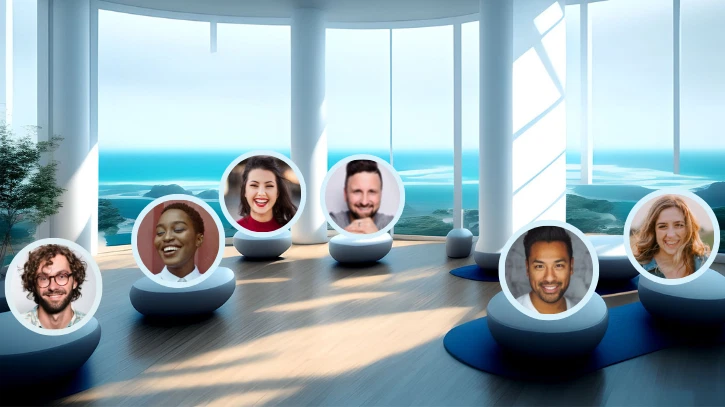 The virtual room layout showing participants arranged in a conference-style setting
Credit: appsumo.com
Key Features Of Gobrunch
GoBrunch transforms virtual meetings into engaging experiences. It offers features that enhance interactivity and improve user engagement. Discover the essential features that make GoBrunch stand out in the virtual event space.
Interactive Virtual Rooms: Engaging Audience Participation
GoBrunch offers interactive virtual rooms that mimic in-person events. Participants can view other attendees in the virtual space, enhancing the sense of presence. The platform allows hosts to create immersive breakout rooms and sessions. This encourages audience participation and keeps attendees engaged. With controls for camera, microphone, screen, and chat, users have full moderation capabilities.
One particularly effective use case is the "circle view" for smaller sessions — instead of a lecture-style layout, everyone appears seated around a virtual round table. This setup significantly reduces the feeling of being talked at and increases spontaneous discussion. For facilitators looking to run collaborative sessions, this spatial awareness feature is something traditional webinar tools simply cannot replicate.
Seamless Integration With Popular Tools: Enhancing Workflow Efficiency
GoBrunch integrates seamlessly with popular tools to enhance workflow efficiency. This integration facilitates smooth operations during virtual events. GoBrunch supports screen sharing with sound, making presentations more dynamic. The platform's collaboration tools ensure that all participants can interact effectively.
🕒 Deal expires soon! Lock in lifetime access before it’s gone!
Customizable Branding Options: Creating Unique Event Experiences
Customizable branding options let organizers create unique event experiences. GoBrunch allows the use of custom subdomains , providing a personalized touch to events. This feature is available from License Tier 2, offering up to seven custom subdomains in Tier 3. The customizable seating layouts and live media controls further enhance the branding possibilities.
Unlimited Event Hosting: Maximizing Reach And Impact
With GoBrunch, hosts can conduct unlimited webinars and events. The platform's realistic interface and interactive features maximize reach and impact. License Tier 3 offers unlimited organizers per session, supporting large-scale events. The platform also provides substantial video storage options, with up to 120 GB available in Tier 3.
License Tier Participants per Webinar Video Storage Organizers Breakout Rooms Custom Subdomains
Tier 1 200 40 GB 8 15 0
Tier 2 400 80 GB 16 35 1
Tier 3 600 120 GB Unlimited 50 7
GoBrunch's flexible pricing plans cater to different needs, ensuring a valuable investment for all users.
5 Proven Strategies To Boost Engagement With GoBrunch
Beyond the platform's built-in features, specific techniques can dramatically improve how participants interact during your sessions. These strategies leverage GoBrunch's unique spatial interface to keep attendees focused and involved.
1. Use Breakout Rooms For Small-Group Collaboration
GoBrunch allows up to 50 breakout rooms per session in Tier 3. Instead of keeping everyone in one large room for the entire event, split participants into smaller groups for discussion, problem-solving, or brainstorming. After 10–15 minutes, bring everyone back to the main room to share findings. This keeps energy levels high and ensures every voice is heard — something large webinars often struggle with. For teams that regularly host collaborative workshops, pairing GoBrunch with a reliable scheduling tool like the one featured in this meeting automation review can streamline the entire workflow from invitation to follow-up.
2. Leverage Custom Seating To Set The Right Tone
The seating layout changes attendee behavior. For a training session, arrange seats in rows facing the presenter — this signals a lecture format and reduces side conversations. For a team retrospective or client workshop, use roundtable seating to encourage open dialogue. The layout shift alone can boost engagement by setting clear expectations before anyone speaks.
3. Enable Attendee Cameras And Circle Views
GoBrunch's spatial interface means participants see each other, not just the presenter. Encourage attendees to keep their cameras on by using the circle-view mode for smaller groups. This visual presence creates social accountability — people are less likely to multitask when they know others can see them. A simple opening prompt like "everyone turn on your camera so we can see each other" goes a long way.
4. Moderate Actively With Built-In Controls
The platform gives hosts granular control over cameras, microphones, screen sharing, and chat. During presentations, mute all attendees to avoid background noise. During Q&A sessions, unmute individuals for focused dialogue. Use the chat moderation features to surface questions without distractions. Proactive moderation keeps the session flowing smoothly and prevents disengagement.
5. Record And Repurpose Session Content
GoBrunch's video storage (up to 120 GB) allows you to record entire events. Share recordings with absent team members, extract highlight clips for social media, or replay key sections during follow-up meetings. This turns a single live session into ongoing value. For content creators, integrating with a tool like this banner creation platform can help promote future events with branded visuals.
Pricing And Affordability
GoBrunch offers a unique opportunity for users to access a feature-rich interactive webinar platform at an affordable price. With lifetime deals, you make a one-time payment and gain unlimited access to all future updates. This approach to pricing allows businesses to save significantly in the long run, especially when compared to subscription-based models.
Understanding The Value Of A Lifetime Deal
Lifetime deals, like those offered by GoBrunch, provide immense value. Instead of recurring monthly or annual fees, users pay once and enjoy ongoing benefits. This model is particularly advantageous for businesses and educators who regularly host virtual events.
Lifetime Access: No recurring payments.
Future Updates: Access to all Prime Chef Plan updates.
Risk-Free: 60-day money-back guarantee ensures satisfaction.
Beyond the direct savings, consider the hidden costs of subscription fatigue. Each monthly or annual tool adds administrative overhead — tracking renewals, managing payment methods, and justifying expenses. A lifetime purchase consolidates your tool stack with a single investment, simplifying budget planning. For small teams and solopreneurs, this predictability matters as much as the upfront saving.
Comparative Analysis: Gobrunch Vs. Subscription-based Platforms
Comparing GoBrunch with subscription-based platforms reveals clear advantages. Subscription models often incur high costs over time. GoBrunch's lifetime deal eliminates this burden, providing a cost-effective solution.
Feature GoBrunch (Lifetime) Subscription-Based Platforms
Cost $89 to $269 one-time Recurring monthly/annual fees
Participants per Webinar 200 to 600 Varies, often limited
Video Storage 40 GB to 120 GB Limited or extra cost
Breakout Rooms 15 to 50 per event Varies, additional cost
Choosing GoBrunch not only saves money but also provides flexibility and scalability. With features like multiple breakout rooms and generous storage, GoBrunch is well-suited for any size event.
Pros And Cons Of Gobrunch
GoBrunch offers an innovative approach to virtual meetings, providing an interactive platform that mimics in-person events. This section explores the pros and cons of using GoBrunch, helping users decide if it meets their needs.
Advantages: Cost-effectiveness And Feature Richness
GoBrunch presents a cost-effective solution for hosting engaging webinars and meetings. With its lifetime access licenses, users can choose from three tiers to suit their needs:
License Tier 1 : $89, supports 200 participants, 40 GB video storage.
License Tier 2 : $199, accommodates 400 participants, 80 GB video storage.
License Tier 3 : $269, allows 600 participants, 120 GB video storage.
The platform offers a host of features, including:
Unlimited webinars without installation.
Interactive virtual classrooms and breakout spaces.
Customizable seating layouts and live media controls.
Each license comes with various organizer limits and breakout rooms, enhancing its feature richness.
Feature Tier 1 Tier 2 Tier 3
Participants per webinar 200 400 600
Video storage 40 GB 80 GB 120 GB
Breakout rooms 15 35 50
Drawbacks: Considerations For Specific Use Cases
While GoBrunch excels in many areas, there are considerations for specific use cases. The platform may not fit every business model due to its structure:
The number of sub-accounts is limited in lower tiers. Tier 1 lacks sub-accounts, while Tier 2 offers 35.
Some users may require more than the provided presentation storage. Tier 1 offers 2 GB, which might be insufficient for larger presentations.
Additionally, those seeking advanced customization might find the platform's options limited.
Despite these considerations, GoBrunch effectively addresses the needs of many seeking an engaging, interactive platform.
It is also worth noting that the spatial interface, while engaging, can feel unfamiliar to first-time attendees. If your audience is accustomed to traditional grid-view platforms, you may need to spend a few minutes at the start of a session orienting them — showing how to move around the room, turn on their camera, and join a breakout table. Providing a quick guide or onboarding email beforehand can smooth this transition.
https://www.youtube.com/watch?v=Lr95v-gunpg
Recommendations For Ideal Users And Scenarios
GoBrunch, a dynamic webinar platform, is perfect for enhancing virtual meetings. It mimics in-person events, offering an immersive experience. With flexible features, it suits various users and scenarios. Explore its ideal fits below.
Best Fit For Small To Medium Enterprises And Educators
Small to medium enterprises find GoBrunch invaluable. It provides interactive webinars and virtual meetings without complex setups. The platform supports up to 600 participants , making it ideal for company-wide meetings. Breakout rooms enhance collaboration. Multiple presenters can share screens, ensuring seamless teamwork.
Educators benefit greatly from GoBrunch. Create immersive virtual classrooms and seminars. Customizable seating layouts replicate traditional classrooms. With session history saved, tracking student participation is easy. Video storage allows educators to share recorded lectures. This boosts student engagement.
🚀 Selling FAST—click here to secure your deal TODAY!
Scenarios Where Gobrunch Excels
Webinars and Training Workshops : Host unlimited webinars without installation. Engage participants with live media controls.
Team Meetings : Manage audio and video. Multiple breakout rooms facilitate group discussions.
Casual Meetups : Mimic in-person dynamics with circle views and seating layouts.
Client Interactions : Enhance client engagement with interactive features. Guarantee smooth sessions.
Product Demos : Showcase software or physical products by sharing your screen with sound while attendees watch in a realistic room layout. The spatial context helps maintain attention during longer demonstrations.
Virtual Networking Events : Set up multiple round tables and allow attendees to move between them, simulating the experience of walking around a real networking venue.
GoBrunch is designed to tackle Zoom fatigue. It offers a realistic interface , keeping participants attentive. Whether hosting seminars or casual gatherings, it ensures every session feels engaging.
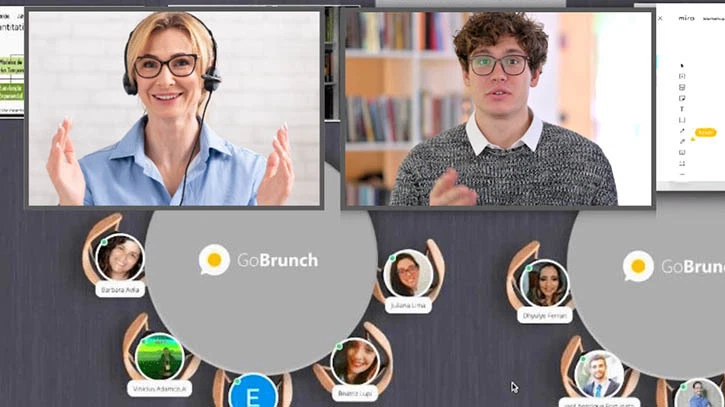 The presenter's view of the virtual room with seated attendees
Credit: appsumo.com
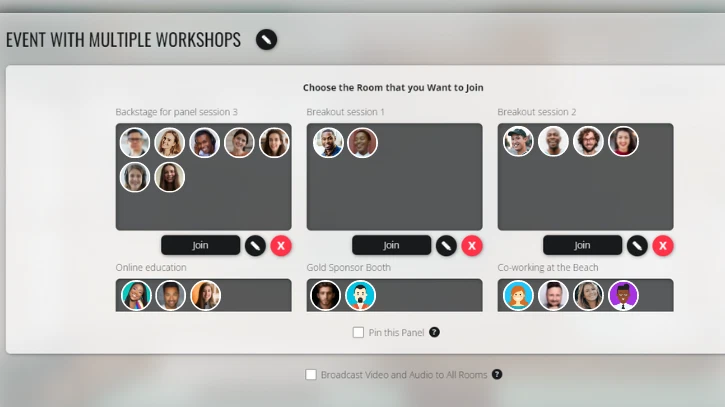 Managing breakout rooms and session settings from the organizer panel
Credit: appsumo.com
Frequently Asked Questions
What Is Gobrunch Lifetime Deal?
The Gobrunch Lifetime Deal offers a one-time purchase for lifetime access. It's ideal for users seeking long-term webinar solutions. This deal eliminates recurring subscription fees, providing a cost-effective option. Users gain full access to Gobrunch's features, ensuring a comprehensive virtual event experience.
How Does Gobrunch Lifetime Deal Work?
With the Gobrunch Lifetime Deal, you pay once for permanent access. This includes all current features and updates. Users can host unlimited webinars without additional costs. It's a straightforward, budget-friendly option for hosting virtual events. This deal simplifies financial planning for businesses.
Is Gobrunch Lifetime Deal Worth It?
Yes, Gobrunch Lifetime Deal is worth it for frequent users. It saves money on recurring fees. Users benefit from continuous updates and features. It's a cost-effective solution for businesses hosting regular webinars. Investing in this deal ensures long-term access to a robust virtual event platform.
Who Should Consider Gobrunch Lifetime Deal?
Businesses hosting regular webinars should consider Gobrunch Lifetime Deal. It's ideal for educators, marketers, and event organizers. The deal offers significant savings over time. It's perfect for those needing a reliable, feature-rich platform. Long-term users benefit most from this cost-effective offer.
Can I Use GoBrunch For One-On-One Coaching Sessions?
Yes, GoBrunch works well for one-on-one coaching. The spatial interface makes the conversation feel more personal than a standard video call, as you and your client appear seated together at a virtual table. For coaches managing multiple clients, consider combining GoBrunch with a client scheduling tool to streamline appointment booking across your sessions.
Does GoBrunch Support Live Polling Or Q&A Features?
GoBrunch includes chat moderation and attendee management tools, but it does not have a built-in polling feature. As a workaround, presenters can share their screen and run a poll through a third-party service. The platform's screen sharing with sound makes this seamless — you can display live poll results without switching windows. Alternatively, the chat function works well for collecting questions during a presentation.
What Internet Connection Speed Do I Need To Run GoBrunch Smoothly?
GoBrunch runs in the browser without heavy downloads, so standard broadband (10–15 Mbps download, 3 Mbps upload) is usually sufficient for hosts. Attendees can join with slower connections. For the best experience, hosts should use a wired connection during larger events and close unnecessary browser tabs to free up system resources.
Can I Migrate Existing Recordings From Other Platforms Into GoBrunch?
GoBrunch's video storage is intended for content created within the platform, such as recorded sessions. While you can share external video links during a webinar via screen sharing, bulk uploading pre-existing recordings is not a core feature. Plan to use GoBrunch primarily for live and recorded sessions generated natively on the platform.
How Does GoBrunch Handle Session Recording And Storage Limits?
The platform automatically records sessions if the host enables the recording option before starting. Recordings save to your GoBrunch account and count toward your video storage limit (40 GB in Tier 1, 80 GB in Tier 2, 120 GB in Tier 3). To manage storage, download completed recordings to your local device or cloud storage, then delete the copies from GoBrunch to free up space for future sessions.
Conclusion
GoBrunch offers an engaging solution for virtual meetings. Its interactive features counter Zoom fatigue. Create immersive classrooms and breakout spaces easily. Choose from three flexible plans. Each plan offers lifetime access. AppSumo provides a 60-day money-back guarantee for security. Enjoy seamless interactions with GoBrunch’s unique virtual setup. Revive your online sessions with ease. Make your meetings fun and interactive. Explore GoBrunch’s features and improve your virtual gatherings. For more details, visit the GoBrunch Lifetime Deal. If you're building a complete remote event toolkit, also consider how a conversational AI assistant could help you automate attendee follow-ups and keep the engagement going long after the session ends.


2 thoughts on “GoBrunch Lifetime Deal – 5 Ways to Boost Virtual Meeting Engagement”