Start a Web Hosting Business: Ultimate Guide to Success
Lead SaaS Analyst & Software Developer at PCSaaS · Software Developer (GitHub @Ratankarmakar) · Google Ads & Analytics Certified · 500+ SaaS Tools Tested · 8+ years in software engineering, B2B SaaS evaluation, AppSumo deal auditing, and performance marketing
Dream of owning Start a web hosting business? This ultimate guide covers everything from startup costs and legalities to marketing strategies and scaling your operations. Learn how to launch and grow a profitable hosting company.
Many people and businesses need web hosting services. The internet is growing, and so is the demand for websites. This creates a great opportunity for new web hosting businesses. Whether you are tech-savvy or a complete beginner, starting a web hosting business can be a viable option. For more on this, see our guide on best cloud hosting for small business.
You can offer various services, from shared hosting to dedicated servers. With the right approach, you can attract many clients and grow your business. In this blog, we'll explore key steps to start a web hosting business, making it simple and achievable for you. Let's dive in and unlock the potential of this exciting business opportunity.

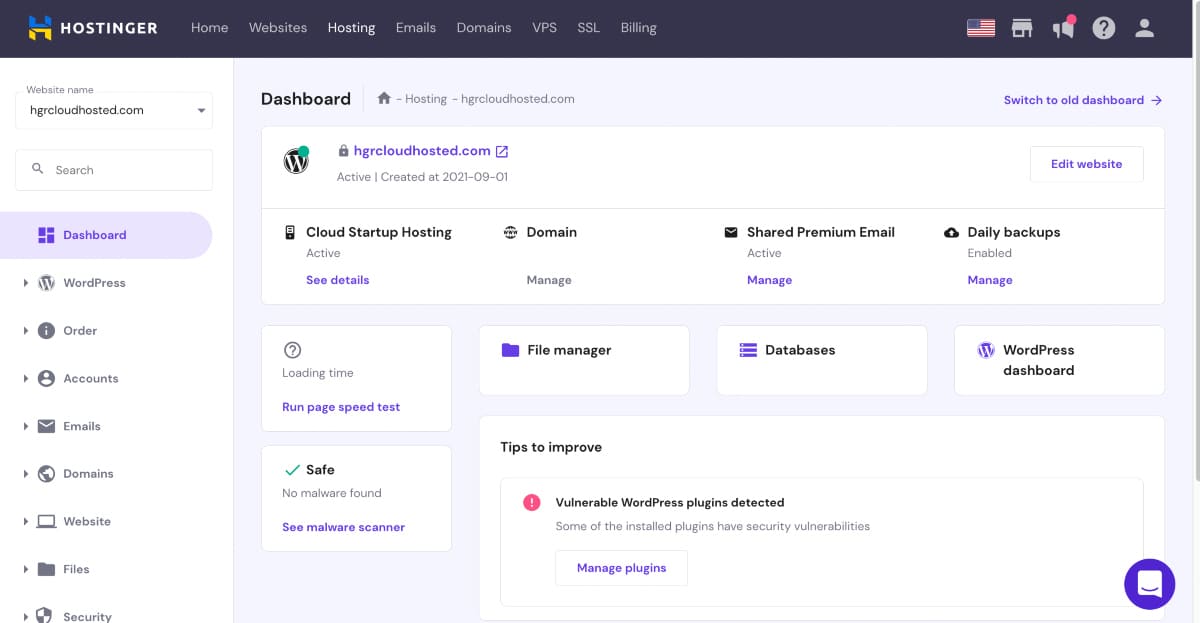
The core equipment needed to begin offering hosting services to clients.
Credit: verpex.com
Introduction To Web Hosting
Starting a web hosting business can be a profitable venture. But first, it's crucial to understand the basics of web hosting. This section will introduce you to the key concepts and importance of web hosting.
What Is Web Hosting?
Web hosting is a service that allows individuals and organizations to make their websites accessible on the internet. A web host, or hosting service provider, offers the technologies and services needed for the website to be viewed on the internet.
Websites are hosted, or stored, on special computers called servers. When internet users want to view your website, all they need to do is type your website address or domain into their browser. Their computer will then connect to your server, and your webpages will be delivered to them through the browser.
| Type of Hosting | Description |
|---|---|
| Shared Hosting | Multiple websites share one server's resources. |
| VPS Hosting | Virtual Private Servers share a physical server but act like separate servers. |
| Dedicated Hosting | A single server is dedicated to one website. |
| Cloud Hosting | Resources are spread across multiple servers. |
Importance Of Web Hosting
Web hosting is essential for online presence. It ensures that your website is accessible to users around the world. Without web hosting, your website wouldn't be visible on the internet.
Good web hosting provides reliable uptime, which means your website is available most of the time. This is crucial for businesses as downtime can lead to lost sales and a negative reputation.
Security is another critical aspect of web hosting. A good web hosting provider will offer security features such as SSL certificates, backups, and firewalls to protect your website from cyber threats.
- Performance: Fast loading times improve user experience and SEO rankings.
- Support: Quality hosting services offer 24/7 support to resolve any issues quickly.
- Scalability: Allows your website to grow as your traffic increases.
Choosing the right web hosting provider is crucial for your business's success. Investing in a good hosting plan can save you time, money, and stress in the long run.
In practice, the combination of uptime reliability and page speed directly affects your clients' search engine rankings. Using a content delivery network (CDN) and server-level caching can dramatically improve performance. For budget-conscious startups, offering affordable WordPress hosting can be a compelling entry point that attracts small business owners who need a simple, cost-effective solution.
Market Research
Market Research is the foundation of any successful web hosting business. It helps you understand the demand, identify the competition, and find your niche. Without thorough market research, your business may struggle to meet customer needs or compete effectively.
Identify Your Niche
Identifying your niche is the first step in your market research. This means finding a specific segment of the web hosting market that you can serve better than others. It could be offering hosting for small businesses, bloggers, or e-commerce sites. Choose a niche that matches your expertise and passion.
Analyze Competitors
Analyzing competitors is crucial to understand what you are up against. Look at what other web hosting companies in your niche are doing. Check their pricing, services, and customer reviews. Create a table to compare their offerings:
| Competitor | Services | Pricing | Customer Reviews |
|---|---|---|---|
| Competitor A | Shared, VPS, Dedicated | $5 – $50/month | 4.5/5 |
| Competitor B | Shared, Cloud | $3 – $30/month | 4.0/5 |
| Competitor C | VPS, Dedicated | $10 – $100/month | 4.2/5 |
Use this information to find gaps in the market. What can you offer that others do not? How can you provide better service or pricing? This will help you position your business effectively.
To dig deeper, use keyword research tools to identify what potential customers are searching for. For example, terms like "affordable hosting for photographers" or "managed WordPress hosting for agencies" can reveal underserved niches. Also, monitor competitor social media and review sites to spot common complaints — those pain points are your opportunities.
Business Plan Creation
Creating a business plan is crucial when starting a web hosting business. It provides a clear roadmap for your venture. A well-structured plan helps in defining goals, financial planning, and understanding market needs. Below, we discuss two critical components: defining your goals and financial planning.
Define Your Goals
First, identify what you want to achieve with your web hosting business. Are you focusing on small businesses or large enterprises? Do you plan to offer shared hosting, VPS, or dedicated servers? Here are some steps to define your goals:
- Market Research: Understand your target audience and their needs.
- Unique Selling Proposition (USP): Determine what makes your service unique.
- Short-term and Long-term Goals: Set achievable milestones.
- Competitive Analysis: Analyze what your competitors offer.
Financial Planning
Financial planning is vital to ensure your business stays profitable. It involves estimating costs and projecting revenues. Here's a breakdown of key financial planning elements:
| Item | Estimated Cost |
|---|---|
| Initial Setup | $5,000 |
| Marketing | $2,000/month |
| Operational Costs | $1,000/month |
In addition to estimating costs, consider these financial aspects:
- Revenue Streams: Identify how you will make money (e.g., subscription plans).
- Break-even Analysis: Determine when your business will start making a profit.
- Funding Sources: Identify where your startup capital will come from.
- Financial Projections: Create a forecast for the first year.
Proper financial planning helps in managing resources and securing investments. It ensures your web hosting business can sustain itself and grow.
Beyond the initial setup, you must account for recurring costs such as server licensing, domain renewals, and support staff salaries. A common mistake is underestimating the cost of customer acquisition. Allocate at least 20% of your projected revenue to marketing in the first year. Also, consider offering monthly billing options to lower the entry barrier for new clients, which can improve cash flow predictability.
Pricing Strategies
Setting the right price for your hosting plans is a balancing act between covering costs, staying competitive, and delivering value. Most hosting businesses use a tiered pricing model: a low-cost shared plan for beginners, a mid-range VPS or managed WordPress plan for growing sites, and a premium dedicated or cloud option for high-traffic clients.
When defining your tiers, consider the cost of support per account. A very cheap plan might attract many customers but also increase your support burden. Instead, focus on a value-based approach — bundle features like free SSL, daily backups, and a staging environment into your mid-tier plan. This makes it easy to upsell as clients outgrow the basic option.
You can also use introductory discounts (e.g., first month 50% off) to attract sign-ups, but be transparent about renewal rates. Check what competitors in your niche charge and position your pricing slightly below or at parity for the first year, then above after you demonstrate superior service.
Legal Considerations
Starting a web hosting business involves several legal considerations. Ensuring you follow the right legal steps is crucial. It protects your business and builds trust with clients. Here, we cover key areas like business registration and legal compliance.
Business Registration
Registering your business is the first legal step. This process gives your business a legal identity. It also allows you to operate under a business name.
- Choose a business structure: Decide if your business will be a sole proprietorship, partnership, LLC, or corporation. Each has different legal implications and tax requirements.
- Register your business name: File your business name with the local government. This prevents others from using the same name.
- Get an EIN: An Employer Identification Number (EIN) is necessary for tax purposes. You can get this from the IRS website.
- Open a business bank account: This keeps your business finances separate from personal ones.
Legal Compliance
Maintaining legal compliance is critical for your web hosting business. This involves following laws and regulations relevant to your industry.
| Compliance Area | Description |
|---|---|
| Data Privacy Laws | Ensure you comply with data privacy laws like GDPR or CCPA. These laws protect user data and require transparency in data handling. |
| Terms of Service and Privacy Policy | Have clear terms of service and privacy policy. This informs users about their rights and how you handle their data. |
| Consumer Protection Laws | Follow laws that protect consumers from unfair practices. This includes providing accurate information and fair pricing. |
Keep up with legal changes in your industry. Regularly review your policies and practices to ensure compliance.
If you plan to serve customers in the European Union, you must comply with the General Data Protection Regulation (GDPR). This includes having a lawful basis for processing data, providing data breach notifications, and allowing users to request deletion of their information. Similarly, the California Consumer Privacy Act (CCPA) applies if you have clients in California. Using incorporation services can simplify the legal setup, but you must still draft clear terms of service and a privacy policy that covers these requirements.
Choosing The Right Technology
Starting a web hosting business can be exciting. Choosing the right technology is crucial. It impacts performance, reliability, and customer satisfaction. Let's explore some key aspects.
Server Options
Servers are the backbone of your web hosting business. You have several options. Dedicated servers offer control and high performance. They are best for large websites with heavy traffic. Shared servers are cost-effective. They are ideal for small websites with low traffic. Virtual Private Servers (VPS) provide a balance. They offer more control than shared servers but are cheaper than dedicated servers.
Software Requirements
Software plays a vital role in web hosting. You need reliable server management software. cPanel and Plesk are popular choices. They are user-friendly and powerful. Ensure your software supports common programming languages. PHP, Python, and Ruby are essential. Choose software that offers security features. SSL certificates and firewalls protect your clients' data.
When evaluating server hardware, pay attention to I/O performance and RAM. For a typical VPS node, 8 GB of RAM and a fast NVMe SSD can comfortably host 20–30 small websites. Always over-provision conservatively to avoid performance degradation. On the software side, consider using a lightweight control panel like CyberPanel or Vestacp if you want to keep costs low and still offer a good user experience.
Backup and Security
A reliable backup strategy is non-negotiable for any hosting business. You should offer automated daily backups off-site (e.g., to a cloud storage provider) and give clients the ability to restore individual files or entire accounts from within their control panel. Keep at least seven days of backups and test restores monthly to verify integrity.
For security, implement a web application firewall (WAF) at the server level, enable fail2ban to block brute-force login attempts, and install a free SSL certificate from Let's Encrypt on every account. Regular vulnerability scanning and automatic updates for the operating system and control panel software are essential. Educate your clients on strong passwords and two-factor authentication, as compromised accounts can affect your entire server.
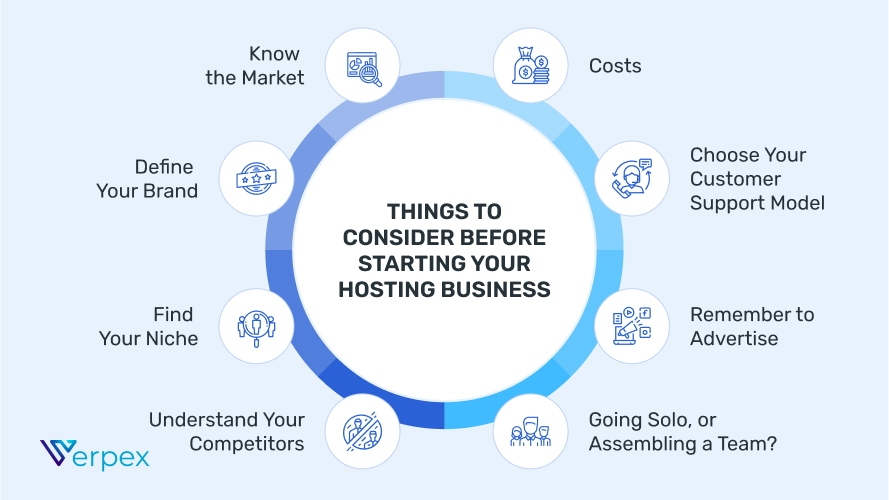
Critical factors to evaluate before you launch your hosting company.
Credit: verpex.com
Setting Up Your Hosting Service
Starting a web hosting business is an exciting venture. Setting up your hosting service is a critical step. This process ensures your clients get reliable and secure web hosting. This section covers the essentials of server setup and control panel configuration. These steps will help you establish a strong foundation for your business.
Server Setup
Choose a reliable server to host your clients' websites. You can opt for dedicated, VPS, or cloud servers. Each has its benefits. Dedicated servers offer full control and resources. VPS servers provide a balance of cost and control. Cloud servers offer scalability and reliability.
Once you choose a server, install the necessary software. This includes the operating system, web server software, and security tools. Popular choices are Linux, Apache, and Nginx. Ensure your server is secure and up-to-date. Regular updates and patches are essential. Perform routine maintenance to keep your server running smoothly.
Control Panel Configuration
A control panel simplifies server management. It provides a user-friendly interface for both you and your clients. Popular control panels include cPanel, Plesk, and DirectAdmin. Choose a control panel that suits your needs and budget.
Install the control panel on your server. Follow the setup instructions provided by the control panel provider. Configure the control panel settings to match your hosting service. Set up user accounts, domains, and email services. Ensure your control panel is secure. Use strong passwords and enable two-factor authentication.
Offer your clients tutorials on using the control panel. This helps them manage their hosting accounts with ease. A well-configured control panel improves the user experience. It also reduces your support workload.
https://www.youtube.com/watch?v=w7s54a9gU4E
Domain Registration Services
Many hosting businesses also offer domain registration as an add-on service. This allows clients to purchase their domain name and hosting from the same provider, simplifying management and increasing your revenue per customer. You can become a reseller through a domain registrar like Namecheap, GoDaddy, or Enom, which provides wholesale pricing and API access for automated registration.
Integration with your control panel is straightforward: most panels support domain registrar modules that let you set retail prices, handle renewals, and manage DNS records. Offering free domain registration with the first year of a hosting plan is a popular promotional tactic. Just be sure to account for the wholesale cost in your pricing model.
Marketing Strategies
Marketing strategies are crucial for the success of any web hosting business. They help attract new customers and retain existing ones. To stand out in a competitive market, you need effective marketing techniques. This section will cover online marketing and customer acquisition.
Online Marketing
Online marketing is essential for reaching a wide audience. Use social media to connect with potential customers. Post regularly on platforms like Facebook, Twitter, and Instagram. Share engaging content that highlights your services.
Search engine optimization (SEO) is also key. Optimize your website with relevant keywords. Use tools like Google Analytics to track your performance. Blogging is another effective strategy. Write informative posts about web hosting. This can improve your search engine ranking.
Email marketing is a powerful tool. Send newsletters with valuable content. Include special offers to encourage sign-ups. Keep your emails short and engaging. Use a clear call-to-action to guide readers.
Customer Acquisition
Customer acquisition involves attracting new clients. Offer free trials to showcase your services. This allows potential customers to experience your hosting firsthand.
Referral programs can boost customer acquisition. Encourage existing customers to refer others. Offer incentives like discounts or free months of hosting.
Partnering with other businesses can also help. Collaborate with web developers and designers. They can recommend your hosting services to their clients.
Attend industry events and network. This can open doors to new opportunities. Building relationships is key to acquiring new customers.

Visual representation of a marketing funnel tailored for a hosting company.
Credit: www.hostingseekers.com
To build a steady stream of leads, invest in content marketing. Create detailed tutorials, comparison guides, and case studies that answer common hosting questions. This positions you as an authority and improves organic search rankings. Also, use email automation tools to nurture leads — send a welcome series with tips for new website owners, then gradually introduce your hosting plans. Running targeted ads on Google and Facebook for niche keywords (e.g., "hosting for WooCommerce stores") can drive qualified traffic.
Customer Support
Customer support is critical for your web hosting business. Your clients need quick, effective help. This builds trust and loyalty. Let's explore the key aspects of customer support.
Support Channels
Offer various support channels to cater to different needs:
- Email Support: Ideal for non-urgent issues. Clients can send detailed queries.
- Live Chat: Great for instant help. It provides real-time assistance.
- Phone Support: Useful for complex issues. Clients can get direct answers.
- Knowledge Base: A self-help portal. Clients can find solutions themselves.
| Support Channel | Best For |
|---|---|
| Detailed queries | |
| Live Chat | Instant help |
| Phone | Complex issues |
| Knowledge Base | Self-help |
Handling Issues
Efficient issue handling is vital. Follow these steps:
- Identify the Issue: Understand the client's problem.
- Prioritize: Urgent issues first, minor ones later.
- Assign: Allocate tasks to the right team members.
- Resolve: Provide a solution quickly and efficiently.
- Follow Up: Ensure the client is satisfied with the solution.
Use a ticketing system to manage issues. This helps track and prioritize requests.
Offer training to your support team. They must be knowledgeable and patient. This ensures they handle issues professionally.
Track key support metrics such as first response time (aim for under 15 minutes) and ticket resolution time (under 4 hours for standard issues). Set clear service level agreements (SLAs) and publish them on your website. For example, you might guarantee that critical issues (server down) are acknowledged within 5 minutes and resolved within 1 hour. Using a help desk platform with automation can reduce the workload on your team and improve response consistency.
Billing and Client Management
Automating billing and client management is essential as you grow. Choose a billing platform that integrates with your control panel and supports recurring invoices, payment gateways, and dunning emails for failed payments. Popular options include WHMCS, Blesta, and ClientExec.
Configure your system to charge clients automatically each month via credit card or PayPal. Set up a grace period (e.g., 3 days) before suspending an account for non-payment, and send reminder emails 7 and 2 days before the due date. For handling your own business finances, using accounting software will help you track income, expenses, and tax obligations accurately.
Monitoring and Performance Optimization
To maintain a high-quality service, you must monitor your servers continuously. Use monitoring tools like Nagios, Zabbix, or UptimeRobot to track CPU usage, memory, disk I/O, and network latency. Set up alerts for thresholds — for example, if CPU usage exceeds 80% for more than 5 minutes, the system should notify you immediately.
Performance optimization involves tuning your web server (e.g., enabling compression, caching, and HTTP/2), using a CDN to serve static assets from edge locations, and regularly auditing slow queries in MySQL/MariaDB. Offer a free performance audit to new clients as a value-add; this can uncover issues like oversized images or unoptimized databases that slow down their site. Proactive optimization reduces churn and builds your reputation as a reliable host.
Scaling Your Business
Starting a web hosting business is just the beginning. As your business grows, you'll need to consider scaling to meet customer demands and stay competitive. Scaling your business effectively involves expanding services and managing growth strategically.
Expanding Services
Offering a variety of services can attract more customers. Here are some services to consider:
- Domain Registration: Help clients secure their online identity.
- Website Building Tools: Provide easy-to-use site builders.
- Email Hosting: Offer professional email solutions.
- SSL Certificates: Enhance website security for clients.
- Managed Hosting: Provide expert management of server resources.
These services not only add value but also increase revenue streams. Diversifying your offerings ensures you meet various customer needs.
Managing Growth
As you expand, managing growth becomes critical. Here are key steps to consider:
- Automate Processes: Use automation tools to streamline tasks.
- Hire Skilled Staff: Bring in experts to manage increased workload.
- Monitor Performance: Regularly check server uptime and speed.
- Customer Support: Ensure 24/7 support for customer queries.
- Scalable Infrastructure: Invest in scalable server solutions to handle traffic spikes.
Efficient management of growth helps maintain high service standards. This keeps clients satisfied and loyal.
Scaling your web hosting business involves expanding services and managing growth effectively. By diversifying offerings and ensuring smooth operations, you can meet customer needs and achieve sustainable growth.
Frequently Asked Questions
How Do I Start A Web Hosting Business?
To start a web hosting business, research the market, choose a reliable server provider, set up your website, and offer exceptional customer support.
What Are The Initial Costs For Web Hosting Business?
Initial costs include server rental, domain registration, website design, marketing, and customer support setup.
How Can I Attract Web Hosting Customers?
Attract customers by offering competitive prices, excellent support, reliable uptime, and effective marketing strategies.
Is Web Hosting Business Profitable?
Yes, a web hosting business can be profitable with the right strategy, customer service, and marketing efforts.
Do I need a reseller account or my own servers to start?
Both options work. A reseller account lets you lease server space from a larger provider and sell it under your brand — this is the simplest way to start with minimal upfront investment. Owning your own servers gives you more control and higher margins but requires technical expertise and a larger capital outlay. Many beginners begin as resellers and later transition to dedicated infrastructure.
What legal documents must I have for a web hosting business?
At minimum, you need a privacy policy, terms of service, and an acceptable use policy (AUP). These documents should outline how you handle data, what content is prohibited, and the limits of your liability. As mentioned, GDPR and CCPA compliance may also be required depending on your client base.
How do I handle backups for my clients?
Offer automatic daily backups stored off-site, and allow clients to restore individual files or entire accounts from their control panel. Make sure to test your backups regularly. A good rule is to keep at least 7 days of backups and to store them in a separate geographical location from your primary server.
What is the best billing software for a hosting business?
WHMCS is the industry standard for hosting billing and client management. It integrates with cPanel, Plesk, and many popular payment gateways. Blesta and ClientExec are also solid alternatives with lower licensing costs. Whichever you choose, ensure it supports automated invoicing, payment reminders, and account suspension.
How can I differentiate my hosting business from giants like Bluehost or SiteGround?
Focus on personalized support, niche specialization (e.g., hosting for photographers, agencies, or non-profits), and transparent pricing without hidden fees. Small businesses and bloggers often value fast, friendly support from a real person over the lowest price. Also, offer unique features like a free staging environment, built-in caching, or migration assistance for new clients.
What is the average profit margin for a web hosting business?
Profit margins vary widely. Reseller hosting can yield 30–50% margins after costs, while owning your own hardware can push margins above 60% once you reach a certain scale. However, initial margins are lower due to setup costs. Focus on minimizing churn and increasing average revenue per client to improve profitability over time.
Conclusion
Starting a web hosting business can be rewarding. It offers growth opportunities. You can help others get online. Focus on good service. Keep learning about new trends. Build strong relationships with your clients. Stay dedicated and patient. With time, you will see success.
Your web hosting business will thrive. Take the first step today.

Similar Posts