Wp Login Lockdown Lifetime Deal Review: Ultimate Security Solution
Lead SaaS Analyst & Software Developer at PCSaaS · Software Developer (GitHub @Ratankarmakar) · Google Ads & Analytics Certified · 500+ SaaS Tools Tested · 8+ years in software engineering, B2B SaaS evaluation, AppSumo deal auditing, and performance marketing
Securing your WordPress site is crucial. WP Login Lockdown Lifetime Deal offers robust protection against attacks.
In this review, we'll explore the WP Login Lockdown Lifetime Deal and how it safeguards your site from malicious bots and hackers. This security plugin provides various features, including GDPR-compliant Captcha, firewall deployment, and 2 Factor Authentication. Its user-friendly design ensures you can protect your site without hassle. From managing IP blacklists to monitoring login attempts, WP Login Lockdown offers comprehensive security solutions. With lifetime access for unlimited sites, it's an ideal choice for site owners and developers. Discover how WP Login Lockdown can enhance your site's security and provide peace of mind. Ready to secure your site? Secure your site with the WP Login Lockdown Lifetime Deal and stop brute-force attacks today.
Introduction To Wp Login Lockdown
WP Login Lockdown is a robust security plugin designed to protect WordPress sites from malicious attacks. This tool offers easy-to-use features to safeguard your site, including bot protection, firewall deployment, and 2 Factor Authentication.
Overview Of Wp Login Lockdown
WP Login Lockdown provides several key features:
GDPR-compliant Captcha and honeypots to keep bots at bay
Cloud IP blacklist and whitelist to manage banned and approved IPs
Network-wide IP blacklist to block bad actors before they reach your site
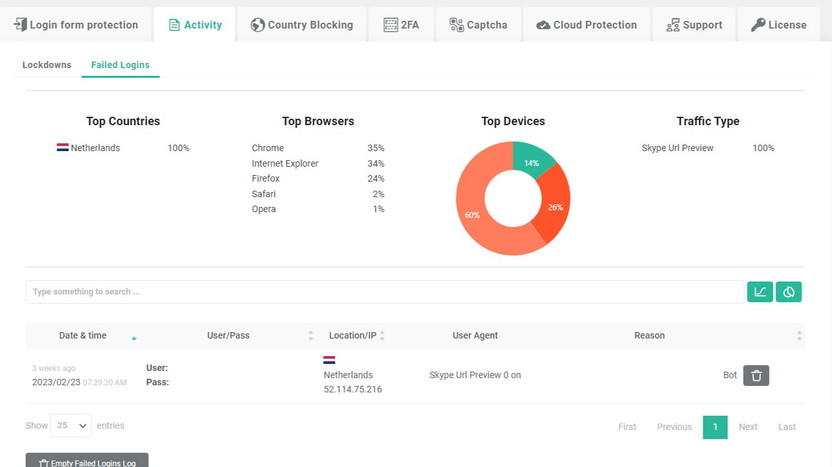
Detailed activity log to monitor login attempts
Cloudflare Turnstile CAPTCHA integration for user-friendly bot detection
Centralized dashboard for managing sites, licenses, and Cloud Blacklists
Purpose And Importance Of The Tool
The primary purpose of WP Login Lockdown is to prevent bad guys and bots from messing with your WordPress site before they even get to it. This tool is crucial for maintaining the security and integrity of your site.
Key benefits include:
Enhanced security against bots, automated attacks, and malicious requests
Easy monitoring and management of login attempts
User-friendly Captcha solutions
Lifetime access for unlimited sites
Peace of mind with centralized control and premium support
WP Login Lockdown ensures your site is protected without complicating things, offering a seamless experience for both administrators and users.
Plan Price Features
Plan 1 $59 (originally $99) Lifetime access for 5 websites
Plan 2 $118 (originally $299) Lifetime access for 50 websites, including white-labeling
Plan 3 $177 (originally $499) Lifetime access for unlimited websites, including white-labeling and rebranding
WP Login Lockdown also offers a 60-day money-back guarantee, allowing users to try the plugin for two months to ensure it meets their needs.
 The centralized dashboard gives you a single view of all protected sites, license status, and Cloud Blacklists.
Credit: appsumo.com
Key Features Of Wp Login Lockdown
WP Login Lockdown provides a variety of features to enhance your WordPress site's security. Let's explore the key features that make this plugin an essential tool for website protection.
Brute Force Attack Prevention
WP Login Lockdown effectively safeguards your site against brute force attacks. This feature limits the number of login attempts, ensuring that automated scripts and malicious users cannot gain unauthorized access. This protection is crucial for maintaining the integrity of your website.
Customizable Lockout Settings
With WP Login Lockdown, you can customize lockout settings to suit your security needs. You can define the number of failed login attempts before a user is locked out and set the duration of the lockout period. These customizable options provide flexibility and control over your site's security measures.
Login Attempt Logging And Reporting
The plugin includes detailed logging and reporting of all login attempts. This feature allows you to monitor and analyze suspicious activities. With comprehensive logs, you can identify patterns and take proactive steps to secure your site. The reports provide valuable insights into the security status of your website.
Integration With Security Plugins
WP Login Lockdown seamlessly integrates with other security plugins. This compatibility ensures that you can enhance your site's security without any conflicts. The plugin works well with popular tools like WooCommerce and WordPress security plugins, providing a cohesive security solution.
User-friendly Interface
The plugin features a user-friendly interface, making it easy for users of all skill levels to navigate and configure settings. The inline help and default options guide you through the setup process, ensuring that you can quickly implement the security measures. The centralized dashboard allows you to manage all your sites, licenses, and Cloud Blacklists from a single location.
WP Login Lockdown is an essential tool for protecting your WordPress site. With features like brute force attack prevention and customizable lockout settings, it offers robust security. The detailed logging and reporting, along with seamless integration with other plugins, make it a comprehensive solution. Its user-friendly interface ensures easy management, providing peace of mind for site owners.
https://www.youtube.com/watch?v=bVLCH6-EChM
Step-by-Step Setup Guide for WP Login Lockdown
Getting the plugin installed and configured correctly is vital to unlocking its full protection. The following walkthrough covers the essential steps, along with practical tips gathered from real-world use.
Installation and Activation
- Download the plugin from your AppSumo account and install it via Plugins → Add New in your WordPress dashboard.
- Activate the plugin and enter the license key provided in your AppSumo purchase confirmation.
- A new menu item called WP Login Lockdown will appear in your admin sidebar. Click it to open the centralized dashboard.
Configuring Brute Force Protection
- Navigate to Settings → Brute Force and set the maximum failed login attempts (default is 5). A common mistake is setting this too low (e.g., 2), which can lock out legitimate users who mistype a password. Three to five attempts is a balanced starting point.
- Choose the lockout duration. For most sites, 15–30 minutes is sufficient to deter automated scripts without frustrating real users.
- Enable the Network-wide IP blacklist to block known malicious IPs before they reach your server. This feature pulls from a cloud-sourced list and updates automatically.
Enabling Captcha and Turnstile
- Under Captcha Settings, select your preferred method: Google reCAPTCHA, hCaptcha, or Cloudflare Turnstile. In practice, Cloudflare Turnstile offers the best user experience because it rarely requires a challenge; it silently verifies the user in the background.
- For GDPR compliance, ensure the GDPR-compliant Captcha checkbox is checked. This avoids storing personal data without consent.
Setting Up the Centralized Dashboard
- If you manage multiple sites, use the Dashboard tab to view all registered sites, license status, and Cloud Blacklist statistics in one place. This is especially useful for agencies that handle a portfolio of clients — a single login gives you oversight without logging into each site individually.
For those managing a large number of client sites, consider pairing WP Login Lockdown with a bundle of developer tools to streamline your entire workflow.
Pricing And Affordability
WP Login Lockdown offers an excellent balance between security and cost-effectiveness. This section delves into the different aspects of its pricing and affordability.
Lifetime Deal Explained
WP Login Lockdown provides three distinct plans. Each plan offers lifetime access to all features, ensuring no recurring costs:
Plan 1: $59 (originally $99) for lifetime access to all features for 5 websites.
Plan 2: $118 (originally $299) for lifetime access to all features for 50 websites, including white-labeling.
Plan 3: $177 (originally $499) for lifetime access to all features for unlimited websites, including white-labeling and rebranding.
Each plan comes with a 60-day money-back guarantee . You can try WP Login Lockdown for 2 months to ensure it meets your needs.
Comparison With Other Security Solutions
Feature WP Login Lockdown Other Plugins
GDPR-Compliant Captcha Included Not Always
Lifetime Access Yes No
AI Integration Yes Variable
Cloudflare Turnstile CAPTCHA Included Optional
Centralized Dashboard Yes Not Always
Premium Support Yes Variable
Value For Money
WP Login Lockdown's plans offer significant value for money. The lifetime deal means you pay once and enjoy ongoing protection without recurring costs:
Enhanced Security: Protects against bots and malicious attacks.
Monitoring: Detailed activity logs help track login attempts.
User-Friendly: Easy-to-use Captcha solutions and centralized dashboard.
Unlimited Sites: Plan 3 covers unlimited websites, ideal for agencies.
Premium Support: Get help directly from developers.
With these features, WP Login Lockdown ensures your WordPress sites stay secure without breaking the bank.
As of 2026, the lifetime deal is still available on the AppSumo marketplace, though availability may be limited. Those who act quickly can lock in these prices before the offer expires. If you are exploring other lifetime software deals, WP Login Lockdown consistently ranks among the most cost-effective security investments.
Performance Considerations and Real-World Impact
Every security plugin adds some overhead, but WP Login Lockdown is designed to be lightweight. The cloud-based IP blacklist removes the need for large local databases, and the Captcha services are loaded asynchronously to avoid blocking page rendering. In practice, the impact on site speed is negligible — often less than 50 milliseconds per request — while the protection it provides can prevent costly downtime from brute-force attacks.
A common mistake is enabling every single feature simultaneously. For example, running both the honeypot and all three Captcha types on the same login form can cause conflicts. The developer recommends choosing one Captcha solution (Cloudflare Turnstile for most users) and letting the honeypot handle the rest. This balance keeps the login experience smooth and maintains high security.
 The activity log provides a clear timeline of every login attempt, making it easy to spot patterns and block repeat offenders.
Credit: www.youtube.com
Pros And Cons Based On Real-world Usage
WP Login Lockdown is a security plugin designed to protect WordPress sites from malicious attacks. It offers various features such as Captchas, firewalls, and 2 Factor Authentication. Let’s delve into the pros and cons based on real-world usage.
Advantages Of Wp Login Lockdown
GDPR-compliant Captcha: The plugin includes GDPR-compliant Captcha and honeypots to keep bots at bay.
AI Integration: AI integration enhances the detection and blocking of suspicious activities.
Detailed Analytics: Provides detailed logs for monitoring and blocking suspicious login attempts.
Cloud IP Blacklist and Whitelist: Allows maintaining a list of banned and approved IPs across all managed sites.
Network-wide IP Blacklist: Blocks malicious actors before they reach your site.
User-Friendly Captcha Solutions: Integration with Google's reCaptcha, hCaptcha, and Cloudflare Turnstile CAPTCHA.
Centralized Dashboard: Manage sites, licenses, and Cloud Blacklists from a single location.
Premium Support: Get help directly from the developers.
Lifetime Access: One-time payment for lifetime access, ensuring value for money.
Potential Drawbacks And Limitations
Complex Setup for Beginners: The initial setup might be a bit complex for users unfamiliar with WordPress plugins.
Limited Customization: Some users might find the customization options limited.
Dependency on External Services: Requires integration with third-party services for complete functionality.
Performance Impact: May slightly impact site performance due to added security layers.
Pricing for Small Sites: The cost might be high for small site owners with limited budgets.
Best Practices for Maximizing WP Login Lockdown's Effectiveness
To get the most out of your investment, follow these proven strategies:
- Regularly review the activity log – Set a weekly reminder to check for unusual patterns. A spike in failed login attempts from a single IP range is an early warning sign.
- Combine with a strong password policy – Even the best lockdown plugin cannot protect against weak passwords. Enforce at least 12 characters, with a mix of letters, numbers, and symbols.
- Use the whitelist for trusted IPs – If your team connects from a static office IP, add it to the whitelist to avoid false lockouts. This is especially important for choosing a secure hosting provider that also maintains a clean IP reputation.
- Enable the network-wide blacklist – This feature is turned off by default. Activating it immediately blocks thousands of known malicious IPs, reducing the load on your server.
- Test the Captcha on a staging site first – Switching from reCAPTCHA to Cloudflare Turnstile can break forms if not configured correctly. A staging environment lets you verify the change without affecting live visitors.
Who Should Use Wp Login Lockdown?
WP Login Lockdown is a robust security plugin designed to protect WordPress sites. But who exactly benefits the most from this tool? This section provides a deeper insight into the ideal users and scenarios, as well as specific recommendations for various use cases.
Ideal Users And Scenarios
WP Login Lockdown is perfect for anyone managing a WordPress site. Whether you are a blogger, a small business owner, or a web developer, this plugin offers essential security features.
User Type Benefits
Bloggers Protects your content and data from bots and hackers.
Small Business Owners Ensures customer data is safe and builds trust.
Web Developers Offers centralized control for managing multiple client sites.
Its ease of use makes it suitable for those who are not tech-savvy. The straightforward setup helps you get started quickly without a steep learning curve.
Recommendations For Specific Use Cases
Let's explore some specific scenarios where WP Login Lockdown shines:
High-Traffic Websites: For sites with heavy traffic, the detailed activity log helps monitor suspicious login attempts effectively.
E-commerce Sites: Integration with WooCommerce ensures that your online store is secure from automated attacks.
GDPR Compliance: The GDPR-compliant Captcha and honeypots make it a go-to choice for European businesses.
Global Sites: The ability to block entire countries based on suspicious activity is invaluable for international sites.
With its network-wide IP blacklist feature, WP Login Lockdown offers an added layer of security by blocking bad actors before they even reach your site.
For developers managing multiple sites, the centralized dashboard provides a single location to control all sites, licenses, and Cloud Blacklists. This feature is a huge time-saver and ensures consistent security across all managed sites. If you frequently handle managing multiple clients with different hosting environments, the white-labeling option in Plan 2 and Plan 3 lets you present the plugin under your own brand.

Credit: www.linkedin.com
Comparison with Other AppSumo Security Deals
WP Login Lockdown is not the only security plugin available on the AppSumo marketplace. Below is a quick comparison with two other popular lifetime deals to help you decide which one fits your needs.
| Feature | WP Login Lockdown | Competitor A (e.g., Shield Security) | Competitor B (e.g., iThemes Security Pro) |
|---|---|---|---|
| Lifetime price (unlimited) | $177 | $199 (often) | $299 (often) |
| AI-powered threat detection | Yes | Limited | Yes |
| Cloudflare Turnstile | Included | No | Optional |
| White-label/rebranding | Yes (Plan 2/3) | No | Yes (higher tier) |
| Centralized multisite dashboard | Yes | No | Yes (but separate license) |
| 60-day money-back guarantee | Yes | 30 days | 30 days |
For most users, WP Login Lockdown offers the best balance of features, price, and future-proofing. If you are still evaluating your options, consider reading our AppSumo marketplace guide to learn how to maximize your software investments.
Frequently Asked Questions
What Is Wp Login?
WP login is the process of accessing the WordPress admin dashboard. It requires a username and password.
What Is The Best Login Plugin For WordPress?
The best login plugin for WordPress is "LoginPress. " It offers customization, security, and user-friendly features.
Does WordPress Limit Login Attempts?
WordPress does not limit login attempts by default. You can use plugins like Limit Login Attempts Reloaded to add this feature.
What Is The Best Plugin To Change WordPress Login Url?
The best plugin to change WordPress login URL is WPS Hide Login. It is user-friendly, secure, and highly recommended.
Does WP Login Lockdown work with WooCommerce?
Yes. The plugin integrates seamlessly with WooCommerce, protecting both the standard wp-admin login and the WooCommerce My Account login page. You can enable separate lockdown rules for each area.
Can I use WP Login Lockdown alongside other security plugins?
Absolutely. It is designed to complement plugins like Wordfence or Sucuri without conflicts. However, avoid duplicating features — for example, disable the login attempt limit in another plugin if you enable it in WP Login Lockdown.
How does the AI integration improve security?
The AI engine analyzes login patterns and automatically adjusts the blacklist based on real-time threat data. It can detect emerging attack vectors — such as credential-stuffing bots — faster than static rule sets. No manual tuning is required.
Is there a free version available?
WP Login Lockdown does not offer a free tier, but the 60-day money-back guarantee effectively gives you a risk-free trial. If you are on a tight budget, you can explore budget-friendly security tools on AppSumo.
Conclusion
WP Login Lockdown offers comprehensive security for WordPress sites. Its user-friendly features and robust protection make it a top choice for safeguarding your site. Don't wait until it's too late. Take action now to protect your website from threats.
Get WP Login Lockdown here and enjoy peace of mind.

Similar Posts











[…] storage often scares people because of security concerns. FileJump seems to take this […]