Best Free Keyword Research Tools to Boost Your SEO in 2026
Lead SaaS Analyst & Software Developer at PCSaaS · Software Developer (GitHub @Ratankarmakar) · Google Ads & Analytics Certified · 500+ SaaS Tools Tested · 8+ years in software engineering, B2B SaaS evaluation, AppSumo deal auditing, and performance marketing
Discover the best free keyword research tools to find high-traffic keywords, improve your SEO strategy, and grow your website without spending a dime.
The secret to successful online content and marketing lies in smart keyword research—but you don’t have to break the bank to get it done. Imagine having powerful tools at your fingertips that help you discover exactly what your audience is searching for, what questions they’re asking, and which trends are gaining momentum—all for free.
You’ll uncover the best free keyword research tools available today, each designed to give you valuable insights and a competitive edge. Keep reading, and you’ll learn how to tap into these resources to elevate your content strategy and attract more visitors effortlessly.
Top Free Keyword Tools
Choosing the right keyword tool can save time and improve content strategy. Free keyword research tools offer valuable insights without any cost. These tools help discover popular search terms and understand audience intent. Here are some top free keyword tools that provide reliable data and easy access.
In practice, many SEO professionals cycle through several of these free tools in their daily workflow because no single free tool covers every angle. A common mistake is relying on only one source for keyword data, which can create blind spots in your strategy. Instead, combine two or three tools to cross-validate search volume estimates and uncover gaps your competitors might have missed.
Google Keyword Planner
Google Keyword Planner is perfect for PPC research and keyword volume. It shows search volume and competition data straight from Google. You need a Google Ads account but do not have to run ads. This tool helps find keywords relevant to your niche and plan campaigns effectively.
When using Google Keyword Planner, filter by location and language to get region-specific data that matters for local SEO. For example, a keyword that appears low competition globally might actually be highly competitive in your target city. Pairing this tool with insights from your affordable SEO tools stack can reveal budget-friendly opportunities to outrank larger competitors.
Answer The Public
Answer the Public helps generate content ideas using real questions people ask online. It creates visual maps of questions, prepositions, and comparisons related to your keywords. This tool is great for understanding what your audience wants to know.
Google Trends
Google Trends analyzes current search interest and highlights trending topics. It shows data and graphs for search terms on Google and YouTube. Use this tool to spot seasonal trends and changes in user behavior over time.
Keyword Tool
Keyword Tool provides many long-tail keyword suggestions based on your seed keyword. It uses auto-suggestions from Google, YouTube, Bing, and more. This tool helps find keywords that are less competitive but highly specific to your content.
Screenshot showing autocomplete suggestions from Google, Bing, and YouTube side by side

Credit: ahrefs.com
Additional Free Options
Exploring additional free options can expand your keyword research toolkit. These tools provide valuable insights without costing a dime. They help uncover new keyword ideas, analyze trends, and track your website’s performance. Each tool offers unique features suited for different needs and skill levels.
Ubersuggest
Ubersuggest offers a simple interface for keyword research and SEO analysis. It provides data on search volume, competition, and keyword suggestions. The tool also shows content ideas and backlink information. You can use it to find keywords that fit your niche and improve your content strategy.
A practical tip: Ubersuggest's "Content Ideas" tab surfaces the most shared articles for any keyword, giving you a blueprint for what resonates with readers. Use this alongside your own business intelligence portal data to identify content angles that your competitors have overlooked.
Semrush Free Version
The free version of Semrush delivers basic keyword data and site audit features. It allows limited daily searches for keyword and domain analysis. You get insights into keyword difficulty and search trends. Semrush helps beginners understand their SEO landscape without a paid plan.
Google Search Console
Google Search Console tracks the keywords your website already ranks for. It shows impressions, clicks, and average position in search results. This tool helps identify opportunities to improve your existing pages. It also alerts you about technical issues affecting SEO performance.
Soovle
Soovle aggregates keyword suggestions from multiple platforms like Google, Bing, and YouTube. It provides a broad view of popular search queries across different search engines. This tool is great for finding diverse keyword ideas quickly. You can explore what people search for beyond Google.
Youtube Keyword Tools
YouTube keyword tools help creators find popular topics and relevant search terms. These tools reveal what viewers often type in the search bar. Using these tools boosts video visibility and attracts more viewers.
Many tools offer free features suitable for beginners. They provide insights into trending keywords and content ideas. Understanding these keywords helps create videos that match viewer interests.
If you are repurposing video content for your website, combine YouTube keyword research with text-based tools to ensure your transcripts and captions also rank in Google. This cross-medium strategy is especially effective when you learn how to sync audio with video properly for accessibility and SEO gains.
Youtube Search Predictions
YouTube Search Predictions show suggested keywords as you type in the search box. These suggestions come from real user searches on YouTube. They help identify popular and trending search terms quickly.
Creators can use these predictions to find relevant keywords. Including these keywords in titles and descriptions can improve video ranking. It is a simple way to tap into current viewer interests.
Youtube Trending Page
The YouTube Trending Page lists popular videos in real time. It reveals what content is currently gaining attention. This page is useful to spot rising topics and themes.
Watching the trending page helps creators understand what viewers want. It also inspires new video ideas based on popular trends. This method keeps content fresh and relevant.
Vidiq
VidIQ is a free browser extension that offers keyword research tools for YouTube. It shows keyword scores, search volume, and competition level. These metrics help choose the best keywords for videos.
VidIQ also provides tag suggestions and video analytics. It helps optimize videos to rank higher in search results. The free version offers valuable data for small creators and beginners.
Tubebuddy
TubeBuddy is another free tool that assists with YouTube keyword research. It suggests keywords and tags based on real search data. TubeBuddy also analyzes competitor videos for keyword ideas.
The tool offers a keyword explorer to check search volume and competition. It helps creators find keywords that are easier to rank for. TubeBuddy integrates directly into the YouTube interface for convenience.
Example of keyword competition scores and search volume displayed inside the YouTube interface
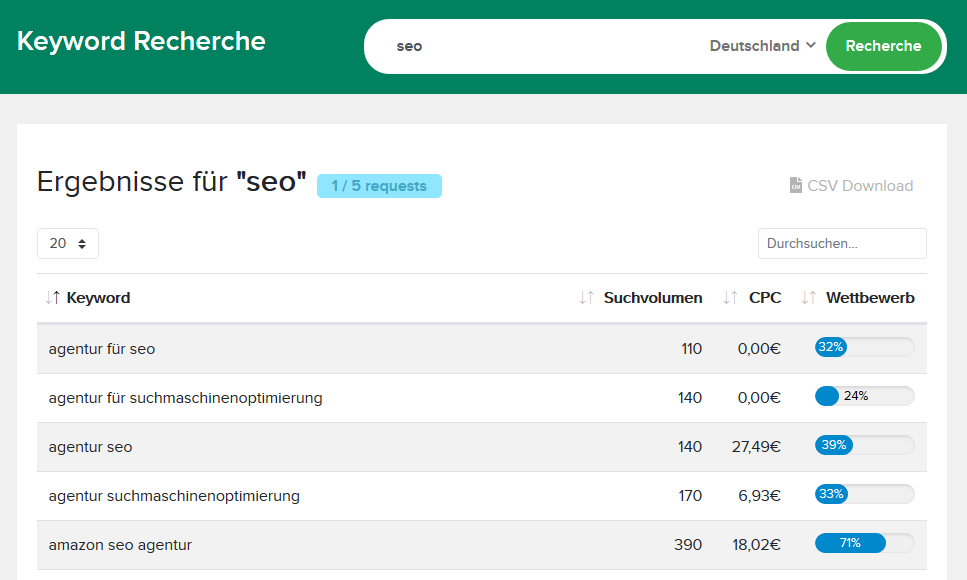
Credit: www.keyword-tools.org
Using Keyword Tools For Ppc
Using keyword research tools for pay-per-click (PPC) campaigns saves time and money. These tools help find relevant keywords that attract the right audience. By targeting the right keywords, advertisers improve ad performance and reduce costs. Free keyword tools offer valuable insights without extra expenses. They reveal search volume, competition levels, and keyword trends. This data guides campaign strategy and bidding decisions. Understanding how to use these tools is essential for effective PPC management.
Google Ads Account Setup
Start by creating a Google Ads account to access Google Keyword Planner. The setup process is straightforward and free. After signing up, navigate to the Keyword Planner tool. No need to run ads to use the planner. This tool provides keyword ideas and data directly from Google. It shows average monthly searches and competition for keywords. Setting up an account opens access to these essential PPC insights.
Analyzing Search Volume And Competition
Keyword tools display search volume to indicate how often people search. Higher search volume means more potential traffic. Competition shows how many advertisers bid on a keyword. High competition usually means higher costs per click. Choose keywords with good search volume but manageable competition. This balance maximizes ad exposure and controls costs. Analyzing these metrics helps build a strong PPC keyword list.
One nuanced approach is to look at "bid range" rather than just competition percentage. A keyword with medium competition but a low bid range can be a hidden gem for smaller budgets. You can also export your PPC-performing keywords into your content strategy, using them to guide organic blog posts that reinforce the same intent—a tactic that works well alongside a solid CRM with email marketing setup to nurture leads across channels.
Generating Content Ideas
Generating content ideas is a key step in creating engaging blog posts and articles. Free keyword research tools help find topics that readers want. These tools reveal what people search for and what questions they ask. This data guides writers to create content that matches user interests.
Using keyword research tools, you can discover fresh ideas without guesswork. This process saves time and boosts content relevance. It also improves your chances of ranking higher in search results. Focus on keywords that spark curiosity and meet searcher intent.
Question-based Keywords
Question-based keywords are phrases that start with words like “how,” “what,” or “why.” People often type these questions in search engines. Free tools like Answer the Public show these questions clearly. Using these keywords helps create content that answers real user queries.
Writing posts that respond to specific questions builds trust. It also attracts visitors who want precise information. For example, if the keyword is “how to grow tomatoes,” write a detailed guide. This approach makes your content useful and shareable.
Long-tail Keyword Suggestions
Long-tail keywords are longer, more specific phrases. They usually have lower competition and higher conversion rates. Tools such as Keyword Tool or Ubersuggest suggest many long-tail options. These suggestions help target niche topics that attract focused audiences.
Using long-tail keywords in your content increases chances of ranking on search engines. They also help capture visitors closer to making a decision. For instance, “best organic tomato seeds for Austin gardens” is a strong long-tail keyword. It targets local readers with clear intent.
When building content around long-tail keywords, consider the user's stage in the buyer's journey. Informational long-tail queries ("how to fix…" or "what causes…") should lead to tutorial-style articles, while transactional long-tail phrases ("buy…" or "best price for…") warrant product comparison pages. This alignment improves dwell time and click-through rates.
A Practical Workflow For Free Keyword Research
Most people jump between tools without a clear process, wasting time and missing opportunities. Here is a repeatable, step-by-step workflow you can follow using only free tools:
- Seed with Google Search Console – Export the top 50 queries your site already ranks for. These are proven terms your audience uses.
- Expand with Keyword Tool – Plug your best-performing query into Keyword Tool to get 100+ long-tail variations.
- Validate with Google Trends – Check whether each long-tail variant is rising, stable, or declining in interest.
- Refine with Answer the Public – Turn your validated keywords into question-based content angles.
- Check competition with Semrush free version – Use your limited daily searches to confirm keyword difficulty before committing to an article.
This loop takes about 20 minutes per topic and produces a content brief you can hand directly to a writer or use to outline your own post.
Diagram showing the five-step keyword research workflow from seed to content brief

Credit: www.ryrob.com
Tracking Trends And Seasonal Keywords
Tracking trends and seasonal keywords helps keep content fresh and relevant. It lets you tap into what people search for right now. Using free keyword research tools, you can spot shifts in interest and plan content accordingly. This strategy improves traffic and engagement on your site.
These tools show which topics gain popularity over days or weeks. They also reveal keywords that peak during certain seasons or events. Understanding these patterns guides your content calendar and SEO efforts.
Identifying Trending Topics
Google Trends is a top free tool for spotting trending topics. It shows real-time search interest for keywords and topics. You can compare multiple terms to see which one grows faster. Trends help you create timely content that matches current user interest.
Answer the Public offers insights on questions people ask about trending topics. It presents common queries and phrases linked to your keyword. This helps generate ideas that meet audience curiosity.
Monitoring trending topics ensures your content stays relevant. It attracts visitors searching for the latest information or news.
Seasonal Keyword Analysis
Seasonal keywords spike during holidays, events, or specific months. Google Trends helps identify these patterns by showing historical search data. You can plan content ahead to capture seasonal traffic.
Keyword Tool and Ubersuggest suggest long-tail keywords related to seasons. These keywords often have less competition and higher conversion rates.
Tracking seasonal keywords boosts your chance of ranking higher during peak times. It also helps maintain steady traffic throughout the year.
A practical calendar tip: map your seasonal keywords at least 90 days before the peak. For example, Christmas-related content should be researched in September, written in October, and published by early November. This lead time gives search engines enough opportunity to index and rank your pages before demand surges.
Read More : SheerSEO Lifetime Deal Review: Boost Rankings & Save Big
Cross-platform Keyword Research
Cross-platform keyword research helps discover keywords across different search engines. It broadens your content reach beyond a single platform. This method combines data from search engines like Google and video platforms like YouTube. Using multiple sources gives a clearer view of what users search for. It helps create content that appeals to diverse audiences on various platforms.
Combining Google And Youtube Data
Google and YouTube serve different search intents but are linked. Google focuses on text-based queries, while YouTube targets video searches. Combining their data reveals popular topics in both formats. For example, a keyword popular on Google might have a trending video on YouTube. Use Google Keyword Planner for search volumes and YouTube's search predictions for video trends. This mix lets you optimize content for both search engines and video platforms.
Using Soovle For Multiple Sources
Soovle is a free tool that pulls keyword suggestions from many platforms. It includes Google, YouTube, Bing, Yahoo, and others. This tool shows keywords side-by-side from different sources. It saves time by gathering data in one place. Soovle helps find unique keywords that might be missed using one platform alone. It supports a wider keyword strategy for blogs, videos, and ads.
For brands that advertise across multiple channels, cross-platform keyword research also feeds into your email marketing for restaurants or local campaigns by revealing the exact phrases your audience uses when searching for services near them.
Frequently Asked Questions
Which Free Tool Is Best For Keyword Research?
Google Keyword Planner is the best free tool for keyword research, offering accurate search volume and competition data directly from Google. It requires a Google Ads account but no active ads. Other good options include Answer the Public, Google Trends, Keyword Tool, Ubersuggest, and Semrush’s free version.
Does Google Have A Free Keyword Tool?
Yes, Google offers a free keyword tool called Google Keyword Planner. It requires a Google Ads account but no active ads. It provides search volume, competition data, and keyword ideas, mainly for PPC campaigns.
Are Free Keyword Tools Worth It?
Free keyword tools offer useful insights for beginners and small projects. They provide basic data but lack advanced features found in paid options. Use them to generate ideas, analyze trends, and get search volume estimates, especially when starting SEO or content research on a budget.
Is Ahrefs Free To Use?
Ahrefs offers limited free tools like Webmaster Tools. Full features require a paid subscription.
How Often Should I Refresh My Keyword List?
Revisit your keyword list at least once per quarter. Search trends shift, new competitors enter the space, and your own content grows. A quarterly refresh helps you retire underperforming keywords and double down on rising opportunities. Set a reminder to run your free-tool workflow on your top five topic clusters every three months.
Can Free Keyword Tools Replace Paid Tools Entirely?
For small to medium websites and solopreneurs, free tools can cover 80% of basic keyword research needs. The missing 20%—like accurate keyword difficulty scores, backlink analysis, or bulk export capabilities—is where paid tools shine. Use free tools for ideation and validation, then consider upgrading only when you need competitor gap analysis or scale your content production.
Comparison Table Of Free Keyword Tools
| Tool | Best For | Key Limitation | Data Sources |
|---|---|---|---|
| Google Keyword Planner | Accurate search volume & PPC data | Requires Google Ads account | Google only |
| Answer the Public | Question-based content ideas | Limited daily searches | Google autocomplete |
| Google Trends | Seasonal & trending topic spotting | No exact search volume numbers | Google & YouTube |
| Keyword Tool | Long-tail keyword suggestions | Limited to 3 queries/day free | Multiple engines |
| Ubersuggest | Content ideas & SEO overview | Search volume may be estimated | Google + own data |
| Semrush Free | Keyword difficulty & site audit | 10 searches/day max | |
| Soovle | Cross-platform discovery | No volume data | Multiple search engines |
| VidIQ / TubeBuddy | YouTube-specific keyword data | Some features behind paywall | YouTube |
Conclusion
Using free keyword research tools helps you find the right words to target. These tools guide content creation and improve search rankings. Experiment with different tools to see which fits your needs best. Regularly updating your keyword list keeps your content fresh and relevant.
Start exploring today and watch your content connect with more readers. Take action now: pick one tool from this list, run your first keyword search within the next 10 minutes, and note three content ideas you can publish this week.

Similar Posts



















[…] Job Titles: e.g., “SaaS Sales,” “SEO Writer.” […]
[…] who links to your site and your competitors. The tool also helps find the best keywords to target. Ahrefs offers site audits to spot SEO problems fast. Its user-friendly interface suits beginners and experts […]
[…] This table helps you instantly compare pricing and core features. If budget is your primary constraint, starting with Google Keyword Planner and mixing in a free tier from Ubersuggest or KWFinder can yield great results without upfront cost. For more on this, see our guide on best free keyword research tools. […]