
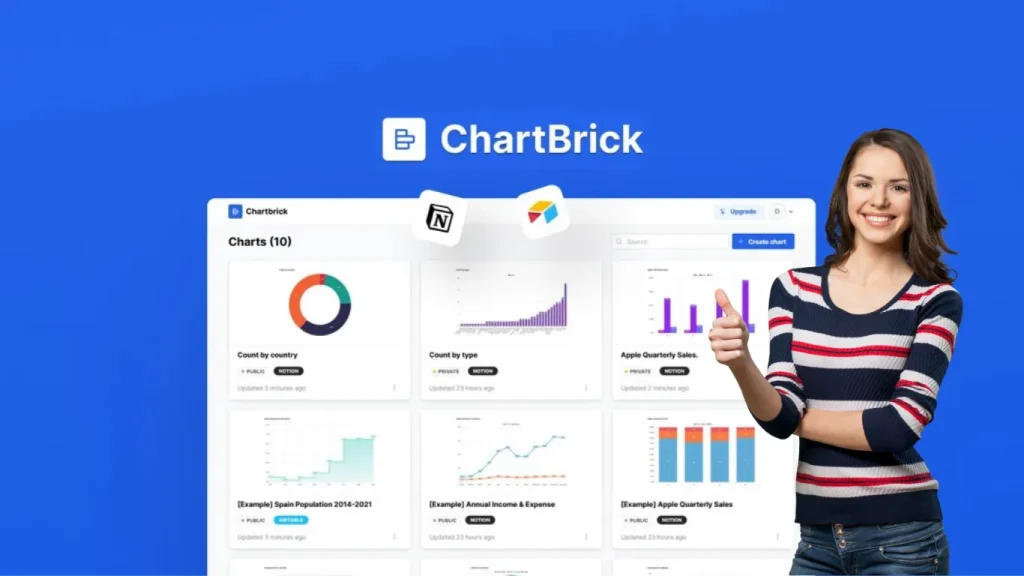
Unlock the Chartbrick Lifetime Deal now! Skyrocket your design projects with exclusive tools—limited time offer, don't miss out on this game-changing opportunity!
Imagine turning your raw data into insightful charts in just seconds—no coding skills needed. Whether you want bar charts, pie charts, or radar charts, ChartBrick lets you visualize your data effortlessly and embed those charts anywhere you like, from Notion pages to your blog posts. What if you could get lifetime access to this powerful tool at a great price? Now you can! Don't miss out on the ChartBrick Lifetime Deal that gives you unlimited charts, unlimited embeds, and all future updates with just a one-time payment. Ready to make your data easier to understand and more engaging? Keep reading to find out how ChartBrick can transform your workflow! For more on this, see our guide on backgroundcut lifetime deal.
Introduction To Chartbrick And Its Lifetime Deal
ChartBrick simplifies data visualization by turning your raw data into clear, insightful charts. It works seamlessly with popular platforms like Notion, Airtable, and Stackby. This tool lets you embed charts anywhere or download them as images. The ChartBrick Lifetime Deal offers unlimited access to all features without recurring costs. It's a smart choice for freelancers, content creators, and task automation enthusiasts.
What Is Chartbrick? An Overview Of The Tool And Its Purpose
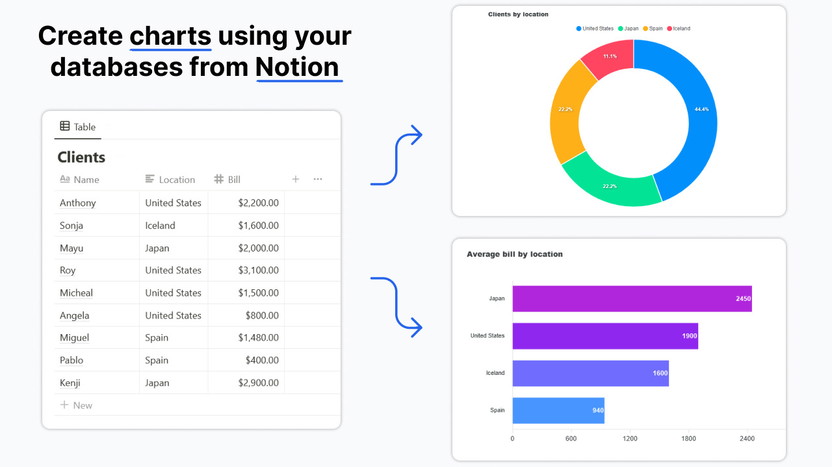
ChartBrick is a no-code chart creation tool . It transforms data from sources like Notion, Airtable, MySQL, CSV, JSON, and Stackby into easy-to-understand charts. Notion users especially benefit since Notion lacks built-in charting. For more on this, see our guide on watermarkup lifetime deal.
Supports 8 chart types: Column, Bar, Line, Area, Pie, Donut, Funnel, Radar
Real-time updates with the latest data
Privacy-focused: no data storage on ChartBrick servers
Download charts as images or embed them on websites and Notion pages
This tool fits well for financial tracking, habit monitoring, and many other uses. Its simplicity suits users with no coding background.
Understanding The Lifetime Deal: What It Offers And Why It Matters
The ChartBrick Lifetime Deal provides permanent access to the platform's features. This deal includes:
Feature Details
Access Type Lifetime access without recurring fees
Plan Unlimited usage with no restrictions
Updates All future plan updates included
Redemption Period Must redeem codes within 60 days of purchase
Stacking Deal is not stackable
This offer matters because it saves costs for long-term users. It also removes limits on chart creation and data source connections. Users gain a reliable, privacy-first tool for ongoing projects. For more on this, see our guide on img upscaler lifetime deal.

The ChartBrick editor allows you to select chart types and connect data sources in a few clicks.
Credit: www.youtube.com
Key Features Of Chartbrick And Their Benefits
ChartBrick offers powerful tools to transform raw data into clear, engaging visuals. Its features simplify data handling and improve understanding. These capabilities serve content creators, freelancers, and anyone needing better data presentations.
No-code Chart Creation: Simplifying Data Visualization For Everyone
ChartBrick lets users create charts without any coding skills . The interface is user-friendly and intuitive. You can build charts in seconds using your data from Notion, Airtable, or CSV files.
Choose from 8 chart types: column, bar, line, area, pie, donut, funnel, and radar.
Instant preview helps you see changes as you build.
Focus on data insights, not technical details.
This approach makes data visualization accessible to all. It saves time and effort by removing technical barriers.
Seamless Integration With Platforms Like Notion, Airtable, And Csv
ChartBrick connects directly to popular platforms such as Notion, Airtable, Stackby, MySQL, CSV, and JSON. This integration allows smooth data import and chart updates.
Platform Benefit
Notion Create charts from your notes and databases easily.
Airtable Visualize Airtable data instantly without exports.
CSV/JSON Upload files and generate charts fast.
MySQL Connect live databases for real-time updates.
These integrations keep your charts current with the latest data. No manual updates needed.
Unlimited Charting Capability: Removing Restrictions For Creative Freedom
The ChartBrick lifetime deal offers unlimited charts . There are no limits on how many charts you can create or embed.
Build as many charts as your projects need.
Use different chart types to fit various data stories.
Experiment with visuals without worrying about caps.
This freedom encourages creativity and thorough data analysis. It suits freelancers, content creators, and teams handling multiple datasets. In practice, this means a single user can maintain separate dashboards for client reports, personal finances, and content analytics all within one account.
Embedding Charts Anywhere: Enhancing Data Presentation Across Platforms
Charts made with ChartBrick can be embedded easily in Notion pages, websites, blogs, and more. You can also download charts as images for offline use.
Copy embed code and place it in your desired platform.
Display live charts that update with your data.
Improve content with interactive and clear visuals.
This feature boosts communication by placing charts exactly where your audience needs them. It enhances reports, articles, and presentations.
Pricing And Affordability Breakdown Of The Lifetime Deal
The ChartBrick Lifetime Deal offers a unique chance to own a powerful data visualization tool with a single payment. This deal eliminates ongoing costs and provides full access without monthly fees. It suits users who want easy and affordable chart creation from sources like Notion, Airtable, and CSV files.
One-time Payment Model: How It Saves Money Compared To Subscriptions
ChartBrick uses a one-time payment model instead of monthly or yearly subscriptions. Paying once means no recurring charges.
Save money over time by avoiding subscription renewals.
Access all features without worrying about price increases.
Ideal for freelancers and content creators on a budget.
Many similar tools charge between $10 and $30 per month. Over a year, that totals $120 to $360. ChartBrick's lifetime deal costs only $49, offering significant savings. When you compare this to the recurring costs of other SaaS tools, the long-term value becomes undeniable.
What's Included In The $49 Lifetime Deal? Features And Access Details
For $49, users get lifetime access to all ChartBrick features without limits.
Feature Details
Chart Types 8 types: column, bar, line, area, pie, donut, funnel, radar
Data Sources Notion, Airtable, Stackby, MySQL, CSV, JSON
Embedding Embed charts anywhere, including Notion pages and websites
Download Options Download charts as images for offline use
Privacy GDPR-compliant, does not store user data
Usage Limits Unlimited charts, no restrictions
This deal offers full access without hidden fees or upgrade costs. It suits users needing fast, no-code chart creation with real-time data updates.
Comparing Chartbrick Lifetime Deal With Other Data Visualization Tools
ChartBrick competes well with popular tools on price and features.
Tool Pricing Key Features Best For
ChartBrick One-time $49 lifetime deal 8 chart types, multiple data sources, embed anywhere, no data storage Freelancers, content creators, small teams
Tool A $15/month subscription Wide chart options, cloud storage, collaboration tools Large teams, enterprises
Tool B $10/month subscription Basic charts, limited integrations, no lifetime option Beginners, individuals
ChartBrick's lifetime deal offers a cost-effective choice without recurring fees. It focuses on ease of use and integration with popular data sources.
The AppSumo listing confirms the one-time $49 price for lifetime access.
Credit: appsumo.com
Pros And Cons Based On Real-world Usage
ChartBrick offers a practical solution for creating charts from various data sources. Users benefit from its simplicity and flexibility. However, some limitations affect overall experience. This section explores the key advantages and drawbacks from real-world use.
User-friendly Interface
ChartBrick is designed for easy use without coding skills. The interface is clean and simple. Users quickly create charts by connecting data sources like Notion, Airtable, or CSV files.
Intuitive drag-and-drop options
Clear chart customization settings
Fast chart generation in seconds
This makes ChartBrick ideal for freelancers, content creators, and task automation enthusiasts. A common mistake new users make is not connecting their data source first—always start by selecting your data to see the chart preview update instantly.
Cost-effectiveness
The lifetime deal offers great value. One payment covers unlimited use without monthly fees. This plan includes all future updates, making it a budget-friendly choice.
Feature Benefit
One-time payment No recurring costs
Unlimited charts Create without limits
Future updates Access to new features
Unlimited Use
The deal includes no restrictions on chart numbers or data connections. Users can embed charts in blogs, websites, or Notion pages freely. Downloading charts as images is also supported.
Embed charts anywhere
Supports multiple data sources
Real-time data updates for charts
Limitations To Consider
ChartBrick does not store user data, which enhances privacy but limits advanced data manipulation. It supports only 8 chart types, which may not cover all complex visualization needs.
Limited chart variety (Column, Bar, Line, Area, Pie, Donut, Funnel, Radar)
No built-in data editing or transformation
Some users may want more integration options
These factors may affect users needing highly customizable or complex charts. For example, if you need scatter plots or heatmaps, you may need a more specialized tool.
Potential Areas For Improvement
Adding more chart types could broaden ChartBrick's appeal. Enhanced data transformation tools would help users prepare data better before charting.
Support for more chart formats
Built-in data editing features
Expanded integration beyond current platforms
Improving these areas would increase its usefulness for advanced users.
https://www.youtube.com/watch?v=90w4huFOFUE
Who Should Consider The Chartbrick Lifetime Deal?
The ChartBrick Lifetime Deal suits many users who want simple, clear data visuals. It offers a no-code way to create charts from popular data sources like Notion, Airtable, and CSV files. The deal is perfect for those who embed charts into websites, blogs, or Notion pages. This section explains who benefits most from ChartBrick and when this lifetime offer fits best.
Ideal Users: Entrepreneurs, Content Creators, And Data Enthusiasts
Entrepreneurs : Need quick visuals for business reports or presentations.
Content Creators : Add engaging charts to blogs, social media, or educational content.
Data Enthusiasts : Enjoy exploring data and want easy chart creation without coding.
These users value a tool that works with multiple data sources and offers real-time updates. The privacy-first approach also appeals to those concerned about data security.
Best Use Cases: Enhancing Notion Pages, Business Reporting, And Educational Projects
Use Case Description Benefits
Enhancing Notion Pages Embed charts directly into Notion for clearer data presentation. Transforms plain data into visual stories, improving understanding.
Business Reporting Create financial, sales, or performance charts from Airtable or CSV. Speeds up report generation with real-time data and multiple chart types.
Educational Projects Visualize data for lessons, workshops, or research summaries. Makes complex data easier to grasp for students or participants.
When To Opt For The Lifetime Deal And When To Explore Other Options
Choose the ChartBrick Lifetime Deal if you:
Regularly create charts and want unlimited access.
Use multiple data sources like Notion, Airtable, or CSV.
Prefer a simple, no-code tool with real-time updates.
Explore other options if you:
Need advanced data analysis beyond basic charts.
Require collaboration features not included in ChartBrick.
Use data sources unsupported by ChartBrick.
The lifetime deal offers great value for those focused on chart creation and embedding, especially without recurring fees.
How To Unlock The Chartbrick Lifetime Deal Today
Accessing the ChartBrick Lifetime Deal is simple and fast. This deal grants you unlimited use of ChartBrick, a tool that creates charts from data sources like Notion, Airtable, and CSV files. It lets you visualize data with no limits, forever. Follow the steps below to secure this offer and start making impactful charts for your projects.
Step-by-step Guide To Purchasing The Lifetime Deal
Visit the official ChartBrick deal page on AppSumo at https://appsumo.com/products/chartbrick/ .
Click the Buy Now button to add the lifetime deal to your cart.
Create an account or log in to AppSumo to proceed with the purchase.
Complete payment using your preferred method.
After purchase, receive a redemption code via email or your AppSumo dashboard.
Redeem your code on ChartBrick's website within 60 days to activate lifetime access.
Important: This deal is not stackable. Make sure to redeem your code promptly.
Tips To Maximize Value From Your Chartbrick Investment
Connect Multiple Data Sources: Use Notion, Airtable, Stackby, CSV, JSON, or MySQL to get diverse insights.
Try All Chart Types: Experiment with column, bar, line, pie, donut, funnel, radar, and area charts.
Embed Charts Widely: Place charts in blog posts, Notion pages, websites, or download them as images.
Keep Data Private: ChartBrick does not store your data, ensuring GDPR compliance.
Use Real-Time Updates: Charts update automatically with your latest data for accurate views.
Leverage No-Code Features: Create charts easily without technical skills or coding.
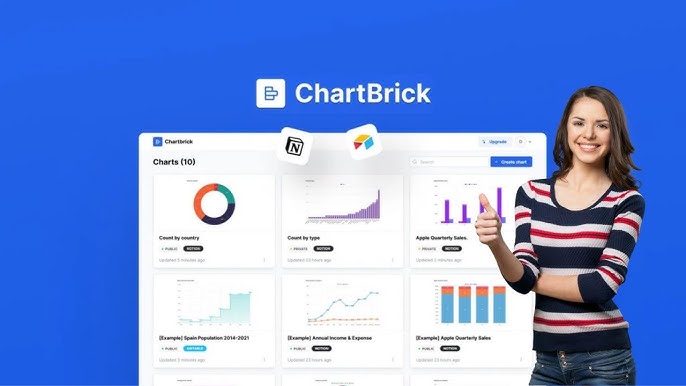
Preview of the available chart formats you can create instantly from your data.
Credit: www.youtube.com
Frequently Asked Questions
What Is Chartbrick Lifetime Deal?
Chartbrick Lifetime Deal offers a one-time payment for unlimited access. It eliminates recurring subscription fees and provides full features forever. This deal is ideal for users wanting cost-effective, long-term data visualization tools.
How Does Chartbrick Integrate With Notion?
Chartbrick seamlessly connects with Notion databases. It allows users to create and embed dynamic charts inside Notion pages. This integration improves data visualization without complex coding or switching between apps.
What Platforms Does Chartbrick Support For Data Import?
Chartbrick supports data import from Notion, Airtable, Stackby, CSV, and JSON files. This flexibility enables users to visualize diverse data sources easily and create insightful charts quickly.
Is Chartbrick Suitable For Beginners And Non-coders?
Yes, Chartbrick is designed to be user-friendly and no-code friendly. Beginners can create stunning charts without technical skills. The intuitive interface simplifies data visualization for all skill levels.
Can I Use Chartbrick With Airtable Databases?
Yes, Chartbrick connects directly to Airtable, pulling data in real time. This is particularly useful for project management dashboards or tracking ongoing metrics without manual exports.
Does Chartbrick Store My Data On Its Servers?
No, Chartbrick processes your data in real time but does not store it. This privacy-first approach ensures your sensitive information remains under your control, which is a key consideration for those managing client data or financial records.
What Chart Types Are Available In Chartbrick?
ChartBrick offers 8 chart types: Column, Bar, Line, Area, Pie, Donut, Funnel, and Radar. Each type works best for different data stories, so experimenting across them helps you find the most impactful visual for your audience.
Can I Embed Charts Directly Into My Website?
Yes, you can copy an embed code from ChartBrick and paste it into any website or blog that supports iframes. This makes it simple to include live, updating charts in your online content without touching any backend code.
Conclusion
ChartBrick offers a simple way to turn your data into clear charts. It works well with Notion, Airtable, and more. You can embed charts anywhere or download them as images. The no-code setup helps save time and effort. With eight chart types, it fits many needs. Privacy is a priority; your data stays safe. This lifetime deal gives great value without limits. Try it risk-free for 60 days. Ready to make your data visual? Grab your ChartBrick lifetime deal here.


1 thought on “Chartbrick Lifetime Deal – Transform Your Data Into Stunning Charts”