Img Upscaler Lifetime Deal to Enhance Images with AI Power
Lead SaaS Analyst & Software Developer at PCSaaS · Software Developer (GitHub @Ratankarmakar) · Google Ads & Analytics Certified · 500+ SaaS Tools Tested · 8+ years in software engineering, B2B SaaS evaluation, AppSumo deal auditing, and performance marketing
Unlock stunning image quality now with the Img Upscaler Lifetime Deal! Boost your visuals instantly—limited offer, don’t miss out. Click to transform today!
That’s exactly what the Img Upscaler Lifetime Deal offers you—a powerful AI-driven tool that upscales and enhances your images with just a few clicks. Whether you’re a graphic designer, photographer, or simply want to bring your old photos back to life, this tool handles batch processing, sharpens details, and even lets you fine-tune your pictures using its built-in editor. For more on this, see our guide on webdiff lifetime deal.
Ready to take your images to the next level forever without recurring fees? Don’t miss out on this exclusive lifetime deal that gives you unlimited access to upscale images by up to 400%. You can check it out right here: Img Upscaler Lifetime Deal. Keep reading to discover how this easy-to-use AI assistant can save you time and deliver stunning results every time.
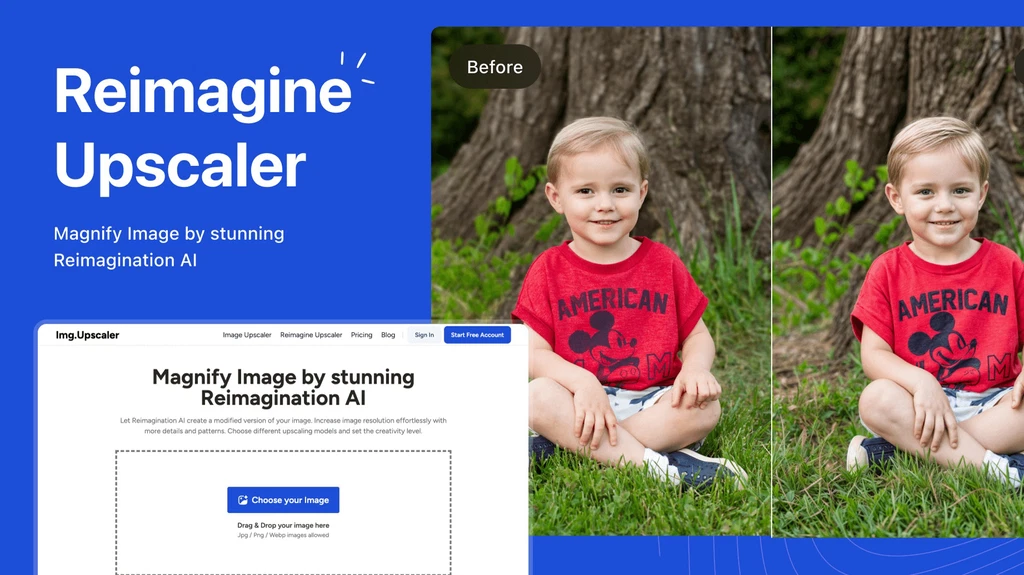
The Img Upscaler dashboard showing upload and upscale options
Credit: appsumo.com
Introduction To Img Upscaler Lifetime Deal
Img Upscaler Lifetime Deal offers an affordable way to enhance your images forever. This tool uses AI technology to improve image quality quickly and easily. It is ideal for users who want clear, high-resolution images without complex software. The deal gives lifetime access to the platform’s features, including batch processing and built-in editing tools. For more on this, see our guide on rendercut lifetime deal.
What Is Img Upscaler And Its Primary Purpose
Img Upscaler is an AI-powered tool designed to enlarge and enhance images. It helps fix low-resolution, blurry, or pixelated pictures by increasing their size and adding detail. Users can upscale images by 200% or 400% in seconds.
Supports batch processing of up to 8 images at once
Includes a built-in image editor for cropping, filters, and annotations
Requires no technical skills or expensive software
Works well for photos, product images, and anime pictures
This tool is perfect for graphic designers, photographers, and web designers who want clear images fast.
Why Choose A Lifetime Deal For Image Enhancement
Lifetime deals offer long-term value at a one-time cost. Img Upscaler’s lifetime plan means no recurring fees. Users can access all features forever with a single purchase.
Benefits include:
Feature Benefit
Unlimited use Enhance images anytime without extra cost
Batch processing Save time by upscaling multiple images simultaneously
Built-in editor Fine-tune images without extra software
AI super-resolution Get sharper, detailed images with ease
Choosing a lifetime deal is smart for those needing constant image enhancement. It ensures access to high-quality results without ongoing payments.
Beyond the obvious savings, the real advantage lies in the AI super-resolution engine itself. Unlike traditional interpolation that simply stretches pixels, Img Upscaler uses a deep convolutional neural network trained on millions of image pairs to reconstruct fine textures and edges. In practice, this means you can take a 72 DPI web image and turn it into a print-ready 300 DPI file without the dreaded “jaggies.” One trade‑off to keep in mind: the AI works best when the original image has at least some latent detail—extremely compressed or heavily artifacted images may still show minor softening after upscaling.
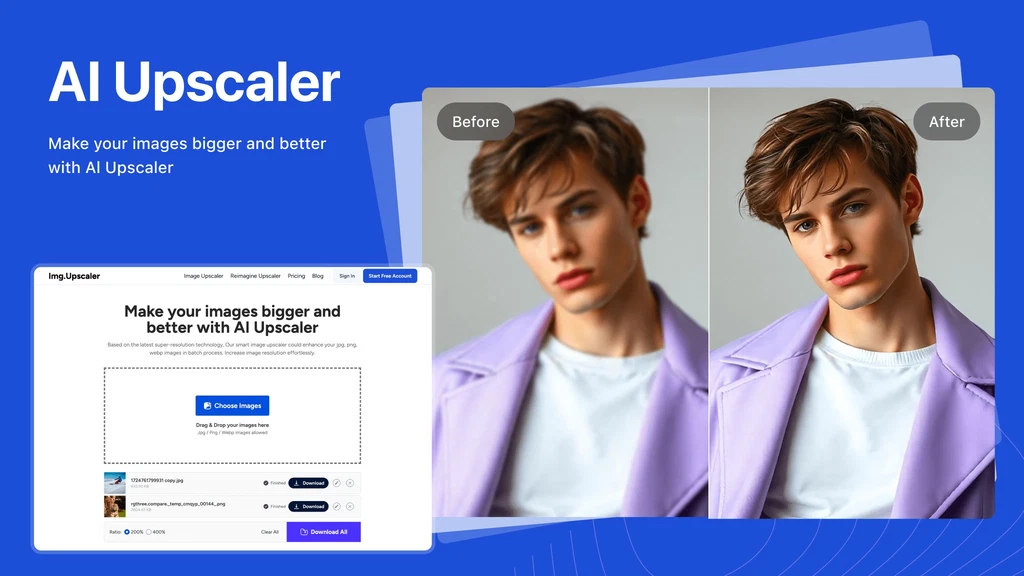
Batch upscaling interface showing several images queued for enhancement
Credit: appsumo.com
Key Features Of Img Upscaler
Img Upscaler offers a powerful set of features designed to improve image quality quickly and easily. It uses advanced AI technology to enhance and enlarge images without losing details. The tool suits both beginners and professionals who need sharp, clear images for any use. Below are the key features that make Img Upscaler a reliable choice for image enhancement.
Ai-powered Image Enhancement For Superior Quality
Img Upscaler uses AI technology to enhance images automatically. It detects blurry or pixelated areas and adds realistic details. This process improves the clarity and sharpness of photos and anime pictures.
The AI enhances textures and patterns, making images look natural and vibrant. It works on various image types without losing original quality.
Instant Image Enlargement Without Quality Loss
The tool can enlarge images by 200% or 400% quickly. It keeps the image sharp and clear, avoiding the usual blur or pixelation from resizing.
Users upload images, and the AI instantly processes them, saving time and effort. This feature is perfect for printing, presentations, or online use.
User-friendly Interface For Hassle-free Experience
Img Upscaler has a clean and simple interface. Users can easily upload images and get results with just a few clicks.
No technical skills required
Clear buttons and instructions
Fast processing time
This ease of use makes it accessible to everyone, from beginners to experts.
Cross-platform Accessibility: Web And Mobile Support
The tool works on both web browsers and mobile devices . Users can upscale images anytime, anywhere without installing software.
Supports all major browsers
Mobile-friendly design
No downloads or updates needed
Batch Processing For Efficient Bulk Image Upscaling
Img Upscaler supports batch processing , allowing up to 8 images to be upscaled at once.
This feature saves time when working with large photo collections or product images.
Batch Feature Benefit
Upscale multiple images Quickly process several photos in one go
Consistent quality All images enhanced with the same AI standards
Simple upload and download Easy management of large image sets
How to Use Img Upscaler for Best Results
Getting the most out of this tool comes down to a simple three‑step workflow that takes only seconds per image.
Step 1 – Upload your image. Drag and drop a file (JPG, PNG, WebP) onto the upload area. For optimal output, start with the highest‑quality source you have – a clean 800×600 photo will upscale far better than a heavily compressed thumbnail.
Step 2 – Choose your scale factor. Select either 2× (200%) or 4× (400%). A common mistake is always picking 4×, but for images that are already reasonably sharp, 2× often produces the most natural result. Reserve 4× for very small or pixel‑heavy originals.
Step 3 – Edit and download. After the AI finishes processing, use the built‑in editor to crop, adjust brightness, or add a filter. Then download your final image in full resolution. If you have multiple images, enable batch mode to upscale up to eight at once – ideal when preparing a product catalog or a set of social media graphics.
The same AI engine also powers many advanced image‑editing suites, but few offer this simplicity at a one‑time price. For more tools that complement your creative workflow, explore our roundup of the top‑rated lifetime software bundles.
Pricing And Affordability Breakdown
The Img Upscaler Lifetime Deal offers a clear and budget-friendly option for users needing image enhancement. Understanding its pricing helps you decide if it fits your needs and budget. This section explains the payment structure, compares it with subscription models, and highlights the long-term savings.
One-time Payment Benefits Of The Lifetime Deal
With the lifetime deal, you pay once and get permanent access. No monthly or yearly fees follow the initial payment. This suits users who want to avoid recurring costs.
Single payment: One upfront cost for unlimited use.
Continuous updates: Receive improvements without extra charges.
Batch processing included: Upscale up to 8 images at once.
Built-in editor: Edit images after upscaling without additional fees.
Comparing Lifetime Deal Cost Vs. Subscription Models
Feature Lifetime Deal Subscription Model
Payment Type One-time payment Monthly or yearly fees
Access Duration Unlimited Active subscription period only
Total Cost Over 2 Years Lower Higher (due to recurring fees)
Updates and Support Included Included
Ideal For Long-term users, frequent upscalers Short-term or occasional users
Value For Money: Long-term Savings And Usage
The Img Upscaler lifetime deal saves money over time. You avoid repeated payments and still get full features. This is ideal for graphic designers, photographers, and web designers who upscale images often.
Consider these points:
Pay once, use forever without extra costs.
Batch processing speeds up work, saving time and effort.
Built-in editing tools reduce the need for other software.
Constant AI improvements keep image quality high.
This deal offers excellent value for those who need consistent, high-quality image enhancement.
Pros And Cons Based On Real-world Usage
The Img Upscaler Lifetime Deal offers a mix of benefits and limitations from daily use. This section explores its strengths and weaknesses, helping you decide if it fits your needs.
Advantages: Quality, Speed, And Cost Efficiency
Image quality improves significantly using AI-powered super-resolution technology. The tool enhances details and sharpness, making low-resolution images clearer and more vibrant.
Batch processing allows users to upscale up to 8 images simultaneously , saving time for large projects. The process is fast, with most images upscaled within seconds.
Lifetime access means one-time payment without recurring fees. This is ideal for budget-conscious users like photographers, graphic designers, and web designers.
Feature Benefit
AI Super-Resolution Enhances image clarity and detail
Batch Processing Upscales multiple images quickly
Built-in Editor Crop, filter, and annotate images
Cost One-time payment, no subscription
Limitations: Possible Areas For Improvement
Sometimes, very low-quality images may not upscale perfectly. Minor artifacts or unnatural textures can appear after enhancement.
The batch limit of 8 images may feel restrictive for users with larger workloads.
The tool does not support advanced editing features found in full photo editors like Adobe Photoshop.
Some users noted occasional delays during peak times, affecting upload and download speed.
User Feedback And Ratings Overview
Users praise the ease of use and fast results. Many appreciate the lifetime deal's value compared to monthly subscriptions.
Ratings often highlight the tool’s clear output and simple interface, suitable for beginners.
High marks for quality and speed
Positive comments on cost efficiency
Requests for higher batch limits and more editing tools
Overall, most users find Img Upscaler a practical solution for enhancing images quickly and affordably.
Tips for Getting the Most Out of Img Upscaler
After using the tool regularly, a few practical habits can noticeably improve your final output.
Start with the best source you have. The AI works hard, but it can’t create detail that never existed. A slightly blurry 1 MB photo will almost always produce a better upscale than a heavily compressed 100 KB version. If you’re restoring old family photos, scan them at the highest practical DPI before uploading.
Use the editor sparingly. The built‑in editor is great for cropping and quick adjustments, but heavy filtering after upscaling can reintroduce noise. Save major colour grading for your primary editing software.
Batch similar images together. When processing a set of product shots taken under the same lighting, do them all in one batch. The AI will apply consistent enhancements, saving you from re‑adjusting settings image by image.
Combine with other tools in your workflow. For instance, after upscaling a hero image for a landing page, you might drop it into a design tool to add text overlays. If you’re managing multiple creative assets, consider a platform that streamlines social media visuals alongside your image library.
For those who regularly handle large image sets, combining this tool with a dedicated social media scheduler can dramatically cut production time.
Img Upscaler vs. Other AI Image Enhancers
How does Img Upscaler compare to other popular options on the market? The table below highlights key differences so you can see where it fits.
| Feature | Img Upscaler (Lifetime Deal) | Topaz Gigapixel AI | Upscayl (Free) |
|---|---|---|---|
| Price | One‑time (AppSumo deal) | ~$99 standalone | Free & open‑source |
| Max Upscale | 4× (400%) | 6× (600%) | 4× (400%) |
| Batch Limit | 8 images | Unlimited (paid) | Single image only |
| Built‑in Editor | Crop, filters, annotations | Limited | None |
| Ease of Use | Very easy (drag & drop) | Moderate (many settings) | Easy |
| Output Quality | Excellent for web & print | Professional‑grade | Good for casual use |
| Platform | Web & mobile responsive | Desktop (Win/Mac) | Desktop (Win/Mac/Linux) |
For most users who need quick, reliable upscaling without a steep learning curve, Img Upscaler offers the best balance of quality and cost. The 8‑image batch limit is rarely a bottleneck for individual creators. If you’re a high‑volume studio processing hundreds of images daily, Topaz Gigapixel’s unlimited batching may justify its higher price. For occasional use, a free tool like Upscayl works well, but you miss the convenience of cloud access and the built‑in editor.
Because Img Upscaler runs entirely in the browser, you can use it on any device without installing software. This cross‑platform flexibility is a clear advantage when you’re working across multiple machines. The underlying AI technology is similar to that used in professional desktop suites, as explained in NVIDIA’s deep‑learning overview of image super‑resolution.
Who Should Consider Img Upscaler Lifetime Deal
The Img Upscaler Lifetime Deal suits users who need quick and clear image enhancement. It works well for those handling many images at once. This tool is powered by AI, making image upscaling simple and fast. It fits both personal and commercial needs without requiring technical skills.
Ideal Users: Photographers, Designers, And Content Creators
Professional and amateur photographers benefit from restoring photo quality easily. Designers use it to improve graphics and visuals for projects. Content creators enhance images for blogs, social media, and videos.
Photographers: Enhance portraits, landscapes, and event photos.
Designers: Improve UI elements, banners, and promotional images.
Content Creators: Boost clarity of social media posts and thumbnails.
Best Use Cases: Restoring Old Photos, Enhancing E-commerce Images, And Social Media Content
Img Upscaler excels in several key areas:
Use Case Description Benefit
Restoring Old Photos Enlarge and clarify blurry, pixelated old pictures. Preserves memories with sharper, high-quality images.
Enhancing E-commerce Images Improve product photos for online stores. Attracts customers with clearer and larger visuals.
Social Media Content Upscale images to meet platform quality standards. Boosts engagement with eye-catching, crisp pictures.
When To Opt For Img Upscaler Over Other Tools
Choose Img Upscaler for fast, batch processing without complex setup. It is ideal when:
You need to upscale multiple images simultaneously.
Ease of use matters more than advanced editing features.
You want affordable, one-time payment access instead of subscriptions.
It offers a simple upload-download workflow with AI-powered clarity improvement. Img Upscaler also includes basic editing tools for cropping and adding effects. This makes it a complete package for quick image enhancement.
How to Claim Your Img Upscaler Lifetime Deal
Getting the lifetime deal is straightforward, but the offer is often time‑limited.
- Visit the AppSumo deal page for Img Upscaler. You’ll see the current price tier – usually a one‑time payment that includes all future updates.
- Choose your licence tier. Higher tiers lift the batch limit or add extra features. For most individuals, the base tier is plenty.
- Complete the purchase and receive your redemption code instantly.
- Activate your account on the Img Upscaler website using the code. You now have lifetime access with no subscription fees.
If you’re new to AppSumo, browse their catalogue of lifetime software deals – many entrepreneurs rely on these one‑time purchases to build their tech stack affordably. The same principle applies here: pay once, enhance forever.
Ready to start? Secure your lifetime access now before the price increases.
Conclusion: Unlocking Unlimited Image Enhancement
The Img Upscaler Lifetime Deal offers a simple way to improve image quality. It uses AI to enhance and enlarge images without losing detail. This tool is ideal for anyone needing clear, sharp photos fast. Batch processing speeds up work by enhancing multiple images at once. The built-in editor adds flexibility, allowing users to polish images after upscaling. This combination of features provides a powerful, user-friendly image enhancement solution.
Summary Of Img Upscaler’s Value Proposition
AI-Powered Upscaling: Enlarges images by 200% or 400% with sharp detail.
Batch Processing: Upscale up to 8 images simultaneously, saving time.
Easy to Use: No technical skills needed; upload and download with one click.
Built-in Image Editor: Crop, add filters, stickers, and annotations after enhancement.
Cost-Effective: One-time payment for lifetime access, avoiding recurring fees.
Versatile Use: Suitable for photographers, graphic designers, and web creators.
Final Thoughts On Investing In The Lifetime Deal
Purchasing the lifetime deal provides unlimited access to Img Upscaler’s features. It removes limits on how often you can enhance images. This is a great choice for users with ongoing image editing needs. The one-time cost is budget-friendly compared to monthly subscriptions. Access to batch processing and the editor ensures high productivity. The deal supports both personal and commercial projects, increasing its value.
Overall, the Img Upscaler Lifetime Deal offers a reliable, efficient way to improve image quality with ease.
https://www.youtube.com/watch?v=vZwKoMooNuo
Frequently Asked Questions
What Is The Free Image Upscaler In 2026?
The free image upscaler in 2026 uses AI to enlarge and enhance low-resolution photos instantly. Popular options include Upscayl and Upscale. media. These tools offer easy, fast, and high-quality image enhancement without cost, perfect for fixing blurry or pixelated images online or via apps.
What Is The Most Advanced Image Upscaler?
Gigapixel AI is the most advanced image upscaler, offering professional-grade AI-powered enhancement and precise control.
Is Upscayl Still Free?
Upscayl remains free for basic image upscaling with minimal quality shifts. Advanced features may require payment.
Is Nero Ai Image Upscaler Free?
Nero AI Image Upscaler offers limited free trials. Full features require a paid subscription or lifetime deal purchase.
Can I Use Img Upscaler for Commercial Projects?
Yes. The lifetime deal grants full commercial rights, so you can upscale product photos, client images, or any other commercial asset without additional royalties or fees.
What Image Formats Are Supported?
Img Upscaler accepts JPG, PNG, and WebP files for input. Outputs are delivered in high‑quality JPG or PNG format, suitable for web publishing and print.
Does Img Upscaler Work on Mobile Browsers?
Absolutely. The web interface is fully responsive, so you can upload and upscale images directly from your smartphone or tablet without installing an app.
Conclusion
Img Upscaler lifetime deal offers a simple way to improve image quality. You can enlarge photos without losing details. Batch processing saves time by handling multiple images at once. The built-in editor helps you fine-tune pictures easily. No special skills or software needed. This tool fits well for designers, photographers, and web creators. Try it risk-free with a 60-day money-back guarantee.
Deal expires soon! Lock in lifetime access before it’s gone!

Similar Posts