WebDiff Lifetime Deal: Spot Website Changes Instantly
Lead SaaS Analyst & Software Developer at PCSaaS · Software Developer (GitHub @Ratankarmakar) · Google Ads & Analytics Certified · 500+ SaaS Tools Tested · 8+ years in software engineering, B2B SaaS evaluation, AppSumo deal auditing, and performance marketing
Secure the WebDiff Lifetime Deal today and detect hidden website issues fast. Save time, avoid client complaints, and ensure error-free updates.
That’s exactly where WebDiff shines. This powerful desktop app lets you quickly compare a website before and after any update, highlighting even the smallest differences in visuals, source code, and links. Imagine saving hours of tedious manual checks and avoiding those frustrating “fix it now” calls. Ready to make website updates stress-free and foolproof? Check out the WebDiff Lifetime Deal and take control of your site changes like a pro.
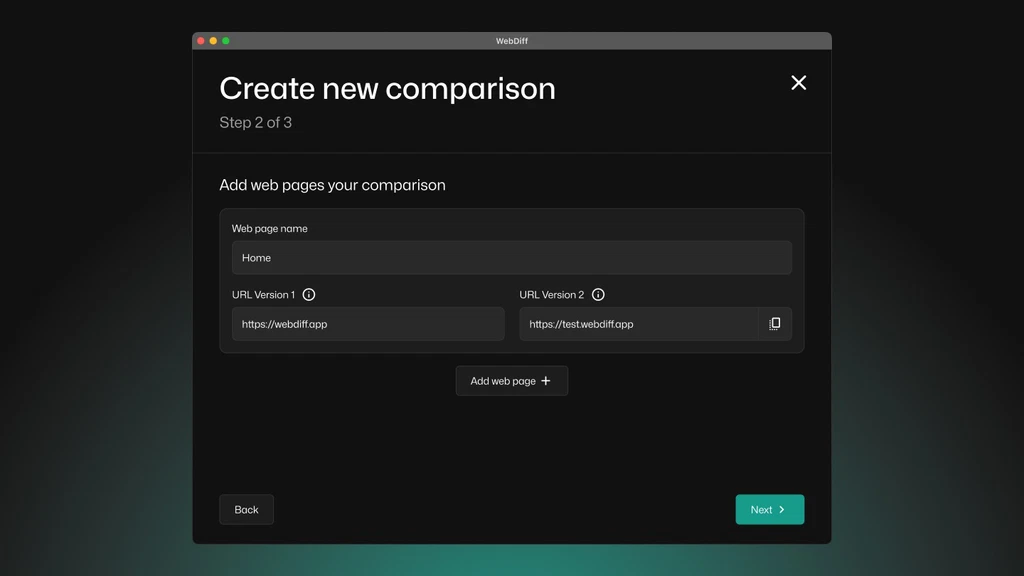 The WebDiff interface displays side-by-site page comparisons with highlighted differences. Credit: appsumo.com
Introduction To Webdiff And Its Lifetime Deal
Webdiff simplifies website update checks by comparing pages before and after changes. It helps spot unwanted differences quickly and accurately.
This tool suits freelancers, marketing agencies, and web design teams needing fast, reliable website comparisons. The lifetime deal offers unlimited access to features with a single payment.
What Is Webdiff? An Overview Of Its Core Purpose
Webdiff is a desktop application for MacOS and Windows. It compares websites visually and technically to detect any changes after updates.
Pixel-perfect visual comparison on desktop and mobile views
Source code tracking to ensure page structure stays intact
SEO element checks for titles, descriptions, H1 tags, and links
Network request analysis for deeper technical insight
Users can enter URLs or import sitemaps to scan many pages at once. The app works on live sites, local networks, and VPNs. Automated background scans notify users when reports are ready.
Clear, color-coded reports highlight differences using traffic light indicators. This makes spotting issues fast and stress-free.
Understanding The Lifetime Deal: What Does Unlimited Access Mean?
The lifetime deal grants full access to all current and future Personal and Team Plan features. Key points include:
Feature Details
One-time payment Pay once and keep using Webdiff forever
Unlimited websites Compare any number of websites without restrictions
Unlimited comparisons Run as many page comparisons as needed
Multiple license tiers Choose plans from 1 to 10 seats, with upgrade/downgrade options
60-day money-back guarantee Try risk-free with full refund option within 60 days
This deal removes recurring fees and usage limits. It suits users who want reliable web page comparisons without extra costs. The app’s continuous updates ensure new features and improvements remain accessible.
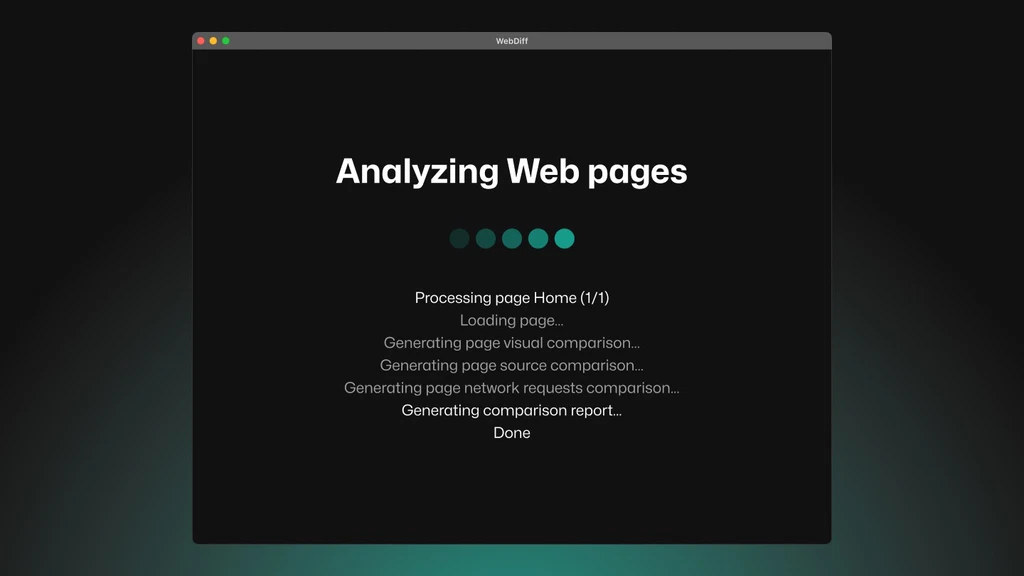 Example of a WebDiff report: green means no change, yellow indicates minor differences, red marks critical issues. Credit: appsumo.com
Key Features That Set Webdiff Apart
Webdiff offers unique features that make website comparison fast and reliable. It helps spot visual and code changes instantly. These features reduce errors and stress during website updates. The tool fits freelancers and agencies managing multiple sites.
Comprehensive Website Comparison Tools: Simplifying Your Workflow
Webdiff compares websites before and after updates with precision. It detects even the smallest changes in:
Pixel-perfect visual differences on desktop and mobile views
Source code to track structural changes
Network requests ensuring all backend elements work
SEO elements like titles, descriptions, and headers
Links – both internal and external
Users can enter URLs or import sitemap files for side-by-side page analysis. It works online, locally, or behind VPNs with no page limits.
In practice, importing a sitemap is the fastest way to scan an entire site. Many users overlook this feature and manually enter dozens of URLs. By pasting your sitemap URL, WebDiff automatically discovers every page, saving valuable time on large projects. You can also exclude specific paths (like /admin/ or /wp-json/) to avoid irrelevant results.
User-friendly Interface: Enhancing Efficiency And Accessibility
Webdiff features a clean, minimalistic interface. It allows quick access to comparison reports without technical hassles. Key benefits include:
Simple setup for all skill levels
Clear, color-coded traffic light indicators showing change severity
Automated screenshot capturing and side-by-side views
Easy navigation through large site sitemaps
This design speeds up quality assurance and reduces manual work.
A common mistake is ignoring the filter options in the report view. When you have dozens of pages, you can sort by change severity (red first) to focus on the most critical issues first. This targeted approach cuts review time in half compared to scanning every page in sequence.
Real-time Updates And Sync: Staying Ahead With Instant Data
Webdiff runs automated comparisons in the background. Users receive notifications as soon as reports are ready. This feature lets users:
Focus on other tasks while Webdiff works
Check results anytime without waiting
Keep track of multiple comparisons effortlessly
Real-time syncing ensures no change goes unnoticed, improving client satisfaction.
To get the most out of background scans, schedule them right after a deployment. For example, run a scan immediately after pushing a staging build to production. WebDiff will notify you within minutes if any visual or code differences appear, allowing you to roll back before clients spot an issue.
Customizable Settings: Tailoring The Experience To Your Needs
Users can adjust Webdiff settings to match their workflow. Features include:
Importing sitemaps to scan many pages at once
Comparing staging and live versions or different site URLs
Ability to rescan specific versions within the same comparison
Options to manage unlimited websites and comparisons
Customization helps users control scans and results effectively.
One powerful customization is the ability to compare two entirely different URLs — for example, a new design prototype vs. the current live site. This is invaluable during redesigns. Also, you can set comparison “profiles” for each client, saving their sitemap URLs and preferred viewport sizes, so you never have to re-enter settings.
Pricing And Affordability Of The Webdiff Lifetime Deal
WebDiff offers a clear and affordable pricing structure through its lifetime deal . This deal eliminates recurring fees by requiring a single payment. It suits freelancers, marketing agencies, and web design agencies who need reliable website comparison tools. The pricing is simple, and users get access to all features without ongoing costs.
Breaking Down The Cost: One-time Payment Vs. Subscription Models
The WebDiff lifetime deal requires a one-time payment , which contrasts with typical subscription models that charge monthly or yearly fees. Here is a breakdown of the lifetime deal tiers:
License Tier One-Time Price Seats Websites & Comparisons
Tier 1 $39 (Regular $99) 1 Seat Unlimited
Tier 2 $99 (Regular $399) 5 Seats Unlimited
Tier 3 $199 (Regular $799) 10 Seats Unlimited
Subscription plans usually cost more over time and require renewal. WebDiff’s lifetime deal offers full access without future payments. This means no surprises or hidden fees.
Note: As of 2026, the WebDiff lifetime deal remains available through AppSumo. Prices may have been adjusted — check the WebDiff Lifetime Deal page for current pricing.
Value For Money: Long-term Savings And Benefits
The lifetime deal delivers strong long-term savings . Paying once avoids repeated subscription costs. Users gain continuous access to all current and future updates for their chosen plan tier.
Unlimited website comparisons to match growing needs
Automated background analysis saves time
Access to all features including pixel-perfect visual and source code checks
60-day money-back guarantee reduces risk
These benefits reduce manual work and stress. WebDiff’s detailed reports help catch errors early. This can prevent costly fixes after updates.
Who Benefits Most From The Lifetime Deal Pricing?
WebDiff’s lifetime deal best suits these groups:
Freelancers managing multiple client websites.
Marketing agencies needing fast, reliable website checks.
Web design agencies looking to save time on quality assurance.
Teams benefit from multi-seat licenses. Unlimited comparisons allow freedom to monitor many websites. The one-time payment helps smaller businesses manage budgets better.
Users who update sites frequently save the most by avoiding recurring fees. The lifetime deal offers peace of mind with ongoing support and updates included.
 Three license tiers available: Solo (1 seat), Team (5 seats), and Agency (10 seats). Credit: appsumo.com
Pros And Cons Based On Real-world Usage
WebDiff offers a clear way to spot website changes after updates. Users rely on it to catch visual and code differences quickly. This section breaks down the advantages and limitations from actual user experiences. Real feedback shows what works well and what needs improvement.
Advantages: Why Users Love Webdiff’s Features And Accessibility
Pixel-Perfect Visual Comparison: WebDiff highlights even the smallest visual changes side by side.
Source Code and Network Request Analysis: Tracks structure changes and network calls for full insight.
Works Locally and Online: Users can compare websites on local networks, VPNs, or live servers without limits.
Automated Background Scanning: Runs comparisons quietly while users focus on other tasks.
Clear, Color-Coded Reports: Traffic light indicators show issues at a glance.
Sitemap Import Feature: Easily analyze large sites by importing URLs directly from sitemaps.
Responsive Support and Updates: The team listens closely and adds requested features quickly.
Users find the interface simple and effective. It saves hours by replacing manual screenshot checks. The ability to compare staging and production sites is a big plus. Many mention peace of mind after updates.
Limitations: Potential Drawbacks And Areas For Improvement
Scan Speed: Some users wish comparisons were faster, especially on large sites.
Comparison Management: Keeping all comparisons in one place could be improved.
Rescanning Workflow: Ability to update scans within the same comparison needs streamlining.
Interface Features: Advanced options for managing multiple projects might enhance usability.
Scanning runs in the background but can take time. Users suggest smoother handling of sitemap refreshes and version updates. These tweaks could boost efficiency further.
User Feedback: What Real Customers Are Saying
User Experience Summary Key Quote
Jess (Verified Purchaser) Uses WebDiff daily to track changes and avoid errors. "Saved me hours of manual QA and gave complete peace of mind."
Marco (Verified Purchaser) Found updates less stressful with clear, traffic-light reports. "WebDiff transformed my update process, making it worry-free."
neposeda (Verified Purchaser) Appreciates sitemap import and detailed pixel tracking. "Even as is, this is a timesaver. Recommend."
NXP (Verified Purchaser) Values simple interface and quick support response. "Helpful for site update comparisons, though speed could improve."
Users praise WebDiff’s accuracy and helpful reports. Support responsiveness earns special mention. Some wish for faster scans but agree the tool reduces update risks significantly.
Who Should Consider The Webdiff Lifetime Deal?
The Webdiff Lifetime Deal suits professionals and teams who manage website updates regularly. It helps catch visual or code changes quickly, reducing errors and stress. This tool fits anyone needing reliable website comparison without limits on usage. Whether small or large projects, Webdiff offers powerful features for quality control and client satisfaction.
Ideal Users: Freelancers, Agencies, And Businesses
Freelancers benefit by saving time checking multiple client sites after updates. Webdiff provides fast, detailed reports to confirm everything works as expected.
Marketing and web design agencies handle many projects and clients. Unlimited comparisons and team seat options make Webdiff ideal for agencies wanting efficient quality assurance.
Businesses with in-house web teams can use Webdiff to monitor changes during website updates or migrations. It helps maintain site stability and avoid broken features.
User Type Key Benefits
Freelancers Save hours on manual checks, ensure client satisfaction
Agencies Manage multiple websites, collaborate with teams, unlimited comparisons
Businesses Maintain website stability, detect unwanted changes early
Use Case Scenarios: When Unlimited Access Makes A Difference
Performing updates on large websites with many pages
Comparing staging sites to live environments before launch
Tracking visual and code changes after plugin or theme updates
Running continuous checks on multiple client sites without limits
Importing sitemaps to automate page comparisons at scale
Unlimited access allows thorough, repeated checks. This prevents missed issues and costly post-update fixes.
Maximizing The Deal: Tips For Getting The Most Out Of Webdiff
Import sitemaps to compare entire websites easily.
Use automated background scans to save manual work and get notified when done.
Review color-coded reports for quick identification of visual or code differences.
Leverage team seats to share access and collaborate within agencies or businesses.
Regularly rescan sites to maintain ongoing website quality assurance.
Following these steps helps reduce errors and improve workflow efficiency. Webdiff becomes an essential part of website maintenance.
Common Mistakes to Avoid When Using WebDiff
Even experienced users sometimes fall into a few predictable traps. Avoiding these will help you get accurate results faster and reduce false positives.
Forgetting to Exclude Irrelevant Pages
When you import a sitemap, WebDiff scans every URL it finds — including admin panels, login pages, or dynamic search results. These typically change between scans and clutter your report. Before running a comparison, use the URL exclusion field to filter out paths like /wp-admin, /cart, or any page that isn’t part of your public content.
Relying Solely on Visual Comparison
Visual diffs are powerful, but they don’t catch everything. A link might appear identical while pointing to a different destination. Always switch to the “Source Code” tab in the report to verify that critical attributes like hrefs, alt text, and structured data haven’t changed unexpectedly. Combining visual and code analysis gives you a complete picture.
Not Configuring Viewport Sizes for Mobile Checks
By default, WebDiff compares at a desktop viewport. If your site uses responsive design, differences may only appear at mobile widths. Set up a second comparison profile with a 375px viewport to catch mobile‑specific layout shifts. This is especially important after CSS or framework updates.
Skipping Regular Scans After Deployments
Waiting until a client reports a broken page is too late. Schedule a background scan immediately after every deployment — even small ones. A lifetime deal like WebDiff encourages unlimited scans, so there’s no reason to hold back. Setting a recurring reminder to run a scan once a week on key pages adds an extra safety net, as recommended in many AppSumo discounts for entrepreneurs.
How WebDiff Compares to Other Website Monitoring Approaches
Understanding where WebDiff fits relative to manual checks and online services helps you decide when to use it.
Manual QA vs. WebDiff
Manually taking screenshots and comparing them side‑by‑side is time‑consuming and error‑prone. A human eye can miss a shifted pixel or a broken link. WebDiff automates the comparison with pixel‑level precision and highlights every discrepancy. The trade‑off: manual QA can catch usability issues that a tool cannot (e.g., confusing copy), so treat WebDiff as a supplement, not a replacement.
Browser Extensions vs. WebDiff
Free browser extensions like Visualping or Distill are great for monitoring a single page, but they lack the ability to scan an entire sitemap, compare source code, or run on local environments. WebDiff’s desktop‑based approach gives you full control over network requests and works offline — crucial for staging sites behind a VPN.
Cloud‑Based Monitors vs. WebDiff
Subscription services like Site24x7 or DebugBear offer continuous uptime and performance monitoring, but they charge monthly and typically don’t provide detailed visual comparison after every update. WebDiff’s one‑time payment model (similar to other lifetime deals) makes it cost‑effective for recurring QA tasks.
For a deeper look at how lifetime software purchases stack up against subscriptions, see the Smatleads Lifetime Deal Review.
Conclusion: Is The Webdiff Lifetime Deal Worth It?
The Webdiff Lifetime Deal offers a unique chance to access a powerful website comparison tool forever. It helps catch unwanted changes after updates, saving time and reducing errors. This deal suits freelancers, marketing agencies, and web design teams who need reliable quality checks. The lifetime access means no recurring fees, making it budget-friendly over time.
Summarizing The Key Benefits And Considerations
Unlimited Comparisons: Compare unlimited websites with no page limits.
Visual and Code Analysis: Detect pixel-level changes plus source code and SEO differences.
Automated Background Scans: Runs quietly while you focus on other tasks.
Clear Color-Coded Reports: Easy-to-understand traffic light indicators highlight issues.
Flexible Use: Works with URLs, local networks, VPNs, and sitemap imports.
Multi-Tier Licenses: Options from 1 to 10 seats fit solo users and teams.
Support and Updates: Active development with responsive customer support.
Considerations:
Scan speed can be slow for large sites but runs in the background.
Some features like rescan improvements and unified comparison views are planned for future updates.
License activation required within 60 days of purchase.
Final Thoughts On Unlocking Unlimited Access Today
Webdiff offers a simple way to avoid post-update surprises on websites. The lifetime deal provides excellent value with no extra costs later. Users praise its ease of use, detailed reports, and helpful support team. It fits well into workflows that demand accuracy and peace of mind during website changes.
For professionals who maintain multiple sites or large projects, this deal can save hours of manual checking. The combination of visual, code, and SEO checks makes it a comprehensive tool. The tiered pricing gives flexibility depending on team size and needs.
Choosing Webdiff means less stress and more confidence in website updates.
https://www.youtube.com/watch?v=9gTAmEKqcdw
Frequently Asked Questions
What Is The Webdiff Lifetime Deal?
The Webdiff Lifetime Deal offers permanent access to Webdiff’s software. Users pay once and enjoy unlimited use. It’s ideal for businesses seeking cost-effective web performance monitoring tools. This deal eliminates recurring subscription fees, making it budget-friendly and valuable for long-term use.
How Does Webdiff Improve Website Performance?
Webdiff monitors your website for speed and uptime regularly. It identifies slow loading times and downtime issues fast. This helps you fix problems before visitors notice. Improved performance boosts user experience and search engine rankings effectively.
Who Should Consider The Webdiff Lifetime Deal?
Website owners, developers, and digital marketers benefit most from Webdiff. It suits anyone needing continuous website monitoring without monthly fees. Small businesses and agencies find it especially useful for managing multiple sites efficiently.
Is The Webdiff Lifetime Deal Cost-effective?
Yes, it saves money by avoiding monthly payments. A one-time purchase covers lifetime use. Over time, this deal reduces expenses compared to subscription models. It’s a smart investment for regular website monitoring needs.
Can I Compare Staging and Production Sites with WebDiff?
Absolutely. WebDiff works with any URL — local, staging, or live. Simply enter the staging URL as the “before” version and the production URL as the “after” version. This is one of the most common workflows for agencies using team seats, as highlighted in the Thrivedesk Lifetime Deal (another tool that simplifies agency operations).
Does WebDiff Work Without an Internet Connection?
WebDiff is a desktop app, so it can run locally once the pages are loaded. However, it needs internet access to fetch the live or staging URLs you want to compare. For offline projects, you can save local HTML files and compare them via the file input option.
How Often Should I Run a Scan?
For sites that receive weekly updates, run a scan immediately after each deployment. For high‑traffic marketing sites, a daily automated scan adds a safety net without extra effort. The unlimited comparison allowance means you never have to count scans — use them as often as needed.
Conclusion
WebDiff helps you check website changes quickly and clearly. It shows side-by-side comparisons of pages before and after updates. This tool saves time by spotting visual and code differences automatically. Users can focus on their work while WebDiff runs in the background. It works well for freelancers and agencies managing many websites. With lifetime access, you get ongoing updates and support. Make website updates less stressful and more reliable.

Similar Posts





















[…] creators exploring other AppSumo offers, the Webdiff Lifetime Deal might complement Forento if you need code comparison or website auditing tools. Similarly, pairing […]
[…] That’s exactly what the Img Upscaler Lifetime Deal offers you—a powerful AI-driven tool that upscales and enhances your images with just a few clicks. Whether you’re a graphic designer, photographer, or simply want to bring your old photos back to life, this tool handles batch processing, sharpens details, and even lets you fine-tune your pictures using its built-in editor. For more on this, see our guide on webdiff lifetime deal. […]